PUQ Support by Time provisioning  module

PUQ Support by Time provisioning module

Developed By PUQ Software

Compatible with WHMCS v9.0

Description

The module allows you to charge your customers with subscription fees for the support provided to them. The module allows you to prepare multiple packages with the number of hours and prices, and then settle the time spent on customer requests. Thanks to it You will know how long it takes to help each of your clients and you will be able to charge for the time you spend.

You can do it in several ways – by setting up permanent subscriptions, where the module itself counts the amount of time still available to use or from the very beginning monitor the hours devoted to the execution of the application. The module also supports the settlement of overtime over a defined package with a separate hourly rate.

Our module does not have an automatic time counter - the time consumption is entered manually by the technical operator when updating the ticket. This is the result of a well-thought-out decision and many years of our experience, and not a lack of technical capabilities.

The mechanism was designed as light as possible to minimize interference with the implemented WHMCS, but to make the most of the built-in mechanisms available in WHMCS and uses the Billable Items function.

The module has been tested on the WHMCS version from 8+. We assume that the module should work without any problems on the older version of WHMCS 7, but we cannot guarantee it. You have 7 days to fully test the module for free.

The module, fully installed and correctly implemented in the system, offers the following functionalities.

Get Your Free Development License: https://puqcloud.com/dev-licenses-whmcs.php

You can acquire a free Development License of this module. This license grants you access to our software products, allowing you to explore and test them for your development and testing projects. It's an invaluable tool for developers and teams seeking to familiarize themselves with our products and engage in limited-scale development before committing to the purchase of commercial licenses.

Module Functions:

  • Support package hours configuration (these hours are included in the price of the product and do not roll over to the next month).
  • Possibility to configure the cost per hour of service after the hour packages are exhausted.
  • Prices are configurable for all currencies that are available in your WHMCS installation.
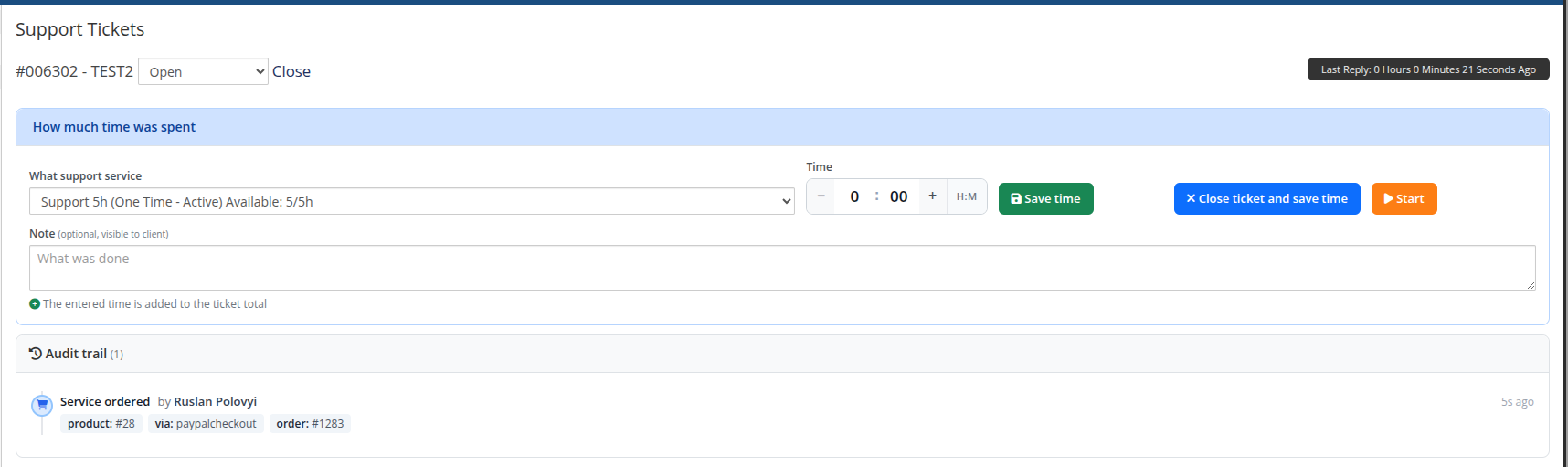
  • During the processing of tickets, the operator has the opportunity to add the number of hours that he spent on the implementation of this ticket. Gradation is 0.25 hours (15 minutes steps).
  • It is possible to omit the use of time monitoring for some tickets and work with them in the standard way.
  • It is possible to add a technical support product to the client, if it does not exist, directly from the ticket update window. This is done from the side of handling the request by the technical support operator. Thanks to this, you do not have to set the service for each client separately, but decide on a specific case.
  • At the beginning of each month, the module calculates all hours of technical support for the previous month, taking into account package hours, then adds the necessary item to the client’s Billable Items, which will be added to the invoice and sent to the client for payment by WHMCS system. This feature is designed so that you can make the most of the built-in WHMCS functionality.
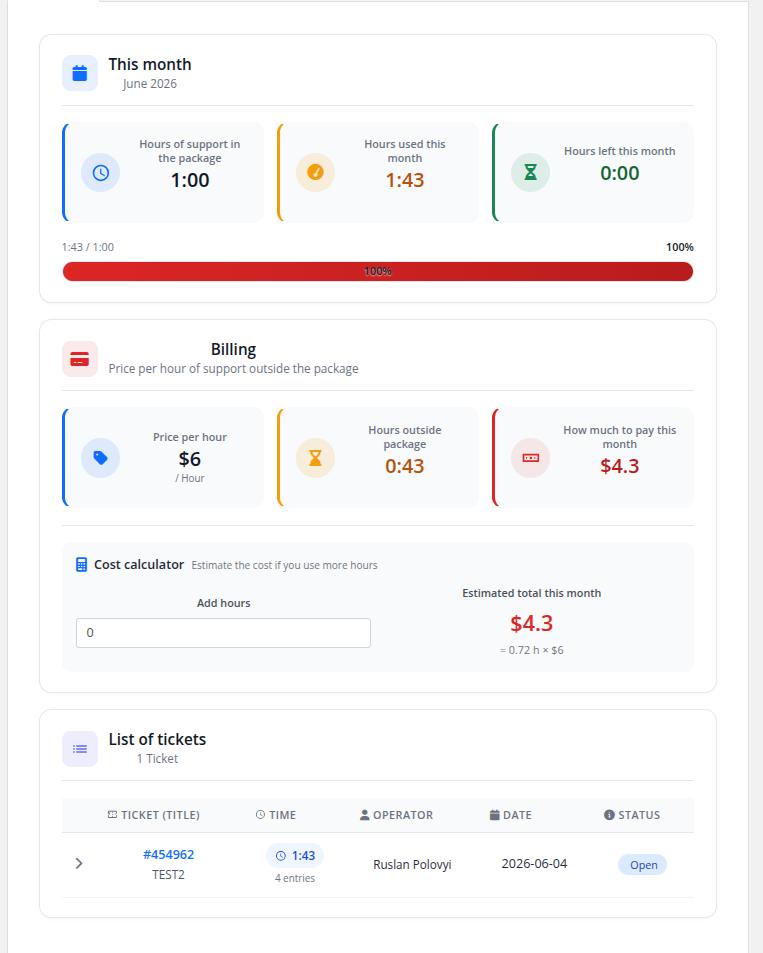
  • In the client area, the client has a complete history of all technical tickets with the time of their service. Also, all the data on the use of hours of technical support.
  • In the administered zone, the operator has a complete history of all technical tickets with the time of their service. Also, all the data on the use of hours of technical support.
  • Module supports multilingualism (Arabic, Azerbaijani, Catalan, Chinese, Croatian, Czech, Danish, Dutch, English, Estonian, Farsi, French, German, Hebrew, Hungarian, Italian, Macedonian, Norwegian, Polish, Romanian, Russian, Spanish, Swedish, Turkish, Ukrainian)

Please look for complete documentation in the link below as this is advanced module and have many more options.

Additional project info

On the basis of our experience and modules that we have created and use for production every day in our company, we decided to publish a commercial version, hence the code of the modules is not the achievement of a programmer who learns and tests new solutions, but the result of the work of experienced developers with over 20 years of experience.

Price for the module.

We are based on a subscription model and we offer two variants - monthly and annual. The annual plan comes with a big discount on the monthly version. More details can be seen on the product page of our store.

Translation

For each of our products, we have prepared a Weblate-based translation mechanism that uses deepL machine learning engine. Missing translations can, for each available language, be generated automatically and suggestions for better expressions.

System Requirements

Module dont have special requirements.

Module Documentation

English documentation: https://puqcloud.com/link.php?id=29

We have prepared a detailed installation manual for the module, including all the steps needed to implement the module.


There are no reviews yet!

Be the first to review PUQ Support by Time provisioning module.

Version Compatibility


Compatible with WHMCS v9.0

Full Version Compatibility


  • Selected versions of WHMCS v9.0
        9.0.0 - 9.0.4
  • Selected versions of WHMCS v8.13
        8.13.0 - 8.13.3
  • All versions of WHMCS v8.12
  • All versions of WHMCS v8.11
  • Selected versions of WHMCS v8.10
        8.10.0
  • Selected versions of WHMCS v8.9
        8.9.0
  • Selected versions of WHMCS v8.8
        8.8.0
  • All versions of WHMCS v8.7
  • All versions of WHMCS v8.6
  • All versions of WHMCS v8.5
  • All versions of WHMCS v8.4
  • All versions of WHMCS v8.3
  • All versions of WHMCS v8.2
  • All versions of WHMCS v8.1
  • All versions of WHMCS v8.0

Support for this product

The best place to start if you need help with a specific product is to contact the developer. All WHMCS Marketplace developers have both a website and support URL listed.

Developed By PUQ Software

Changelog

v3.0 Released June 4th, 2026

Latest Version


  • Compatibility: supports PHP 7.4 / 8.1 / 8.2+ and WHMCS 8.x / 9.x. Published as a separate ionCube build per PHP version ? php74, php81, php82 (use php82 for PHP 8.2 and any newer PHP). WHMCS 8 runs on PHP 7.4 / 8.1 / 8.2; WHMCS 9 runs on PHP 8.2.
  • Module rewritten on the new PUQ module skeleton:
    • License class moved into the main module file (puqSupportByTime.php)
    • New puqSupportByTimeModuleSettings class for product configuration with structured JSON in configoption24
    • Product configuration UI rendered through the AdminAreaFooterOutput hook
    • License alert added on the WHMCS admin homepage (AdminHomepage hook)
  • Schema versioning: new puq_module_versions table + migration runner so updates apply schema changes automatically and idempotently on first load.
  • Redesigned client area (cards, progress bar, modern stat panels)
  • Redesigned ticket header (Bootstrap panels, icons)
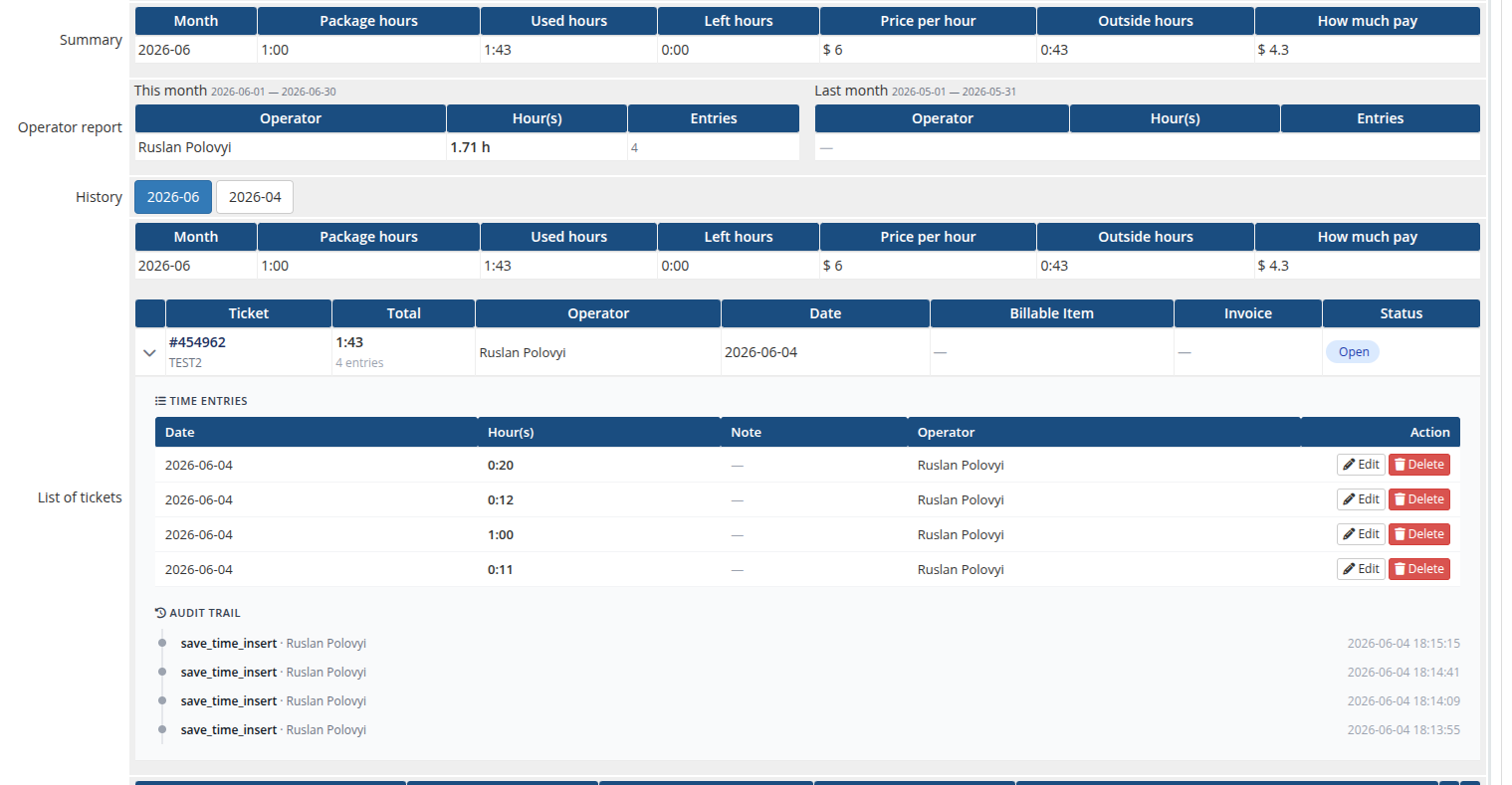
  • Redesigned admin product page (summary table, history navigator)
  • AJAX ticket header: the entire time-logging header on the admin ticket page is now rendered and driven by AJAX. Save / Close+Save / Reopen / Start-Stop timer / Order service no longer reload the page.
  • Multi-entry per ticket: every Save Time (and every timer stop) is recorded as its own entry instead of overwriting, so a ticket keeps a full breakdown of sessions. Each entry has its own note, operator and timestamp.
  • Per-entry notes + operator tracking: every time entry can carry an optional note (shown to the client when Show work log to client is enabled) and stores the WHMCS admin who logged it. Columns on puqSupportByTime_items: note, admin_id, created_at, ticket_record_id.
  • Parent ticket records: new puqSupportByTime_tickets table holds per-ticket billing state (one billable item per ticket) and a snapshot of package hours / hourly rate, while puqSupportByTime_items becomes a pure time log.
  • Live timer: Start / Stop / Cancel on the ticket page with a server-anchored running clock. New table puqSupportByTime_timers. Stop rounds up to the nearest minute and saves a regular time entry. A floating widget on every admin page lists all of the operator's running timers.
  • Audit trail: append-only log of every state change (time logged / updated / deleted, timer start / stop / cancel, service ordered, ticket billed). New table puqSupportByTime_audit. Shown on the ticket header and on the service page.
  • Operator report: per-operator hours and entry counts for the current and previous month on the service page.
  • Cost calculator in the client-area home screen ? interactive "if I use ___ more hours" predictor.
  • Usage chart in the client-area history tab ? last 12 months as a Google ComboChart with a package line and bars coloured by overage status.
  • Usage notifications: email the client when monthly usage crosses configured thresholds (e.g. 80 %, 100 %). New table puqSupportByTime_notifications for idempotent per-(month, threshold) tracking.
  • Show work log to client toggle per product ? reveals the operator name + note per ticket in the client area.
  • Date filter rewritten to use Y-m-t instead of the literal -31
  • Custom admin path now read from configuration.php consistently
  • Backward-compatible settings migration: legacy values stored in configoption3 (hours / invoice action / item name) and configoption4 (per-currency hourly rate) are read transparently when the new configoption24 slot is empty, so existing v2.x products keep working without any reconfiguration. The first save through the v3.0 form moves everything into configoption24.

Note: No manual reconfiguration is required after updating to v3.0 ? settings are migrated automatically on first read. Re-saving the product through the new form is recommended but not mandatory.


Previous Versions


v2.1 Released September 20th, 2025

View/hide detailed changelog

  1. Support for custom admin path


v2.0 Released September 23rd, 2024

View/hide detailed changelog

Module is coded ionCube v13

Supported php version:

  • php 7.4 WHMCS 8.11.0 -
  • php 8.1 WHMCS 8.11.0 +
  • php 8.2 WHMCS 8.11.0 +


v1.3 Released October 19th, 2023

View/hide detailed changelog

  1. Added the ability to delete reserved time positions in the admin panel.
  2. Changed check of one-time packages, from daily cron to every cron, to change to terminator state.


v1.2.5 Released October 11th, 2023

View/hide detailed changelog

  1. Supported WHMCS v8.8.0
  2. Translations added/updated (Arabic, Azerbaijani, Catalan, Chinese, Croatian, Czech, Danish, Dutch, English, Estonian, Farsi, French, German, Hebrew, Hungarian, Italian, Macedonian, Norwegian, Polish, Romanian, Russian, Spanish, Swedish, Turkish, Ukrainian)


v1.2 Released August 2nd, 2023

View/hide detailed changelog

  1. Added the possibility of one-time support packages with a limit of hours
  2. The display of time in the client and admin zones is displayed in a human-readable format
  3. Other display and logic improvements


v1.1 Released March 21st, 2023

View/hide detailed changelog

  1. Changes in design in the client area.
  2. Added translations
  3. Support WHMCS V8.6
  4. Support IonCube PHP Loader v12
  5. Support for PHP 8.1
  6. Support for PHP 7.4
  7. Added a field with a description of the position on the invoice


v1.0 Released October 1st, 2022

View/hide detailed changelog

1.0 Initial version


See also

Accept Bitcoin and cryptocurrency payments - CoinGate for WHMCS

Easily accept Bitcoin, Tether, Ethereum and many other crypto payments on your WHMCS website

Free
Account Statements Module

Send account statements to customers

Free
GST WHMCS Module For India

As WHMCS does provide tax rules options where you can configure your GST tax but we have some extra features in our module that makes it stand out and necessary to use.

Commercial
Handling Fees

A handling fee are the costs that business owners incur when processing payments from customers.

Free
Free Opensource Gateway Fees

Gateway no fees Addon

Free