Changelog
v2.0
Released March 4th, 2026
Latest Version
This addon integrates WHMCS with <strong>Oblio.eu</strong>, allowing you to:
- Automatically issue Oblio documents from WHMCS invoices
- Choose when documents are issued: <code>On Paid</code> or <code>On Created</code>
- Support multiple document types (<code>Proforma</code>, <code>Factura</code>, <code>Aviz</code>)
- Optionally register payments automatically in Oblio
- Optionally send issued invoices to SPV (eFactura)
- Map WHMCS payment gateways (e.g. <code>banktransfer</code>, <code>ipay</code>, <code>stripe</code>, <code>paypal</code>, <code>cash</code>) to Oblio payment types (<code>Ordin de plată</code>, <code>Card</code>, <code>Numerar</code>, etc.)
- Configure customer VAT/CIF source from WHMCS Tax ID or a Client Custom Field
- Automatically store Oblio document details on the WHMCS invoice
- Multiple currencies supported
- Prevent duplicate document creation when WHMCS triggers multiple hooks
- Fully extendable for custom payment gateways
- No WHMCS core file modifications required
What's New in v2.0
- OAuth2 authentication using Oblio API credentials
- Support for Proforma, Factura and Aviz documents
- Configurable auto-issue timing (On Created / On Paid)
- Optional payment registration support
- Optional SPV (eFactura) submission
- Customer VAT/CIF custom field support
- Improved duplicate protection and API rate limiting
Installation
- Upload the <code>modules</code> folder to the root of your WHMCS installation.
- Activate the addon under <strong>WHMCS Admin → System Settings → Addon Modules</strong>.
- Enter your Oblio API credentials and configure default options.
EXTRA STEP
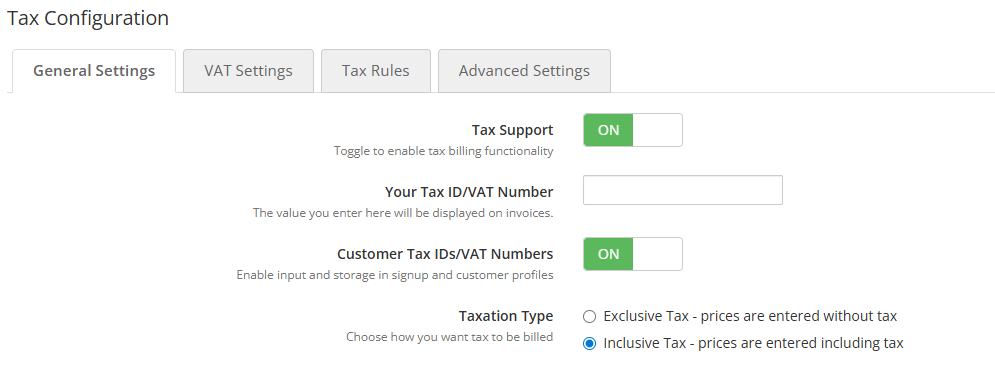
- WHMCS <strong>Tax Support</strong> and <strong>Customer Tax IDs/VAT Numbers</strong> should be enabled if you want to send VAT/CIF information to Oblio.
Requirements
- WHMCS 8.x or newer
- PHP 7.4 or newer
- Valid Oblio account with API credentials
Built and maintained by <strong>Angvlar SRL</strong>.
Previous Versions
v1.4
Released August 22nd, 2025
View/hide detailed changelog
This addon integrates WHMCS with Oblio.eu, allowing you to:
- Sync WHMCS invoices to Oblio automatically when paid
- Automatically send the "Invoice Generated" e-mail from Oblio (optional)
- Map WHMCS payment methods (e.g.,
banktransfer, ipay, stripe, paypal, cash) to Oblio-supported formats (Ordin de plată, Card, PayPal, Numerar)
- Multiple currencies allowed
- Debug payment mapping and log unknown payment methods for better support
- Fully open-source and extendable for custom payment gateways
- "Are you a Romanian VAT-paying company?" - Tick this if your company is VAT registered in Romania (TVA) - DEFAULT: OFF
What's New in v1.4
- Changed the normal VAT to 21%
- Fixed an error with a missing DB table
Installation:
- Upload the
modules folder to the root of your WHMCS installation.
- Activate the addon under WHMCS Admin → Setup → Addon Modules.
- Enter your Oblio API credentials and configure default options.
EXTRA STEP:
- Tax Support and Customer Tax IDs/VAT Numbers must be enabled in WHMCS!
✅ Requirements:
- WHMCS 8.x or newer
- PHP 7.4 or newer
- Valid Oblio account with API access enabled
Built and maintained by Angvlar SRL.
v1.3
Released July 15th, 2025
View/hide detailed changelog
This addon integrates WHMCS with Oblio.eu, allowing you to:
- Sync WHMCS invoices to Oblio automatically when paid
- Automatically send the "Invoice Generated" e-mail from Oblio (optional)
- Map WHMCS payment methods (e.g.,
banktransfer, ipay, stripe, paypal, cash) to Oblio-supported formats (Ordin de plată, Card, PayPal, Numerar)
- Multiple currencies allowed
- Debug payment mapping and log unknown payment methods for better support
- Fully open-source and extendable for custom payment gateways
What's New in v1.3
- Added support for international customers
- Fixed invoice payment status for foreign currencies
- Added a new option in the module settings: "Are you a Romanian VAT-paying company?" - Tick this if your company is VAT registered in Romania (TVA) - DEFAULT: OFF
Installation:
- Upload the
modules folder to the root of your WHMCS installation.
- Activate the addon under WHMCS Admin → Setup → Addon Modules.
- Enter your Oblio API credentials and configure default options.
EXTRA STEP:
- Tax Support and Customer Tax IDs/VAT Numbers must be enabled in WHMCS!
✅ Requirements:
- WHMCS 8.x or newer
- PHP 7.4 or newer
- Valid Oblio account with API access enabled
Built and maintained by Angvlar SRL.
v1.2.0
Released July 14th, 2025
View/hide detailed changelog
This addon integrates WHMCS with Oblio.eu, allowing you to:
- Sync WHMCS invoices to Oblio automatically when paid
- Automatically send the "Invoice Generated" e-mail from Oblio (optional)
- Map WHMCS payment methods (e.g.,
banktransfer, ipay, stripe, paypal, cash) to Oblio-supported formats (Ordin de plată, Card, PayPal, Numerar)
- Multiple currencies allowed
- Debug payment mapping and log unknown payment methods for better support
- Fully open-source and extendable for custom payment gateways
What's New in v1.2.0
- Added support for multiple currencies
Installation:
- Upload the
modules folder to the root of your WHMCS installation.
- Activate the addon under WHMCS Admin → Setup → Addon Modules.
- Enter your Oblio API credentials and configure default options.
EXTRA STEP:
- Tax Support and Customer Tax IDs/VAT Numbers must be enabled in WHMCS!
✅ Requirements:
- WHMCS 8.x or newer
- PHP 7.4 or newer
- Valid Oblio account with API access enabled
Built and maintained by Angvlar SRL.
v1.1.0
Released June 24th, 2025
View/hide detailed changelog
This addon integrates WHMCS with Oblio.eu, allowing you to:
- Sync WHMCS invoices to Oblio automatically when paid
- Automatically send the "Invoice Generated" e-mail from Oblio (optional)
- Map WHMCS payment methods (e.g.,
banktransfer, ipay, stripe, paypal, cash) to Oblio-supported formats (Ordin de plată, Card, PayPal, Numerar)
- Debug payment mapping and log unknown payment methods for better support
- Fully open-source and extendable for custom payment gateways
What's New in v1.1.0
- Added support for dynamic payment method mapping from WHMCS to Oblio format
- Introduced fallback system for unknown payment methods
- Added debug logging via
logModuleCall() to trace hook activation and payment method handling
- Improved hook logic for safer operation and easier customization
Installation:
- Upload the
modules folder to the root of your WHMCS installation.
- Activate the addon under WHMCS Admin → Setup → Addon Modules.
- Enter your Oblio API credentials and configure default options.
✅ Requirements:
- WHMCS 8.x or newer
- PHP 7.4 or newer
- Valid Oblio account with API access enabled
Built and maintained by Angvlar SRL.
v1.0.0
Released June 11th, 2025
View/hide detailed changelog
[1.0.0] - 2025-06-11
Added
- Initial release of the Oblio x WHMCS module.
- Automatic invoice creation in Oblio upon WHMCS payment.
- Quick setup with your Oblio email and token.
- Runs silently after initial configuration.
- Fully compatible with WHMCS without core file modifications.
- English language support.
Notes
- Requires an Oblio.eu account.
- Provided as-is; future compatibility with WHMCS/Oblio updates is not guaranteed.