WHMCS n8n Webhook Notification Module

WHMCS n8n Webhook Notification Module

Developed By Webhook Automation Labs

Compatible with WHMCS v8.13

Overview

The WHMCS n8n Webhook Notification Module lets you push WHMCS notifications into n8n using a secure HTTP webhook.

Use it to connect WHMCS to your own automation workflows without writing a custom integration for every tool.

What This Module Does

  • Sends WHMCS notifications (tickets, invoices, orders, services, etc.) to an n8n webhook
  • Lets you route different notification rules to different webhook URLs
  • Supports optional authentication headers for secure endpoints
  • Provides debug logging to help you troubleshoot delivery issues
  • Avoids polling the WHMCS API – events are pushed in real time

Typical Use Cases

  • Support automation

    • Route new or escalated tickets into Slack, Mattermost, Teams, or any other system via n8n
    • Create on-call alerts when a high-priority ticket is opened
  • Billing and invoicing

    • Trigger payment reminder flows for unpaid invoices
    • Send notifications to finance when large invoices are created or paid
  • Orders and provisioning

    • Send order events to internal tools or CRMs
    • Start custom provisioning workflows in n8n when new services are purchased
  • Operations

    • Push WHMCS events into dashboards, logs, or monitoring
    • Fan out notifications to multiple channels from a single webhook

Features

  • JSON webhook delivery
  • Optional authentication (Bearer token or custom header)
  • Webhook URL override per notification rule
  • Configurable custom header name
  • Debug log option to record HTTP status codes in the WHMCS Activity Log
  • Open-source and safe to modify (MIT licensed)

Requirements

  • WHMCS version 8.1 or later
  • An n8n instance (self-hosted or cloud)
  • A workflow in n8n with a Webhook trigger node

Installation

  1. Download the latest module archive from the Git repository
    (search for the repository named radheneev/whmcs-n8n-webhook on GitHub and open the Releases section).

  2. Extract the contents of the module into:

    • /modules/notifications/n8nwebhook/
  3. In the WHMCS admin area, go to:

    • Setup → Notifications → Providers
  4. Locate n8n Webhook in the provider list and click Configure.

  5. Enter your default webhook URL from n8n, adjust authentication if needed, and save.

Configuration

Provider Settings

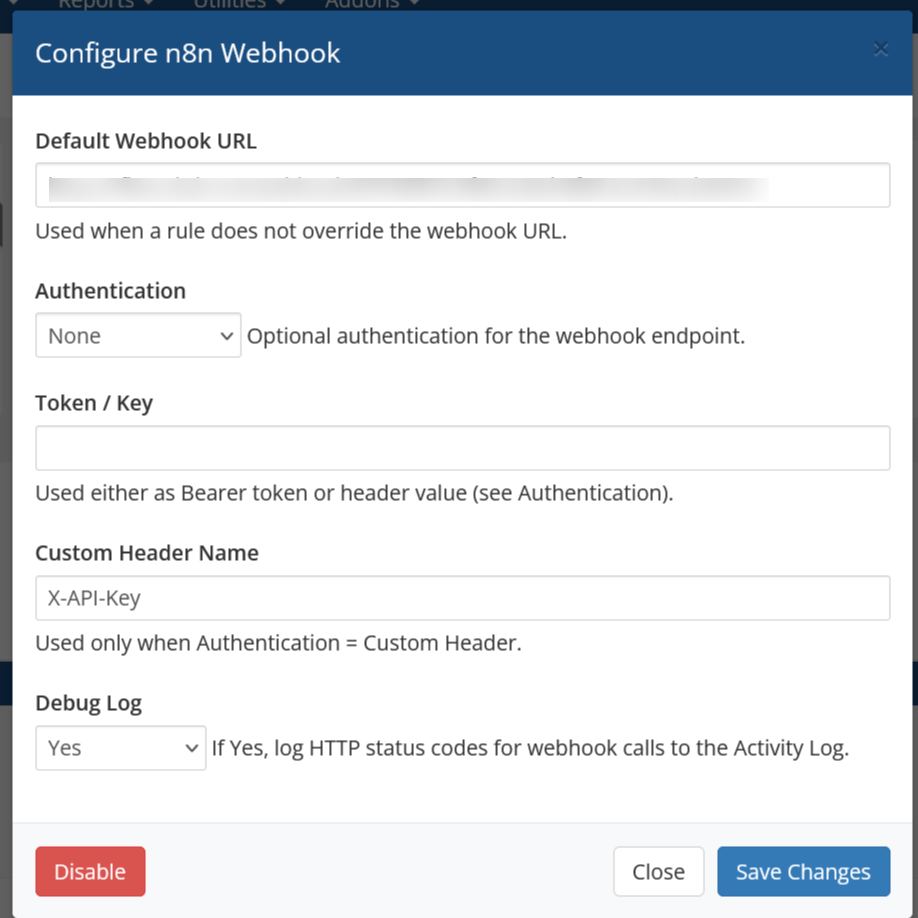
In the provider configuration dialog you can set:

  • Default Webhook URL
    Used when a notification rule does not override the URL.

  • Authentication mode

    • None
    • Bearer token
    • Custom header
  • Token / Key
    Used either as a Bearer token or as the custom header value, depending on the selected authentication mode.

  • Custom Header Name
    Used only when Authentication is set to Custom Header (for example: X-API-Key).

  • Debug Log
    When enabled, the module records HTTP status codes from webhook calls into the WHMCS Activity Log.

Notification Rules

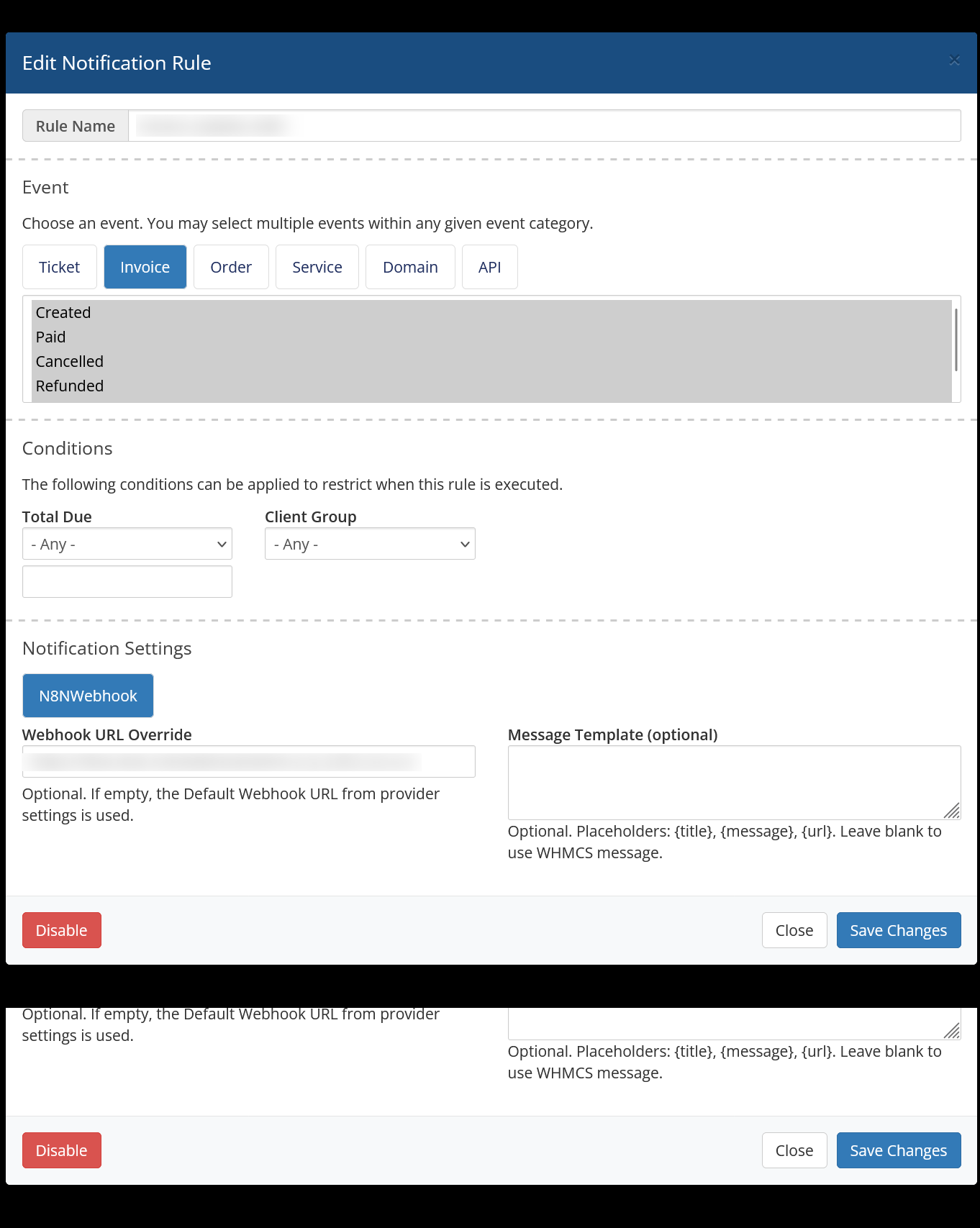
For each notification rule you can:

  • Choose the event category (Ticket, Invoice, Order, Service, Domain, API).
  • Select one or more events, such as:
    • Invoices: Created, Paid, Cancelled, Refunded
    • Tickets: Opened, Reply Added, Flagged, Closed
    • Orders: New Order, Accepted, Cancelled
  • Apply conditions like client group or invoice total.
  • Choose n8n Webhook in the Notification Settings section.
  • Optionally set a Webhook URL Override:
    • When empty, the provider’s Default Webhook URL is used.
    • When filled, this rule sends to a different n8n workflow.
  • Optionally set a Message Template:
    • Use placeholders such as {title}, {message}, {url}.
    • Leave blank to use the standard WHMCS message.

This allows you to send different WHMCS events to different n8n workflows without extra modules.

FAQ

Do I need to write any code?
No. Configuration happens entirely from WHMCS Notifications and n8n workflows.

Can I route different events to different flows?
Yes, using Webhook URL Override in notification rules.

How do I secure the webhook?
Enable authentication in the provider settings and validate the token/header in n8n.

Which events are supported?
Any event WHMCS Notification Rules support (tickets, invoices, orders, services, domains, etc.).

Is it open-source?
Yes — MIT licensed, so fully modifiable.


There are no reviews yet!

Be the first to review WHMCS n8n Webhook Notification Module.

Version Compatibility


Compatible with WHMCS v8.13

Full Version Compatibility


  • Selected versions of WHMCS v9.0
        9.0.0
  • All versions of WHMCS v8.13
  • All versions of WHMCS v8.12
  • All versions of WHMCS v8.11
  • Selected versions of WHMCS v8.10
        8.10.0
  • Selected versions of WHMCS v8.9
        8.9.0
  • Selected versions of WHMCS v8.8
        8.8.0
  • All versions of WHMCS v8.7
  • All versions of WHMCS v8.6
  • All versions of WHMCS v8.5
  • All versions of WHMCS v8.4
  • All versions of WHMCS v8.3
  • All versions of WHMCS v8.2
  • All versions of WHMCS v8.1
  • All versions of WHMCS v8.0

System Requirements


  • WHMCS 8.1 or later
  • PHP 7.4 or later (PHP 8.x recommended)
  • Admin access to WHMCS Notifications system
  • Outbound HTTPS access from WHMCS server

* Requirements listed are in addition to the WHMCS default system requirements.

Support for this product

The best place to start if you need help with a specific product is to contact the developer. All WHMCS Marketplace developers have both a website and support URL listed.

Developed By Webhook Automation Labs

Changelog

v1.0.0 Released December 30th, 2025

Latest Version


Initial public release – WHMCS provider – Webhook support – Optional auth headers & SSL settings – JSON payload with ticket/invoice/order details

 

See also

Discord Notifications

A simplistic, free & open source hook allowing instant Discord notifications when an action is triggered.

Free
Netgsm Sms

Netgsm Sms addon provides you sending customized bulk sms and creating sms templates.

Free
MSG91 SMS/OTP Plugin

MSG91 WHMCS SMS plugin gives you the power and flexibility to stay connected with your customers by sending them an SMS and OTP's for 2FA at the crucial steps that matters the most.


Free
SMS Manager

More Advanced SMS System

Commercial
SMSQ Notify

Send SMS Notification From WHMCS by SMSQ Notify

Free