Sheepy: accept Bitcoin and crypto payments

Sheepy: accept Bitcoin and crypto payments

Developed By Sheepy LLC

Compatible with WHMCS v9.0

Sheepy WHMCS Plugin

This module integrates the sheepy.com cryptocurrency payment gateway into WHMCS. Customers are redirected to a hosted Sheepy checkout to pay in the cryptocurrency of their choice, and the WHMCS invoice is updated automatically as the on-chain payment progresses.

Merchants can keep funds in cryptocurrency or set up automatic conversion to fiat or stablecoins to avoid FX risks.

Supported cryptocurrencies

  • Bitcoin (BTC)
  • Ethereum (ETH)
  • Tether (USDT) TRC-20
  • Tether (USDT) ERC-20
  • Tether (USDT) BEP-20
  • Tether (USDT) SOL
  • USD Coin (USDC)
  • TRON (TRX)
  • BNB
  • Solana (SOL)
  • Litecoin (LTC)
  • XRP
  • Bitcoin Cash (BCH)
  • Dogecoin (DOGE)

See sheepy.com/supported-cryptocurrencies for the up-to-date list and supported trading pairs.

Requirements

  • WHMCS 8.13 or higher (8.x and 9.x are both supported by the same build)
  • PHP 8.1 or higher with the curl extension
  • An HTTPS-enabled WHMCS installation reachable from the public internet (required for webhook delivery)
  • An active Sheepy merchant account with API credentials — apply for an account (my.sheepy.com/auth/sign-up) or contact us (sheepy.com/contact-us)

Installation

  1. Download the latest release archive.
  2. Upload the contents of the archive into your WHMCS installation so that the files land under modules/gateways.
  3. In the WHMCS admin area, go to Setup → Payments → Payment Gateways → All Payment Gateways.
  4. Click Sheepy in the list to activate the module.
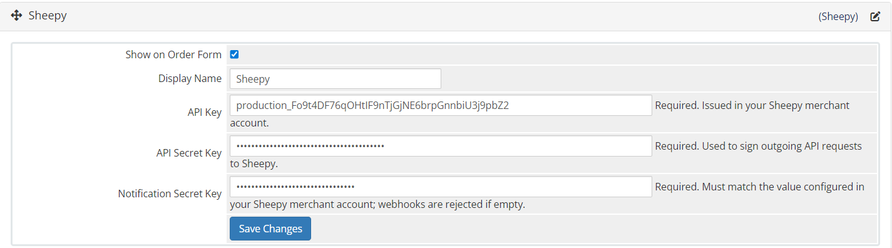
  5. Enter your API credentials (see below) and click Save Changes.

Configuration

  1. Log in to the Sheepy dashboard at my.sheepy.com
  2. Go to Integration → API Integration and copy your API Key and API Secret Key.
  3. Go to Integration → Integration settings → Webhooks:
    • Click Generate secret key and copy the resulting Notification Secret Key. It is shown only once.
    • The webhook URL field can be left empty — the module sends its callback URL with every invoice automatically.
  4. In WHMCS, open Setup → Payments → Payment Gateways → Sheepy.
  5. Paste the API Key, API Secret Key and Notification Secret Key, then save.

After saving, customers will see Sheepy as a payment option on their invoices.

How payment works

  1. The customer opens an unpaid invoice in WHMCS and clicks Pay Now.
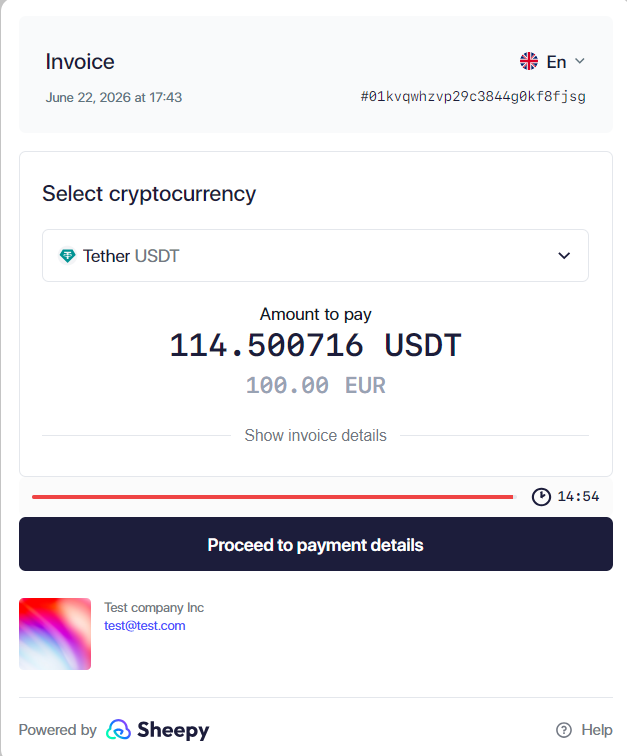
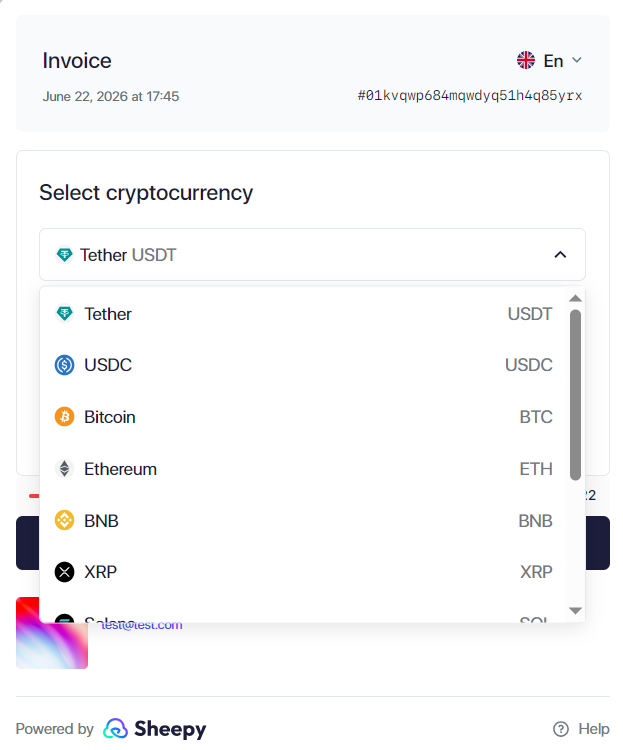
  2. WHMCS redirects them to the Sheepy checkout, where they choose a cryptocurrency and complete the payment.
  3. Sheepy notifies WHMCS as the payment progresses, and the invoice status is updated automatically.

Sheepy checkouts are valid for 15 minutes. If a customer abandons the checkout and returns later, the module reuses the same Sheepy invoice when possible, or transparently creates a fresh one.

Invoice statuses

WHMCS invoice status When it is set Paid Payment confirmed on the Sheepy network Payment Pending Transaction seen on-chain but not yet confirmed, or held by Sheepy for review Refunded Refund processed by Sheepy Unpaid Waiting for the customer to pay, or the previous checkout expired

Refunds

The Sheepy API does not expose a refund endpoint to integrated platforms. To refund a payment:

  1. Open the corresponding invoice in your Sheepy merchant dashboard.
  2. Process the refund there.
  3. Sheepy sends a refund notification to WHMCS, which automatically records the refund transaction and marks the WHMCS invoice as Refunded.

Do not use the WHMCS Refund button for Sheepy payments. The module refuses the WHMCS-initiated refund with a pointer to the Sheepy merchant cabinet, so the invoice stays Paid until the real refund completes on the Sheepy side and the webhook arrives.

Support

For issues with the module, please contact sheepy.com/support. Module activity, payments, refunds and webhook rejections are written to the WHMCS Billing → Gateway Log screen and are a good first stop when investigating a problem.

For general Sheepy questions and merchant onboarding, visit www.sheepy.com or contact us (sheepy.com/contact-us). The Sheepy API reference is available at sheepy.com/api.

Latest version

For the latest version check our Github here https://github.com/sheepycrypto/sheepy-whmcs-plugin

License

This module is released under the MIT License.


There are no reviews yet!

Be the first to review Sheepy: accept Bitcoin and crypto payments.

Version Compatibility


Compatible with WHMCS v9.0

Full Version Compatibility


  • All versions of WHMCS v9.0
  • All versions of WHMCS v8.13

System Requirements


  • PHP 8.1+ with curl extension
  • WHMCS 8.13 or higher (8.x and 9.x are both supported by the same build)
  • An HTTPS-enabled WHMCS installation reachable from the public internet (required for webhook delivery)
  • An active Sheepy merchant account with API credentials https://my.sheepy.com/auth/sign-up

* Requirements listed are in addition to the WHMCS default system requirements.

Support for this product

The best place to start if you need help with a specific product is to contact the developer. All WHMCS Marketplace developers have both a website and support URL listed.

Developed By Sheepy LLC

Changelog

vv1.0.1 Released June 19th, 2026

Latest Version


[v1.0.1] - 2026-06-19

Changed

  • The WHMCS admin Refund button now refuses Sheepy refunds with a pointer to the Sheepy merchant cabinet, so the invoice can no longer be silently marked Refunded without an actual refund reaching the customer. Real refunds must still be initiated on the Sheepy side and will sync back to WHMCS via webhook.

Fixed

  • Show WHMCS's native payment failure panel on the invoice page when a Sheepy invoice cannot be created, instead of silently bouncing the client back without explanation.
  • Record the HTTP status code and the full error message returned by Sheepy in Billing → Gateway Log so the merchant can see exactly why an invoice was rejected.
  • Append an admin-visible note to the WHMCS invoice on attention-worthy Sheepy statuses (partially_paid, overpaid, invalid, error) so the merchant can see the Sheepy invoice ID and the amount-vs-requested breakdown directly on the invoice card, without digging through the Gateway Log. The same breakdown is also shown in the Billing → Gateway Log Result column. Notes are idempotent — repeated webhooks for the same (sheepy_invoice_id, status) pair are not duplicated.


[v1.0.0] - 2026-06-02

  • Initial release.


See also

WHMCS Bitcoin Payments

Accept Bitcoin payments on your website

Free
Accept Bitcoin and cryptocurrency payments - CoinGate for WHMCS

Easily accept Bitcoin, Tether, Ethereum and many other crypto payments on your WHMCS website

Free
Coinbase Commerce

No Fees, Easy Setup. Accept cryptocurrencies like: Bitcoin, Bitcoin Cash, Ethereum and Litecoin!

Free
PayTR Virtual Pos iFrame API

Open your web site to shopping with the advantages of PayTR. Take your payments securely.

Free
Gateway Fees for WHMCS

With this WHMCS module, you'll get the payment gateway fees from your clients directly.

Free