Host Modules Email Templates for WHMCS
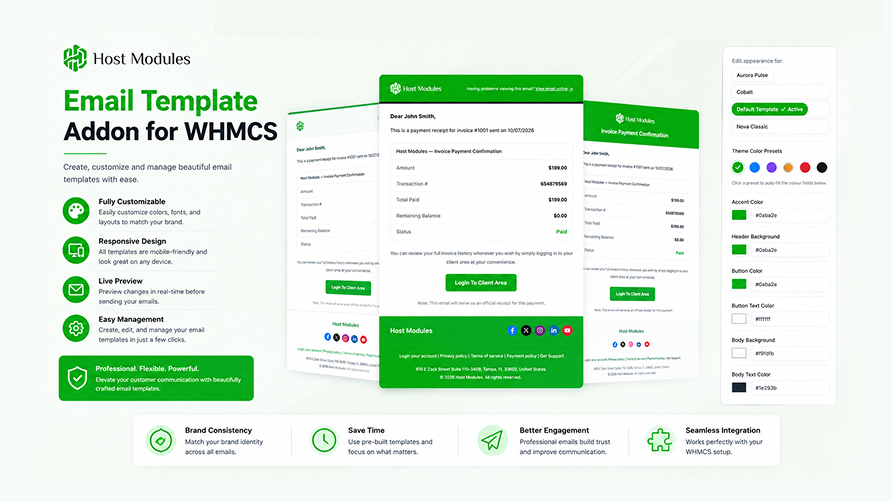
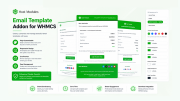
HM Email Templates gives every email WHMCS sends — invoices, tickets, welcome
messages, password resets — a polished, on-brand HTML look. Instead of WHMCS's
plain default wrapper, your clients receive beautifully structured emails that
match your brand identity.
Unlike theme-specific email addons, HM Email Templates is fully standalone and
works with any WHMCS client theme.
View Details ·
Documentation ·
Changelog
─────────────────────────────────────
6 BUILT-IN PROFESSIONAL TEMPLATES
─────────────────────────────────────
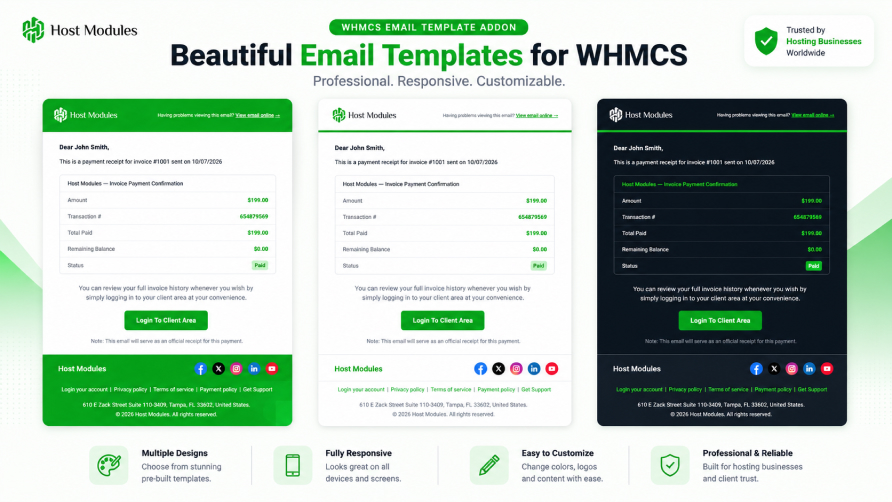
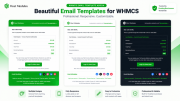
Choose the design that fits your brand from the template gallery:
-
Nova Classic — Centered brand panel framing the card with a matching slim
accent bar, pre-header strip, and the footer moved onto the page itself
(social icons, dot-separated copyright/address line, footer links).
-
Aurora Pulse — Brand centered on a clean white card with hairline dividers,
a centered subject headline, and a quiet centered footer signed off with a
small brand wordmark. The one template that shows the email subject as a
headline.
-
Cobalt — Blueprint precision styling: squared corners, engineering double
rule, grid glyph, and a left-aligned corporate footer.
-
Slate — Dark terminal-window card with a traffic-light title bar,
monospace URL chip, and teal accent tick. Built dark-first for tech brands.
-
Ember — Warm terracotta boutique card with an accent crown, centered logo
band, three-dot divider, and soft rounded corners.
-
Default Template — Clean transactional layout focused on readability;
ideal for distraction-free notifications.
Activate any template in one click. New template packs are auto-discovered —
drop a folder in the templates directory and it appears in the gallery instantly,
no code changes needed.
─────────────────────────────────────
LIVE APPEARANCE EDITOR
─────────────────────────────────────
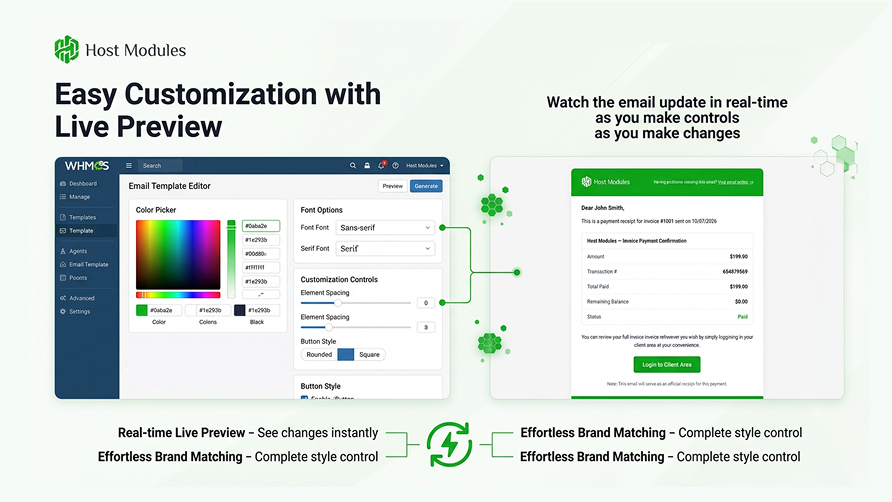
Configure colours, fonts, backgrounds, buttons, tables, and accents from a
split-pane admin panel — see a live preview of your changes before saving. Up to
28 configurable design settings per template, each pre-filled with that
template's own defaults.
-
17 shared colour presets on every template — one click sets the complete
palette (header, body, card, buttons, footer, pre-header and table colours).
The active preset is highlighted, so you always know whether your colours are
a preset or custom.
- Accent colour, header background, body background, card background
- Button colour and button text colour
- Font family (Google Fonts supported) and body font size
- Body text colour and link colours
- Footer and pre-header background, text, and link colours
-
Reset to Defaults restores the template's shipped palette at any time
─────────────────────────────────────
DARK MODE EMAIL SUPPORT
─────────────────────────────────────
- Optional
prefers-color-scheme styling per template — emails follow the
recipient's device theme.
- Configurable dark background, dark card, and dark text colours.
- Tables, body text, and links adapt automatically to dark surfaces so nothing
disappears against a dark card.
- Upload an optional dark-mode logo; it is used automatically on dark
headers and falls back to your light logo when not set.
─────────────────────────────────────
TABLE STYLE ENGINE
─────────────────────────────────────
WHMCS invoice and summary tables inside emails are restyled to match your brand:
- Four table styles: bordered, minimal, striped, accent
- Full colour control — Table Header Text, Table Body Text,
Table Row Label Text (the left label cell) and Table Totals Text
(Sub Total / Total rows), plus a Table Border Color override
- Colours are applied even when the email body carries its own inline styling,
and the border colour recolours every table edge — outer frame, header rule,
and row dividers
- Fully interactive in the live preview, which includes a sample invoice with a
totals row
─────────────────────────────────────
FULL BRANDING CONTROL
─────────────────────────────────────
-
Logo Upload — Upload a PNG, JPEG, GIF, or WebP logo with secure MIME
validation, or use an external URL. Optional dark-mode variant.
-
Per-template Logo Variant & Header Branding — choose light/dark logo and
how the brand is displayed per template, interactive in the live preview.
-
Header Text — Company name, header link text, and an optional header URL
label.
-
Pre-header Bar — Optional top "view email online" strip with custom text
and link, styled per template.
-
Social Links — Enable/disable and set URLs for 12 platforms: Facebook,
X/Twitter, Instagram, LinkedIn, YouTube, TikTok, WhatsApp, Telegram, Discord,
GitHub, Pinterest, and Threads.
-
Footer — Custom copyright text (with
{$dateYear} support), company
address, and up to 5 configurable footer links.
-
Domain Link Control — Show or hide your website URL in the footer, with a
custom label.
-
WHMCS Shortcodes — Insert
{whmcs_company_name}, {whmcs_system_url},
{whmcs_domain}, {whmcs_company_email}, {whmcs_address} and
{current_year} into any text field; they resolve from WHMCS General Settings
at send time, so your details stay in one place.
─────────────────────────────────────
RTL & MULTI-LANGUAGE SUPPORT
─────────────────────────────────────
- Automatic RTL detection for Arabic, Hebrew, Farsi, Urdu, and other
right-to-left languages — no configuration needed.
- Text alignment, layout direction, and template structure flip automatically
for RTL clients.
- Per-language translation overrides for all user-facing strings across
24 languages, stored in the database.
- All translatable strings (header text, footer copyright, footer address,
pre-header text, footer link names) can be overridden per language.
─────────────────────────────────────
PREDEFINED MESSAGE BLUEPRINTS
─────────────────────────────────────
5 ready-to-use HTML email body blueprints for the most common WHMCS email types:
- Account Welcome
- Invoice Payment Confirmation
- Password Reset
- Ticket Opened
- Ticket Reply
Each blueprint ships in both LTR and RTL variants. Copy and paste directly into
the WHMCS email template editor — no HTML knowledge required.
─────────────────────────────────────
DASHBOARD, DIAGNOSTICS & CONTROL
─────────────────────────────────────
-
Setup Progress Tracker — a live checklist that shows exactly what is left
to configure before your emails go out branded.
-
System Health — traffic-light checks for everything that can stop wrapping
(PHP version, extensions, storage permissions, wrapping toggle, active
template, license, database tables, pipeline activity) with a fix-it hint on
every failure.
-
Email Log — a journal of every processed email: wrapped / skipped / error,
with the reason. Email content is never logged.
-
Send Test Email — fire a real email through the full pipeline from the
dashboard.
-
Download Diagnostics — one-click JSON export for support tickets (no
license key, no email content included).
-
Remote Status URL — secret-gated, read-only endpoint for remote health
monitoring.
-
Per-template Exclusions — deliver selected WHMCS emails (for example plain
security notices) without the branded wrapper.
─────────────────────────────────────
SEAMLESS WHMCS INTEGRATION
─────────────────────────────────────
- Hooks into the WHMCS SendEmail event — wraps every outgoing email
automatically with zero configuration after setup.
- No WHMCS core file edits and no template file modifications required —
installs and activates in minutes.
- Strips WHMCS's own default global wrapper to avoid double-wrapping, and works
with installs that have customised WHMCS mail headers/CSS.
- Custom merge fields are preserved — 2FA codes, verification links and similar
dynamic values survive the wrapping intact.
- Safe fallback — if anything goes wrong, the original email is delivered
unmodified. Email delivery is never blocked.
- Settings backup & restore — your configuration is automatically backed up
on deactivation and restored on reactivation.
- Auto-migration — database schema updates run automatically; no manual SQL
required.
- All settings stored in WHMCS's own database — no external dependencies.
─────────────────────────────────────
SECURE ONE-CLICK UPDATES
─────────────────────────────────────
- Update from the admin area in one click — no FTP, no re-upload.
- Packages are digitally signed, and the signature plus checksum are
verified before anything is installed. An unverifiable package is refused and
nothing on your site changes.
- Packages are downloaded only from
hostmodules.com over verified TLS.
- A backup is taken first — if it cannot be created, the update is cancelled, so
every update can be rolled back.
- Failed database migrations are reported clearly instead of being reported as
success.
- Your uploaded logos, settings and storage folder are preserved across updates.
─────────────────────────────────────
RELEASE HISTORY
─────────────────────────────────────
Full notes: https://doc.hostmodules.com/email-template/v1-1-1/changelog/
v1.1.1 — current
A polish release focused on the Appearance page and table styling.
- Full table colour control: Table Header Text, Table Body Text, Table Row Label
Text, Table Totals Text and Table Border Color — pre-filled from template
defaults and set by all 17 colour presets.
- Table colours now win over inline styling in the email body, and the border
colour recolours every table edge; the live preview gained a totals row.
- Switching from a dark preset to a light one no longer leaves the dark card
background behind — every preset defines a complete palette.
- The active colour preset is highlighted with a ring; no ring means custom
colours.
- Reset to Defaults actually resets (it previously re-saved current values), and
the loading spinner shows only on the button you clicked.
- Refreshed default colours across all six templates, Ember's default border
styling, and Nova's footer background restored as a configurable field.
- Updater hardening: signed packages, always-on checksum verification,
downloads restricted to hostmodules.com, update cancelled if a backup cannot
be made, and honest reporting of failed migrations.
v1.1.0
A major feature, stability, security, and supportability release.
- All six template packs redesigned with distinct visual identities, plus two
brand-new designs: Slate (dark-first professional) and Ember (warm,
centered logo).
- A shared library of 17 colour presets on every template, per-template Logo
Variant and Header Branding controls, and automatic dark-surface adaptation
for tables, body text and links.
-
Dark mode email support with configurable dark colours.
-
Per-template exclusions — send selected WHMCS emails unwrapped.
-
Email Log, System Health dashboard, Send Test Email,
Download Diagnostics, and a secret-gated Remote status URL.
- RTL variants of all five predefined message blueprints; footer address became
translatable per language.
- Admin menu reorganised into Template Setup / Content / System groups, with
clearer status banners.
- Reliability: temporary license-server problems no longer disable the addon,
license checks are throttled during outages, appearance defaults apply on
fresh installs, robust content extraction for customised WHMCS mail headers,
correct language fallback, atomic settings saves, and rotated size-capped logs.
- Security: CSRF protection on all admin actions, protected migration forms,
hardened update-package validation, webhook replay protection, TLS always
verified, SVG logo uploads removed (stored-XSS vector), and the storage
directory protected from direct web access.
-
Requirement change: v1.1.0 and later require PHP 8.1+ (previously
advertised as 7.4). Activation verifies this and refuses on older versions.
v1.0.0
Initial release.
- 4 professionally designed email templates with a one-click gallery.
- Live split-pane preview editor, 7 colour scheme presets, full colour control,
Google Fonts, and the table style engine (bordered, minimal, striped, accent).
- Logo upload and external URL, 5 social platforms, footer copyright/address and
5 custom links, pre-header strip.
- Per-language translation overrides for 24 languages with automatic RTL layout.
- 5 predefined message blueprints.
- SendEmail hook with fallback protection, database-backed translations, and
license management with an HMAC-secured webhook.
─────────────────────────────────────
REQUIREMENTS
─────────────────────────────────────
- WHMCS 8.x or newer
- PHP 8.1 or newer (verified at activation)
- PHP extensions:
curl, dom, openssl
- MySQL 5.7+ / MariaDB 10.3+
- Writable
storage/ directory
- Works with any WHMCS client theme (no theme dependency).