OwnPay WHMCS

OwnPay WHMCS

Developed By OwnPay

Compatible with WHMCS v9.0

OwnPay Payment Gateway Module for WHMCS

A WHMCS payment gateway module that integrates with the OwnPay payment platform. Customers are redirected to OwnPay's hosted checkout to complete payment, then returned to WHMCS upon completion.

Features

  • Hosted Checkout - Customers are redirected to OwnPay's secure hosted checkout page for payment
  • Webhook Notifications - Asynchronous payment confirmation via HMAC-SHA256 signed webhooks
  • Refund Support - Process full or partial refunds directly from the WHMCS admin panel
  • Transaction Information - View detailed transaction data in the WHMCS admin area
  • Test Mode - Enable detailed API logging for debugging and troubleshooting
  • Secure - HMAC-SHA256 webhook signature verification, HTTPS enforcement, and output escaping throughout

Requirements

  • WHMCS 8.0 or later (fully compatible with WHMCS 9.0+)
  • PHP 8.1 or later (WHMCS 9.0 requires PHP 8.2+)
  • cURL PHP extension enabled
  • An active OwnPay instance with API access enabled

Installation

  1. Download the module package
  2. Upload modules/gateways/ownpay.php to your WHMCS installation at <whmcs>/modules/gateways/ownpay.php
  3. Upload modules/gateways/callback/ownpay.php to <whmcs>/modules/gateways/callback/ownpay.php
  4. Upload the modules/gateways/ownpay/ directory to <whmcs>/modules/gateways/ownpay/

File Structure

After installation, your WHMCS directory should contain the following files:

  • modules/gateways/ownpay.php - Main gateway module
  • modules/gateways/ownpay/logo.svg - Default gateway logo
  • modules/gateways/ownpay/lang/english.php - English language strings
  • modules/gateways/callback/ownpay.php - Webhook callback handler

Configuration

WHMCS Setup

  1. Navigate to Setup > Payments > Payment Gateways
  2. Click Activate next to OwnPay Payment Gateway
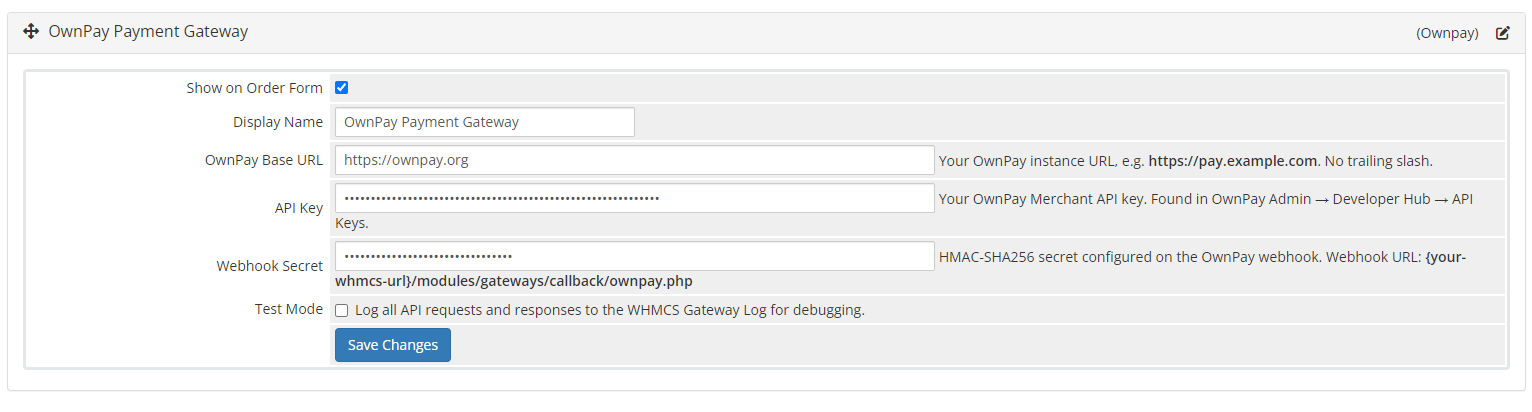
  3. Configure the following settings:

OwnPay Base URL - Your OwnPay instance URL (e.g. https://pay.example.com). No trailing slash.

API Key - Your OwnPay API key (begins with op_xxxx.xxxxx). Found in your OwnPay Admin panel under Your Brand > Developer Hub > API Keys.

Webhook Secret - The HMAC-SHA256 secret used for webhook signature verification. The Webhook Callback URL is displayed in this field's description - copy it into your OwnPay webhook settings.

Gateway Logo URL - Optional. URL to a custom logo image to display on the checkout page.

Test Mode - Enable to log all API requests and responses for debugging purposes.

OwnPay Webhook Setup

  1. In WHMCS, navigate to Setup > Payments > Payment Gateways and open the OwnPay settings
  2. Copy the Webhook Callback URL shown in the Webhook Secret field description. It follows the format: https://your-whmcs-domain.com/modules/gateways/callback/ownpay.php
  3. In your OwnPay admin panel, go to Developer Hub > Webhooks > Add Webhook
  4. Paste the URL and enter the same secret configured in WHMCS
  5. Subscribe to the following events:
    • payment.completed
    • payment.failed
    • payment.refunded

How It Works

Payment Flow

  1. Customer clicks Pay Now on a WHMCS invoice
  2. WHMCS calls the gateway module, which creates a payment intent via the OwnPay API
  3. Customer is redirected to the OwnPay hosted checkout page
  4. Customer completes payment on OwnPay
  5. OwnPay sends a signed webhook to the WHMCS callback handler
  6. The callback handler verifies the HMAC signature, validates the invoice, applies the payment, and logs the transaction
  7. Customer is redirected back to WHMCS and the invoice is marked as paid

Webhook Security

All webhooks from OwnPay are verified using HMAC-SHA256 signatures:

  • The signature is sent in the X-OP-Signature, X-Signature, or X-OwnPay-Signature request header
  • Computed as HMAC-SHA256 of the raw request body using the configured webhook secret
  • Verified using hash_equals() for timing-safe comparison
  • Requests with invalid or missing signatures are rejected with HTTP 403

Refund Processing

Refunds are processed via the OwnPay API:

  • Full refunds - Click Refund on the transaction in the WHMCS admin without specifying an amount
  • Partial refunds - Specify a partial amount when initiating the refund from the admin panel
  • Refund status is tracked and displayed in the WHMCS transaction log

API Endpoints Used

The module communicates with the following OwnPay API endpoints on your configured Base URL:

  • POST /api/v1/payments - Create a payment intent
  • GET /api/v1/payments/{id} - Check payment status
  • POST /api/v1/refunds - Process a refund
  • GET /api/v1/transactions/{id} - Retrieve transaction details
  • GET /api/v1/health - Connectivity check

Troubleshooting

Enable Test Mode

Enable Test Mode in the gateway configuration to log all API requests and responses to the WHMCS Gateway Log, accessible under Utilities > Logs > Gateway Log.

Common Issues

"OwnPay gateway is not configured" - Set the Base URL and API Key in the gateway configuration.

"Connection to OwnPay failed" - Verify the Base URL is correct and reachable from your server.

"Signature verification failed" - Ensure the Webhook Secret matches between WHMCS and your OwnPay webhook settings.

"Invoice ID not found in webhook payload" - Verify that the webhook is sending the reference field containing the invoice ID.

Payment not applied after webhook - Check the WHMCS Gateway Log for errors and ensure the callback file is uploaded to the correct path.

Debug Checklist

  1. Verify the cURL PHP extension is enabled on your server
  2. Confirm the OwnPay Base URL is reachable from your WHMCS server
  3. Check the WHMCS Gateway Log for detailed error messages
  4. Confirm the webhook callback URL is publicly accessible
  5. Ensure the webhook secret matches exactly between WHMCS and OwnPay

Changelog

Version 1.0.1 - 2026-07-09

  • Improve call_back url same origin validation.

Version 1.0.0 - 2026-07-07

  • Initial release
  • Third-party gateway integration with OwnPay hosted checkout
  • Webhook callback handler with HMAC-SHA256 signature verification
  • Full and partial refund processing support
  • Transaction information display in the WHMCS admin area
  • Test mode with detailed API request/response logging
  • English language file included

License

This module is released under the MIT License.


There are no reviews yet!

Be the first to review OwnPay WHMCS.

Version Compatibility


Compatible with WHMCS v9.0

Full Version Compatibility


  • Selected versions of WHMCS v9.0
        9.0.0 - 9.0.5
  • Selected versions of WHMCS v8.13
        8.13.0 - 8.13.4
  • All versions of WHMCS v8.12
  • All versions of WHMCS v8.11
  • Selected versions of WHMCS v8.10
        8.10.0
  • Selected versions of WHMCS v8.9
        8.9.0
  • Selected versions of WHMCS v8.8
        8.8.0
  • All versions of WHMCS v8.7
  • All versions of WHMCS v8.6
  • All versions of WHMCS v8.5
  • All versions of WHMCS v8.4
  • All versions of WHMCS v8.3
  • All versions of WHMCS v8.2
  • All versions of WHMCS v8.1
  • All versions of WHMCS v8.0

Support for this product

The best place to start if you need help with a specific product is to contact the developer. All WHMCS Marketplace developers have both a website and support URL listed.

Developed By OwnPay

Changelog

v1.0.1 Released July 9th, 2026

Latest Version


Version 1.0.1 - 2026-07-09

  • Improve call_back url same origin validation.


Previous Versions


v1.0.0 Released July 7th, 2026

View/hide detailed changelog

Changelog

1.0.0 - 2026-07-07

  • Initial release
  • Third-party gateway integration with OwnPay checkout
  • Webhook callback handler with HMAC-SHA256 signature verification
  • Refund processing support
  • Transaction information display in admin area
  • Test mode with detailed API logging
  • English language support


See also

WHMCS Bitcoin Payments

Accept Bitcoin payments on your website

Free
Accept Bitcoin and cryptocurrency payments - CoinGate for WHMCS

Easily accept Bitcoin, Tether, Ethereum and many other crypto payments on your WHMCS website

Free
Coinbase Commerce

No Fees, Easy Setup. Accept cryptocurrencies like: Bitcoin, Bitcoin Cash, Ethereum and Litecoin!

Free
PayTR Virtual Pos iFrame API

Open your web site to shopping with the advantages of PayTR. Take your payments securely.

Free
Gateway Fees for WHMCS

With this WHMCS module, you'll get the payment gateway fees from your clients directly.

Free