AURAS Pay Crypto Payment Gateway

AURAS Pay Crypto Payment Gateway

Developed By AURAS Pay

Compatible with WHMCS v9.0

AURAS Pay Crypto Payment Gateway for WHMCS

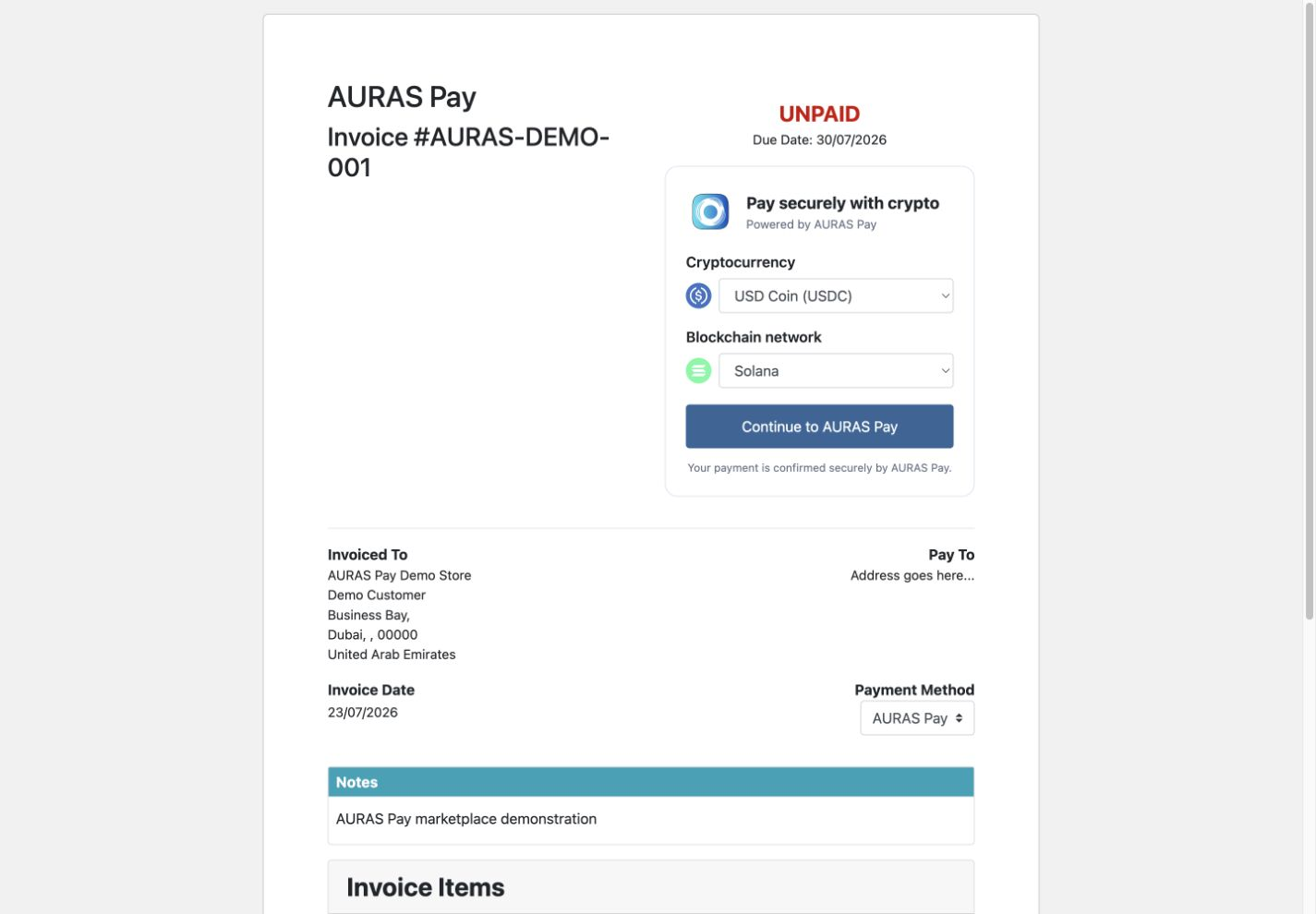
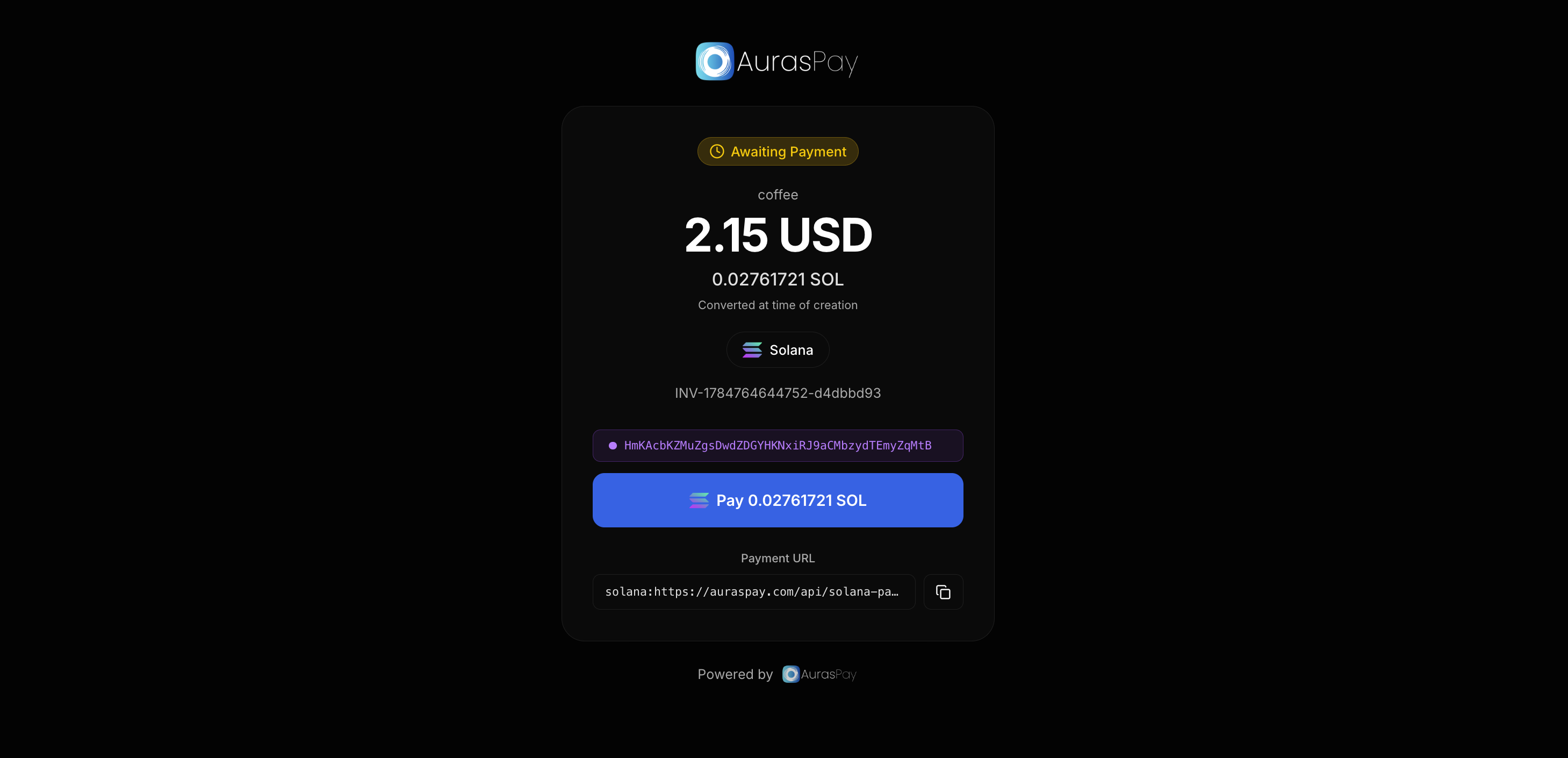
AURAS Pay for WHMCS lets hosting companies accept cryptocurrency payments directly from unpaid WHMCS invoices. The gateway adds AURAS Pay as a payment option, allows the client to select a supported cryptocurrency and compatible blockchain network, and redirects the client to the secure AURAS Pay hosted checkout.

After payment, the module does not trust the browser return alone. It validates the signed AURAS Pay webhook, retrieves the payment from the AURAS Pay API, verifies the invoice reference, amount, fiat currency, payment ID, and completed status, and then records the transaction and marks the matching WHMCS invoice as paid.

Key features

  • Native WHMCS payment-gateway integration for unpaid invoices.
  • Customer-selectable cryptocurrency and compatible blockchain network.
  • Secure redirect to the AURAS Pay hosted checkout.
  • Signed webhook validation and server-to-server payment verification.
  • Duplicate-payment protection using the external payment transaction ID.
  • Automatic WHMCS invoice payment recording after successful verification.
  • Local transaction records for reconciliation, including invoice ID, fiat amount and currency, selected crypto asset, network, reference, payment ID, and status.
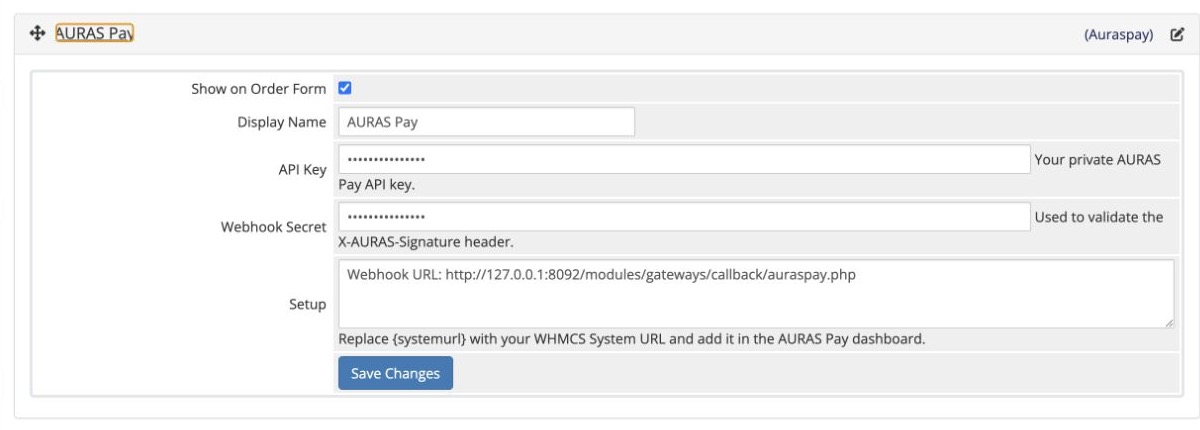
  • Simple configuration from Configuration > Apps & Integrations > Payments > Payment Gateways.
  • No recurring module subscription; payments are processed through the merchant's own AURAS Pay account.

How it works

  1. The administrator uploads the module files and activates AURAS Pay in WHMCS.
  2. The administrator enters the AURAS Pay API key and webhook secret.
  3. A client opens an unpaid WHMCS invoice and chooses AURAS Pay.
  4. The client selects a cryptocurrency and compatible blockchain network.
  5. WHMCS creates the payment through the AURAS Pay API and redirects the client to the hosted checkout.
  6. AURAS Pay sends a signed webhook after payment.
  7. The module verifies the webhook and payment details before adding the WHMCS transaction and marking the invoice paid.

Requirements

  • WHMCS 8.x
  • PHP 7.4 or later with cURL and JSON extensions
  • HTTPS-enabled WHMCS installation
  • AURAS Pay merchant account, API key, and webhook secret
  • Publicly accessible callback URL

Installation

  1. Extract the package into the root directory of your WHMCS installation. The files will be placed under modules/gateways/.

  2. In WHMCS Admin, open Configuration > Apps & Integrations > Payments > Payment Gateways.

  3. Activate AURAS Pay.

  4. Enter the API key and webhook secret from your AURAS Pay account, then save.

  5. Add this callback URL in the AURAS Pay dashboard:

    https://YOUR-WHMCS-DOMAIN/modules/gateways/callback/auraspay.php

  6. Open an unpaid client invoice and select AURAS Pay to test the checkout.

FAQ

Does the module mark an invoice paid when the customer returns from checkout?

No. The browser return is not treated as proof of payment. The invoice is marked paid only after a signed webhook is received and the payment is verified again through the AURAS Pay API.

Where do customer payments go?

Payments are processed through the merchant's own AURAS Pay account.

Can the customer choose the cryptocurrency and network?

Yes. The invoice payment form shows supported cryptocurrencies and only the compatible networks for the selected asset.

Does the module prevent duplicate transactions?

Yes. WHMCS transaction checks and the AURAS Pay external payment ID are used to prevent the same completed payment from being recorded twice.

What happens if the webhook is delivered more than once?

Repeated webhook deliveries are handled idempotently. An already recorded payment is acknowledged without adding another WHMCS transaction.

Is a public HTTPS URL required?

Yes. AURAS Pay must be able to reach the WHMCS callback URL securely to deliver payment notifications.

Support

For module support, contact [email protected].


There are no reviews yet!

Be the first to review AURAS Pay Crypto Payment Gateway.

Version Compatibility


Compatible with WHMCS v9.0

Full Version Compatibility


  • All versions of WHMCS v9.0
  • All versions of WHMCS v8.13

Support for this product

The best place to start if you need help with a specific product is to contact the developer. All WHMCS Marketplace developers have both a website and support URL listed.


Developed By AURAS Pay

Changelog

v1.0.0 Released July 20th, 2026

Latest Version


  • Initial release
  • Hosted AURAS Pay checkout integration
  • Cryptocurrency and network selector
  • Signed webhook handling and server-side verification
  • Duplicate transaction protection


See also

WHMCS Bitcoin Payments

Accept Bitcoin payments on your website

Free
Accept Bitcoin and cryptocurrency payments - CoinGate for WHMCS

Easily accept Bitcoin, Tether, Ethereum and many other crypto payments on your WHMCS website
Free
Coinbase Commerce

No Fees, Easy Setup. Accept cryptocurrencies like: Bitcoin, Bitcoin Cash, Ethereum and Litecoin!

Free
PayTR Virtual Pos iFrame API

Open your web site to shopping with the advantages of PayTR. Take your payments securely.

Free
Gateway Fees for WHMCS

With this WHMCS module, you'll get the payment gateway fees from your clients directly.

Free