cPanel Username Changer For WHMCS

cPanel Username Changer For WHMCS

Developed By TIVRO

Compatible with WHMCS v9.0

cPanel Username Changer for WHMCS

cPanel Username Changer for WHMCS gives your clients a secure, controlled way to request a cPanel username change directly from the WHMCS client area. Instead of handling every request manually through WHM, clients can choose a new username, verify their request by email, and track its progress — while your team retains complete control through configurable limits, approval workflows, fees, cooldowns, and audit logging.

The addon communicates directly with WHM to validate username availability before execution and automatically synchronises the new username back to WHMCS after a successful rename.

Built for hosting providers who want to reduce manual support work while keeping cPanel account renames secure, controlled, and fully auditable.

Username Change Flow

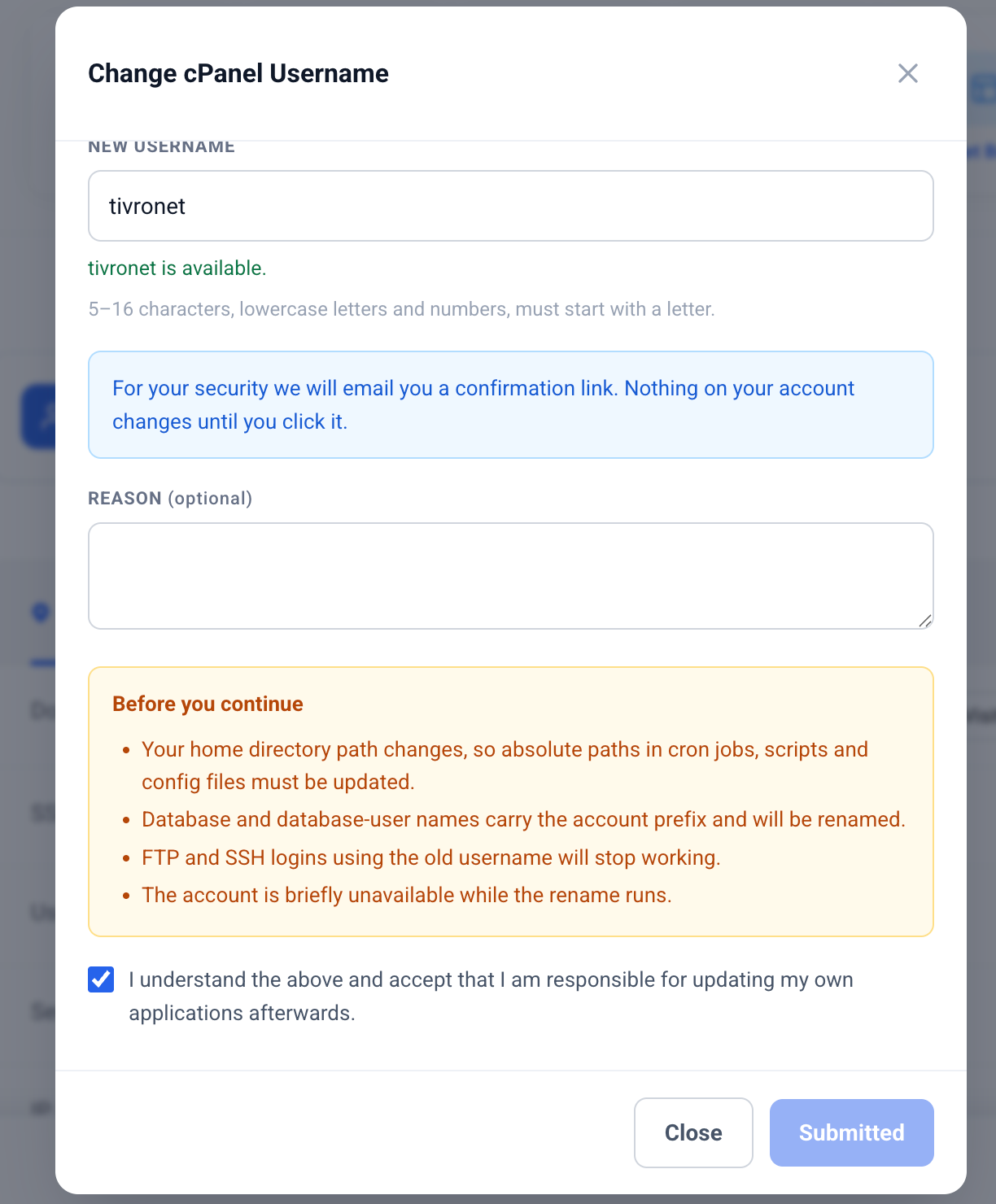
  • Secure username request — clients request a new username directly from their service page
  • Live availability checking — username availability is checked as the client types
  • Alternative suggestions — suggested usernames are shown when the requested name is unavailable
  • Impact acknowledgement — clients must confirm they understand the effects of changing their username
  • Email confirmation — every client request must be confirmed through a secure email link
  • Request tracking — clients can view the status and history of their requests
  • Request cancellation — clients can cancel their own pending requests before execution

Client Area

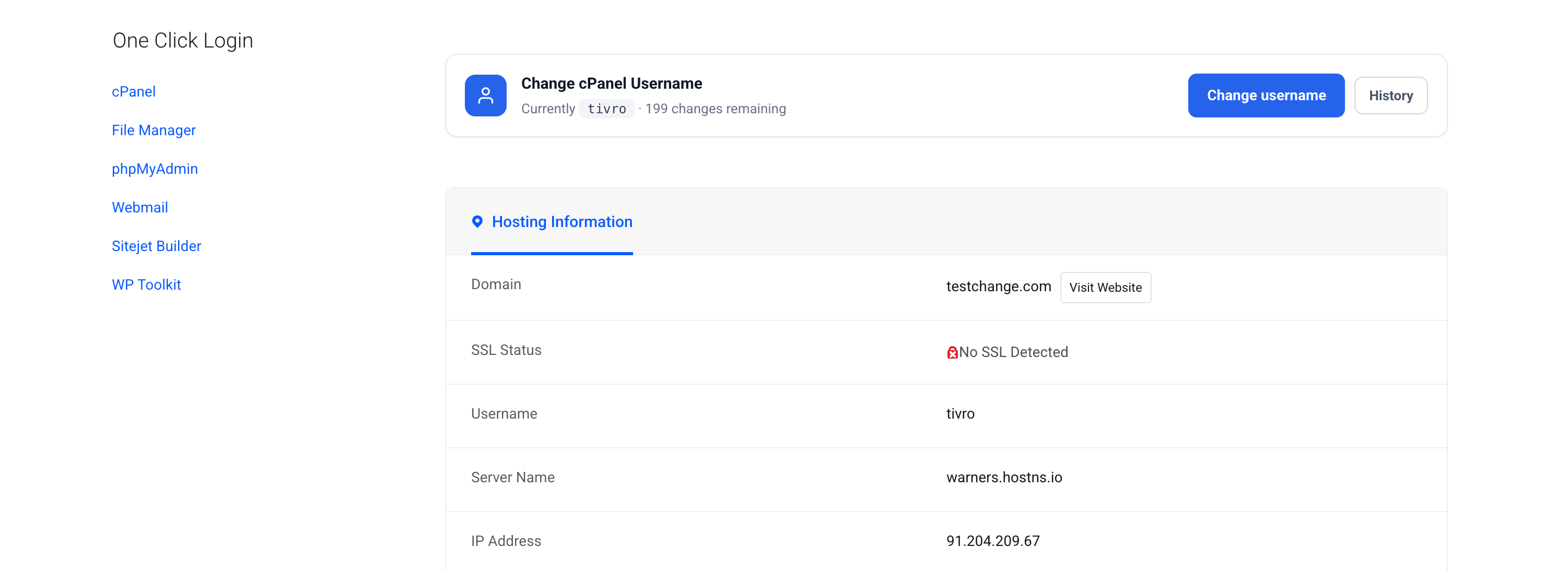
  • Compact service banner — integrated directly into the existing WHMCS service page
  • Premium modal interface — no additional client-area menu item or separate page required
  • Mobile responsive — automatically adapts to a mobile-friendly bottom sheet
  • Theme independent — self-contained styling works across WHMCS client themes without template modifications
  • Live validation — invalid characters and unsupported usernames are rejected while typing
  • Optional reason field — collect a reason for the requested change when required
  • Change history — clients can view previous username change requests and their statuses

Email Confirmation

  • Secure confirmation link — confirmation is required before approval or invoicing
  • Single-use tokens — each confirmation token can only be used once
  • Hashed token storage — confirmation tokens are stored securely as hashes
  • Configurable expiry — confirmation links can expire from 1 hour up to 30 days
  • Automatic expiration — unconfirmed requests are automatically retired through cron
  • Client resend option — clients can request another confirmation email with rate limiting
  • Session independent — confirmation links work without requiring the client to be logged in
  • Standalone confirmation page — confirmation results work independently of the active WHMCS theme

Username Validation

  • Configurable length limits — define minimum and maximum username lengths within cPanel's 16-character limit
  • cPanel-compatible format — lowercase letters and numbers with configurable leading-character rules
  • Reserved username protection — prevent the use of system and administrator usernames
  • Custom reserved words — maintain your own configurable reserved username list
  • WHMCS-wide checking — checks usernames against other services across your WHMCS installation
  • WHM validation — verifies availability directly against the cPanel/WHM server
  • Pre-execution validation — availability is checked again immediately before the rename
  • Invalid input protection — unsupported characters are blocked as the client types

Policy & Limits

  • Disabled by default — enable the feature only for the products you choose
  • Global configuration — define default availability, limits, fees and cooldown periods
  • Per-product overrides — customise settings for individual products
  • Per-client overrides — waive restrictions, grant additional changes, or block specific clients
  • Change allowance — configure the total number of changes allowed per service
  • Unlimited option — allow unlimited username changes where required
  • Cooldown period — prevent repeated username changes within a configurable period
  • Service status control — choose which WHMCS service statuses can request changes
  • cPanel-only availability — the feature is only available for compatible cPanel/WHM services

Approval & Fees

  • Optional admin approval — require staff approval before execution
  • Optional service fee — charge clients for username changes
  • Client currency support — invoices are generated using the client's configured currency
  • Configurable taxation — apply the appropriate WHMCS tax configuration
  • Automatic payment handling — release the rename when the invoice is paid
  • Admin payment bypass — staff can waive payment and execute a request immediately
  • Decline with reason — admins can decline requests and provide an explanation to the client
  • Admin-initiated changes — staff changes bypass confirmation, approval, fees, limits and cooldowns

WHM & Execution

  • WHM API integration — performs account renames directly through WHM API 1
  • Secure API communication — uses the API credentials already configured for the WHMCS server
  • Immediate or queued execution — run changes immediately or process them through cron
  • Execution locking — request records are claimed before execution to prevent duplicate renames
  • Runtime verification — account existence and username validity are checked immediately before execution
  • Multi-server support — each service is resolved against its assigned WHMCS server
  • External change detection — handles usernames changed outside the addon between request and execution
  • Configurable retries — failed operations can be retried directly from the admin area

WHMCS Synchronisation

  • Automatic username sync — updates the WHMCS service record after a successful server rename
  • Fallback synchronisation — direct fallback is available if the standard update fails
  • Mismatch detection — server-to-WHMCS inconsistencies are detected and recorded
  • Admin alerts — staff are notified when the server rename succeeds but WHMCS synchronisation fails
  • Completion notification — clients receive confirmation once the username has successfully changed

Admin Panel

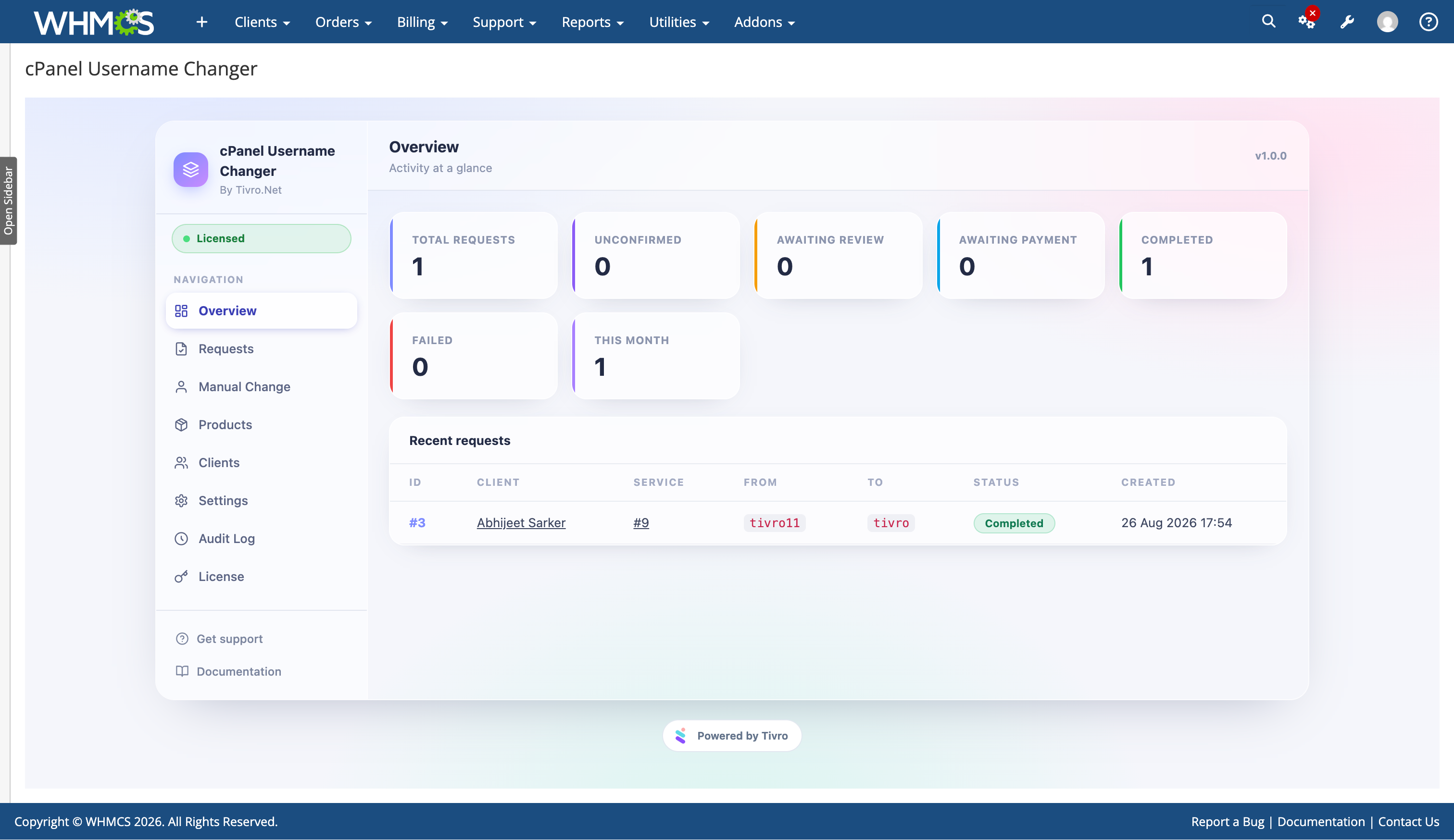
  • Request dashboard — view request counts by status and recent activity
  • Request queue — search and filter requests by status
  • Inline management — approve, decline, resend and retry directly from the queue
  • Detailed request view — client, service, product, server, IP address, timestamps, reason and errors
  • Manual username change tool — rename an account directly using the service ID
  • Product policies — configure username change settings per product
  • Client overrides — manage individual client restrictions and allowances
  • Audit log — searchable history of username change activity
  • Pending request badge — quickly identify outstanding requests from the module navigation
  • Service page integration — current username and management shortcut available from the WHMCS admin service page

Notifications & Emails

  • Confirmation email — sent before the request can proceed
  • Submission email — confirms the request has been submitted
  • Approval email — informs the client when their request is approved
  • Decline email — explains when and why a request has been declined
  • Completion email — confirms the new username and highlights required client-side updates
  • Failure email — informs the client when execution fails
  • Staff notifications — alerts admins about new requests, failures and synchronisation issues
  • WHMCS email verification — delivery is verified through the client's WHMCS email history
  • Automatic email templates — templates are created during installation and repaired if removed
  • Fully editable — all email templates remain editable through WHMCS

Security & Audit

  • CSRF protection — protected client and administrative actions
  • Rate limiting — prevents abuse of client-facing endpoints and email resend functionality
  • Service ownership verification — clients can only request changes for services they own
  • Complete event history — every request maintains a detailed event trail
  • Actor tracking — records whether actions were performed by the client, admin or system
  • IP logging — request activity includes the originating IP address
  • Error tracking — failed operations retain the server error and execution details
  • Single-use confirmation — confirmation links cannot be replayed after use

Developer Integration

  • TivroUsernameChanged hook — trigger your own integrations after a successful username change
  • Full event trail — useful for custom reporting, automation and troubleshooting
  • Multi-server aware — integrates with existing WHMCS server assignments
  • No template modifications — client-area integration works without editing WHMCS templates

Operations

  • Automatic database migrations — database structure is installed and upgraded automatically
  • WHMCS cron support — queued requests, expired confirmations and retry processing can run through cron
  • Simple installation — upload the module files and complete the installation process
  • Configurable audit retention — control how long audit records are retained
  • Brand customisation — configure the module heading and accent colour to match your brand

Compatibility

  • WHMCS: 8.x / 9.x
  • PHP: 8.1+
  • ionCube Loader: Required
  • cPanel / WHM: Required
  • WHM API 1: Required
  • WHMCS Cron: Required for scheduled processing
  • Valid Tivro License: Required


There are no reviews yet!

Be the first to review cPanel Username Changer For WHMCS.

Version Compatibility


Compatible with WHMCS v9.0

Full Version Compatibility


  • Selected versions of WHMCS v9.0
        9.0.0 - 9.0.8
  • All versions of WHMCS v8.13
  • All versions of WHMCS v8.12
  • All versions of WHMCS v8.11
  • Selected versions of WHMCS v8.10
        8.10.0
  • Selected versions of WHMCS v8.9
        8.9.0
  • Selected versions of WHMCS v8.8
        8.8.0
  • All versions of WHMCS v8.7
  • All versions of WHMCS v8.6
  • All versions of WHMCS v8.5
  • All versions of WHMCS v8.4
  • All versions of WHMCS v8.3
  • All versions of WHMCS v8.2
  • All versions of WHMCS v8.1
  • All versions of WHMCS v8.0

System Requirements


  • PHP v8.1+
  • Ioncube Loader v15+

* Requirements listed are in addition to the WHMCS default system requirements.

Support for this product

The best place to start if you need help with a specific product is to contact the developer. All WHMCS Marketplace developers have both a website and support URL listed.

Developed By TIVRO

Changelog

vv1.0.0 Released August 26th, 2026

Latest Version


v1.0.0 - released 26 AUG 2026


See also

FREE ResellerClub Tools v2

Working comfortably with ResellerClub's products and services through your WHMCS system requires additional tools.

Free
SEO Manager

The module developed to add meta description and meta keywords and change the page title

Free
WHOIS for Clients

WHOIS for Clients

Free
Dropbox Backup for WHMCS

This module will integrate WHMCS with Dropbox to upload a copy of WHMCS database onto the cloud. You will never have to worry about losing data any more.


Free
Software Licensing Addon

Build, License & Distribute Your Own Apps using WHMCS

Commercial