Let your Swiss customers pay WHMCS invoices with the Swiss QR-bill: scan, confirm, done.
Swiss QR Invoice adds the Swiss QR-bill (QR-Rechnung / QR-facture / QR-fattura) as a payment method in WHMCS. Every unpaid invoice gets:
Your customers scan the code with their banking app, or copy the details into e-banking. You receive a normal bank transfer, with no card fees and no payment provider in between.
The QR-bill is the standard payment slip in Switzerland and Liechtenstein: it has replaced the old red and orange payment slips (BV/ESR). Many Swiss businesses and private customers prefer paying invoices this way.
WHMCS has no built-in support for it. Swiss QR Invoice adds it as a regular payment gateway:
All three QR-bill types, selectable in the gateway settings:
RF…) for automatic reconciliation, also for payments from abroad.Configurable reference. The reference is built from the invoice number or the invoice ID, with an optional prefix, for example the customer ID required by your bank. Check digits are calculated automatically.
Payment message with the invoice number. For example "JetHosting 2026-0142". The prefix can be changed, and the message appears in every bill type.
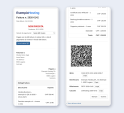
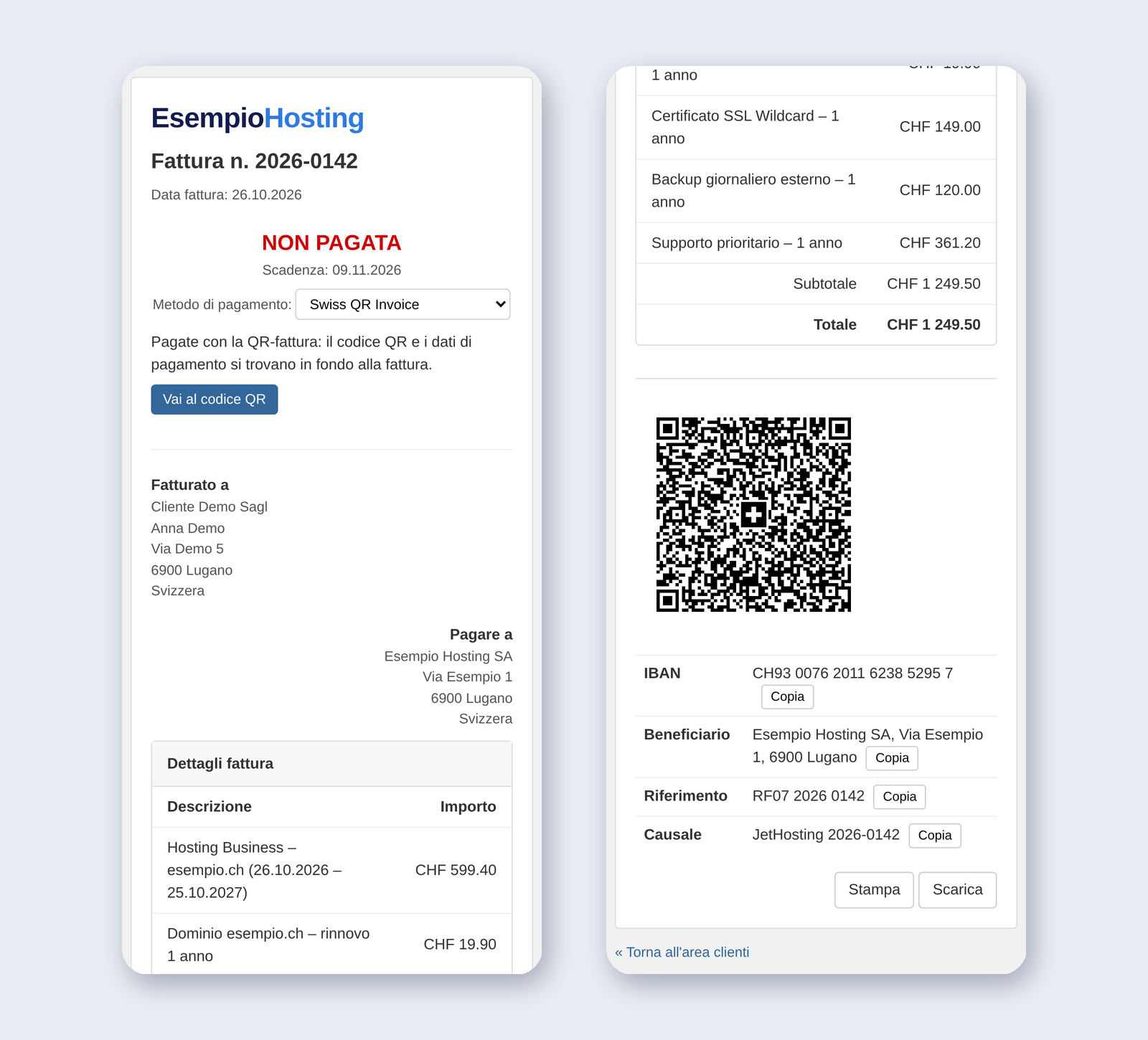
Online invoice. The client area invoice shows the QR code and the payment details (IBAN, payee, reference, message), each with a Copy button. You can place this block at the bottom of the invoice or in the payment section. The browser Print button prints the QR code at its real size (46 × 46 mm).
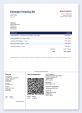
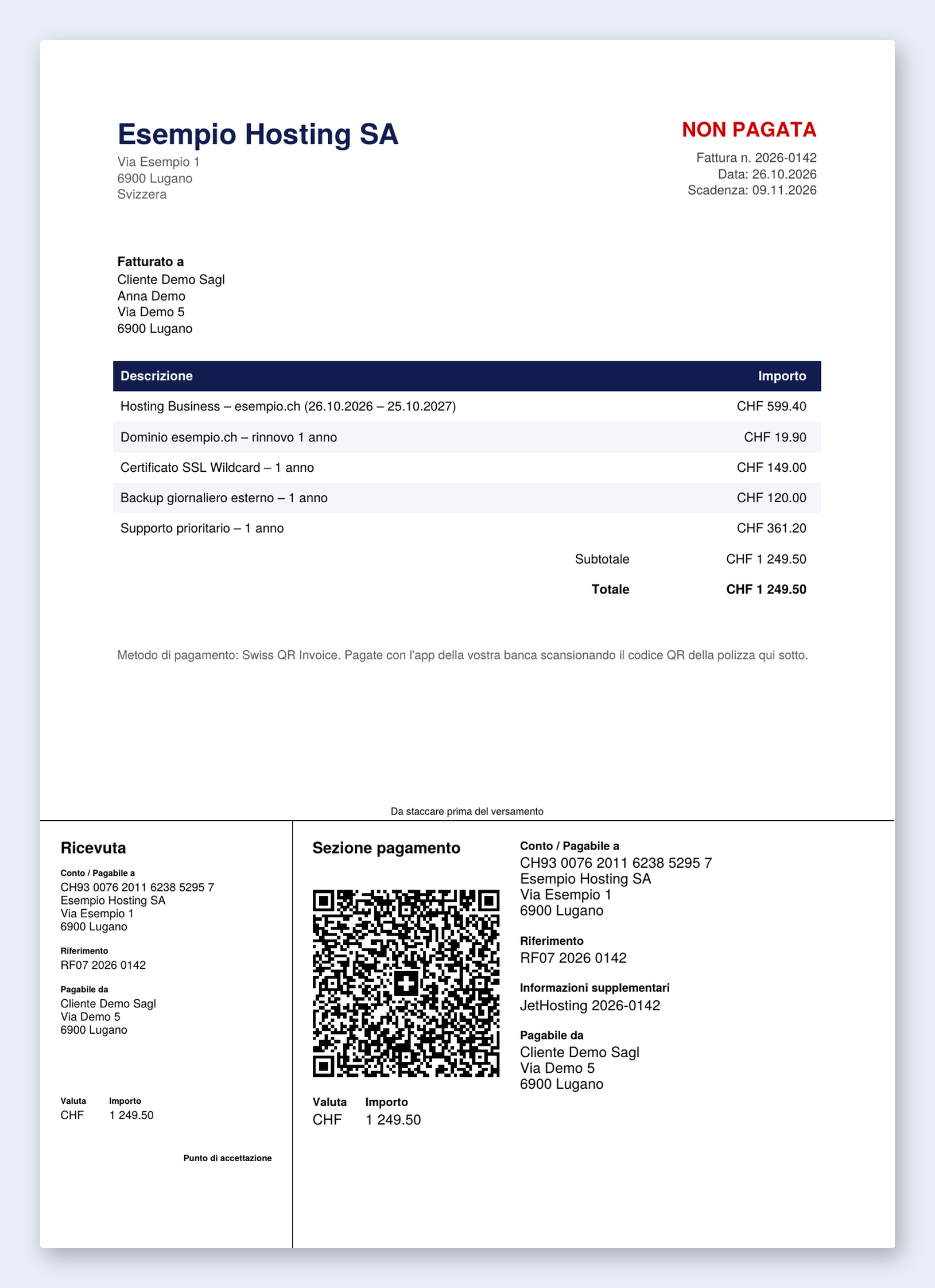
PDF invoice with payment part. The full payment part with receipt (210 × 105 mm) goes on the invoice PDF:
It is also attached to the invoice emails.
Payer details. The customer's name and address are filled in from the client profile, with street and house number split automatically for structured addresses. You can switch this off to leave a blank field with corner marks instead.
Four languages. The payment part labels and client-area texts are available in Italian, German, French and English, chosen automatically from the client's language or set to a fixed language.
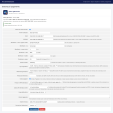
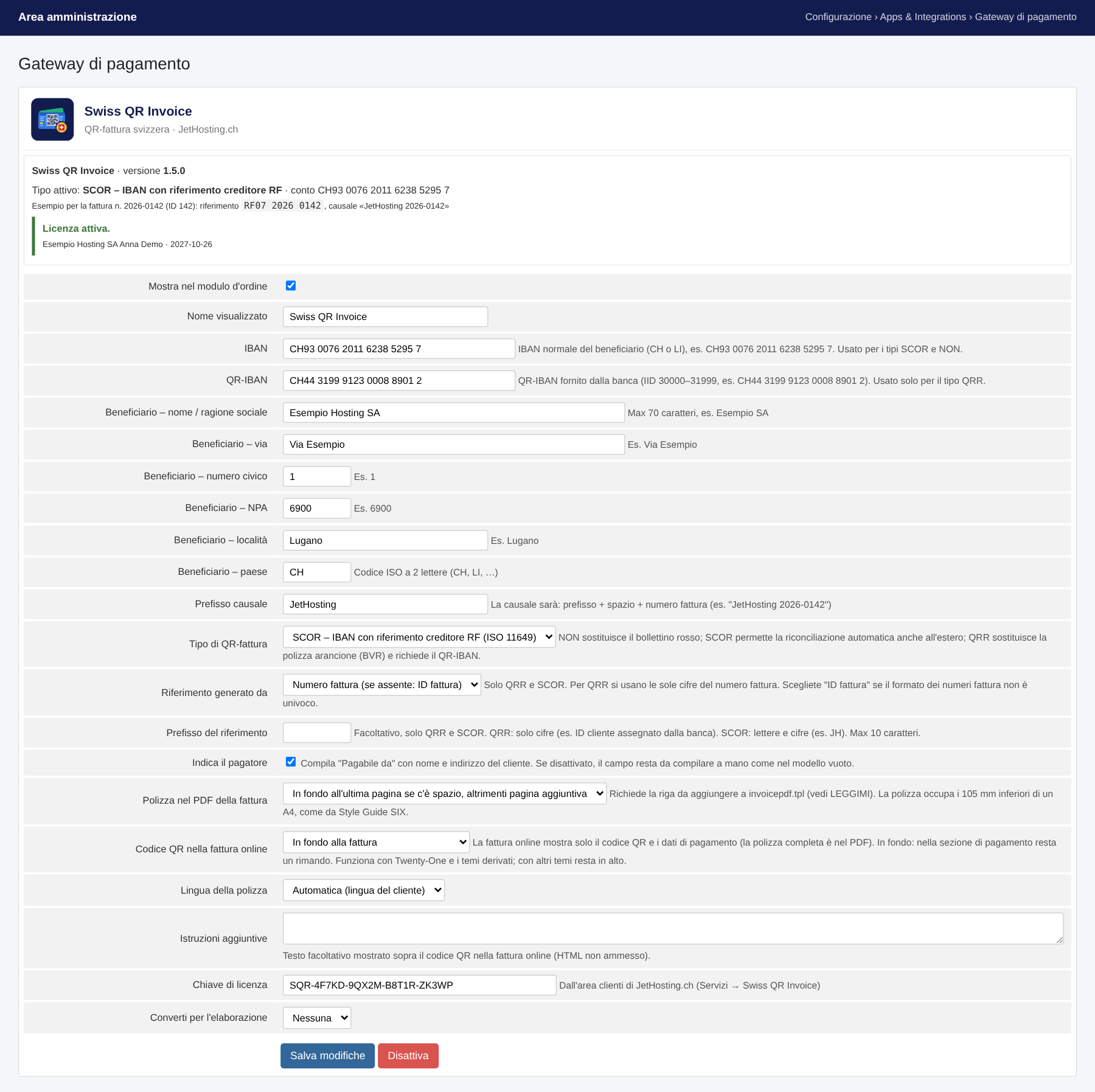
Built-in configuration check. The gateway settings page shows:
Standards-based. It follows the Swiss Implementation Guidelines QR-bill v2.3 (data version 0200, structured addresses) and the SIX style guide for the layout.
No external dependencies. The QR code encoder and the payment part layout are part of the module. Nothing is sent to third parties to create the QR code.
Apps & Integrations. The module ships with WHMCS metadata and a logo, so it appears under Apps & Integrations → Payments.
modules/gateways/swissqrinvoice.php). Settings are stored and encrypted by WHMCS like any other gateway.viewinvoice.tpl. With other themes the QR code stays in the payment section.invoicepdf.tpl, preferably in a child theme. Without it, the PDF invoice stays unchanged.includes/hooks/ keeps the gateway out of checkout and the payment method menus while the license is not valid.A Swiss QR Invoice license from JetHosting.ch is required.
modules and includes folders to your WHMCS root folder.invoicepdf.tpl, so the payment part is printed on the PDF invoices.Are payments recorded in WHMCS automatically? No. The QR-bill is a bank transfer, so WHMCS gets no automatic confirmation. Record the payment when it reaches your account, manually or with a bank statement import. The payment message and, with SCOR/QRR, the reference make it easy to match the payment to the invoice.
Which bill type should I choose?
You can switch at any time from the gateway settings.
Do I need to change my theme?
No, not for the online invoice with Twenty-One or a theme based on it. For the PDF, add one short snippet to invoicepdf.tpl; the included guide shows exactly where.
Can customers outside Switzerland pay? Yes. Anyone with a bank account can pay by transfer using the IBAN and the payment message. The scan function, however, is typical of Swiss and Liechtenstein banking apps. The payee account itself must be Swiss or from Liechtenstein.
What about invoices in other currencies? The QR-bill standard only allows CHF and EUR. For invoices in other currencies the gateway shows a notice instead of the QR code.
Does the printed payment part meet the SIX requirements? The layout follows the SIX style guide, with sizes, fonts and positions as specified. Before using it in production, check a sample PDF with your bank or with the official SIX QR-bill validator. When printing, always use 100 % scale, not "fit to page".
Is any data sent to third parties? No data is sent to create the QR code. The only external connection is the license check with the JetHosting.ch license server. It sends the license key, domain, installation folder and module version, never invoice or customer data.
How do I uninstall it?
Deactivate the gateway in WHMCS, delete modules/gateways/swissqrinvoice.php, the modules/gateways/swissqrinvoice/ folder and includes/hooks/swissqrinvoice.php, and remove the snippet from invoicepdf.tpl if you added it.
I clienti svizzeri pagano le fatture WHMCS con la QR-fattura: scansione, conferma, fatto.
Swiss QR Invoice aggiunge a WHMCS la QR-fattura svizzera (QR-Rechnung / QR-facture / QR-bill) come metodo di pagamento. Ogni fattura non pagata riceve:
Il cliente scansiona il codice con l'app della sua banca, oppure copia i dati nell'e-banking. Voi ricevete un normale bonifico, senza commissioni sulle carte e senza intermediari.
La QR-fattura è la polizza di versamento standard in Svizzera e nel Liechtenstein: ha sostituito i vecchi bollettini rossi e arancioni (BV/PVR). Molte aziende e privati svizzeri preferiscono pagare le fatture così.
WHMCS non la supporta in modo nativo. Swiss QR Invoice la aggiunge come un normale gateway di pagamento:
Tutti e tre i tipi di QR-fattura, selezionabili nelle impostazioni del gateway:
RF…) per la riconciliazione automatica, anche per pagamenti dall'estero.Riferimento configurabile. Il riferimento è generato dal numero fattura o dall'ID fattura, con un prefisso facoltativo, ad esempio l'ID cliente richiesto dalla banca. Le cifre di controllo sono calcolate automaticamente.
Causale con il numero di fattura. Ad esempio "JetHosting 2026-0142". Il prefisso è modificabile e la causale compare in tutti i tipi.
Fattura online. Nell'area clienti la fattura mostra il codice QR e i dati di pagamento (IBAN, beneficiario, riferimento, causale), ciascuno con il pulsante Copia. Il blocco può stare in fondo alla fattura o nella sezione di pagamento. Il pulsante Stampa del browser stampa il QR a misura reale (46 × 46 mm).
PDF della fattura con la polizza. La sezione pagamento completa con ricevuta (210 × 105 mm) va nel PDF della fattura:
Arriva quindi anche con le email delle fatture.
Dati del pagatore. Nome e indirizzo del cliente vengono presi dal profilo, con via e numero civico separati automaticamente per gli indirizzi strutturati. Disattivando l'opzione resta un campo vuoto con gli angoli.
Quattro lingue. Le diciture della polizza e i testi dell'area clienti sono in italiano, tedesco, francese e inglese, scelti automaticamente in base alla lingua del cliente o impostati su una lingua fissa.
Controllo della configurazione integrato. La pagina del gateway mostra:
Conforme agli standard. Segue le Swiss Implementation Guidelines QR-bill v2.3 (versione dati 0200, indirizzi strutturati) e lo Style Guide SIX per l'impaginazione.
Nessuna dipendenza esterna. Il generatore del codice QR e l'impaginazione della polizza fanno parte del modulo. Per creare il QR non viene inviato nulla a terzi.
Apps & Integrations. Il modulo include i metadati WHMCS e un logo, quindi compare in Apps & Integrations → Payments.
modules/gateways/swissqrinvoice.php). Le impostazioni sono salvate e cifrate da WHMCS come per ogni altro gateway.viewinvoice.tpl. Con altri temi il codice QR resta nella sezione di pagamento.invoicepdf.tpl un breve snippet documentato, meglio in un tema figlio. Senza di esso il PDF della fattura resta invariato.includes/hooks/ toglie il gateway dal checkout e dai menu dei metodi di pagamento finché la licenza non è valida.Serve una licenza Swiss QR Invoice di JetHosting.ch.
modules e includes nella cartella principale di WHMCS.invoicepdf.tpl lo snippet della guida inclusa, per stampare la polizza nei PDF delle fatture.I pagamenti vengono registrati automaticamente in WHMCS? No. La QR-fattura è un bonifico, quindi WHMCS non riceve una conferma automatica. Il pagamento va registrato quando arriva sul conto, a mano o con un import degli estratti bancari. La causale e, con SCOR/QRR, il riferimento rendono immediato collegare il pagamento alla fattura.
Quale tipo di QR-fattura scegliere?
Potete cambiare tipo in qualsiasi momento dalle impostazioni del gateway.
Devo modificare il tema?
No, per la fattura online con Twenty-One o un tema derivato. Per il PDF basta aggiungere un breve snippet a invoicepdf.tpl; la guida inclusa indica esattamente dove.
Possono pagare anche clienti fuori dalla Svizzera? Sì. Chiunque abbia un conto bancario può pagare con un bonifico usando IBAN e causale. La scansione del QR è però tipica delle app bancarie svizzere e del Liechtenstein. Il conto del beneficiario deve essere svizzero o del Liechtenstein.
E le fatture in altre valute? Lo standard QR-fattura ammette solo CHF ed EUR. Per le fatture in altre valute il gateway mostra un avviso al posto del codice QR.
La polizza stampata rispetta i requisiti SIX? L'impaginazione segue lo Style Guide SIX, con misure, font e posizioni come previsto. Prima dell'uso in produzione verificate un PDF di prova con la vostra banca o con il validatore ufficiale SIX. In stampa usate sempre la scala al 100 %, non "adatta alla pagina".
Vengono inviati dati a terzi? Per creare il QR non viene inviato nessun dato. L'unica connessione esterna è la verifica della licenza presso il server licenze di JetHosting.ch. Invia chiave di licenza, dominio, cartella di installazione e versione del modulo, mai dati di fatture o clienti.
Come si disinstalla?
Disattivate il gateway in WHMCS, eliminate modules/gateways/swissqrinvoice.php, la cartella modules/gateways/swissqrinvoice/ e includes/hooks/swissqrinvoice.php, e togliete lo snippet da invoicepdf.tpl se l'avevate aggiunto.
Be the first to review Swiss QR Invoice.
The best place to start if you need help with a specific product is to contact the developer. All WHMCS Marketplace developers have both a website and support URL listed.

Easily accept Bitcoin, Tether, Ethereum and many other crypto payments on your WHMCS website

No Fees, Easy Setup. Accept cryptocurrencies like: Bitcoin, Bitcoin Cash, Ethereum and Litecoin!

Open your web site to shopping with the advantages of PayTR. Take your payments securely.
With this WHMCS module, you'll get the payment gateway fees from your clients directly.