WHMCS Maintenance

WHMCS Maintenance

Developed By JetHosting.ch

Compatible with WHMCS v9.1

Replace the plain WHMCS maintenance page with one that matches your brand.

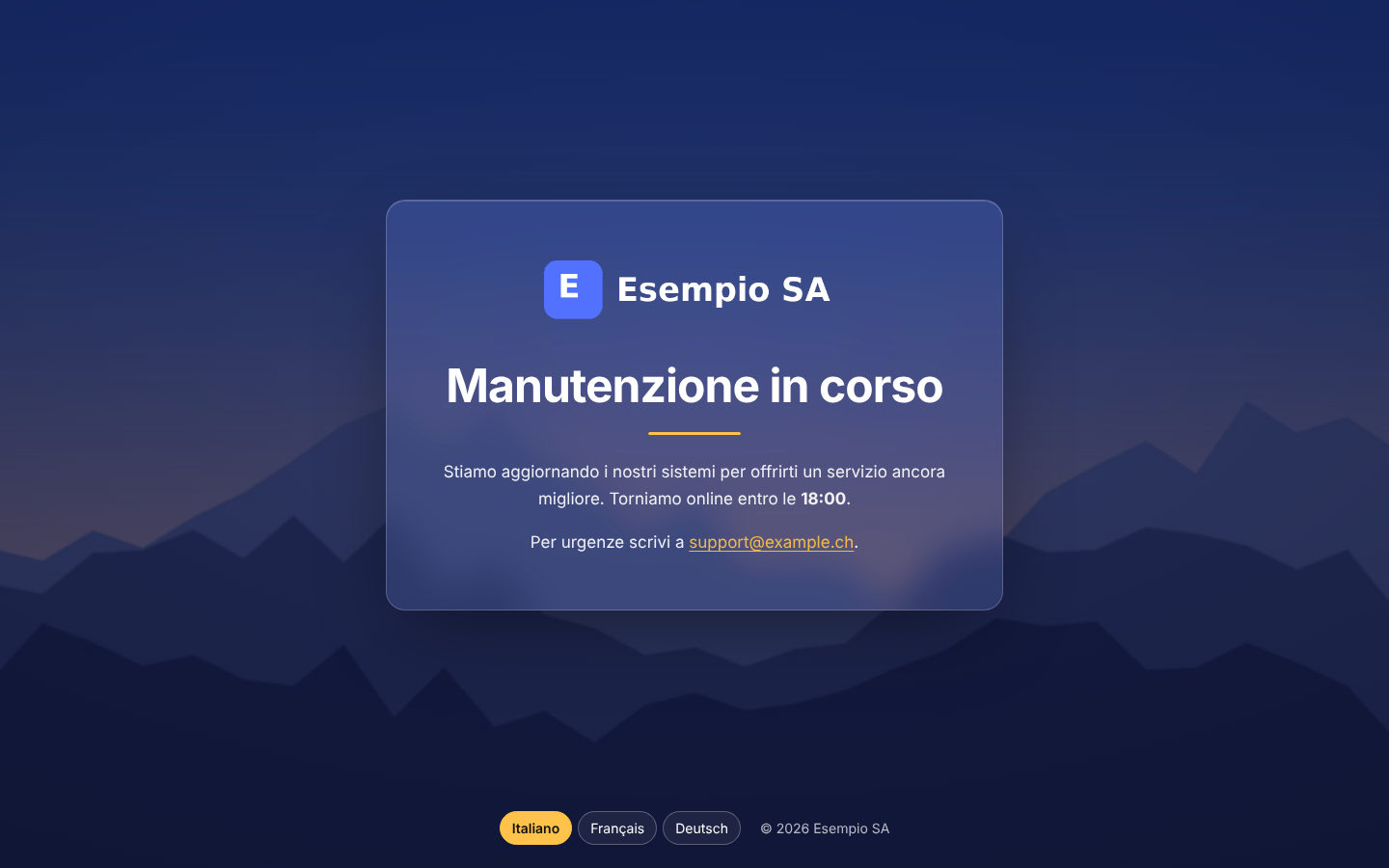
JetHosting Maintenance is a WHMCS addon that replaces the standard maintenance mode page with a full-screen page in your own style: a background image, your logo and a formatted message, in your clients' language if you want.

Some examples:

  • a photo of your data center behind a frosted-glass card with your logo and "Back at 18:00";
  • a message with a link to your status page and a support email address;
  • the same notice in Italian, German, French and English, with a language switcher at the bottom of the page.

Why use it?

The built-in WHMCS maintenance page shows one line of plain text. During planned work, it is the first thing your clients see. JetHosting Maintenance gives that moment a professional look and lets you say more: when you will be back, what is changing and where to get help. It works with the maintenance mode switch you already use and does not modify core files or templates.

Key features

  • Background image. Upload a JPG, PNG, WebP or GIF, or enter an image URL. Choose the focal point that stays visible on narrow screens. A colored overlay with adjustable opacity keeps the text readable on any photo.
  • Your logo, or the WHMCS one. Upload a logo or enter its URL. Leave the field empty and the module uses the logo already set in WHMCS. With no logo at all, it shows your company name.
  • Rich text with HTML. Write the title and the message with paragraphs, bold, links, lists, headings and images. A small toolbar inserts the most common tags. Scripts, iframes, forms and event handlers are removed automatically, so the page stays safe for every visitor.
  • Optional multilingual texts. Write one message per client area language. Visitors see the text in their language, picked from their choice, their WHMCS session, their client account or their browser. Languages you leave empty use the main text. An optional switcher lets visitors change language.
  • Styles to choose from. Frosted glass, solid or no text box. Text color and accent color for links, the animated progress line and the active language.
  • Search-engine friendly. The page returns HTTP 503 with a Retry-After header and noindex, so search engines know the outage is temporary and do not index the page.
  • Admin preview. Check the result in the Preview tab before switching maintenance mode on. Only logged-in administrators can open the preview.
  • Works on every screen. The layout adapts to phones and large monitors. Animations are turned off for visitors who prefer reduced motion.
  • No external resources. System fonts and inline styles: no CDN, no tracking, no requests to third-party servers.
  • Never without a page. If the license is not valid, visitors still see a clean page with the standard WHMCS maintenance message.

Integration with WHMCS

The module uses only official WHMCS features:

  • the WHMCS maintenance mode and its redirect URL setting;
  • addon module settings and admin page;
  • the admin home page hook for license notices.

When you enable the custom page, the module sets its own page as the maintenance redirect URL. It saves the previous value and restores it when you disable the page or the addon. It does not modify core files or templates.

Requirements

  • WHMCS 8.x or 9.x
  • PHP 7.4 to 8.4 with OpenSSL and DOM (cURL recommended)
  • ionCube Loader 15
  • A writable modules/addons/jhmaintenance/uploads/ folder for uploaded images
  • Outbound HTTPS from WHMCS to the license server
  • A valid JetHosting license

Installation

  1. Upload the modules folder into your WHMCS root folder.
  2. Go to System Settings → Addon Modules, activate JetHosting Maintenance, click Configure and choose the administrator roles with access.
  3. Open Addons → JetHosting Maintenance → Settings, enter your license key, tick Use the custom page and save.
  4. Set up the background, logo and texts, then check them in Preview.
  5. Switch maintenance mode on as usual in System Settings → General Settings → General.

To upgrade, upload the new version over the old one.

FAQ

Do I still turn maintenance mode on in WHMCS? Yes. The module only changes what visitors see. You switch maintenance mode on and off exactly as before.

Can administrators keep working during maintenance? Yes. As with the standard page, logged-in administrators keep using WHMCS normally.

What if I already use a custom maintenance redirect URL? The module saves it when you enable the custom page and puts it back when you disable the page or the addon.

Which HTML can I use? Formatting tags such as paragraphs, bold, italic, links, lists, headings, tables and images. Scripts, style blocks, iframes, forms and javascript links are removed when you save, so you see right away what will be published.

Do I have to translate the message into every language? No. Multilingual texts are optional. When they are on, any language you leave empty uses the main text.

Can I upload an SVG logo? Uploads accept JPG, PNG, WebP and GIF, because SVG files can contain scripts. You can still use an SVG logo by entering its URL.

What happens without a valid license? Maintenance mode keeps working: visitors see a clean page with the standard WHMCS message, without the module's background and texts. Your settings are kept, and the custom page comes back automatically once the license is valid.

How do I uninstall it? Deactivate the addon: the previous maintenance redirect URL is restored. Settings, texts and images are kept for a later reactivation. To remove them completely, drop the mod_jhmaintenance_settings and mod_jhmaintenance_texts tables and delete the module folder.


There are no reviews yet!

Be the first to review WHMCS Maintenance .

Version Compatibility


Compatible with WHMCS v9.1

Full Version Compatibility


  • Selected versions of WHMCS v9.1
        9.1.0
  • All versions of WHMCS v9.0
  • All versions of WHMCS v8.13

Support for this product

The best place to start if you need help with a specific product is to contact the developer. All WHMCS Marketplace developers have both a website and support URL listed.

Developed By JetHosting.ch

Changelog

v1.0.0 Released October 27th, 2026

Latest Version


1.0.0: initial build


See also

Email Template for Lagom WHMCS Client Theme

Modern and fully responsive WHMCS email template, containing 3 different styles.
Commercial
LowEndHost - Free Theme

#1 Free WHMCS Web Hosting Theme

Free
Lara, WHMCS Admin Theme

Lara is a WHMCS Admin theme, using the open source AdminLTE package.

Commercial
Lagom WHMCS Client Theme

Fully responsive WHMCS client area theme offering the choice of different styles and layouts for the ultimate user experience.

Commercial
Blend Admin Theme Dark Mode

This file adds dark mode to the Blend admin theme

Free