Notice Board Manager

Notice Board Manager

Developed By AQAIT.COM

Compatible with WHMCS v9.1

Professional Announcement & Custom Notice Management Module for WHMCS

  • Information | Details
  • Developer | AQAIT.COM
  • Module Type | WHMCS Addon Module
  • Target WHMCS Version | WHMCS v9.0.6+
  • Target PHP Version | PHP 8.2 |
  • Category | Administration / Client Area Customization

Full Overview

Keep your WHMCS clients instantly informed with AQAIT Notice Board Manager a flexible and feature-rich announcement and notification management addon developed by AQAIT.COM

Whether you need to communicate critical maintenance schedules, server updates, emergency interruptions, promotional domain and hosting offers, or general news, AQAIT Notice Board Manager provides a centralized control panel to broadcast messages across your WHMCS Client Area without modifying theme files.

The addon combines multiple notification sources into a single management interface. Administrators can display active WHMCS system announcements, highlight Knowledgebase updates, or create fully customized notices with complete control over visibility, scheduling, colors, call-to-action buttons, and positioning.

With two display styles (Standard Sliding Bar and News Marquee Bar), independent top and footer placement, automatic rotation, navigation controls, and mobile-responsive layouts, your clients can stay informed across different devices.

Key Features

Multiple Notice Sources

  • Custom Notices: Create unlimited custom notifications tailored to your business.
  • WHMCS Announcements Integration:** Automatically retrieve and display published system announcements.
  • Knowledgebase Updates:Highlight important Knowledgebase articles directly in the notice bar.
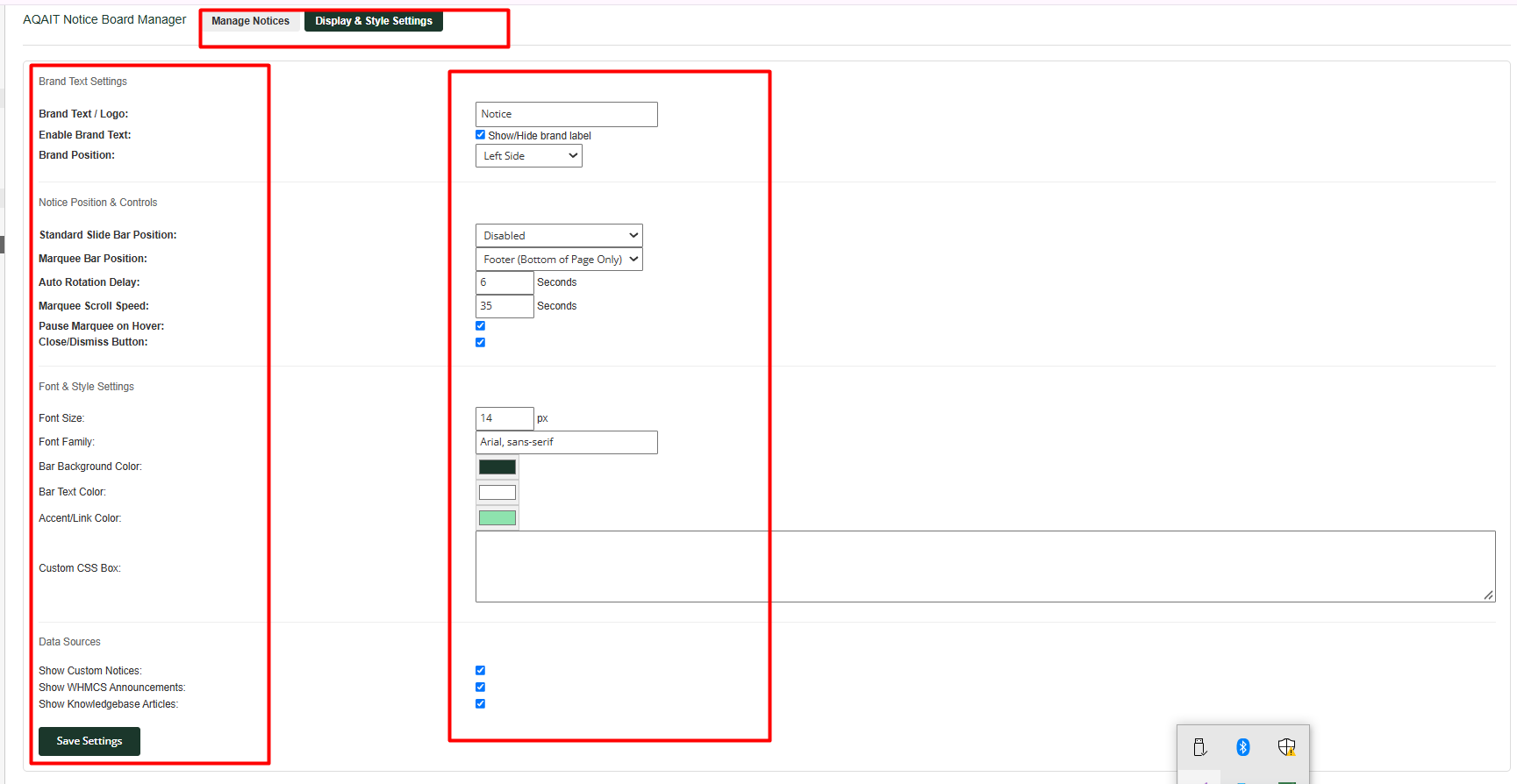
  • Granular Source Controls: Enable or disable individual notification sources independently.

Advanced Custom Notice Management

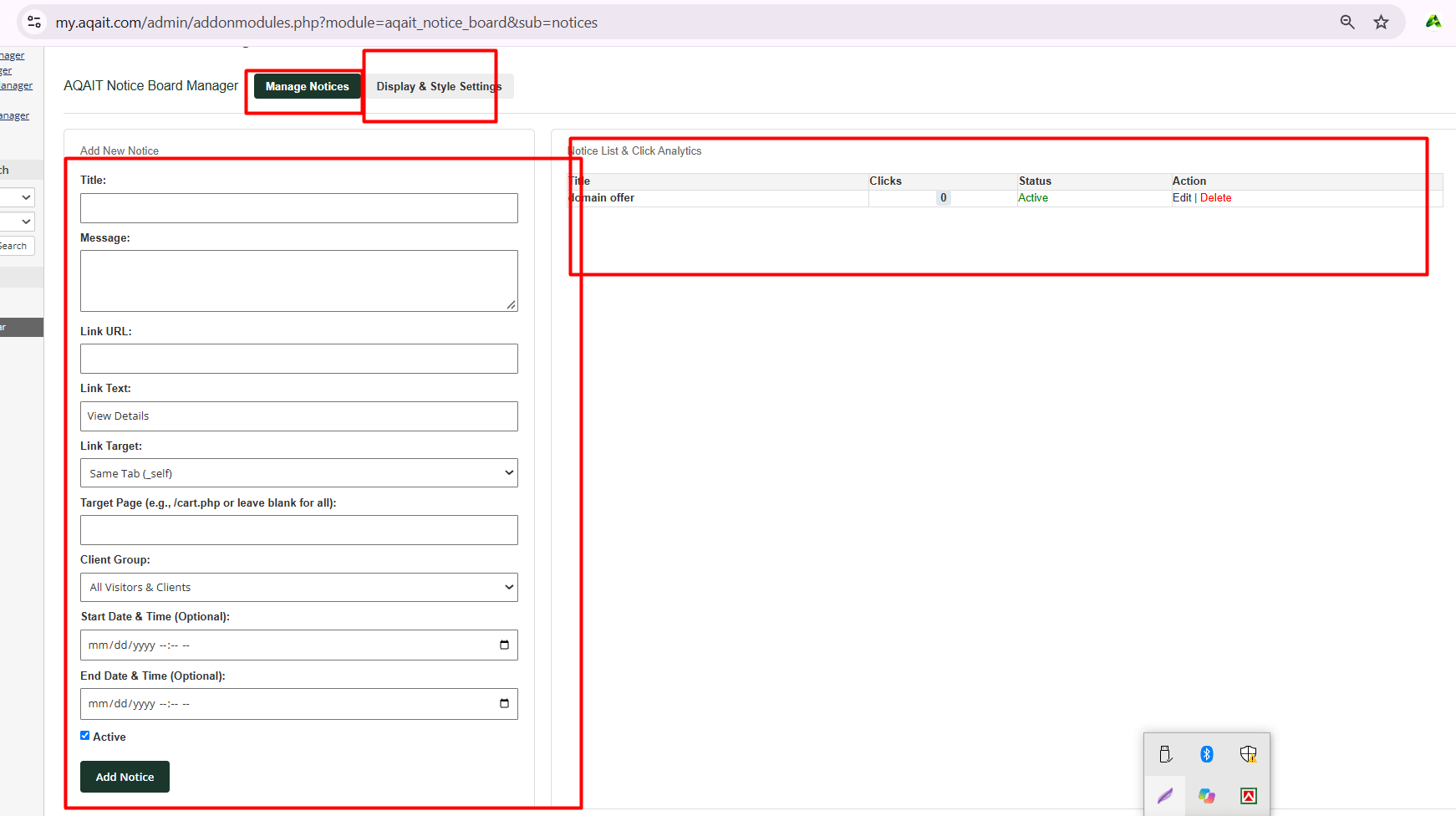
  • Create, edit, and delete custom notices effortlessly.
  • Set custom titles, detailed messages, and priority sort orders.
  • Add actionable Call-to-Action (CTA) buttons with custom text and destination URLs.
  • Configure links to open in the same tab (_self) or a new tab (_blank).
  • Enable or disable individual notices whenever needed.

Flexible Display Positions & Layouts with Two Display Styles

  • Standard Sliding Bar: Displays centered notices with automatic rotation, Previous/Next navigation, and item counter indicators.
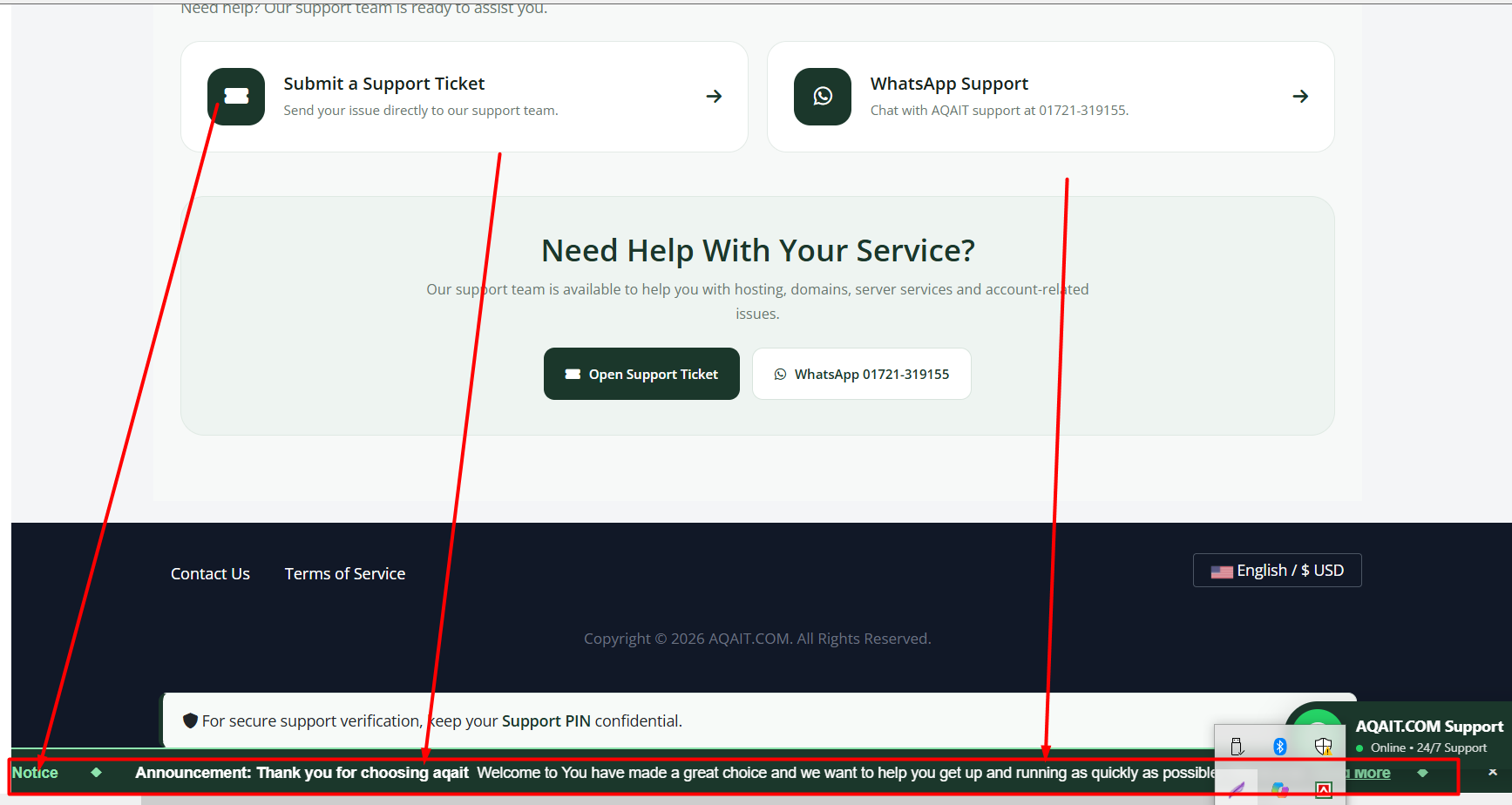
  • News Marquee Bar:Provides classic newspaper-style scrolling announcements from right to left, with pause-on-hover functionality.

Independent Display Positions:

  • Top Only (above the header)
  • Footer Only (sticky at the bottom)
  • Both (top and footer simultaneously)
  • Disabled

> Brand Text Customization:

  • Configure an editable brand label or text (e.g., AQAIT.COM).
  • Choose its position: Left, Right, or Top.

Notice Types & Visual Styles

Choose from four distinct notification types:

  • Info: General information and announcements.
  • Success: Successful updates and positive messages.
  • Warning: Important alerts and service notifications.
  • Urgent / Danger: Critical notices and emergency alerts.

Color-coded visual styles help clients quickly recognize the importance of each message.

Scheduled Notices & Targeted Display

  • Configure precise Start Date/Time and End Date/Time.
  • Automatically publish and expire notices according to their schedules.
  • Display notices on specific pages or URLs (e.g., /cart.php, domain search, or client dashboard).
  • Broadcast notices to all visitors or restrict visibility to logged-in clients.

Ideal for limited-time promotions, domain sales, scheduled maintenance, and holiday announcements.

Dynamic Appearance & Customization

  • Live Color Pickers: Customize bar background, text, and accent/link colors.
  • Typography Controls: Configure font size (in pixels) and font family (e.g., Arial, sans-serif).
  • Custom CSS: Add custom CSS declarations directly from the administration interface without modifying core theme files.
  • Responsive Design:Optimized for desktop, tablet, and mobile devices.

Engagement & Client Controls

  • Built-in click counter and analytics to track client engagement and CTA button clicks.
  • User-controlled Close/Dismiss option allows clients to hide notice bars during their session.

Data Preservation & Backward Compatibility

  • Includes a migration routine to support upgrades from earlier releases.
  • Preserves existing notice data and settings during supported module updates.
  • Designed to maintain existing database records during schema migrations.

Technical Requirements

  • An active WHMCS installation.
  • Targeted for WHMCS v9.0.6 and compatible versions.
  • PHP 8.2 environment.
  • WHMCS Capsule ORM database access.
  • Administrator permissions to upload files and manage WHMCS Addon Modules.

Installation Guide

Follow these steps to install AQAIT Notice Board Manager:

Step 1: Upload Module Files

Download and extract the AQAIT Notice Board Manager package.

Upload the aqait_notice_board directory to:

WHMCS_ROOT/modules/addons/aqait_notice_board/

Step 2: Upload Hook File

Upload the hook file aqait_notice_board.php to:

WHMCS_ROOT/includes/hooks/aqait_notice_board.php

Step 3: Activate the Module

  1. Log in to your WHMCS Admin Area.
  2. Navigate to System Settings → Addon Modules
  3. Locate AQAIT Notice Board Manager
  4. Click Activate
  5. Configure Administrator Role Access Permissions.

Step 4: Configure Your Notices

Navigate to:

Addons → AQAIT Notice Board Manager

Configure your notification sources, display positions, colors, and notice settings. Then publish your first notice!

Upgrade Instructions

Important: Always create a full backup of your WHMCS database and file system before performing any upgrade.

  1. Download and extract the latest module package.
  2. Replace the existing module files in /modules/addons/aqait_notice_board/.
  3. Replace the hook file in /includes/hooks/.
  4. Log in to your WHMCS Admin Area.
  5. Navigate to the AQAIT Notice Board Manager addon page.
  6. Allow the automatic migration routine to execute.
  7. Verify that your existing notices and settings are preserved.

The migration routine is designed to update the required database structure while retaining existing notice data.

Developer & Technical Support

  • Developed by AQAIT.COM
  • Website: https://aqait.com
  • Client Portal: https://my.aqait.com
  • Support Email: [email protected]

For technical support, custom feature requests, or installation assistance, contact the AQAIT.COM Support Team

AQAIT.COM — Professional Hosting Solutions & Reliable Support.


There are no reviews yet!

Be the first to review Notice Board Manager.

Version Compatibility


Compatible with WHMCS v9.1

Full Version Compatibility


  • All versions of WHMCS v9.1
  • All versions of WHMCS v9.0
  • All versions of WHMCS v8.13
  • All versions of WHMCS v8.12
  • All versions of WHMCS v8.11
  • Selected versions of WHMCS v8.10
        8.10.0
  • Selected versions of WHMCS v8.9
        8.9.0
  • Selected versions of WHMCS v8.8
        8.8.0
  • All versions of WHMCS v8.7
  • All versions of WHMCS v8.6
  • All versions of WHMCS v8.5
  • All versions of WHMCS v8.4

System Requirements


  • System Requirements - WHMCS: WHMCS 9.0.6 (target version) - **PHP:** PHP 8.2 (target version) - **Database:** MySQL or MariaDB supported by your WHMCS installation. - **WHMCS Permissions:** Administrator access to install and activate addon modul

* Requirements listed are in addition to the WHMCS default system requirements.

Support for this product

The best place to start if you need help with a specific product is to contact the developer. All WHMCS Marketplace developers have both a website and support URL listed.

Developed By AQAIT.COM

Changelog

vManager-v1.4.1 Released November 3rd, 2026

Latest Version


Version 1.2.0 – November 2026

New Features

  • Restored full Custom Notice Management functionality.
  • Added Custom Notice Create, Edit, and Delete options.
  • Added Live Preview for notice appearance.
  • Added flexible Top, Bottom, and Both display positions.
  • Added configurable notice colors and visual styles.
  • Added scheduled notices with start and expiry dates.
  • Added automatic notice rotation and interval settings.
  • Added Previous and Next notice navigation.
  • Added configurable action buttons with custom URLs.

Improvements

  • Improved WHMCS Announcements integration.
  • Improved Knowledgebase notice display controls.
  • Enhanced admin settings and notice management interface.
  • Improved responsive design for desktop and mobile devices.
  • Improved client area notice display and dismissal controls.

Database & Upgrade

  • Added migration support for supported v1.1.0 data.
  • Improved existing notice and settings preservation.
  • Retained legacy database tables during migration.

Compatibility

  • Developed for WHMCS 9.0.6.
  • PHP 8.2 compatibility target.


See also

FREE ResellerClub Tools v2

Working comfortably with ResellerClub's products and services through your WHMCS system requires additional tools.

Free
SEO Manager

The module developed to add meta description and meta keywords and change the page title

Free
WHOIS for Clients

WHOIS for Clients

Free
Dropbox Backup for WHMCS

This module will integrate WHMCS with Dropbox to upload a copy of WHMCS database onto the cloud. You will never have to worry about losing data any more.


Free
Software Licensing Addon

Build, License & Distribute Your Own Apps using WHMCS

Commercial