Payment Gateway Fees For WHMCS

Payment Gateway Fees For WHMCS

Developed By HostPie

Compatible with WHMCS v8.3

How does it work?

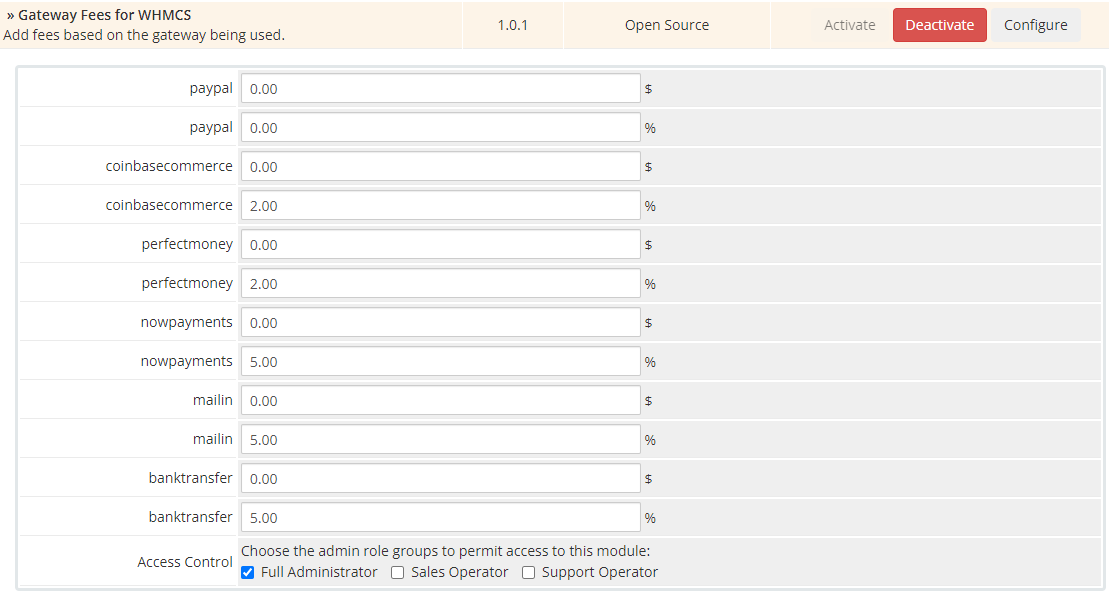
Log into your WHMCS admin panel to active the WHMCS addon. Then go to Addons and active the module and set up the amount you would like to charge from your clients.

To use the module follow the steps below:

  1. Log into your hosting control panel
  2. Go to File Manager and switch to WHMCS directory
  3. Upload The File And Unzip
  4. Now log in to your WHMCS admin panel
  5. Go to Setup > Add-on Modules and enable it
  6. Now you need to set the values for the fees


There are no reviews yet!

Be the first to review Payment Gateway Fees For WHMCS.

Version Compatibility


Compatible with WHMCS v8.3

Full Version Compatibility


  • Selected versions of WHMCS v8.3
        8.3.0
  • All versions of WHMCS v8.2
  • All versions of WHMCS v8.1
  • All versions of WHMCS v8.0
  • All versions of WHMCS v7.10
  • All versions of WHMCS v7.9
  • All versions of WHMCS v7.8
  • All versions of WHMCS v7.7
  • All versions of WHMCS v7.6
  • All versions of WHMCS v7.5

Support for this product

The best place to start if you need help with a specific product is to contact the developer. All WHMCS Marketplace developers have both a website and support URL listed.

Developed By HostPie

Changelog

v1.0.0 Released August 9th, 2021

Latest Version


= 1.0.0 =

  • Initial release of the addon.


See also

w2x for Xero

Synchronise your invoices, Contacts, Products and Payments with Xero

Commercial
Services Fee

Transfer the fees to your client

Commercial
QuickBooks Online For WHMCS

Integrate your financial data stored in WHMCS into QuickBooks Online.

Commercial
KashFlow Accounting

Automatically transfer your billing & transaction history to KashFlow

Free
Zero Invoice Management

Avoid sending notifications or creation of 0€ Invoices

Free