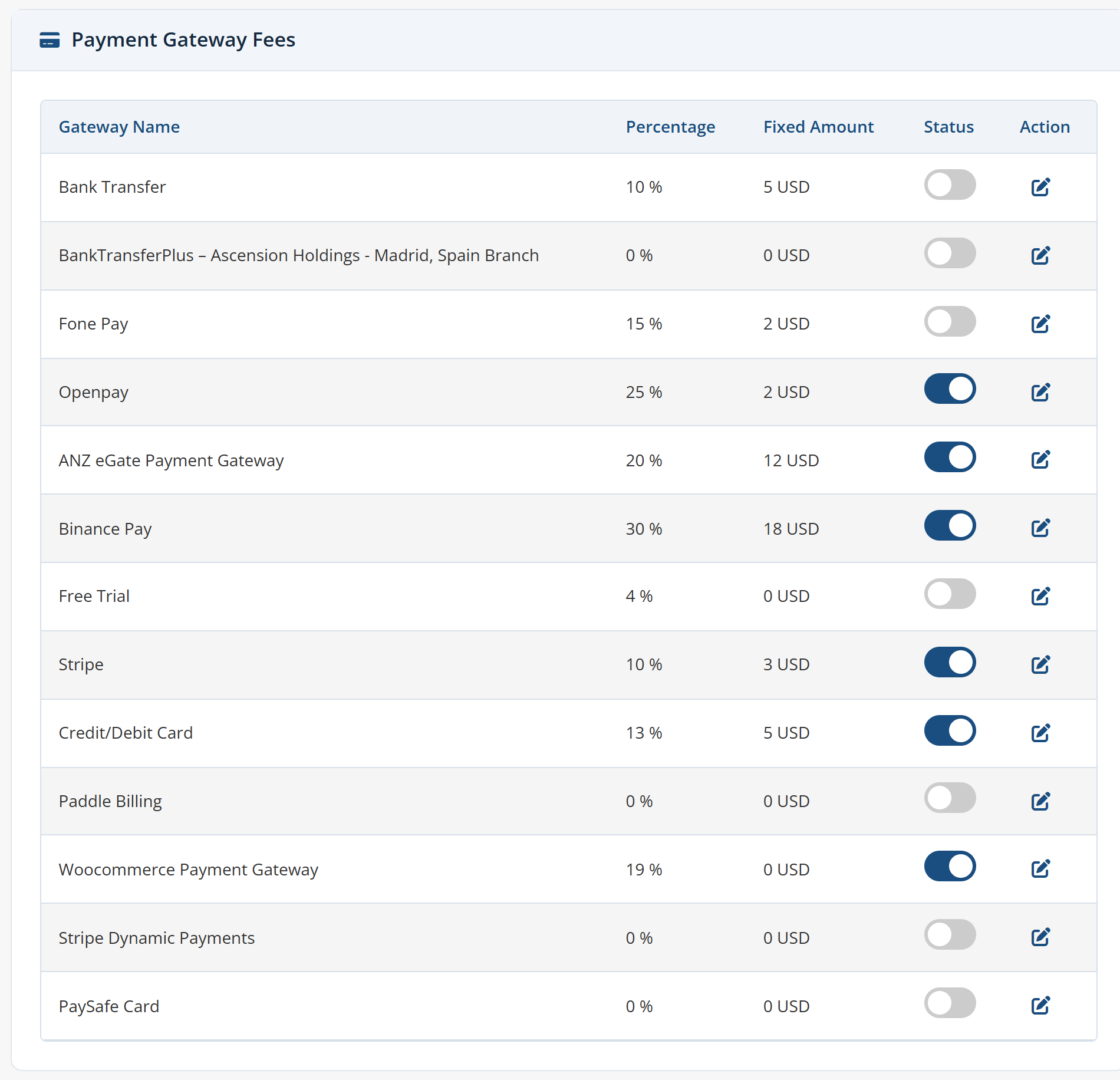
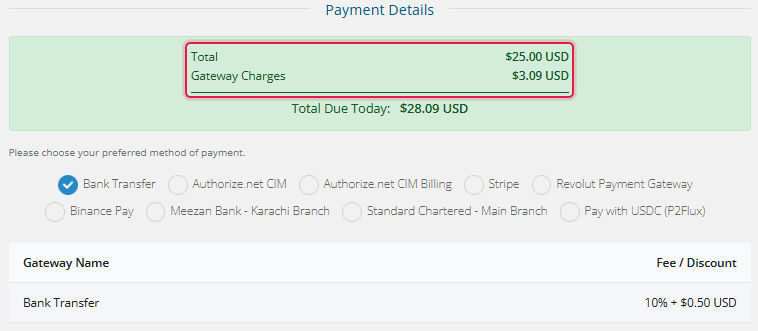
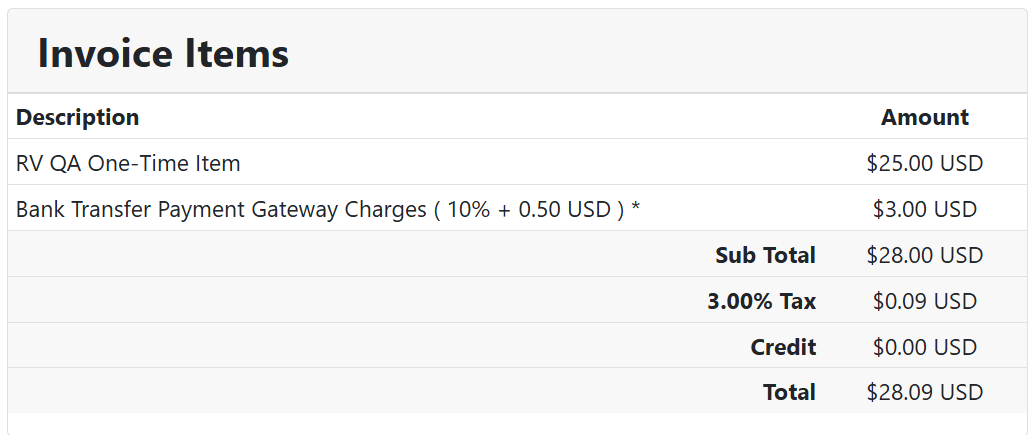
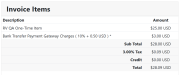
Payment Gateway Fees and Charges automatically adds payment gateway fees, payment gateway charges, a payment gateway surcharge, a payment gateway commission or a payment gateway discount to your client invoices, based on the payment method the client chooses. Set a percentage fee, a fixed fee, or both, for every gateway activated in WHMCS. The module recalculates the invoice the moment the gateway is switched, shows the client the exact payment method fees before checkout completes, and keeps the subtotal, tax and total correct throughout.
Call the number whatever your accounting calls it. Payment fees, payment charges, a payment surcharge, a payment commission, payment costs you are passing on, a payment gateway markup on the order, payment gateway costs recovered at checkout, or simply payment gateway fees and charges shown as one line on the invoice.
Configure payment-gateway fees, payment-gateway charges, a payment-gateway surcharge, a payment-gateway commission or a payment-gateway discount for each gateway independently. The same controls cover payment-method fees, payment-method charges and any payment-method surcharge, so payment method charges, a payment method surcharge, a payment method commission and a payment method discount can all differ from one gateway to the next.
Use it to recover what your provider actually deducts: payment processing fees, payment processing charges, a payment processing surcharge, transaction charges, transaction costs, a transaction surcharge, merchant fees, merchant charges, processor fees, processor charges and card processing fees. Or invert it — enter a negative value and the same engine applies a payment discount, a payment incentive, a gateway based discount that steers clients toward cheaper methods, or cash discount pricing for markets where surcharging is restricted.
Test all features with our 5-Day Free Access!
Admin Features:
Client Area Features:
Per-Gateway Settings:
Global Settings:
Charges Applied Across Every Gateway Type:
The module reads your activated gateways from WHMCS and adds its charge as an invoice line item. It does not connect to, authenticate against, or call any payment provider's API. The Stripe Calculations option is a fee calculation formula, not a Stripe integration; where WHMCS Stripe Intents is in use, the module adjusts the pending checkout amount to match the recalculated total.
Invoice And Order Flows Handled:
Supported Order Form Templates:
This is a native WHMCS addon. It controls WHMCS payment fees and WHMCS payment charges from one dashboard, so WHMCS transaction fees and WHMCS processing fees are recovered consistently: WHMCS invoice fees on renewals, WHMCS checkout fees on new orders, and a WHMCS payment surcharge or WHMCS gateway commission on whichever gateways you choose. WHMCS payment gateway fees and WHMCS gateway fees behave identically on manual and cron-generated invoices.
Administrators arrive here looking for different things — a WHMCS fees module, a WHMCS charges module, a WHMCS surcharge module or a WHMCS commission module; gateway fees for WHMCS, payment fees for WHMCS, a fees module for WHMCS or a surcharge module for WHMCS — and every one of those describes this addon. It is also compared with payment gateway fees and allocator tools, written elsewhere as payment gateway fees & allocator or payment gateway fees allocator; this module concentrates on charging and discounting at the point of payment rather than allocating amounts afterwards.
General Info:
Available Pricing Models:
The best place to start if you need help with a specific product is to contact the developer. All WHMCS Marketplace developers have both a website and support URL listed.
Update (10-04-2026)
Enhanced the handling of inclusive taxation.
Sidebar auto-collapses when the module is accessed from the WHMCS admin area.
Changed the design of the entire module. Added a feature to add an amount or percentage at the same time. Added a feature to include an additional tax option on the fees.
Version 1.1 (Initial Release)


Easily accept Bitcoin, Tether, Ethereum and many other crypto payments on your WHMCS website

No Fees, Easy Setup. Accept cryptocurrencies like: Bitcoin, Bitcoin Cash, Ethereum and Litecoin!

Open your web site to shopping with the advantages of PayTR. Take your payments securely.

With this WHMCS module, you'll get the payment gateway fees from your clients directly.



Plame Nick @plame1451
Great module and the support team is very helpful and fast. Highly recommended.
Roger Drew @roger5106
This module does exactly what I needed add fees for certain payment gateways. No more manual adjustments. Invoices update automatically and everything just works. Solid module, happy with it
Denilson @denilson4577
This module is super easy for managing fees and discounts for different payment gateways in WHMCS. The recent updates in the module are fantastic they’ve added great features that make it even more powerful and user-friendly. Really impressed.
Smith david @smith3210
Great addon! Now we can easily apply custom payment fees for each gateway. Works smoothly with WHMCS and makes billing much more accurate
Mathew Byte @mathew1077
I have been using the module, and it works seamlessly. The updated version is excellent, with new features that are incredibly useful. Considering the price, it is highly affordable and offers great value. I highly recommend it!
Luis Contreras @luis9391
The product works, but the support is very bad, they do not respond, the application has some details and no response is received, I have 48 hours waiting for a response
hello, I was able to receive the correct support, all the problems have been corrected and it works very well now.
I have upgraded to 5 stars because it is very easy to use.
Provonic Support @whmpress
Hi Luis,
Owner@ProvonicWe sincerely apologize for any inconvenience you may have faced.
Upon reviewing your concern, we found that our team responded to your ticket #whmp-866248 within the same day. You can verify this by checking the ticket history in your client portal. Please let us know if you had any trouble receiving our response.
Thanks
Joe liner @joe4900
This module is easy to use and has helped me exclude the price for the service across other payment methods. Highly recommended.
Syed Muaaz Ahmad @syed2020
WHMPress's WHMCS Payment Gateway Charges module has been a game-changer for us. It allows us to set up and manage payment gateway fees seamlessly, ensuring a transparent and smooth experience for our customers. The module is easy to configure, works flawlessly, and has made our payment processing more efficient and accurate. Highly recommended this plugin!
Ammar @ammar4384
This module has been a great addition to our system and it has been running smoothly since day one. We especially appreciate how easy it is to navigate and how it has streamlined our processes.Overall, it’s been a positive experience,
Diego @diego6350
I've been using their modules for a while and am extremely satisfied with all of them. This module, in particular, works flawlessly. It's easy to set up, highly reliable and integrates seamlessly with the system. The features are well thought out, and it delivers exactly what it promises. I highly recommend it to anyone looking for a solid solution.
chris @chris7294
I've have been using this module this is very beneficial for me and doing my work done properly.
Eren @eren7589
This module operates efficiently saving my money by preventing unnecessary deductions. I'm highly satisfied with its performance.
khubaib @khubaib6438
It works perfectly and significantly helps in transferring the payment gateway costs to our clients.
Muhammad Haseeb @muhammad7191
This module is very beneficial and I am thankful to have it. Additionally, it is extremely useful and highly recommended.
sajid iqbal @sajid2388
This tool is a lifesaver! Every percentage counts with large volumes, and this payment gateway module boosts my financial security and rewards. I've also bought and set it up for my another instance
Alis @alis1570
The module is super useful because even though I'm selling domains without making any money (with no profit) to compete in the market when a client pays through PayPal, it costs me around $ or more per transaction. But with this module, I can add extra charges to the invoice when a client wants to pay through PayPal. Plus, I've made back the cost of the module in just 2 days! I'd totally recommend it to everyone.