Email Marketer Extended

Email Marketer Extended

Developed By Provonic

Compatible with WHMCS v9.1
Spooktacular Halloween Sale!
Get 20% OFF and enjoy frighteningly good deals! Use code HALLOWEEN20 at checkout before this spooky offer disappears!

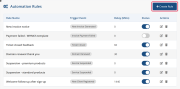
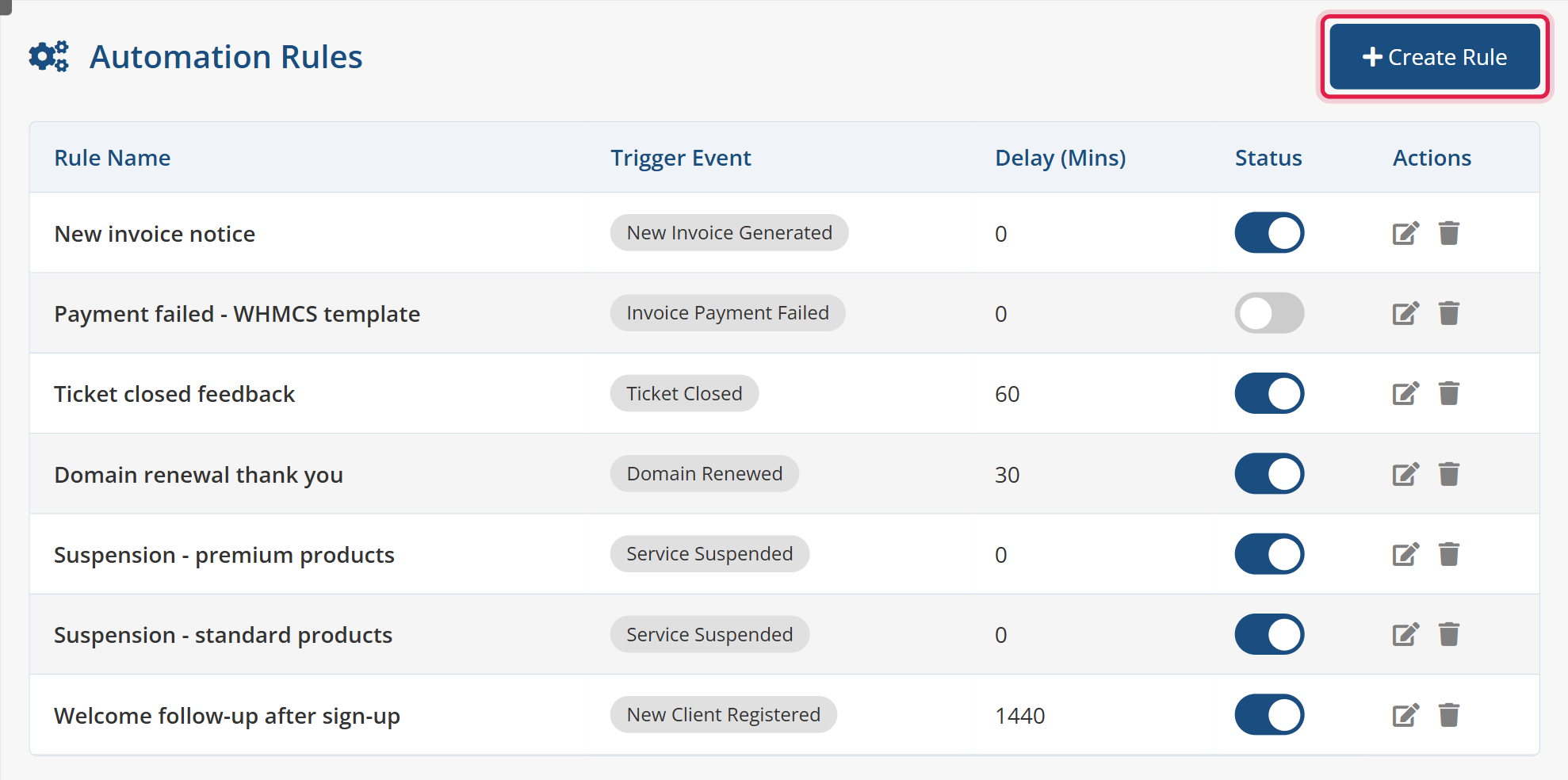
Provonic Email Marketer Extended (EME) is a WHMCS email marketing module, email marketing addon and email automation addon that sends targeted, personalized emails to clients based on real-time lifecycle events, lifecycle flows and bulk email campaigns. Create unlimited reusable email templates with WHMCS merge fields, or reuse your existing WHMCS email templates, map them to trigger events with automation rules and optional send delays, and the module queues each email and delivers it on the WHMCS cron, with no manual work once it is set up.

Event-based triggers cover the whole client lifecycle: orders placed via any payment gateway, new client registrations, password changes, new invoices, invoice paid, invoice payment failed, cancellation requests, service activated, service suspended, service unsuspended and service terminated, domain registered, domain renewed and domain transferred, and ticket opened and ticket closed. That makes it the welcome email, onboarding email, payment reminder, follow-up email, suspension notice, win-back email and drip campaign tool for every WHMCS automated email you need.

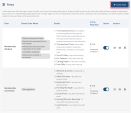
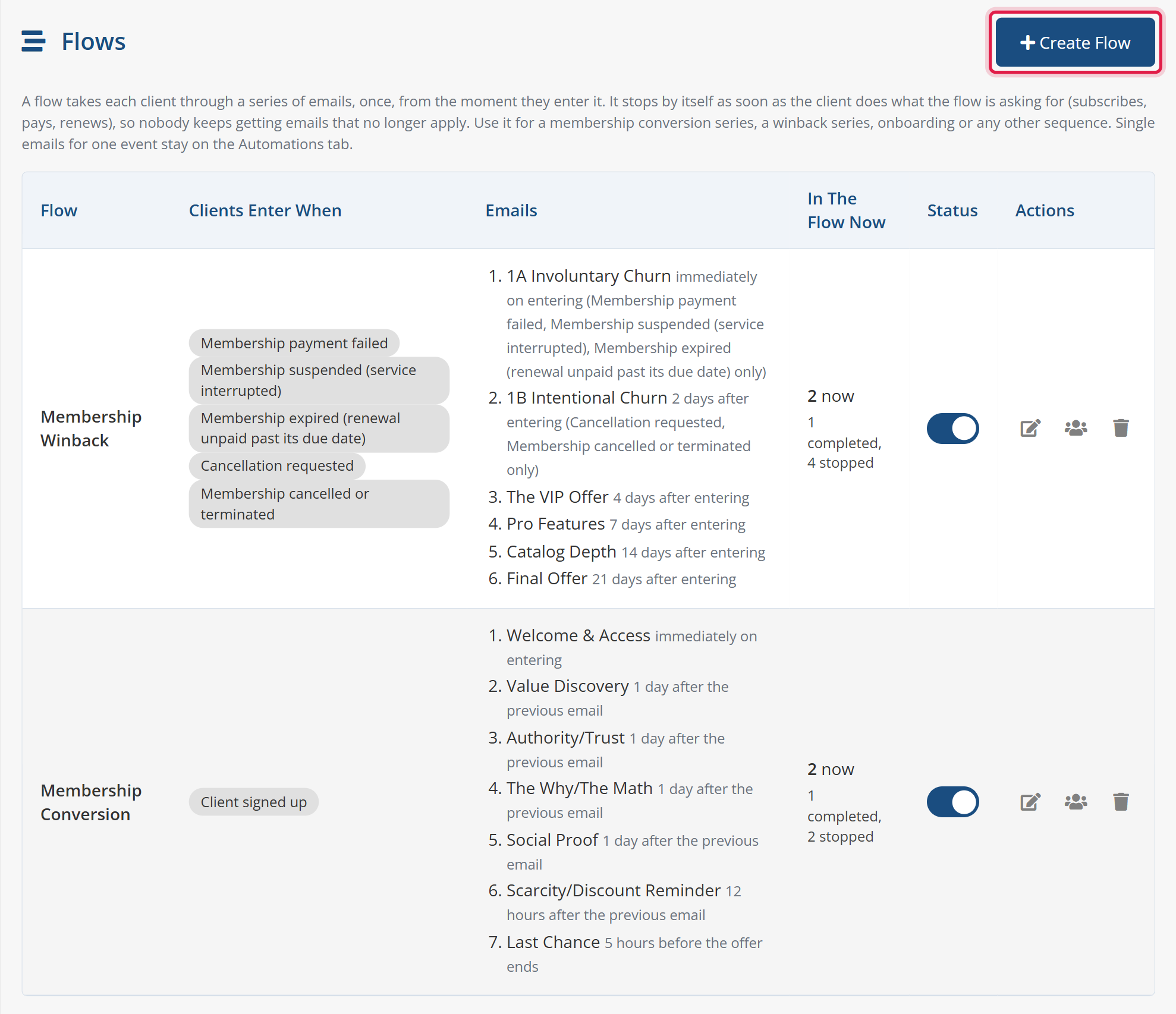
Flows build complete email sequences: a membership conversion flow for clients who registered but never ordered or left an invoice still unpaid, and a winback flow for a failed payment, a suspension, an expired membership, a cancellation request or an end of billing cycle cancellation. Clients enter when their profile is approved (a verified email, a client group or a custom client field), only from your launch date forward, and each one goes through the flow once. Every email has its own timing: after the client entered, after the previous email, or a last-chance email hours before the offer expires, with a different first email per way in. Stop conditions end the flow the moment the client subscribes, pays, renews, is reactivated or withdraws the cancellation, checked on every event, every cron run and just before each send, so paying members never get another "please subscribe" or "come back" email.

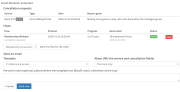
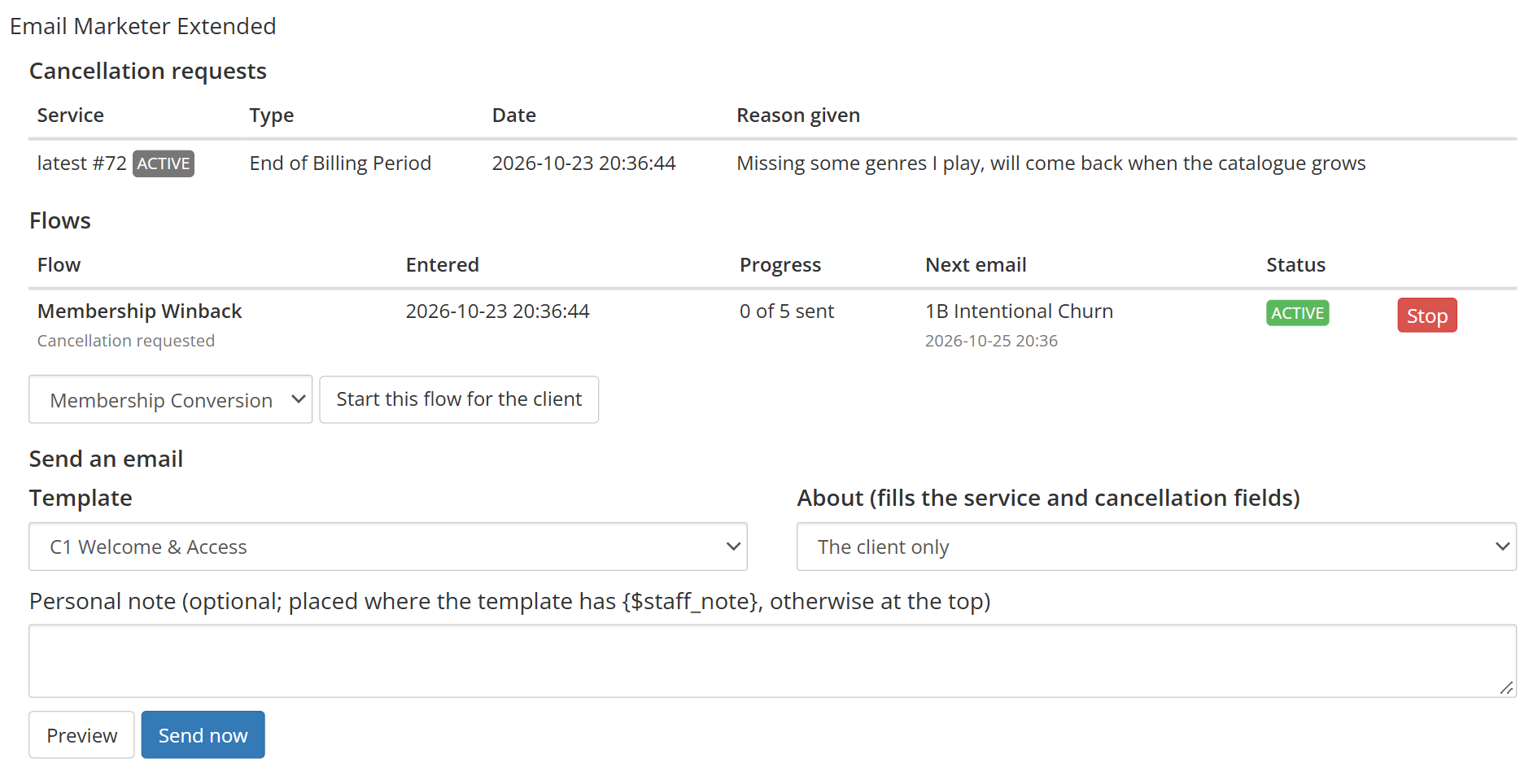
Support staff get a panel on every client profile with the client's flows, progress and next email, the cancellation reason the client gave, a Stop button for any running sequence, and retention email templates they can preview and send by hand with the client's details and a personal note filled in.

Advanced filters target exactly the right clients: product, product group, addon, billing cycle, payment method, client group, client country, client language, client status, service status, TLD, domain status, ticket department, ticket priority, ticket status and date range. Several rules can share one trigger event, so a premium product can get a different email from a standard one, and a series of rules with different delays builds a simple email sequence.

Every triggered email goes into a persistent delivery queue with a configurable batch send limit per cron run (default 50) to protect your server IP reputation, duplicate queue protection, pending, sent and failed status tracking with the mail server's own failure reason, and logging to the WHMCS Activity Log with an EME prefix. Deliver through the WHMCS mail settings, or switch on the built-in SMTP configuration to send through a dedicated SMTP server, with a test email to prove the settings before saving.

Flows (Email Sequences):

  • Membership Conversion Flow
  • Winback Flow After Cancellation
  • Multi-Step Email Sequences
  • Unlimited Emails Per Flow
  • Start On Profile Approval
  • Start On Payment Failure Or Suspension
  • Start On Expiry Or Cancellation
  • Different First Email Per Entry
  • Timing After Entry Or Previous Email
  • Last-Chance Email Before Offer Expires
  • Only Enroll From Your Launch Date
  • One Sequence Per Client At A Time
  • No Burst Of Overdue Emails
  • Stop A Sequence Manually

Lifecycle Triggers:

  • Registered, No Invoice Yet
  • Invoice Still Unpaid (Abandoned Cart)
  • Before Unpaid Invoice Is Due
  • Service Overdue (Renewal Unpaid)
  • Service Cancelled or Terminated
  • End of Billing Cycle Cancellations

Stop Conditions:

  • Stop When The Client Subscribes
  • Stop When The Client Pays
  • Stop When The Membership Is Renewed
  • Stop When A Cancellation Is Withdrawn
  • Checked Again Before Every Send

Client Profile Panel:

  • Flows And Next Email Per Client
  • Cancellation Reasons At A Glance
  • Retention Email Templates For Staff
  • Preview And Send With A Personal Note
  • Start Or Stop A Flow For A Client

Email Campaigns:

  • Bulk Email Campaigns To All Clients
  • Campaigns By Product, Service Or Domain
  • Email List Campaigns With CSV Import
  • Send Now Or Schedule
  • Pause, Resume And Cancel
  • Campaign Reports With Failure Reasons
  • Optional Open Tracking

Consent & Unsubscribe:

  • Marketing Opt-In Only Option
  • One-Click Unsubscribe Link
  • Skip List For Bounced Addresses

Email Templates:

  • Unlimited Reusable Templates
  • Subject And Message Body Per Template
  • Preview Text, Promo Code And Button
  • Template Categories
  • The WHMCS Email Editor (TinyMCE)
  • Visual And HTML Source Views
  • Paste A Complete HTML Email Template
  • One-Click Merge Field Insertion
  • Conditional Content With {if}
  • Email Preview For Any Client
  • Broken Link Check Before Sending
  • Use Existing WHMCS Email Templates
  • Edit And Delete Any Template

Automation Rules:

  • Unlimited Event-Based Rules
  • Multiple Rules Per Trigger Event
  • Map Any Template To Any Trigger
  • Delay In Minutes, Hours Or Days
  • Live On/Off Toggle Per Rule
  • Duplicate Queue Protection

Trigger Events:

  • Order Placed Via Any Gateway
  • New Client Registered
  • Client Password Changed
  • Invoice Created, Paid Or Failed
  • Cancellation Requested
  • Service Activated, Suspended, Unsuspended, Terminated
  • Domain Registered, Renewed, Transferred
  • Ticket Opened Or Closed

Advanced Filters:

  • Filter By Product Or Product Group
  • Filter By Addon And Billing Cycle
  • Filter By Payment Method
  • Filter By Client Group
  • Filter By Client Country
  • Filter By Client Language
  • Filter By Service Status
  • Filter By TLD And Domain Status
  • Filter By Ticket Department And Priority
  • Filter By Date Range
  • Criteria Shown Per Trigger Event

Queue & Delivery:

  • Persistent Delivery Queue
  • Email Queue With Status Tracking
  • Processed On Every WHMCS Cron Run
  • Batch Limit Per Cron (Default 50)
  • Sent Via WHMCS Mail Or Custom SMTP
  • Pending, Sent, Failed Tracking
  • Mail Server Failure Reason Per Email
  • Recorded In Client Email History

SMTP Configuration:

  • Dedicated SMTP Server For Module Emails
  • SMTP Host, Port And Encryption
  • TLS, SSL Or No Encryption
  • Encrypted SMTP Password Storage
  • Custom From Email And From Name
  • Send Test Email Before Saving
  • Self-Signed Certificate Option

Logging:

  • Activity Log Entries Prefixed EME
  • Skipped Rule Reasons In Activity Log
  • Optional WHMCS Module Log
  • Passwords And License Keys Never Logged
  • Queue Log Viewer And Clear Logs

General Info:

  • WHMCS 8 And WHMCS 9
  • PHP 8.1, 8.2, 8.3 And 8.4
  • Requires ionCube Loader v13 Or Later
  • No Client Area Template Changes

Available Pricing Models:

  • One-Time: $̵4̵5̵ > $36
  • Open Source: $̵1̵1̵8̵ > $94.40

Whether you search for WHMCS email marketing, email marketing for WHMCS, a WHMCS email automation module, email automation for WHMCS, a WHMCS autoresponder, an autoresponder for WHMCS, WHMCS triggered emails, triggered emails for WHMCS, WHMCS follow-up emails or WHMCS SMTP for module emails, Email Marketer Extended covers it.


Reviews

5 stars
1
1
4 stars
0
0
3 stars
0
0
2 stars
0
0
1 star
0
0
Ramson  Joy avatar

Ramson Joy @ramson7113

May 6, 2026 at 01:48:48 PM

Finally, an email marketing module that actually works with WHMCS events. New signup? Send email. Payment made? Send email. Ticket submitted? Send email. Just create your templates, set the rules, and let the cron job do the rest. Zero manual work. Really happy with this.

  • 6 months ago
  • Version Number 1.0.0

Version Compatibility


Compatible with WHMCS v9.1

Full Version Compatibility


  • Selected versions of WHMCS v9.1
        9.1.0
  • All versions of WHMCS v9.0
  • All versions of WHMCS v8.13
  • All versions of WHMCS v8.12
  • All versions of WHMCS v8.11
  • Selected versions of WHMCS v8.10
        8.10.0
  • Selected versions of WHMCS v8.9
        8.9.0
  • Selected versions of WHMCS v8.8
        8.8.0
  • All versions of WHMCS v8.7
  • All versions of WHMCS v8.6
  • All versions of WHMCS v8.5
  • All versions of WHMCS v8.4
  • All versions of WHMCS v8.3
  • All versions of WHMCS v8.2
  • All versions of WHMCS v8.1
  • All versions of WHMCS v8.0

Support for this product

The best place to start if you need help with a specific product is to contact the developer. All WHMCS Marketplace developers have both a website and support URL listed.

Developed By Provonic

Changelog

v1.5.0 Released October 24th, 2026

Latest Version


Added

  • Flows: email sequences each client goes through once, with any number of emails timed after the client entered, after the previous email, or before their offer ends
  • Seven ways into a flow: client signed up, invoice left unpaid, membership payment failed, membership suspended, membership expired, cancellation requested, and membership cancelled or terminated
  • A different email per way in, so a failed payment and a cancellation get their own first email and share the follow-ups
  • Entry requirements for profile approval (a verified email address, a client group or a custom client field), a start date so only clients from launch day on are enrolled, membership products, and once-only or re-entry after a waiting period
  • Offer deadlines: a fixed time after entering, a WHMCS promotion's expiry date, or the unpaid invoice's due date, with {$offer_expires} and {$offer_hours_left}
  • Stop conditions for a flow: the client has an active membership, the membership or invoice is back in good standing (renewed, paid, reactivated or the cancellation withdrawn), or any invoice is paid
  • A list of the clients in each flow, with their progress and next email, and a Stop button
  • An Email Marketer Extended panel on the client profile: the client's flows, cancellation requests with the reason given, Stop and Start buttons, and a preview-and-send for any template with a personal note
  • Template category, preview text, promo code and call-to-action button, and the merge fields {$promo_code}, {$cta_button}, {$cta_url}, {$flow_name}, {$cancellation_reason}, {$cancellation_type} and {$staff_note}
  • The WHMCS email editor for template bodies, with Visual and HTML Source views and a one-click list of every merge field
  • Email preview for templates, campaigns and flow emails, rendered for any client, with empty-field warnings and a list of the links
  • Smarty {if} conditions on the module's own merge fields in every email, sent through WHMCS or the module's SMTP

Changed

  • A client is in a flow once at a time: a cancellation followed by the termination of the same membership no longer starts a second sequence
  • When several emails of a flow fall due at once, only the latest is sent
  • A closed client account, or a marketing preference switched off, ends the client's flows
  • Flow emails go out with their template as it is when sent, so edits reach clients already in the flow
  • The Queue tab shows the flow an email came from, "Sent by staff" for emails sent from the client profile, and links each client to their profile
  • A Check for Update button on the Info tab installs a new release straight away instead of waiting for the daily check
  • Module Logs can also be switched on or off from the module's Configure screen
  • The SMTP password is never shown on the Settings page, and the licence key on the Info tab is shown masked
  • The admin area follows the standard Provonic layout, with the module's own icons, buttons and dialogs throughout, including the client profile panel
  • Clearing the queue log no longer reloads the page

Fixed

  • Emails sent over the module's SMTP showed the WHMCS email header's own template code instead of the header
  • Template names and subjects containing & or quotes were saved escaped and sent that way


Previous Versions


v1.4.0 Released October 22nd, 2026

View/hide detailed changelog

Added

  • Lifecycle flow triggers, checked on every cron run: Registered, No Invoice Yet; Invoice Still Unpaid; Before Unpaid Invoice Is Due; Service Overdue (Renewal Unpaid); and Service Cancelled or Terminated, including cancellations at the end of the billing cycle
  • Stop Sending When on every rule: a flow's remaining emails stop as soon as the client pays an invoice, has an active service, or the invoice or service the email is about is resolved
  • Only clients who accept marketing emails: a rule option that respects each client's marketing preference
  • An unsubscribe link in every marketing email, with a confirmation page for the recipient
  • Rule delays in minutes, hours or days
  • Invoice merge fields ({$invoice_num}, {$invoice_total}, {$invoice_date_due}, {$invoice_link}) in emails about an invoice

Changed

  • Each client, invoice or service is acted on once per lifecycle rule, and only after the rule was created, so a new rule never emails a backlog
  • Two different invoices or services now each get their own reminder instead of being treated as a duplicate
  • The Queue tab shows stopped emails with the reason, the rule that queued each email, and the address of email list contacts
  • Provonic branding in the module header and Info tab

Fixed

  • Advanced Filters on a rule could be lost when the rule was saved, so the rule matched every client
  • The Invoice Payment Failed trigger never ran; it now runs when WHMCS reports a failed card or direct debit payment
  • Campaign reports showed email list recipients without their name or address


v1.3.0 Released September 22nd, 2026

View/hide detailed changelog

Added

  • Email Lists for addresses outside WHMCS, with CSV import, and an Email List campaign type
  • Campaign reports with sent, failed and skipped counts, failure reasons grouped, and every recipient listed
  • A Skip List: addresses are added after a permanent delivery failure or by hand, and can be unblocked
  • Optional open tracking for campaigns

Fixed

  • Campaign criteria could be ignored when they reached the server in an unreadable form
  • Row action buttons could disappear when the admin icon font did not load


v1.2.0 Released September 19th, 2026

View/hide detailed changelog

Added

  • Email campaigns to all clients, to owners of chosen products or services, or to domain owners, sent now or at a set time
  • Pause, resume and cancel a running campaign
  • The number of recipients shown before a campaign is sent
  • One email per service or domain, with that record's merge fields
  • Optional inclusion of WHMCS users who have no client account
  • An option to exclude clients who opted out of marketing email
  • A test send of a campaign through the real sender


v1.1.0 Released September 4th, 2026

View/hide detailed changelog

Added

  • SMTP configuration: send the module's emails through a dedicated SMTP server, with host, port, encryption, username, password, From address and From name
  • Send Test Email, which checks the SMTP settings on screen before they are saved and shows the mail server's own error when it fails
  • Module Logs setting, which records every trigger, rule match, queued email and send attempt in the WHMCS Module Log
  • More than one automation rule can now use the same trigger event, each with its own criteria and template
  • The Products criteria is grouped by product group, and a whole group can be selected at once
  • Advanced Filters now explain that the trigger event must be chosen first
  • Refresh Database setting, so the module's data is only deleted on deactivation when you choose to

Changed

  • Emails sent through SMTP look the same as WHMCS emails: merge fields are filled in, your email header and footer are applied, and the email is recorded in the client's Email History
  • The Queue tab shows the template used and, for a failed email, the reason the mail server gave
  • Clear Logs keeps emails that are still waiting to be sent
  • Service Status, Domain Status and Ticket Status criteria list every status WHMCS uses, and criteria are only shown for the trigger events they apply to
  • The Info tab also shows the WHMCS, PHP and ionCube versions
  • Refreshed admin interface with toggle switches, searchable selects and confirmation dialogs

Fixed

  • Emails built from a WHMCS email template arrived with a broken layout
  • Editing a saved template could show its HTML as plain text
  • Upgraded installations could fail to queue any email until the module was reactivated
  • Rules skipped without a recorded reason now write the reason to the Activity Log
  • The License Key row on the Info tab was always empty
  • The module's admin actions now require an administrator to be signed in


v1.0.0 Released April 18th, 2026

View/hide detailed changelog

  • Automated email triggers based on core WHMCS events (Clients, Invoices, Services, Domains, and Tickets).
  • Time-delayed email dispatching to schedule automated follow-ups exactly when needed.
  • Custom Email Template Builder with a rich text editor to design professional emails.
  • Smart background Queue System with Cron Batch Limits to ensure safe delivery and protect server IP reputation.


See also

Discord Notifications

A simplistic, free & open source hook allowing instant Discord notifications when an action is triggered.

Free
Netgsm SMS

Netgsm Sms addon provides you sending customized bulk sms and creating sms templates.

Free
MSG91 SMS/OTP Plugin

MSG91 WHMCS SMS plugin gives you the power and flexibility to stay connected with your customers by sending them an SMS and OTP's for 2FA at the crucial steps that matters the most.


Free
SMS Manager

More Advanced SMS System

Commercial
SMSQ Notify

Send SMS Notification From WHMCS by SMSQ Notify

Free