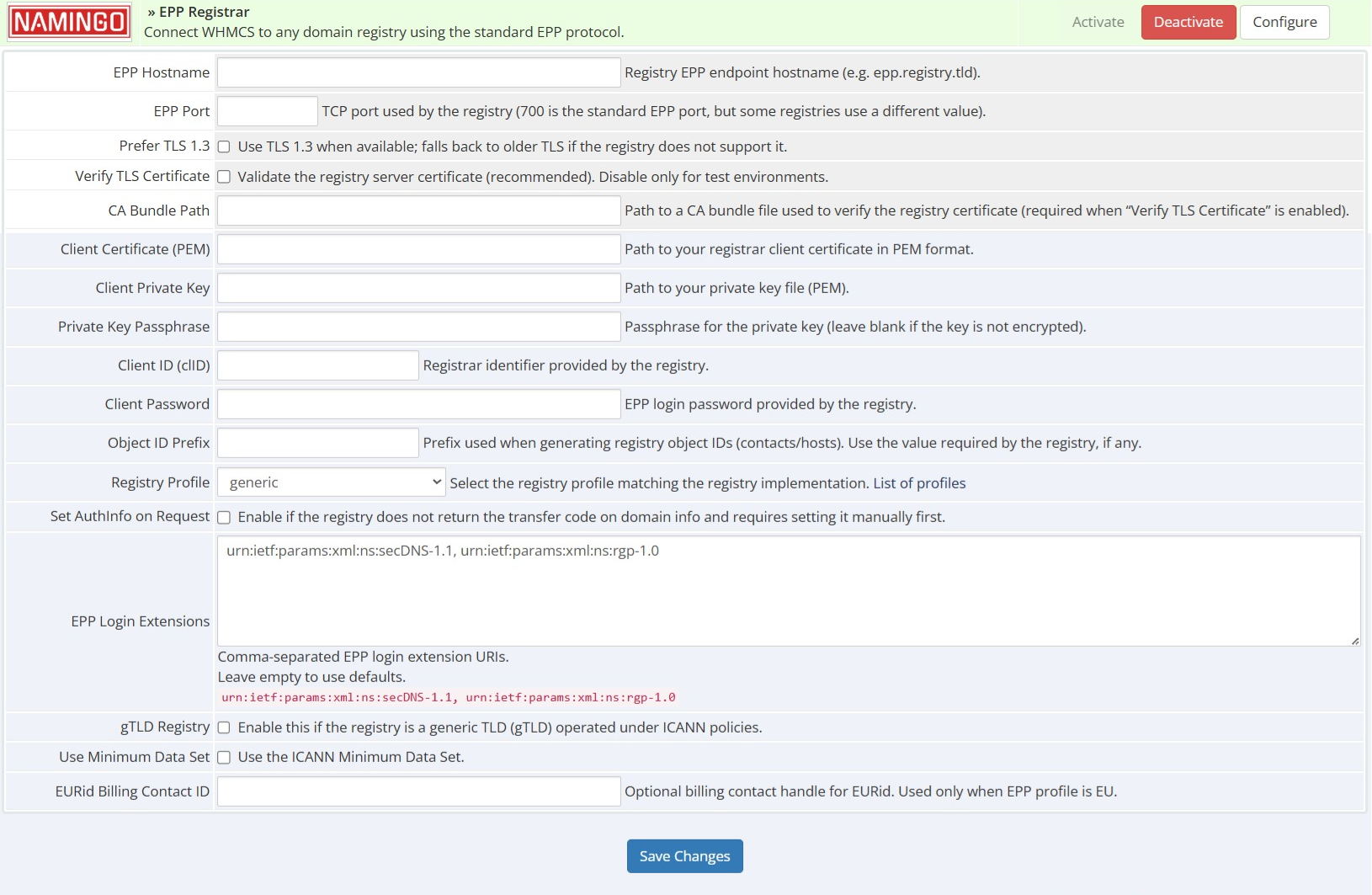
Generic RFC EPP — TLDs: any — Profile: N/A — Needs: N/A
AFNIC — TLDs: .fr / others — Profile: FR — Needs: N/A
CARNET — TLDs: .hr — Profile: HR — Needs: N/A
CentralNic — TLDs: all — Profile: N/A — Needs: Set AuthInfo on Request
CoCCA — TLDs: all — Profile: N/A — Needs: Set AuthInfo on Request
CORE/Knipp — TLDs: all — Profile: N/A — Needs: N/A
Domicilium — TLDs: .im — Profile: N/A — Needs: N/A
DRS.UA — TLDs: all — Profile: N/A — Needs: N/A
EURid — TLDs: .eu — Profile: EU — Needs: N/A
GoDaddy Registry — TLDs: all — Profile: N/A — Needs: N/A
Google Nomulus — TLDs: all — Profile: N/A — Needs: N/A
Hostmaster — TLDs: .ua — Profile: UA — Needs: N/A
Identity Digital — TLDs: all — Profile: N/A — Needs: N/A
IIS — TLDs: .se, .nu — Profile: SE — Needs: N/A
IT.COM — TLDs: all — Profile: N/A — Needs: N/A
Namingo — TLDs: all — Profile: N/A — Needs: N/A
NASK — TLDs: .pl — Profile: PL — Needs: N/A
NIC Chile — TLDs: .cl — Profile: N/A — Needs: N/A
NIC Mexico — TLDs: .mx — Profile: MX — Needs: N/A
NIC.LV — TLDs: .lv — Profile: LV — Needs: N/A
.PT — TLDs: .pt — Profile: PT — Needs: N/A
Regtons — TLDs: all — Profile: N/A — Needs: N/A
RoTLD — TLDs: .ro — Profile: N/A — Needs: N/A
RyCE — TLDs: all — Profile: N/A — Needs: N/A
SIDN — TLDs: all — Profile: N/A — Needs: N/A
SWITCH — TLDs: .ch, .li — Profile: SWITCH — Needs: Set AuthInfo on Request
Tucows Registry — TLDs: all — Profile: N/A — Needs: N/A
Verisign — TLDs: all — Profile: VRSN — Needs: N/A
ZADNA — TLDs: .za — Profile: N/A — Needs: N/A
ZDNS — TLDs: all — Profile: N/A — Needs: N/A
In Progress
Caucasus Online — TLDs: .ge — Profile: — — Status: —
DENIC — TLDs: .de — Profile: DE — Status: —
DOMREG — TLDs: .lt — Profile: LT — Status: —
FORTH-ICS — TLDs: .gr, .ελ — Profile: GR — Status: —
FRED — TLDs: .cz / any — Profile: FRED — Status: —
NORID — TLDs: .no — Profile: NO — Status: —
Paid Registry Support
HKIRC — TLDs: .hk — Profile: HK — Status: —
Internet.ee — TLDs: .ee — Profile: EE — Status: —
Registro.it — TLDs: .it — Profile: IT — Status: —
Traficom — TLDs: .fi — Profile: FI — Status: —
Use our Module Customizer Tool at https://namingo.org/whmcs-module/ to generate a fine-tuned EPP registrar module specifically for your registry.
Place the generated registrar module directory (as produced by the Module Customizer Tool) into
[WHMCS_path]/modules/registrars/.
Then place your key.pem and cert.pem files inside that same generated module directory.
Ensure correct file permissions:
chown -R www-data:www-data [WHMCS_path]/modules/registrars/[MODULE]
chmod -R 755 [WHMCS_path]/modules/registrars/[MODULE]
Activate from Configuration -> Apps & Integrations -> (search for [MODULE]) -> Activate
Configure from Configuration -> System Settings -> Domain Registrars
Add a new TLD using Configuration -> System Settings -> Domain Pricing
If your module includes additional domain fields, copy the contents of
additionalfields.php into [WHMCS_path]/resources/domains/additionalfields.php. If the file already exists, merge the contents (do not overwrite it).
Create a whois.json file in [WHMCS]/resources/domains and add the following:
[
    {
        "extensions": ".yourtld",
        "uri": "socket://your.whois.url",
        "available": "NOT FOUND"
    }
]
WHMCS does not support running multiple instances of the same registrar module at the same time.
This limitation exists because WHMCS identifies registrar modules by:
If you try to use the same EPP registrar module for multiple registries (for example: .eu, .ua, a test registry, and a production registry), you will encounter issues such as:
The supported solution is to duplicate the module and rename its functions so that each registry has its own uniquely named module.
Each module instance:
To simplify this process, we provide a WHMCS Module Customizer Tool that automatically:
If you're unsure whether your system can access the EPP server, you can test the connection using OpenSSL. Try one or both of the following commands:
openssl s_client -showcerts -connect epp.example.com:700
openssl s_client -connect epp.example.com:700 -CAfile cacert.pem -cert cert.pem -key key.pem
Replace epp.example.com with your EPP server's hostname and adjust the paths to your certificate files (cacert.pem, cert.pem, and key.pem) as needed. These tests can help identify issues with SSL/TLS configurations or network connectivity.
If you do not have an SSL certificate and private key for secure communication with the registry, you can generate one using OpenSSL.
openssl genrsa -out key.pem 2048
openssl req -new -x509 -key key.pem -out cert.pem -days 365
Note: For production environments, it's recommended to use a certificate signed by a trusted Certificate Authority (CA) instead of a self-signed certificate.
If you experience login or other issues with EPP-over-HTTPS registries such as .eu, .fi, .hr, .it, or .lv, it might be caused by a corrupted or outdated cookie file. Follow these steps to fix it:
rm -f /tmp/eppcookie.txt
After deleting the cookie file, try logging in again. This will force the creation of a new cookie file and may resolve the issue.
The best place to start if you need help with a specific product is to contact the developer. All WHMCS Marketplace developers have both a website and support URL listed.

Manage, acquire, renew, and transfer your Dynadot domain names using WHMCS.
The OpenSRS Domains Pro module allows you to register, renew and transfer domains from an ever-expanding selection of TLDs, including many new gTLDs. This module supports domain locking and WHOIS Privacy for select TLDs, as well as WHMCS Domain Sync.
Effortlessly manage domain registrations, renewals, transfers, and DNS with the Openprovider WHMCS module. Sync pricing, automate tasks, and streamline your reseller business with ease.

Advanced domain module for WHMCS - Easily offer over 2000 TLDs to your customers


Artur Hatsaturjan @artur3485
The module is very useful, but needs some updates on declared registries.
My question is how to set it up for FI, LV, IS, CH domains? Does it need to be installed for every tld as a different module?
anant pandey @anant1068
No comment provided.