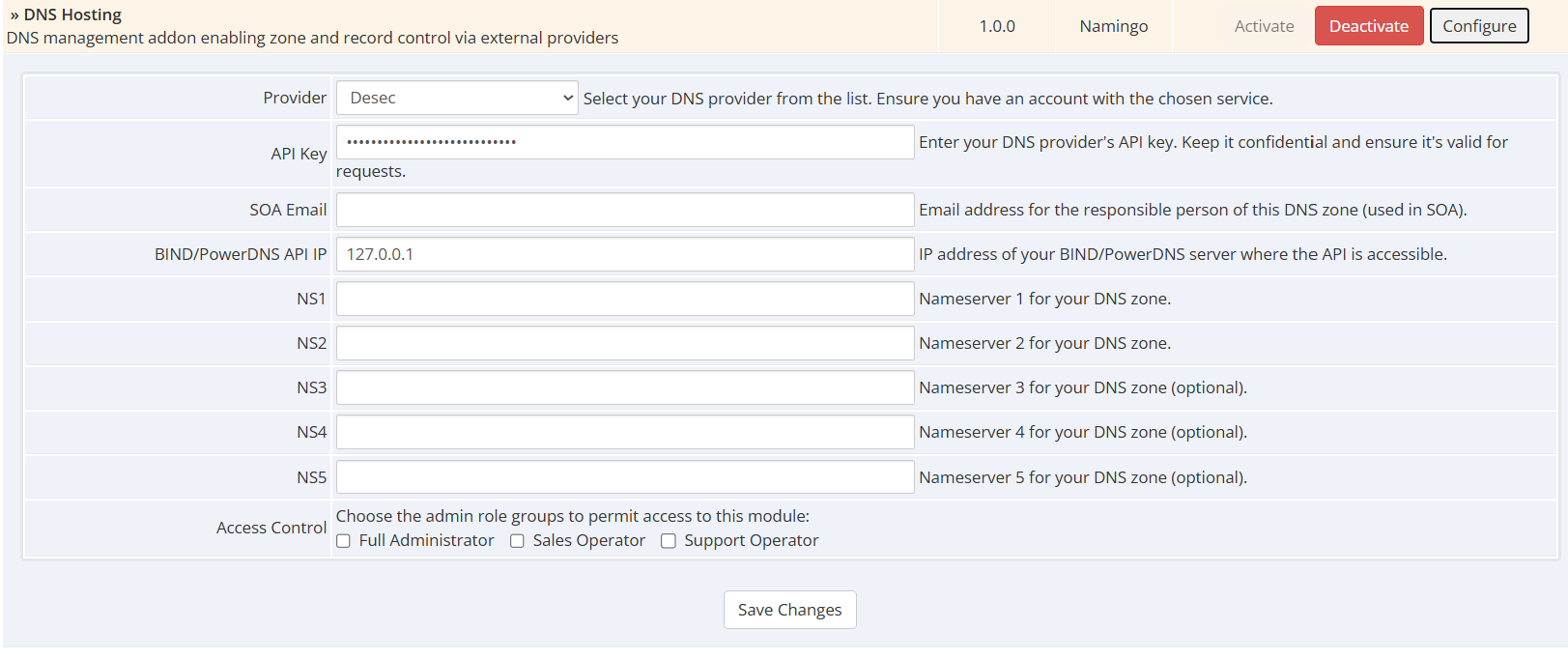
Most DNS providers require an API key, while some may need additional settings such as authentication credentials or specific server configurations. All required values must be set in the .env file.
AnycastDNS — Credentials: API_KEY — Requirements: N/A — Status: Done — DNSSEC: Unavailable
Bind9 — Credentials: API_KEY:BIND_IP — Requirements: bind9-api-server / bind9-api-server-sqlite — Status: Done — DNSSEC: In Progress
Cloudflare — Credentials: EMAIL:API_KEY or API_TOKEN — Requirements: N/A — Status: Done — DNSSEC: Unavailable
ClouDNS — Credentials: AUTH_ID:AUTH_PASSWORD — Requirements: N/A — Status: Done — DNSSEC: Done
Desec — Credentials: API_KEY — Requirements: N/A — Status: Done — DNSSEC: Done
DNSimple — Credentials: API_KEY — Requirements: N/A — Status: Done — DNSSEC: Unavailable
Hetzner — Credentials: API_KEY — Requirements: N/A — Status: In Progress — DNSSEC: Unavailable
PowerDNS — Credentials: API_KEY:POWERDNS_IP — Requirements: gmysql-dnssec=yes in pdns.conf — Status: Done — DNSSEC: Done
Vultr — Credentials: API_KEY — Requirements: N/A — Status: Done — DNSSEC: Unavailable
whmcs_dns directory to your WHMCS installation so the final structure is: /modules/addons/whmcs_dns/
To use the BIND9 module, you must install the bind9-api-server on your master BIND server. This API server allows for seamless integration and management of your DNS zones via API.
Make sure to configure the API server according to your BIND installation parameters to ensure proper synchronization of your DNS zones.
After activating the addon, configure the module settings in WHMCS → System Settings → Addons:
DNS Provider
Identifier of the PlexDNS-supported provider
(e.g. Desec, PowerDNS, Cloudflare, etc.)
API Key
API key for the selected DNS provider.
SOA Email
Email address used in the SOA record (where applicable).
Nameservers (NS1–NS5)
Nameservers that clients should point their domains to when using this DNS service.
Click Save Changes to apply the configuration.
Be the first to review DNS hosting.
The best place to start if you need help with a specific product is to contact the developer. All WHMCS Marketplace developers have both a website and support URL listed.
Sell SSL on autopilot: automated issuance, validation, installation and renewal, right inside WHMCS.
Resell VPS & Cloud Dedicated Products from Liquid Web

Kopage, self-hosted, Website Builder for Webhosting Companies your clients will love to use. Attract more clients and reduce churn rate with easy and intiutive website builder.

Turnkey PaaS, Docker hosting, auto-scalable clusters and VPS with full integration to WHMCS
Resell Dedicated Servers from Limestone Networks white label API.