PUQ Proxmox KVM provisioning module

PUQ Proxmox KVM provisioning module

Developed By PUQ Software

Compatible with WHMCS v9.0

Proxmox KVM WHMCS Module

The PUQ Proxmox KVM module for WHMCS provides automated provisioning, management, and billing of KVM virtual machines on Proxmox VE clusters. The module consists of two parts: the Server Module that handles VM provisioning and the client/admin interface, and the Addon Module that manages IP address pools, DNS zones, cron tasks, and provides a centralized management dashboard.

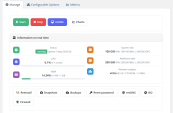
The module allows your customers to provision and manage KVM machines on your Proxmox server or Proxmox cluster. It exposes virtually all functions of Proxmox directly from the WHMCS panel without forcing the user (or admin) to log in to Proxmox itself. This greatly simplifies customer account management, improves customer satisfaction and reduces the number of support requests.

The module is intended for advanced users — installation and correct configuration require knowledge and experience in server and network administration. Although the documentation is detailed and allows the module to be installed by an intermediate user, we strongly suggest following the order defined in the installation chapter.

Changed in v3.0. Starting from v3.0 the module ships its own dedicated addon module (puq_proxmox_kvm) — the separate PUQ Customization addon required for v1.3–v2.x is no longer needed. On first activation the new addon automatically migrates IP pools, DNS zones and VM records from the old puq_customization tables.

New in v3.3. Full WHMCS Configurable Options coverage — 18 distinct options with clean plain-English names cover every per-service customisation (CPU, RAM, every disk size / bandwidth / IOPS, network bandwidth, IP counts, OS, backups, snapshots). Every option has a sensible default in Module Settings so products work out of the box. Disk downgrades are blocked by a three-layer safety net; selecting Additional Disk = 0 cleanly removes the extra disk.

New in v4.0. Dual-mode snapshot system (scheduled automatic snapshots with automated FIFO rotation or lifetime cleanup), streamlined client area interface matching backups, modernized usage charts, ionCube 15 support, and comprehensive multi-language translations across 25 languages.

Installation service

If you don't feel comfortable performing the installation yourself, PUQcloud offers an installation service in two variants — module installation and configuration and full implementation. See https://puqcloud.com/whmcs-module-proxmox-kvm.php for details.

Main Features

  • Automated VM provisioning — automatic deployment of KVM virtual machines via linked clone or full clone with state machine-based deploy pipeline
  • Post-clone migration — automatic VM migration to the target node with correct storage after cloning, supporting cross-node deployment with local storage
  • VM lifecycle management — create, suspend, unsuspend, terminate, reinstall, change package (upgrade/downgrade) with step-by-step state machine and retry logic
  • Firewall management — configurable firewall policies, anti-spoofing IPSet rules, and client-side firewall rule management (add, delete, reorder)
  • Snapshot management — dual-mode: automated scheduled snapshots with FIFO rotation (identical to backups) or manual snapshots with configurable lifetime cleanup; instant rollback and removal
  • Backup management — manual and scheduled backups with restore capability, per-day schedule configuration
  • IPv4/IPv6 IP address pool management — centralized IP allocation with per-server pools, automatic bridge/VLAN selection
  • DNS zone management — Cloudflare and HestiaCP integration for forward and reverse DNS automation
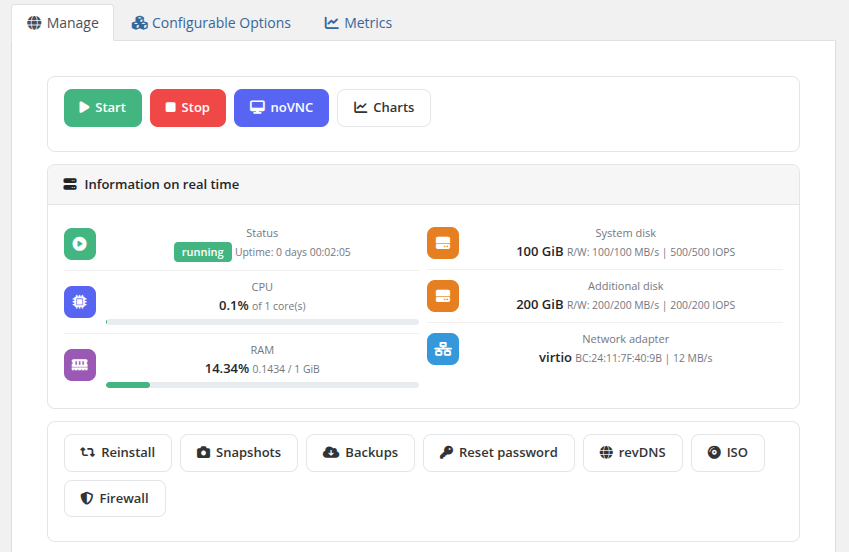
  • noVNC web console — secure browser-based console access via VNC proxy with one-time authentication links
  • Cloud-init support — automatic hostname, IP, DNS, user, and password configuration via cloud-init
  • ISO mounting — mount and unmount ISO images from Proxmox storage for OS installation
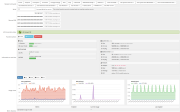
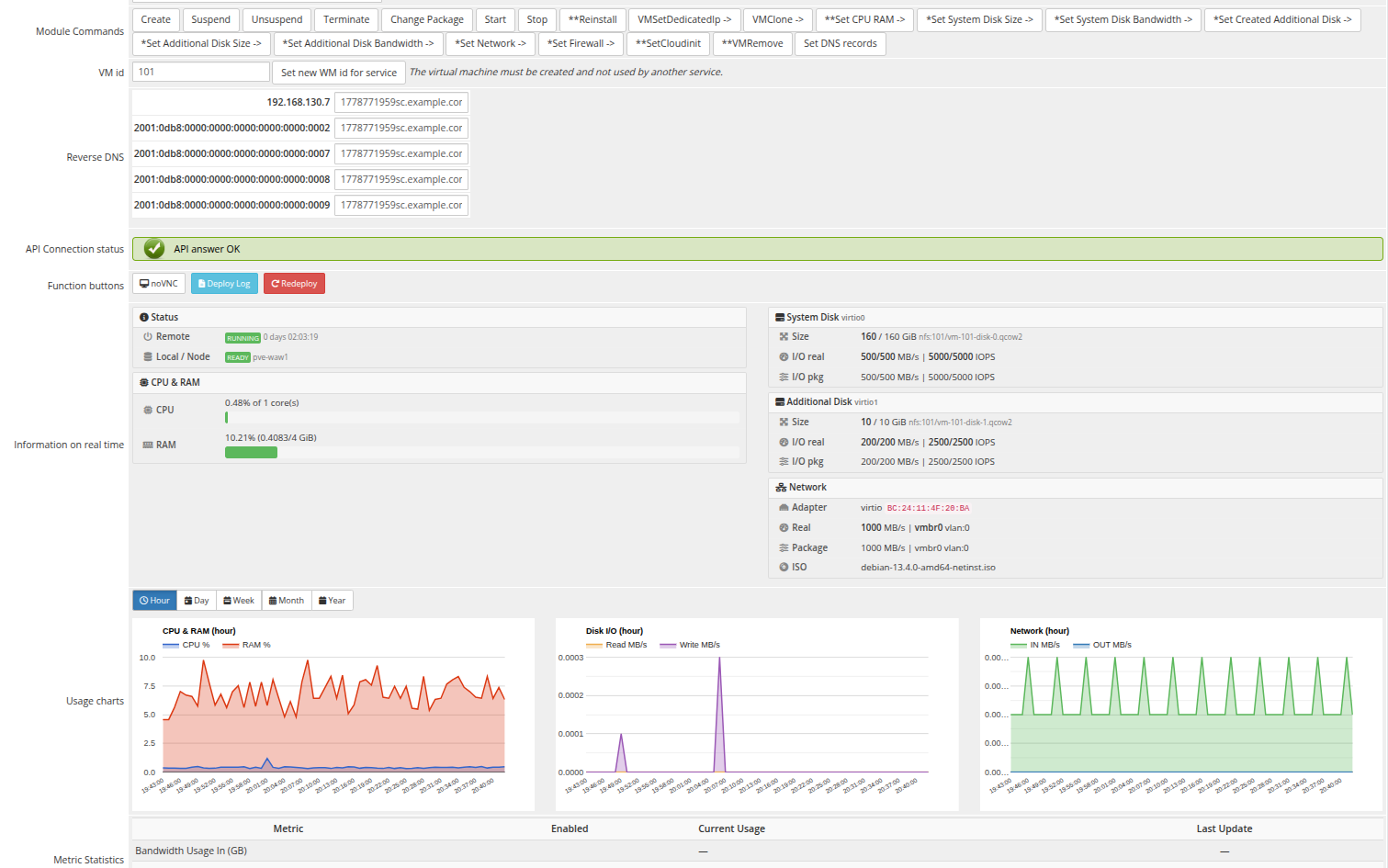
  • Resource usage charts — real-time CPU, RAM, disk I/O, and network usage graphs with historical data
  • Usage-based billing — network traffic metering (inbound/outbound) with WHMCS Metric Billing
  • Configurable client permissions — per-product control over which features are available to customers (start, stop, noVNC, charts, reinstall, reset password, revDNS, ISO mount, firewall)
  • Multi-language support — 25 languages including Arabic, Azerbaijani, Catalan, Chinese, Croatian, Czech, Danish, Dutch, English, Estonian, Farsi, French, German, Hebrew, Hungarian, Italian, Macedonian, Norwegian, Polish, Romanian, Russian, Spanish, Swedish, Turkish, and Ukrainian
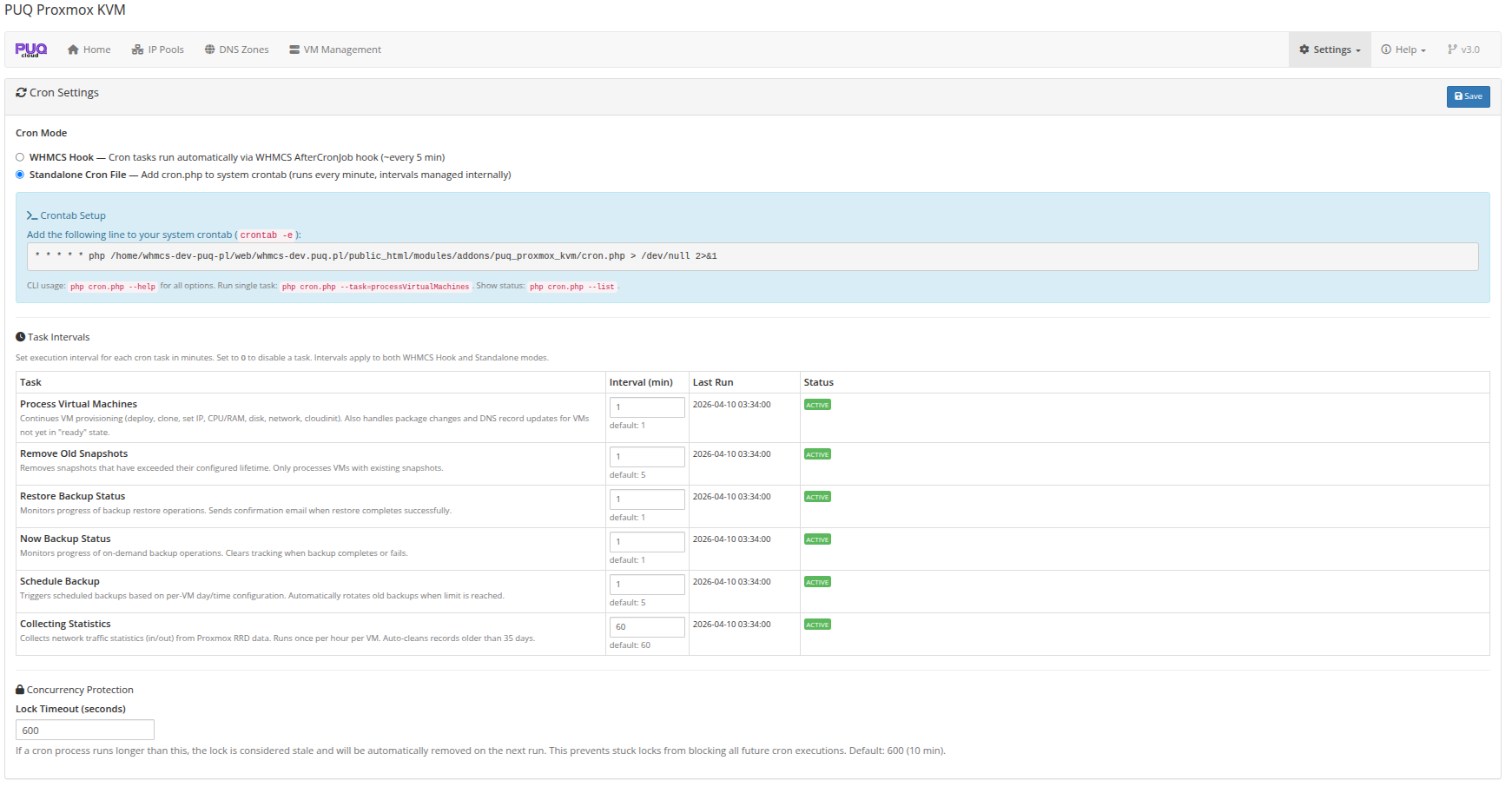
  • Cron system — flexible cron with two modes (WHMCS hook or standalone), configurable intervals per task, CLI tools, lock management
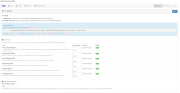
  • Admin product settings UI — custom Bootstrap-based settings panel for VM configuration, storage, network, firewall, integrations, email templates, and client permissions

System requirements

Requirement Minimum WHMCS 8.x+, 9.x+. PHP 7.4, 8.1, 8.2, 8.3, 8.4 Proxmox VE 7.x+, 8.x+ ionCube Loader v15+

Module Components

Component Type Directory Server Module puqProxmoxKVM modules/servers/puqProxmoxKVM/ Addon Module puq_proxmox_kvm modules/addons/puq_proxmox_kvm/

The Addon Module is required for the server module to function. It manages:

  • IP address pools (IPv4 and IPv6)
  • DNS zones (Cloudflare, HestiaCP)
  • VM management dashboard
  • Cron task orchestration
  • Global settings (API timeouts, migration, cron intervals)

Links

  • Product page: https://puqcloud.com/whmcs-module-proxmox-kvm.php
  • Documentation: https://doc.puq.info/books/proxmoxkvm-whmcs-module
  • GitHub: https://github.com/puqcloud/WHMCS-Module-Proxmox-KVM
  • Support: https://puqcloud.com/submitticket.php
  • Community: https://community.puqcloud.com/


There are no reviews yet!

Be the first to review PUQ Proxmox KVM provisioning module.

Version Compatibility


Compatible with WHMCS v9.0

Full Version Compatibility


  • All versions of WHMCS v9.0
  • All versions of WHMCS v8.13
  • All versions of WHMCS v8.12
  • All versions of WHMCS v8.11
  • Selected versions of WHMCS v8.10
        8.10.0
  • Selected versions of WHMCS v8.9
        8.9.0
  • Selected versions of WHMCS v8.8
        8.8.0
  • All versions of WHMCS v8.7
  • All versions of WHMCS v8.6
  • All versions of WHMCS v8.5
  • All versions of WHMCS v8.4
  • All versions of WHMCS v8.3
  • All versions of WHMCS v8.2
  • All versions of WHMCS v8.1
  • All versions of WHMCS v8.0

System Requirements


  • WHMCS: 8.x+, 9.x+
  • PHP: 7.4, 8.1, 8.2, 8.3, 8.4
  • ionCube Loader: v15+
  • Proxmox VE: 8.x+, 9.x+

* Requirements listed are in addition to the WHMCS default system requirements.

Support for this product

The best place to start if you need help with a specific product is to contact the developer. All WHMCS Marketplace developers have both a website and support URL listed.

Developed By PUQ Software

Changelog

v4.0.0 Released September 3rd, 2026

Latest Version


Major release: Dual-mode snapshot architecture, unified client UX matching backups, modernized usage charts, ionCube 15 support, and comprehensive multi-language synchronization.

Dual-Mode Snapshot System

  • Snapshot Schedule Mode: New product setting allowing automated weekly scheduled snapshots with automatic FIFO rotation, functioning identically to scheduled backups.
  • Automated Rotation: When the snapshot quota (e.g. 3/3) is reached, the oldest snapshot is automatically purged before creating the new scheduled snapshot.
  • Dedicated Cron Task: Registered scheduleSnapshot cron task running every 5 minutes to execute scheduled snapshots labeled Scheduler: YYYY-MM-DD.
  • Self-Healing Schema Migration: Automatic database column verification and dynamic migration (vm_snapshot_schedule, vm_snapshot_last).
  • Dynamic Product Settings: Enabling Snapshot schedule mode dynamically locks and disables Snapshot lifetime, preventing conflicting cleanup policies.

Client Area UI & UX Modernization

  • Snapshots Page: Rebuilt with simultaneous server-side rendering of the schedule card and loader spinners matching the backups page (no jumping elements or layout shifts).
  • Usage Charts (charts.tpl): Completely refactored with dedicated cards for CPU & RAM, Disk I/O, and Network, integrated kvmAjax client, full localization, and responsive auto-scaling on window resize.


Previous Versions


v3.3 Released May 14th, 2026

View/hide detailed changelog

Configurable Options release: full coverage with plain-English names, Module Settings defaults for every resource, disk shrink protection.

Configurable Options

  • 18 supported options with plain-English names: CPU Cores, RAM, System Disk, Additional Disk, System Disk Read/Write Bandwidth, System Disk Read/Write IOPS, Additional Disk Read/Write Bandwidth, Additional Disk Read/Write IOPS, Network Bandwidth, IPv4 Addresses, IPv6 Addresses, Backups, Snapshots, Operating System.
  • 11 are new in v3.3 — all disk size / bandwidth / IOPS parameters and Network Bandwidth.
  • Legacy prefix names (B|..., S|..., CPU|..., RAM|..., ipv4|..., ipv6|..., OS|...) still work. When both forms exist on the same product, the plain name wins.

Module Settings defaults

A product now works without any Configurable Options at all — every resource has a default in Module Settings, overridden only when a matching option is assigned to the service. New default fields: Backups and Snapshots count in VM Configuration; IPv4 count and IPv6 count in Network.

Disk shrink protection

Proxmox cannot shrink disks. v3.3 blocks downgrades at three layers:

  1. Upgrade page — smaller sub-options are visually disabled with (downgrade not allowed), warning banner above the form, client-side submit guard.
  2. Change-package state machine — backend skips the resize step with skip — shrink not allowed by Proxmox, VM is not stopped, snapshots are not removed.
  3. Post-backup-restore — re-applying a smaller package size after restore is treated the same way.

Additional Disk = 0 deletes the disk

Selecting 0 for Additional Disk now detaches the disk and purges the file from storage. Upgrade form labels the sub-option (removes the existing disk — data will be lost) and requires a JavaScript confirm() before submit. To disallow this for clients, omit the 0|... sub-option from the Additional Disk dropdown.

Faster change-package

The Start VM step at the end of a change-package now polls for up to 60 seconds in the same cron pass. Slower-starting VMs (cloud-init, large memory) no longer force a one-minute wait for the next cron tick.


v3.2 Released April 18th, 2026

View/hide detailed changelog

A DNS, lifecycle and admin-UX release. Key goal: long-running operations (provisioning many DNS records, tearing down a service with large backups) must never time out the WHMCS request. Both Set DNS records and Terminate now run asynchronously in cron with live progress streamed to the cron output. Under the hood — full null-safety hardening across both modules for PHP 8.1/8.2 stability.

PowerDNS provider

Native support for the PowerDNS Authoritative Server REST API as a third DNS provider (alongside Cloudflare and HestiaCP). Works out of the box with standard PowerDNS installations — configure server URL and api_key, the module takes care of the rest. Fully integrated with forward and reverse zones, automatic ensureTrailingDot / FQDN normalization, and PowerDNS-strict content formatting for PTR / CNAME / NS records.

Asynchronous Set DNS records

The Set DNS records admin button used to call the Proxmox and DNS APIs synchronously — on a service with many reverse-DNS records it would exceed the PHP execution limit and fail with a blank error page. The button now queues the job by setting the VM status to set_dns_records and returns success instantly. The cron task picks it up on the next tick, runs DeleteDNSRecords + SetDNSRecords, and writes a full step-by-step log to the VM record.

Asynchronous Terminate

Same treatment for service termination. When an admin clicks Terminate, the module sends a fire-and-forget "stop" request to Proxmox, sets vm_status = 'terminate', returns 'success' — and WHMCS marks the service Terminated immediately. The actual heavy work (graceful stop with polling, backups removal, DNS deletion, VM DELETE API call, DB cleanup) is done by cron.

Benefits:

  • Client loses access to the service instantly; no waiting 30+ seconds for the admin action to complete.
  • Large backup cleanup and bulk DNS deletion can't time out the HTTP request anymore.
  • The VM starts shutting down in the background while the cron queue is still processing other VMs — by the time cron picks it up, it's often already stopped.

Robust VM stop polling

The terminate flow previously used a fixed 15-second stop window which was insufficient for VMs with large memory footprints or QEMU guest-agent filesystem freeze. It now issues a single stop request and polls the remote status every 5 seconds for up to 120 seconds (graceful), then a 60-second force-stop window. Live progress is emitted every 15 seconds so admins see what's happening.

New error_terminate status + Reset / Delete Record actions

When termination fails (for example, the Proxmox API DELETE call returns an error), the VM no longer silently falls back to remove. It's now marked error_terminate:

  • Cron never automatically retries — the admin has to act.
  • The VM record is not deleted from the database and the IPs stay allocated in the pool, so they cannot be accidentally reassigned to another client while the failing VM is still present on Proxmox.
  • A clear red error banner in the VM Log modal shows the failure reason.

The Reset VM Status modal has been expanded with terminate (retry) and remove (force-mark) options, plus an embedded reference table explaining when to use each status. A new Delete Record button (trash icon) appears for rows in error_terminate / remove status — it removes the row from puqProxmoxKVM_vm_info only, with an explicit confirmation dialog warning that Proxmox state is not touched.

Live cron output

The standalone cron (php cron.php) now streams every individual step in real time with timestamps. During a deploy you can watch DNS records being created zone by zone, IP by IP, instead of waiting 60 seconds and seeing only the summary. During a terminate you see stop request sent, periodic still running, waited Xs / 120s heartbeats, each DNS deletion, the final VM deleted. Output is flushed after every line — nothing is buffered.

DNS zones UX + credentials never leave the server

The DNS Zones page now shows three provider types (Cloudflare, HestiaCP, PowerDNS) with a single unified CRUD interface. Secret fields (API tokens, admin passwords, API keys) are no longer returned to the browser — the edit form shows (unchanged — enter new to replace) placeholders, and the save flow preserves the stored value if the field is left empty.

IP Pools — automatic reverse-DNS zone hint

When configuring an IP Pool, the required reverse-DNS zone name for the prefix is now computed automatically and shown as a hint both in the add/edit modal and as a second line in the Addresses column of the pool list. For example, a 2001:db8::/120 pool shows:

2001:db8::2 - 2001:db8::50
rDNS zone: 0.0.0.0.0.0.0.0.0.0.0.0.0.0.0.0.0.0.0.0.0.0.8.b.d.0.1.0.0.2.ip6.arpa

Admins no longer have to compute nibble reversals by hand — copy the value straight into the DNS Zones form. Both IPv4 (/8, /16, /24) and IPv6 (any nibble-aligned prefix) are supported; non-aligned prefixes show a "classless delegation required" hint.

DNS record creation — reliability

A collection of DNS bugs fixed in one pass:

  • IPv6 PTR names — previously computed via str_replace(':', '') which produced a garbage PTR for any compressed IPv6 address (e.g. 2001:db8::1 became 1.8.b.d.1.0.0.2.ip6.arpa instead of the correct 32-nibble form). Now uses inet_pton + bin2hex, correct for every IPv6 form.
  • PowerDNS PTR/CNAME/NS content — automatically wrapped with a trailing dot so PowerDNS strict mode does not reject records with "Record content malformed".
  • HestiaCP server URL — normalized on save so it always ends with /, regardless of how the admin types it.
  • Zone suffix matching — zones saved with a trailing dot (example.com.) now match correctly against record names.
  • IPv6 DNS1-only / DNS2-only — an IP pool with only dns1 or only dns2 now correctly sets the VM's DNS server; previously only the dns1+dns2 combination worked reliably.

Non-blocking DNS errors

DNS API failures (zone missing, provider down, auth error) never block deploy, change-package, or terminate. Each zone and each record is wrapped in individual try-catch and logged as a non-blocking event. The operation proceeds with the rest. A summary (forward_ok/err, rev_ok/err, per-zone messages) is written to the VM log and, when errors occurred, to the WHMCS module log as well.

VM Management page polish

  • IPs column — each IP is now shown together with its rDNS on the line below (smaller, muted) as one visual block. Easy to scan.
  • Actions column — all buttons stay on a single row.
  • Filters — service-status and vm-status filters remember the admin's last choice in localStorage and restore it on the next visit. Default is now "All" on first visit (used to be "Active").

Admin UX — clearer error surfacing

  • VM Log modal shows a prominent red alert banner at the top when last_error_action / last_error_message are present in the last action log.
  • Client Activity Log gets exactly one entry per terminate attempt — "terminated successfully" on success, "termination FAILED — admin attention required: <reason>" on error. No spam.

Under the hood

  • Full null-safety audit across both modules: all typed-property assignments, $params[&#039;...&#039;], $_GET[&#039;...&#039;], and explode()[n] reads now use ?? default or bounds checks. Prevents TypeError: cannot access offset on null warnings on PHP 8.1/8.2 when Proxmox API responses or DB rows omit optional fields.
  • Removed dead code: legacy pre-ProxmoxApi ticket parsing, unused isOk() helper, commented-out stubs (~40 lines total).
  • Cloudflare / HestiaCP DNS clients harden json_decode results against non-JSON / empty responses.
  • cleanupFirewall now distinguishes benign "IPSet does not exist" from real API errors (auth, 500) and logs the latter.
  • Live-cron logger is shared across deploy, change-package, and terminate flows — consistent output format everywhere.


v3.1 Released April 16th, 2026

View/hide detailed changelog

A stability and admin UX release on top of v3.0. Focused on making product configuration self-explanatory and hardening the cron against bad data.

Actionable errors on the Product Configuration page

The custom Module Settings UI no longer fails silently when something is wrong with the product's Server Group. Instead of a generic "No server found" message, the page now shows a contextual banner with an exact fix-it hint and highlights the affected fields (Node, OS Template, Storages):

  • "Server Group is not selected" — when the product hasn't been saved or no group is assigned.
  • "Server Group no longer exists" — when the referenced group was deleted.
  • "Server Group has no servers assigned" — with a direct path to Setup &rarr; Products/Services &rarr; Servers &rarr; Edit group.
  • "Server Group references a missing server" — when the group still exists but points to a deleted server.

Cron stability — safe handling of incomplete network data

Fixed a regression where one service with a missing IP-pool entry or server address field could crash the entire processVirtualMachines cron run on PHP 8.0+. All assignments from server_address_list and IP pool data (netmask, gateway, DNS, bridge, VLAN) are now null-safe, so the cron continues processing the rest of the queue even if a single service has stale or incomplete network configuration.

Statistics collection fix

GetStatistics() now resolves the VM's current Proxmox node before collecting RRD data and safely skips services whose remote node is not yet known (for example, services still in the deployment queue). Prevents spurious errors in the statistics cron.


v3.0 Released April 11th, 2026

View/hide detailed changelog

Version 3.0 introduces a redesigned architecture, a dedicated addon module, and a broad range of new features.

New Dedicated Addon Module

Version 3.0 includes its own dedicated addon module, reducing reliance on the previous addon structure.

  • Dashboard - centralized overview of IP pools, DNS zones, and KVM services
  • IP Pool Management - per-server pools, usage visibility, and improved validation
  • DNS Zone Management - Cloudflare and HestiaCP integration for forward and reverse DNS
  • VM Management - centralized VM overview with deploy logs, status monitoring, retry actions, and service record visibility
  • Settings - separate pages for general settings and cron configuration
  • Migration Support - support for importing legacy addon data during initial activation
  • Access Control - configurable admin role access for the addon module

Deploy Workflow Improvements

The VM deployment process now uses a step-by-step workflow.

  • Each deployment step is tracked individually
  • If a step fails, the process can continue during the next cron run
  • Detailed deploy logs include step timing, status changes, and error messages
  • Deploy progress is visible in both CLI output and the admin area

Deploy flow:
Allocate IP -> DNS and clone -> Migrate to target node -> Set CPU and RAM -> Resize system disk -> Configure disk I/O -> Create additional disk -> Resize additional disk -> Configure additional disk I/O -> Configure network -> Configure firewall -> Configure cloud-init -> Start VM -> Verify running status and send email

Post-Clone VM Migration

Version 3.0 adds improved migration handling for cross-node deployment.

  • After cloning on the template node, VMs can be migrated to the selected target node and storage
  • Supports offline migration with target storage mapping
  • Selects suitable target nodes based on storage availability and free RAM
  • Migration timeout can be adjusted through cron configuration
  • If migration is not completed, the VM can remain on the template node and deployment can continue

Change Package Workflow

Package upgrades and downgrades now use the same step-based workflow.

  • Update IP and DNS
  • Stop VM
  • Set CPU and RAM
  • Resize disks
  • Configure I/O
  • Configure network
  • Configure firewall
  • Start VM
  • Verify running status

Additional improvements:

  • Each step checks whether a change is required before applying it
  • Detailed action logs are recorded for change operations
  • If a step fails, the process can continue from the last completed step on the next cron run

Firewall Management

Version 3.0 adds expanded firewall support for deployment and client self-service.

  • Deploy configuration - firewall options such as enable state, DHCP, NDP, MAC filter, IP filter, log levels, input policy, output policy, and anti-spoofing configuration can be applied during deployment
  • Client area - firewall rules management with add, delete, reorder, and policy controls
  • Admin product settings - dedicated Firewall configuration panel in product settings
  • Rule validation - server-side validation for action, direction, protocol, IP or CIDR values, and port ranges

Cron System

The cron system supports two operating modes.

  • WHMCS Hook mode - runs together with the WHMCS cron
  • Standalone mode - separate cron file with CLI task controls
  • Per-task intervals - each cron task can use its own interval, including the option to disable a task
  • Lock management - locking support with timeout handling
  • Structured results - cron tasks return structured monitoring information

Client Area Redesign

All client area pages have been updated with a redesigned interface.

  • AJAX-based loading - data loads asynchronously instead of loading everything during page open
  • Modern UI - consistent PUQ-style card-based layout
  • Session cache - short-term VM status cache to reduce API load
  • Fast polling - quicker status refresh after start and stop actions
  • Firewall page - firewall rule management with reorder and policy controls
  • Network information message - notification when additional IP addresses require manual configuration
  • Translation support - interface text supports multilingual output

Admin Area Improvements

  • Custom product settings UI - Bootstrap-based configuration panels for VM Configuration, Storage, Network, Firewall, Integrations, Email Templates, and Client Permissions
  • Real-time VM information - AJAX-based status, CPU, RAM, disk, and network details
  • Deploy log viewer - step-by-step deploy history with timing information
  • Change package log - detailed action history with skipped-step indicators
  • Quick actions - noVNC and Redeploy buttons in the admin service view
  • Metric billing - bandwidth usage tracking with WHMCS Metric Billing integration

Stability Improvements

  • Improved validation for addon page requests
  • Improved validation for admin-side AJAX requests
  • Improved validation for firewall rules, IP ranges, and port ranges
  • Safer database error handling
  • Cleaner DNS-related log output
  • Improved compatibility for supported PHP versions

Compatibility

  • WHMCS - 8.x, 9.x
  • PHP - 7.4, 8.1, 8.2
  • Proxmox VE - 8.x, 9.x
  • ionCube Loader - v13, v14, v15


v2.4 Released August 31st, 2025

View/hide detailed changelog

  1. Changes have been made to account for a custom path to the admin panel.
  2. Changes have been made to direct links, taking into consideration the system URL parameter in WHMCS.


v2.3 Released August 9th, 2025

View/hide detailed changelog

  1. Changed the authentication method from login/password to token ID / token. Users who update must create a token and enter the new authentication details in the Proxmox server settings. The username should be in the format root@pam!whmcs-dev (token ID), and the password should be the token value itself.
  2. Renamed the anti-spoofing rule filter from wm-VMID to ipfilter-net0.
  3. Various performance improvements that increased the module’s response speed.

Warning:

Before updating, you must create a Proxmox API token and enter its details in the server settings.

Username: root@pam!your-token-id

Password: your token value


v2.2 Released July 14th, 2025

View/hide detailed changelog

  1. Backup restoration mechanism improved.
  2. Security fixes implemented.
  3. Client web interface updated: button-related bugs fixed and loaders added.
  4. Adapted for compatibility with Proxmox v8.4.


v2.0 Released September 23rd, 2024

View/hide detailed changelog

Module is coded ionCube v13

Supported php version:

  • php 7.4 WHMCS 8.11.0 -
  • php 8.1 WHMCS 8.11.0 +
  • php 8.2 WHMCS 8.11.0 +

Changelog:

  1. Сreated a check that PUQ Customization and extension Module PuqProxmoxKVM are Active if they are needed.


v1.5 Released March 4th, 2024

View/hide detailed changelog

  1. Fixed a bug with the problem of assigning an IPv6 address in some cases the error "No IPv6 addresses available" was displayed
  2. Fixes in client zone templates
  3. Changed the display of the product in the admin area
  4. Added metrics for incoming and outgoing traffic, charging is possible


v1.4.5 Released October 11th, 2023

View/hide detailed changelog

  1. Support WHMCS v8.8.0
  2. Translations added/updated (Arabic, Azerbaijani, Catalan, Chinese, Croatian, Czech, Danish, Dutch, English, Estonian, Farsi, French, German, Hebrew, Hungarian, Italian, Macedonian, Norwegian, Polish, Romanian, Russian, Spanish, Swedish, Turkish, Ukrainian)


v1.4 Released July 24th, 2023

View/hide detailed changelog

  1. Added synchronization of Forward DNS, Revdns zones (required PUQ customization)
    • cloudflare.com
    • HestiaCP
  2. The function of changing the package is transferred to Cron
  3. Fixes a bug related to the default operating system template.
  4. Added Virtual Machine Templates (CentOS 9)


v1.3 Released July 11th, 2023

View/hide detailed changelog

  1. Integration with PUQ customization(FREE)
  2. IPv6 support (required PUQ customization)
  3. Ability to create virtual machines with IPv6 only
  4. Added pools of IP addresses (required PUQ customization)
  5. Added ability to define multiple IPv4 and IPv6 addresses
  6. Added configuration options that allow you to configure the amount of RAM, CPU, IPv4, IPv6.
  7. Added a check if the deployment of the machine during the cloning failed, then the cloning will start again.
  8. The design of the main screen of the client area has been changed. (dropdown list with VM network settings)
  9. Changed the display of virtual machine graphs in the Admin zone (3 graphs in a row)
  10. When ordering a service, the fields for entering name servers have been removed
  11. Added virtual machine templates (Debian 12, Ubuntu 22.04)


v1.2.1 Released March 4th, 2023

View/hide detailed changelog

  1. Support for PHP 8.1 and PHP 7.4
  2. Changes made to templates


v1.2 Released January 6th, 2023

View/hide detailed changelog

  1. Support WHMCS V8.6
  2. Support IonCube PHP Loader v12 
  3. Support for PHP 8.1
  4. Changes made to templates


v1.1 Released October 22nd, 2022

View/hide detailed changelog

  1. Modified security
  2. Remote debug logging in the admin panel
  3. Some corrections in translations
  4. Fixed a bug that incorrectly checked if the service belongs to a logged-in user in the client area


v1.0 Released September 19th, 2022

View/hide detailed changelog

First version


See also

Hetzner Servers Manager

Integrate manager for Hetzner Dedicated

Commercial
Liquid Web VPS & Cloud Dedicated Reseller Program

Resell VPS & Cloud Dedicated Products from Liquid Web

Free
SolusVM WHMCS module

Automate the sale of VPS servers & give your clients the ability to completely manage their VPS server inside of WHMCS, using the industry leading SolusVM control panel.


Free
Acronis Cyber Protect Cloud

AI-Powered Integration of Data Protection and Cybersecurity.

Free
VPN reseller module

Resell VPN accounts with whitelabel Windows, Mac, IOS and Android software

Free