A WHMCS provisioning module for Zabbix — sell network monitoring as a service. It automates account creation, suspension, termination and password changes for Zabbix users.
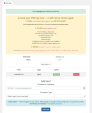
zabbix_agentd.conf and a unique 256-bit PSK encryption key, shown once.The module uses a super-admin API token, so no manual account creation is needed. Each WHMCS service maps to one isolated environment in Zabbix.
Order placed (CreateAccount):
hostgroup.create — whmcs_client_{userid}_svc_{serviceid}
usergroup.create — usrgrp_whmcs_client_{userid}_svc_{serviceid}, with read-write access scoped to that host group only.user.create — whmcs_{userid}_{serviceid}, assigned the pre-created role from Module Settings.Order suspended (SuspendAccount):
whmcs_disabled group, which disables login.Order unsuspended (UnsuspendAccount):
Order terminated (TerminateAccount):
host.delete — all hosts in the group.usergroup.delete — the user group.user.delete — the user.hostgroup.delete — the host group.Password changed (ChangePassword):
user.update — the new password is applied.Each client can only see and interact with hosts in their own host group. This is enforced by Zabbix itself through the user group permissions, not by the module. Even if a client uses the Zabbix UI directly, they cannot access hosts belonging to other clients.
When a client adds a host with type Zabbix Agent:
random_bytes(32) and a unique PSK identity.zabbix_agentd.conf and the raw PSK key, shown once only.The PSK key is never stored anywhere. If it is lost, the client removes the host and adds it again to get a new key.
The module assigns whatever Zabbix role you specify in the Module Settings of the product. You are free to configure the role however you like: grant read-only access, allow template editing, restrict certain views, or anything else Zabbix roles support. The module does not enforce any specific role configuration, which gives you full flexibility to tailor the client experience to your use case.
curl, json
Upload the modules/ directory to the root of your WHMCS installation, merging with the existing structure. The layout is:
modules/
servers/
zabbix/
zabbix.php
ZabbixAPI.php
lang/
english.php
russian.php
ukrainian.php
The token must belong to a Super Admin user. Tokens from regular Admin or User accounts cannot create host groups or manage users.
Go to Administration, then User roles, then Create user role. This role is assigned to every client on this product. You can configure it however suits your service; the module has no requirements. A minimal starting point:
Save the role and note its name. You will enter it in Module Settings.
Go to Setup, then Servers, then Add New Server:
Zabbix Production
zabbix.example.com
Zabbix Monitoring
Click Save Changes, then Test Connection. You should see a success message.
Test Connection performs two checks. First it calls apiinfo.version without auth to verify the server is reachable, then it makes an authenticated API call to verify the token is valid.
Go to Setup, then Server Groups, then Create New Group, and add the server from step 4.
Go to Setup, then Products/Services, then Create New Product:
Zabbix Monitoring and Server Group to the group from step 5.Set per-product in Module Settings. Each product can have different values.
5. Maximum number of hosts the client can add.client_basic. Name of the Zabbix role to assign. It must exist in Zabbix beforehand.client_basic
client_advanced
client_pro
Each role can have different API permissions, visible sections, and UI access, all configured in Zabbix.
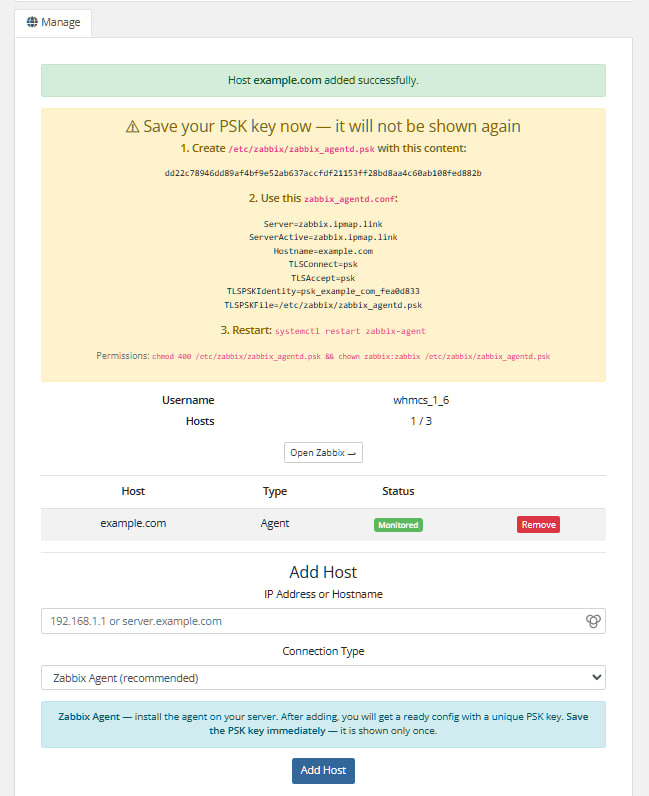
When a client views their active service they see:
2 / 5.A table of all added hosts showing name, connection type and monitoring status. Each row has a Remove button.
The client fills in:
Zabbix Agent — recommended; requires the agent installed on the target server.SNMP — for network devices; uses port 161.ICMP Ping — simplest; no agent required, just ping.When the connection type is Zabbix Agent, the client sees a one-time block.
1. PSK file, saved as /etc/zabbix/zabbix_agentd.psk. It contains a single line: 64 hex characters, for example a3f1c8....
2. Agent config, a ready-to-use zabbix_agentd.conf with these directives:
Server=zabbix.example.com
ServerActive=zabbix.example.com
Hostname=client-server.example.com
TLSConnect=psk
TLSAccept=psk
TLSPSKIdentity=psk_client-server_a1b2c3d4
TLSPSKFile=/etc/zabbix/zabbix_agentd.psk
3. Permissions and restart, run on the target server:
chmod 400 /etc/zabbix/zabbix_agentd.psk
chown zabbix:zabbix /etc/zabbix/zabbix_agentd.psk
systemctl restart zabbix-agent
The PSK key is shown only once and is never stored. If the client loses it, they remove the host and add it again.
Language files are in modules/servers/zabbix/lang/. WHMCS automatically loads the file matching the system language, set under Setup, General Settings, Localisation. It falls back to english.php if not found.
To add a new language, copy lang/english.php to lang/<language>.php (lowercase, matching the WHMCS language name) and translate the values.
CURLOPT_SSL_VERIFYPEER is true and CURLOPT_SSL_VERIFYHOST is 2.CURLOPT_FOLLOWLOCATION is false, so redirects are not followed.hash_equals().preg_replace before use in a file path.random_bytes(32), cryptographically secure, and never stored.Test Connection fails
CreateAccount fails with a role-not-found error
Suspend fails
whmcs_disabled usergroup on first suspend. Make sure the API token has permission to create user groups.Client sees a host-group-not-found message
CSRF token error in client portal
modules/servers/zabbix/
zabbix.php — WHMCS module hooks (MetaData, ConfigOptions, lifecycle functions)ZabbixAPI.php — Zabbix JSON-RPC API clientlang/
english.php
russian.php
ukrainian.php
Be the first to review Zabbix.
The best place to start if you need help with a specific product is to contact the developer. All WHMCS Marketplace developers have both a website and support URL listed.
First version


Resell VPS & Cloud Dedicated Products from Liquid Web

Automate the sale of VPS servers & give your clients the ability to completely manage their VPS server inside of WHMCS, using the industry leading SolusVM control panel.