WHMCS Analytics

WHMCS Analytics

Developed By UnderHost.com

Compatible with WHMCS v9.0

WHMCS Analytics

Google Analytics 4 and Search Console, right inside your WHMCS admin.

Stop tab-hopping between WHMCS, Google Analytics, and Search Console. WHMCS Analytics puts your website's traffic and SEO data where you actually work - the WHMCS admin dashboard. It installs like any addon module and runs on a stock WHMCS install with no template edits.

What you get

Live Google Analytics 4

  • Users, sessions, page views, engagement, and bounce rate at a glance
  • Breakdowns by page, country, browser, language, OS, device, screen resolution, and traffic source
  • A world-map heatmap of your visitors by country
  • Fast, clean charts bundled locally — no external CDNs

Google Search Console

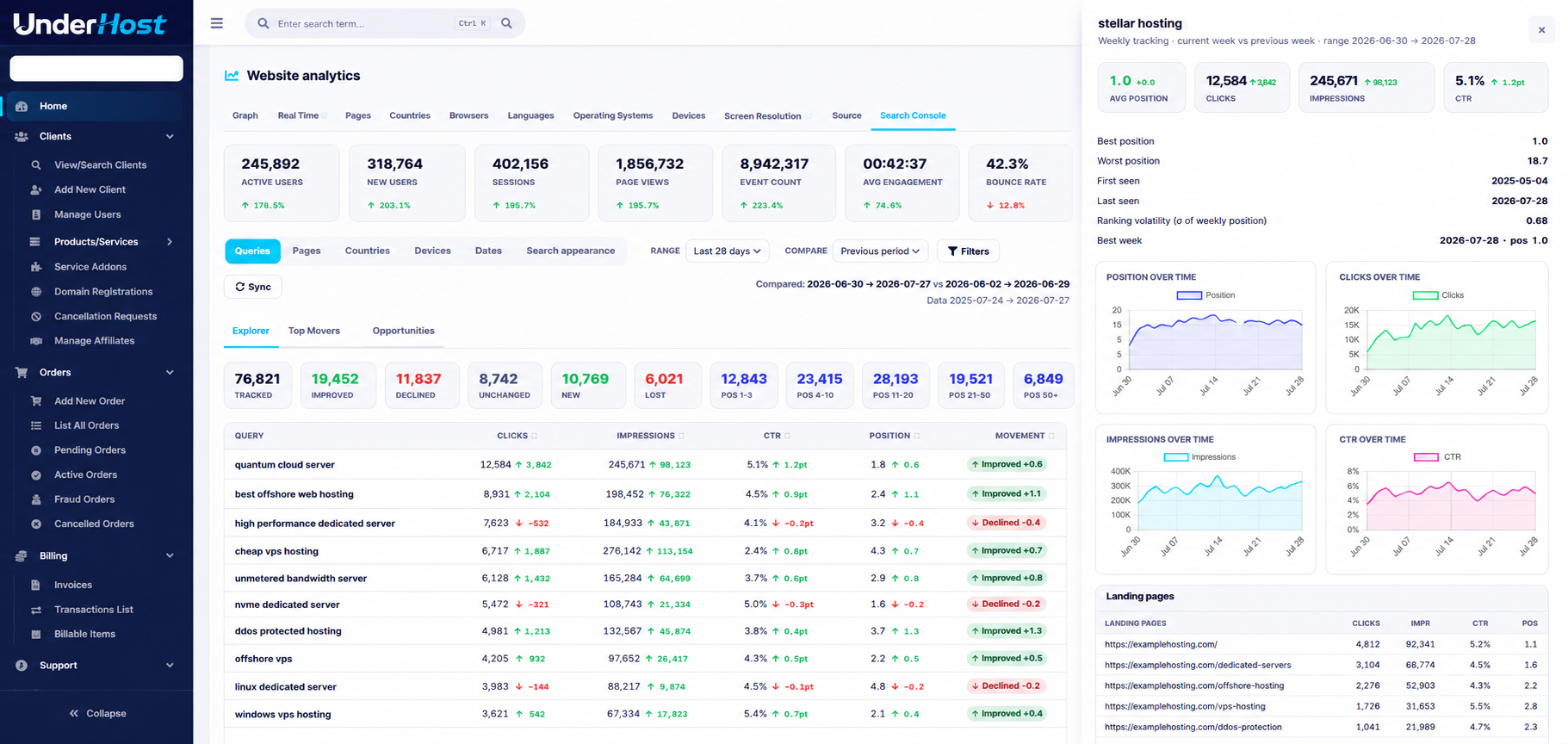
  • Query and page performance: clicks, impressions, CTR, and average position
  • Weekly keyword position tracking with movement badges (improved, declined, new, lost)
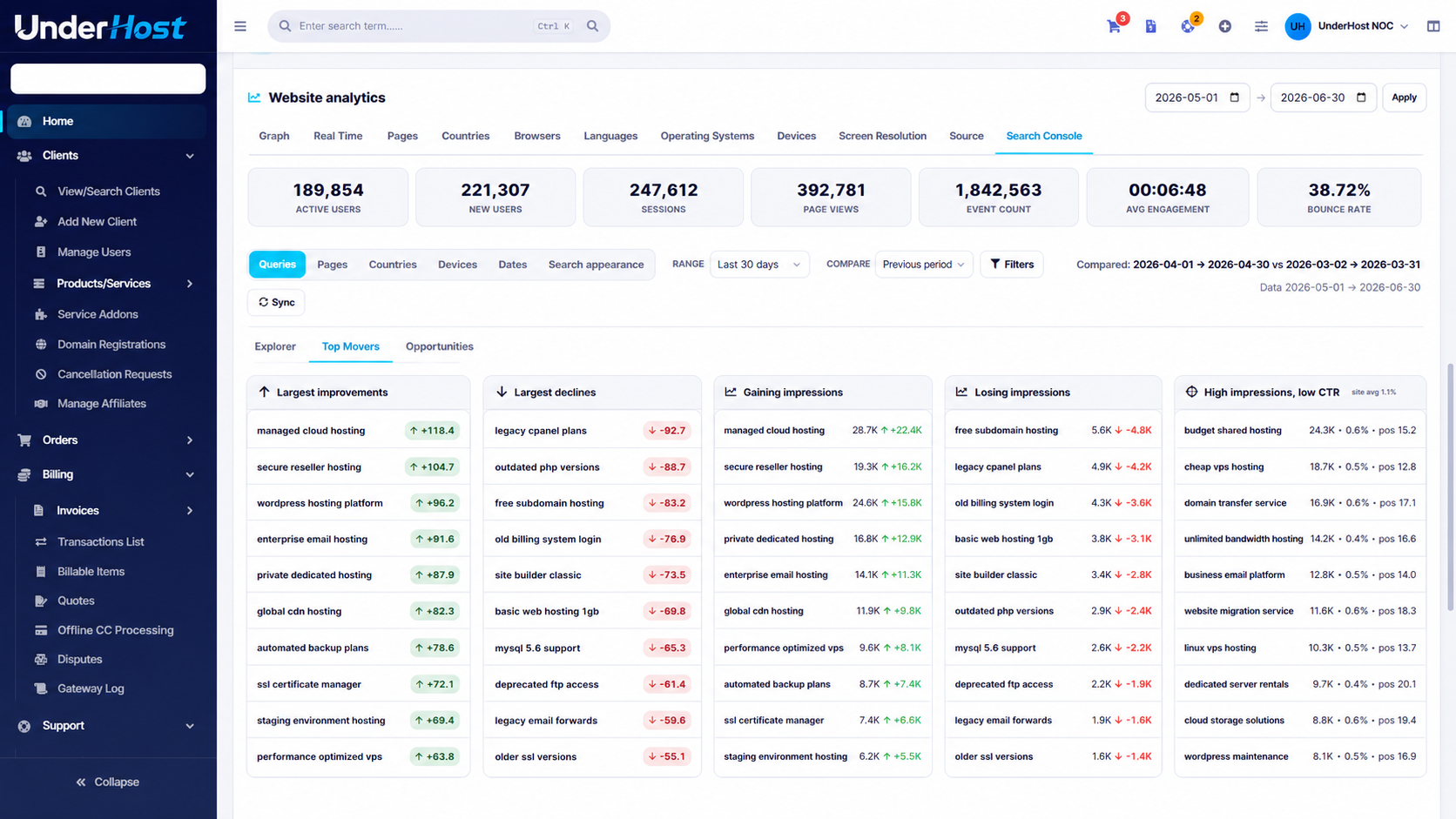
  • Top Movers and automatic SEO Opportunities (CTR gaps, page-one chances, declining keywords)
  • Per-keyword history: position, clicks, impressions, and CTR over time

AI SEO Advisor (optional — bring your own key)

  • Turns your GA4 and Search Console data into prioritized, specific recommendations
  • Works with OpenAI, Google Gemini, Anthropic (Claude), or DeepSeek
  • Privacy-first: an aggregate snapshot is sent only when you click Get advice

Only aggregate metrics (top queries, pages, countries, and KPIs) are ever sent - never visitor personal data - and nothing leaves your server until you ask for advice.

Flexible history storage

Store Search Console history in the backend you choose:

  • Local WHMCS database - the default, with zero setup
  • External MySQL
  • libSQL / Turso (remote)

Why admins love it

  • Everything in one place - no more jumping between three dashboards
  • No theme edits - appears as a dashboard widget and a dedicated addon page
  • Guided setup - a built-in Setup Guide walks you through Google OAuth step by step
  • Private and self-hosted - talks directly to Google's APIs; your data stays yours
  • Full source code, no encryption - github: https://github.com/UnderHost/WHMCS-Analytics
  • FREE means FREE - no license fees, subscriptions, temporary promotions, or previously included features becoming paid add-ons later ;) Looking at you, Lara.

Requirements

  • WHMCS 8.x/9.x and PHP 8.1+ with cURL enabled
  • A Google Analytics 4 property and a free Google Cloud OAuth client
  • For the MySQL storage options: MySQL 8.0+ or MariaDB 10.2+


There are no reviews yet!

Be the first to review WHMCS Analytics.

Version Compatibility


Compatible with WHMCS v9.0

Full Version Compatibility


  • Selected versions of WHMCS v9.0
        9.0.0 - 9.0.6
  • Selected versions of WHMCS v8.13
        8.13.0 - 8.13.5

System Requirements


  • WHMCS 8.x
  • PHP 8.1 or newer with the cURL extension enabled
  • pdo_mysql (present on virtually all WHMCS hosts) - required for the Local and External MySQL storage backends
  • A Google Analytics 4 property and a free Google Cloud OAuth client
  • For the MySQL storage backends: MySQL 8.0+ or MariaDB 10.2+
  • AI SEO Advisor (optional): requires your own paid API key from OpenAI, Google Gemini, Anthropic (Claude), or DeepSeek.

* Requirements listed are in addition to the WHMCS default system requirements.

Support for this product

The best place to start if you need help with a specific product is to contact the developer. All WHMCS Marketplace developers have both a website and support URL listed.

Developed By UnderHost.com

Changelog

v2.2.8 Released August 9th, 2026

Latest Version


Changelog — WHMCS Analytics

All notable changes to this project are documented here. The format is based on Keep a Changelog, and this project follows Semantic Versioning.

[Unreleased]

Changes for the next release go here. Suggested headings: Added, Changed, Fixed, Removed, Security.

[2.2.8] — 2026-08-09

Changed

  • Docs & in-app Setup guide now describe the Indexing (URL Inspection) and Alerts tabs, and the README lists them among the features.

[2.2.7] — 2026-08-09

Added

  • Alerts tab — a prioritized "what needs attention" feed. Flags weekly and 28-day traffic drops/spikes and worsening bounce rate (GA4), search-click swings, ranking drops, and page-2 opportunities (from stored Search Console history), plus revenue up/down (WHMCS). Colour-coded cards, most severe first, with an All clear state when nothing triggers. Threshold is configurable (alert_traffic_pct, default 20%).
  • Indexing tab — Search Console URL Inspection. Lists your top pages by impressions with a per-page index-status badge (Indexed / Not indexed / Excluded), a box to inspect any URL, and a detail view (coverage, robots.txt, page fetch, last crawl, Google vs declared canonical, mobile usability) with an "Open in Search Console" link. Requires the connected account to be a full user of the property.
  • Business KPIs on the Graph tab now sit in their own labelled Business row (Orders / Revenue / Signups / Conversion Rate), separated from the GA4 traffic tiles.
  • The Search Console summary is split into two rows — movement stats (Tracked / Improved / Declined / Unchanged / New / Lost) above the position buckets (Pos 1–3 … 50+).

Changed

  • Reworked the dashboard/widget header — a gradient property badge and a single segmented date-range control with an accent Apply button, replacing the stray icon and three loose inputs.

Fixed

  • Blank dashboard (regression since 2.2.0). A PHP notice was printing into the JSON response and corrupting it, which silently blanked the widget. The endpoint now suppresses inline errors (they still log) and the front-end surfaces the real message instead of hiding the card.
  • Chart.js version collision. The WHMCS admin ships its own older Chart.js; building our v4-style graph against it threw getBasePixel and flooded the console with "skip" errors (and broke the native System Overview graph). The module now loads its own Chart.js v4 in isolation and restores the host's global, so both charts work.
  • No-revenue sites no longer show an empty flat Revenue line and a phantom right-hand axis on the Graph tab — the overlay is dropped when there's nothing to plot.
  • The dashboard widget now re-flows the admin masonry grid (via a ResizeObserver) when tall content such as Search Console loads, so neighbouring widgets no longer overlap.

[2.2.0] — 2026-08-09

Added

  • WHMCS revenue overlay on the traffic graph. The Graph tab now overlays your WHMCS business data on the GA4 chart: a Revenue line on a second (right) axis, plus KPI tiles for Orders, Revenue, Signups, and Conversion Rate (orders ÷ sessions). Business figures come from your WHMCS database (orders/transactions/clients) in the default currency; the overlay degrades gracefully to the plain traffic graph if that data isn't available.
  • Service Account authentication — a second connection method alongside OAuth. Paste a Google service-account JSON key and share your GA4 property + Search Console site with the service-account email. No OAuth consent screen, no app verification, and the token never expires (so the daily Search Console sync won't break after 7 days like an unpublished OAuth app). Signs a JWT (RS256) and exchanges it for an access token — no extra PHP dependencies. Choose the method under Settings & connection; both paths feed the same dashboard.

Changed

  • The OAuth Client ID/Secret are no longer required when using Service Account auth (relaxed the credential gates in the AJAX endpoint, widget, cron, and daily hook). The setup guide now documents both connection methods.

[2.0.2] — 2026-08-09

Fixed

  • AI SEO Advisor was cut off mid-answer. The output-token cap was too low — Gemini "flash" models spend part of the budget on internal thinking, which truncated the visible reply (and left broken Markdown). Raised the ceilings: Gemini maxOutputTokens 1300 → 8192, and OpenAI/Anthropic/DeepSeek max_tokens 1300 → 2500.

Changed

  • Richer advisor output. The prompt now asks for 3–6 specific bullets per section (citing real queries/pages/numbers), ~400–800 words, starting directly at the first heading — so recommendations are fuller and more concrete.

[2.0.1] — 2026-08-08 — public GitHub release

Added

  • AI SEO Advisor — a bring-your-own-key LLM tab (OpenAI, Google Gemini, Anthropic/Claude, DeepSeek) that turns a GA4 + Search Console snapshot into prioritized recommendations. Consent-gated; only aggregate metrics are sent.
  • World-map heatmaps on the GA4 Countries and Search Console country views.
  • Dedicated addon page with Dashboard / Settings / Setup guide tabs, plus an in-UI copy-the-redirect-URI helper and Google Cloud links on the Configure screen.
  • Apps & Integrations listing metadata (whmcs.json + logo.png).

Fixed

  • Admin dashboard widget now registers via the AdminHomeWidgets hook and is self-contained under modules/addons/whmcs_analytics/ (no modules/widgets/ file), resolving the widget not appearing and a class-redeclaration crash when a stale copy was left behind. Widget uses the full-width embed styling and a masonry re-layout nudge so neighbouring widgets no longer overlap.

Changed

  • Refreshed default AI model IDs to current releases; keys/models overridable.
  • Subtle "Powered by UnderHost" footer credit on the dashboard/widget; UnderHost banner on the admin settings + setup-guide screens only (never on the stats).

[1.0.0] — 2026-08-07 — first public release

Repackaged as a generic, public WHMCS addon. Works on a stock WHMCS install with no theme edits: the dashboard is available both as a WHMCS dashboard widget and on the addon's own Dashboard tab.

Added

  • Pluggable Search Console history storage with a driver abstraction (lib/Db/*, lib/Storage.php). Choose the backend in the settings:
    • Local WHMCS database (default, zero setup) — stores history in the WHMCS MySQL DB via its own isolated PDO connection (ANSI_QUOTES so the SQLite-style SQL runs unchanged); tables auto-created.
    • External MySQL — host/port/name/user/pass via PDO.
    • libSQL / Turso — remote libSQL endpoint (generalizes the old Bunny client) with URL + full/read-only tokens. A Test connection button verifies the chosen backend.
  • Setup guide tab — step-by-step in-app instructions (Google OAuth, connect, choose data, pick storage, enable the widget).
  • AI SEO Advisor (lib/AiAdvisor.php, dashboard SEO Advisor tab) — bring-your-own-key LLM (OpenAI default, Anthropic/Claude, DeepSeek) that turns a GA4 + Search Console snapshot into prioritized recommendations. Consent-gated: an aggregate snapshot (top queries/pages/countries + KPIs, no visitor PII) is sent only when an admin clicks Get advice. Provider/model/key configured in settings; advice rendered from Markdown.
  • Portable read queries: FULL OUTER JOIN replaced with a UNION-of-keys + LEFT JOIN so comparisons run on both MySQL and libSQL; the week bucket and schema/upsert DDL are dialect-specific per driver.

Changed

  • Renamed everything for public release: module slug whmcs_analytics, namespace WhmcsAnalytics, widget WhmcsAnalyticsWidget, settings table mod_whmcs_analytics, display name WHMCS Analytics. (CSS/JS class prefixes kept as-is internally.)
  • Settings screen reworked around the storage picker; the old Bunny env-var configuration (BUNNY_DB_*, bunny.config.php) and BUNNY_SETUP.md are removed in favor of in-UI configuration. See STORAGE.md.

Requirements

  • PHP 8.1+, WHMCS 8.x. For the MySQL backends: MySQL 8.0+ / MariaDB 10.2+ (CTEs).

[0.3.1] — 2026-08-07

Added

  • Dedicated addon page (whmcs_analytics.php) — the full analytics dashboard is now available directly at Addons → WHMCS Analytics, not only the admin homepage. A Dashboard / Settings tab bar at the top switches between the live dashboard and the connection/threshold settings (?view=settings). Same UI + assets as the homepage embed and the widget.

Changed

  • World-map colours (assets/geomap.js) — darker, more saturated ramp and a square-root colour scale so a single dominant country no longer washes the rest of the map out to near-white; mid-tier countries now read clearly. The legend and tooltips still display the real (un-scaled) figures.

[0.3.0] — 2026-08-07

Added — world-map heatmaps + chart polish

  • World-map heatmap for countries (assets/geomap.js, bundled assets/echarts.min.js v5.5.1 + assets/world.geo.json) — a heat-shaded, zoomable/pannable ECharts choropleth now sits above the country tables in both the GA4 Countries tab (shaded by users) and the Search Console Countries view (shaded by impressions). ECharts and the GeoJSON load lazily and only once. CpgaGeoMap.render() resolves country keys from ISO alpha-2 (GA4 countryId), ISO alpha-3 (Search Console), or English name to the map's ISO-3 keys, and adapts its palette to light/dark admin themes. The existing tables are kept intact beneath each map.

Changed

  • GA4 Countries endpoint (ajax.php) now returns a geo payload carrying both the map dataset (with ISO country codes via the countryId dimension) and the original table rows.
  • Chart polish (assets/ga.js) — GA time-series line charts get point-style legends/tooltips, thousands-separated values, and cleaner axes.

Fixed

  • Keyword-detail drawer charts (assets/gsc.js) showed undefined in their tooltips because the datasets had no label. Each chart (Position / Clicks / Impressions / CTR) now carries its metric name and a formatted tooltip.

[0.2.0] — 2026-07-25

Added — Search Console expansion + historical storage

  • Bunny Database (libSQL) integration (lib/Bunny.php) — dependency-free libSQL HTTP pipeline client over cURL. Credentials read from server env vars (BUNNY_DB_URL / BUNNY_DB_TOKEN / BUNNY_DB_READONLY_TOKEN) with a protected config/bunny.config.php fallback. Read path uses the read-only token.
  • Historical store (lib/GscStore.php) — per-dimension daily tables (query, page, country, device, search appearance) + daily totals + per-query meta (first/last seen, best/worst position) + per-site sync state. Impression- weighted average position; week-over-week and period-over-period comparisons computed at read time.
  • Daily ingestion (lib/GscSync.php, hooks.php DailyCronJob, cron/gsc_sync.php) — incremental trailing-window refresh + resumable monthly backfill (default 12 months), time-boxed. Manual Sync button on the dashboard loops until backfill completes.
  • Read API (lib/GscApi.php) — Bunny-backed endpoints: view, summary, movers, opportunities, detail, sync, status. Full sorting (incl. position/click/impression/CTR change), filtering (text, min impressions/clicks, position range, movement), and comparison handling. Keyword-detail breakdowns (pages/countries/devices for one query) fetched live from Google.
  • Search Console sub-app (assets/gsc.js, assets/gsc.css) — replaces the simple keywords table with a view switcher, filter + comparison bar, sortable movement table with accessible badges (↑/↓/–/New/Lost), summary cards, Top Movers, Opportunities, and a keyword detail drawer with four separate charts (Position over time uses a reversed axis so position 1 is at the top).
  • Module settings: Bunny status + stored-coverage display and configurable tracking/opportunity thresholds (history window, movement threshold, CTR / page-one / declining thresholds).
  • Google.php: searchAnalyticsAll() paging helper (startRow paging) for full-range ingestion.
  • Docs: BUNNY_SETUP.md, SEARCH_CONSOLE.md.

Security

  • The full-access Bunny token is used only by the sync/cron writer and the dashboard Sync button; all dashboard reads use the read-only token. Data endpoints require an authenticated WHMCS admin session. Only aggregate Search Console metrics are stored (no personal data).

[0.1.0] — 2026-07-24

  • Initial release: GA4 OAuth connection, property/site pickers, dashboard widget with graph + KPI tiles + tabs (Real Time, Pages, Countries, Browsers, Languages, OS, Devices, Screen Resolution, Source, Search Console).


Previous Versions


v2.0.2 Released August 9th, 2026

View/hide detailed changelog

Changelog — WHMCS Analytics

All notable changes to this project are documented here. The format is based on Keep a Changelog, and this project follows Semantic Versioning.

[Unreleased]

Changes for the next release go here. Suggested headings: Added, Changed, Fixed, Removed, Security.

[2.0.2] — 2026-08-09

Fixed

  • AI SEO Advisor was cut off mid-answer. The output-token cap was too low — Gemini "flash" models spend part of the budget on internal thinking, which truncated the visible reply (and left broken Markdown). Raised the ceilings: Gemini maxOutputTokens 1300 → 8192, and OpenAI/Anthropic/DeepSeek max_tokens 1300 → 2500.

Changed

  • Richer advisor output. The prompt now asks for 3–6 specific bullets per section (citing real queries/pages/numbers), ~400–800 words, starting directly at the first heading — so recommendations are fuller and more concrete.

[2.0.1] — 2026-08-08 — public GitHub release

Added

  • AI SEO Advisor — a bring-your-own-key LLM tab (OpenAI, Google Gemini, Anthropic/Claude, DeepSeek) that turns a GA4 + Search Console snapshot into prioritized recommendations. Consent-gated; only aggregate metrics are sent.
  • World-map heatmaps on the GA4 Countries and Search Console country views.
  • Dedicated addon page with Dashboard / Settings / Setup guide tabs, plus an in-UI copy-the-redirect-URI helper and Google Cloud links on the Configure screen.
  • Apps & Integrations listing metadata (whmcs.json + logo.png).

Fixed

  • Admin dashboard widget now registers via the AdminHomeWidgets hook and is self-contained under modules/addons/whmcs_analytics/ (no modules/widgets/ file), resolving the widget not appearing and a class-redeclaration crash when a stale copy was left behind. Widget uses the full-width embed styling and a masonry re-layout nudge so neighbouring widgets no longer overlap.

Changed

  • Refreshed default AI model IDs to current releases; keys/models overridable.
  • Subtle "Powered by UnderHost" footer credit on the dashboard/widget; UnderHost banner on the admin settings + setup-guide screens only (never on the stats).

[1.0.0] — 2026-08-07 — first public release

Repackaged as a generic, public WHMCS addon. Works on a stock WHMCS install with no theme edits: the dashboard is available both as a WHMCS dashboard widget and on the addon's own Dashboard tab.

Added

  • Pluggable Search Console history storage with a driver abstraction (lib/Db/*, lib/Storage.php). Choose the backend in the settings:
    • Local WHMCS database (default, zero setup) — stores history in the WHMCS MySQL DB via its own isolated PDO connection (ANSI_QUOTES so the SQLite-style SQL runs unchanged); tables auto-created.
    • External MySQL — host/port/name/user/pass via PDO.
    • libSQL / Turso — remote libSQL endpoint (generalizes the old Bunny client) with URL + full/read-only tokens. A Test connection button verifies the chosen backend.
  • Setup guide tab — step-by-step in-app instructions (Google OAuth, connect, choose data, pick storage, enable the widget).
  • AI SEO Advisor (lib/AiAdvisor.php, dashboard SEO Advisor tab) — bring-your-own-key LLM (OpenAI default, Anthropic/Claude, DeepSeek) that turns a GA4 + Search Console snapshot into prioritized recommendations. Consent-gated: an aggregate snapshot (top queries/pages/countries + KPIs, no visitor PII) is sent only when an admin clicks Get advice. Provider/model/key configured in settings; advice rendered from Markdown.
  • Portable read queries: FULL OUTER JOIN replaced with a UNION-of-keys + LEFT JOIN so comparisons run on both MySQL and libSQL; the week bucket and schema/upsert DDL are dialect-specific per driver.

Changed

  • Renamed everything for public release: module slug whmcs_analytics, namespace WhmcsAnalytics, widget WhmcsAnalyticsWidget, settings table mod_whmcs_analytics, display name WHMCS Analytics. (CSS/JS class prefixes kept as-is internally.)
  • Settings screen reworked around the storage picker; the old Bunny env-var configuration (BUNNY_DB_*, bunny.config.php) and BUNNY_SETUP.md are removed in favor of in-UI configuration. See STORAGE.md.

Requirements

  • PHP 8.1+, WHMCS 8.x. For the MySQL backends: MySQL 8.0+ / MariaDB 10.2+ (CTEs).

[0.3.1] — 2026-08-07

Added

  • Dedicated addon page (whmcs_analytics.php) — the full analytics dashboard is now available directly at Addons → WHMCS Analytics, not only the admin homepage. A Dashboard / Settings tab bar at the top switches between the live dashboard and the connection/threshold settings (?view=settings). Same UI + assets as the homepage embed and the widget.

Changed

  • World-map colours (assets/geomap.js) — darker, more saturated ramp and a square-root colour scale so a single dominant country no longer washes the rest of the map out to near-white; mid-tier countries now read clearly. The legend and tooltips still display the real (un-scaled) figures.

[0.3.0] — 2026-08-07

Added — world-map heatmaps + chart polish

  • World-map heatmap for countries (assets/geomap.js, bundled assets/echarts.min.js v5.5.1 + assets/world.geo.json) — a heat-shaded, zoomable/pannable ECharts choropleth now sits above the country tables in both the GA4 Countries tab (shaded by users) and the Search Console Countries view (shaded by impressions). ECharts and the GeoJSON load lazily and only once. CpgaGeoMap.render() resolves country keys from ISO alpha-2 (GA4 countryId), ISO alpha-3 (Search Console), or English name to the map's ISO-3 keys, and adapts its palette to light/dark admin themes. The existing tables are kept intact beneath each map.

Changed

  • GA4 Countries endpoint (ajax.php) now returns a geo payload carrying both the map dataset (with ISO country codes via the countryId dimension) and the original table rows.
  • Chart polish (assets/ga.js) — GA time-series line charts get point-style legends/tooltips, thousands-separated values, and cleaner axes.

Fixed

  • Keyword-detail drawer charts (assets/gsc.js) showed undefined in their tooltips because the datasets had no label. Each chart (Position / Clicks / Impressions / CTR) now carries its metric name and a formatted tooltip.

[0.2.0] — 2026-07-25

Added — Search Console expansion + historical storage

  • Bunny Database (libSQL) integration (lib/Bunny.php) — dependency-free libSQL HTTP pipeline client over cURL. Credentials read from server env vars (BUNNY_DB_URL / BUNNY_DB_TOKEN / BUNNY_DB_READONLY_TOKEN) with a protected config/bunny.config.php fallback. Read path uses the read-only token.
  • Historical store (lib/GscStore.php) — per-dimension daily tables (query, page, country, device, search appearance) + daily totals + per-query meta (first/last seen, best/worst position) + per-site sync state. Impression- weighted average position; week-over-week and period-over-period comparisons computed at read time.
  • Daily ingestion (lib/GscSync.php, hooks.php DailyCronJob, cron/gsc_sync.php) — incremental trailing-window refresh + resumable monthly backfill (default 12 months), time-boxed. Manual Sync button on the dashboard loops until backfill completes.
  • Read API (lib/GscApi.php) — Bunny-backed endpoints: view, summary, movers, opportunities, detail, sync, status. Full sorting (incl. position/click/impression/CTR change), filtering (text, min impressions/clicks, position range, movement), and comparison handling. Keyword-detail breakdowns (pages/countries/devices for one query) fetched live from Google.
  • Search Console sub-app (assets/gsc.js, assets/gsc.css) — replaces the simple keywords table with a view switcher, filter + comparison bar, sortable movement table with accessible badges (↑/↓/–/New/Lost), summary cards, Top Movers, Opportunities, and a keyword detail drawer with four separate charts (Position over time uses a reversed axis so position 1 is at the top).
  • Module settings: Bunny status + stored-coverage display and configurable tracking/opportunity thresholds (history window, movement threshold, CTR / page-one / declining thresholds).
  • Google.php: searchAnalyticsAll() paging helper (startRow paging) for full-range ingestion.
  • Docs: BUNNY_SETUP.md, SEARCH_CONSOLE.md.

Security

  • The full-access Bunny token is used only by the sync/cron writer and the dashboard Sync button; all dashboard reads use the read-only token. Data endpoints require an authenticated WHMCS admin session. Only aggregate Search Console metrics are stored (no personal data).

[0.1.0] — 2026-07-24

  • Initial release: GA4 OAuth connection, property/site pickers, dashboard widget with graph + KPI tiles + tabs (Real Time, Pages, Countries, Browsers, Languages, OS, Devices, Screen Resolution, Source, Search Console).


v2.0.1 Released August 8th, 2026

View/hide detailed changelog

All notable changes to this project are documented here. The format is based on Keep a Changelog, and this project follows Semantic Versioning.

[Unreleased]

Changes for the next release go here. Suggested headings: Added, Changed, Fixed, Removed, Security.

[2.0.1] — 2026-08-08 — public GitHub release

Added

  • AI SEO Advisor — a bring-your-own-key LLM tab (OpenAI, Google Gemini, Anthropic/Claude, DeepSeek) that turns a GA4 + Search Console snapshot into prioritized recommendations. Consent-gated; only aggregate metrics are sent.
  • World-map heatmaps on the GA4 Countries and Search Console country views.
  • Dedicated addon page with Dashboard / Settings / Setup guide tabs, plus an in-UI copy-the-redirect-URI helper and Google Cloud links on the Configure screen.
  • Apps & Integrations listing metadata (whmcs.json + logo.png).

Fixed

  • Admin dashboard widget now registers via the AdminHomeWidgets hook and is self-contained under modules/addons/whmcs_analytics/ (no modules/widgets/ file), resolving the widget not appearing and a class-redeclaration crash when a stale copy was left behind. Widget uses the full-width embed styling and a masonry re-layout nudge so neighbouring widgets no longer overlap.

Changed

  • Refreshed default AI model IDs to current releases; keys/models overridable.

[1.0.0] — 2026-08-07 — first public release

Repackaged as a generic, public WHMCS addon. Works on a stock WHMCS install with no theme edits: the dashboard is available both as a WHMCS dashboard widget and on the addon's own Dashboard tab.

Added

  • Pluggable Search Console history storage with a driver abstraction (lib/Db/*, lib/Storage.php). Choose the backend in the settings:
    • Local WHMCS database (default, zero setup) — stores history in the WHMCS MySQL DB via its own isolated PDO connection (ANSI_QUOTES so the SQLite-style SQL runs unchanged); tables auto-created.
    • External MySQL — host/port/name/user/pass via PDO.
    • libSQL / Turso — remote libSQL endpoint (generalizes the old Bunny client) with URL + full/read-only tokens. A Test connection button verifies the chosen backend.
  • Setup guide tab — step-by-step in-app instructions (Google OAuth, connect, choose data, pick storage, enable the widget).
  • AI SEO Advisor (lib/AiAdvisor.php, dashboard SEO Advisor tab) — bring-your-own-key LLM (OpenAI default, Anthropic/Claude, DeepSeek) that turns a GA4 + Search Console snapshot into prioritized recommendations. Consent-gated: an aggregate snapshot (top queries/pages/countries + KPIs, no visitor PII) is sent only when an admin clicks Get advice. Provider/model/key configured in settings; advice rendered from Markdown.
  • Portable read queries: FULL OUTER JOIN replaced with a UNION-of-keys + LEFT JOIN so comparisons run on both MySQL and libSQL; the week bucket and schema/upsert DDL are dialect-specific per driver.

Changed

  • Renamed everything for public release: module slug whmcs_analytics, namespace WhmcsAnalytics, widget WhmcsAnalyticsWidget, settings table mod_whmcs_analytics, display name WHMCS Analytics. (CSS/JS class prefixes kept as-is internally.)
  • Settings screen reworked around the storage picker; the old Bunny env-var configuration (BUNNY_DB_*, bunny.config.php) and BUNNY_SETUP.md are removed in favor of in-UI configuration. See STORAGE.md.

Requirements

  • PHP 8.1+, WHMCS 8.x. For the MySQL backends: MySQL 8.0+ / MariaDB 10.2+ (CTEs).

[0.3.1] — 2026-08-07

Added

  • Dedicated addon page (whmcs_analytics.php) — the full analytics dashboard is now available directly at Addons → WHMCS Analytics, not only the admin homepage. A Dashboard / Settings tab bar at the top switches between the live dashboard and the connection/threshold settings (?view=settings). Same UI + assets as the homepage embed and the widget.

Changed

  • World-map colours (assets/geomap.js) — darker, more saturated ramp and a square-root colour scale so a single dominant country no longer washes the rest of the map out to near-white; mid-tier countries now read clearly. The legend and tooltips still display the real (un-scaled) figures.

[0.3.0] — 2026-08-07

Added — world-map heatmaps + chart polish

  • World-map heatmap for countries (assets/geomap.js, bundled assets/echarts.min.js v5.5.1 + assets/world.geo.json) — a heat-shaded, zoomable/pannable ECharts choropleth now sits above the country tables in both the GA4 Countries tab (shaded by users) and the Search Console Countries view (shaded by impressions). ECharts and the GeoJSON load lazily and only once. CpgaGeoMap.render() resolves country keys from ISO alpha-2 (GA4 countryId), ISO alpha-3 (Search Console), or English name to the map's ISO-3 keys, and adapts its palette to light/dark admin themes. The existing tables are kept intact beneath each map.

Changed

  • GA4 Countries endpoint (ajax.php) now returns a geo payload carrying both the map dataset (with ISO country codes via the countryId dimension) and the original table rows.
  • Chart polish (assets/ga.js) — GA time-series line charts get point-style legends/tooltips, thousands-separated values, and cleaner axes.

Fixed

  • Keyword-detail drawer charts (assets/gsc.js) showed undefined in their tooltips because the datasets had no label. Each chart (Position / Clicks / Impressions / CTR) now carries its metric name and a formatted tooltip.

[0.2.0] — 2026-07-25

Added — Search Console expansion + historical storage

  • Bunny Database (libSQL) integration (lib/Bunny.php) — dependency-free libSQL HTTP pipeline client over cURL. Credentials read from server env vars (BUNNY_DB_URL / BUNNY_DB_TOKEN / BUNNY_DB_READONLY_TOKEN) with a protected config/bunny.config.php fallback. Read path uses the read-only token.
  • Historical store (lib/GscStore.php) — per-dimension daily tables (query, page, country, device, search appearance) + daily totals + per-query meta (first/last seen, best/worst position) + per-site sync state. Impression- weighted average position; week-over-week and period-over-period comparisons computed at read time.
  • Daily ingestion (lib/GscSync.php, hooks.php DailyCronJob, cron/gsc_sync.php) — incremental trailing-window refresh + resumable monthly backfill (default 12 months), time-boxed. Manual Sync button on the dashboard loops until backfill completes.
  • Read API (lib/GscApi.php) — Bunny-backed endpoints: view, summary, movers, opportunities, detail, sync, status. Full sorting (incl. position/click/impression/CTR change), filtering (text, min impressions/clicks, position range, movement), and comparison handling. Keyword-detail breakdowns (pages/countries/devices for one query) fetched live from Google.
  • Search Console sub-app (assets/gsc.js, assets/gsc.css) — replaces the simple keywords table with a view switcher, filter + comparison bar, sortable movement table with accessible badges (↑/↓/–/New/Lost), summary cards, Top Movers, Opportunities, and a keyword detail drawer with four separate charts (Position over time uses a reversed axis so position 1 is at the top).
  • Module settings: Bunny status + stored-coverage display and configurable tracking/opportunity thresholds (history window, movement threshold, CTR / page-one / declining thresholds).
  • Google.php: searchAnalyticsAll() paging helper (startRow paging) for full-range ingestion.
  • Docs: BUNNY_SETUP.md, SEARCH_CONSOLE.md.

Security

  • The full-access Bunny token is used only by the sync/cron writer and the dashboard Sync button; all dashboard reads use the read-only token. Data endpoints require an authenticated WHMCS admin session. Only aggregate Search Console metrics are stored (no personal data).

[0.1.0] — 2026-07-24

  • Initial release: GA4 OAuth connection, property/site pickers, dashboard widget with graph + KPI tiles + tabs (Real Time, Pages, Countries, Browsers, Languages, OS, Devices, Screen Resolution, Source, Search Console).


See also

Google Tag Manager & GA 4 Enhanced Ecommerce for WHMCS

Send WHMCS GA 4 Enhanced Ecommerce Data Layer to any tag with GTM WHMCS

Commercial
Report Generator For WHMCS

Build dynamic reports, schedule their creation and email the results to your staff members.
Commercial
Sales By Staff Report

Report to show the Sales per Staff member per month.

Free
Intercom Addon Module

Intercom Addon Module integrates Intercom.io customer platform into WHMCS.

Free
MetricsCube Business Analytics For WHMCS

Access MetricsCube business reports with user tracking and data comparison features.

Free