ServersCTL — cPanel Replication, Disaster Recovery & WHMCS Automation
Turn disaster recovery into a service you can sell directly through WHMCS.
ServersCTL lets hosting providers offer branded cPanel account replication, standby recovery and automated DNS cutover directly from their existing WHMCS installation.
When a customer purchases protection, ServersCTL can automatically identify the correct cPanel account, provision a recovery destination, create and verify protected copies, monitor recovery readiness, and provide the customer with a branded continuity console inside WHMCS.
No separate customer portal. No manual provisioning workflow. No custom disaster-recovery platform to build.
Sell. Provision. Protect. Recover.
-
Sell — Add account protection as a recurring WHMCS service.
-
Provision — Automatically activate protection when a customer orders.
-
Protect — Maintain verified copies on designated recovery infrastructure.
-
Recover — Test recovery and move customer traffic to the recovery server when required.
ServersCTL provides the operational platform behind the service, while WHMCS handles the customer relationship, ordering and billing.
More Than a WHMCS Module
ServersCTL combines:
- Automated WHMCS provisioning
- Agent-powered server management
- Encrypted cPanel account replication
- Recovery-server orchestration
- DNS and TLS automation
- Controlled cutover and failback
- Infrastructure monitoring
- Customer-facing continuity management
It provides the infrastructure and automation required to operate a managed recovery service — not simply the billing interface used to sell one.
Automated WHMCS Provisioning
ServersCTL integrates the protection lifecycle directly with WHMCS.
When a customer purchases an eligible replication or continuity add-on, ServersCTL can:
- Identify the associated hosting service and cPanel account.
- Select an available recovery destination.
- Provision account protection.
- Create the initial protected copy.
- Restore and prepare the account on the recovery server.
- Verify the replication result.
- Monitor ongoing recovery readiness.
- Present the service to the customer inside WHMCS.
Additional capabilities include:
- Configurable WHMCS add-ons
- Automatic activation after ordering
- Hosting-service and domain binding
- Automatic recovery-destination assignment
- Scheduled replication
- Current replication state inside WHMCS
- Lifecycle reconciliation for interrupted or delayed operations
- Automatic resource cleanup when protection is cancelled
- Hosting-provider branding throughout the customer experience
WHMCS Routing Awareness
During a recovery event, ServersCTL can automatically update the WHMCS service assignment so that WHMCS remains aligned with the server currently handling the customer's service.
When production is restored, ServersCTL can return the WHMCS service assignment to the original production server as part of the failback workflow.
Replication & Recovery
Deliver managed cPanel account continuity without building your own disaster-recovery platform.
ServersCTL supports:
- Encrypted cPanel account replication
- Direct server-to-server transfer
- Scheduled protected copies
- Manual replication on supported plans
- Multiple recovery destinations
- Verified package, transfer, restore and integrity stages
- Fresh replication before live cutover
- Recovery-server website validation
- TLS and redirect validation
- DNS readiness checks
- Controlled live recovery testing
- Automated DNS cutover (cPanel DNS Cluster or Cloudflare)
- Automated return to production
- Recovery activity and status history
A Recovery Copy You Can Actually Test
ServersCTL goes beyond simply reporting that a backup exists.
Recovery workflows can validate the destination infrastructure and restored account before production traffic is moved.
For full recovery testing, ServersCTL can create and restore a fresh protected copy, validate the recovery environment and provide the customer with the result before completing a live cutover.
Recovery Safety
Recovery operations use real infrastructure checks before traffic is moved.
ServersCTL can validate:
- The latest protected copy
- The receiving recovery server
- Account restoration status
- Website availability
- TLS and redirect behaviour
- The configured DNS provider
- WHMCS server routing
- The selected production or recovery destination
This allows hosting providers to offer customers more than a backup: a managed and testable recovery path.
DNS Automation
ServersCTL can coordinate recovery routing through supported hosting-provider DNS or customer-authorised Cloudflare DNS.
Capabilities include:
- Domain-specific DNS configuration
- Encrypted credential storage
- Cloudflare token validation
- Hosting-provider managed DNS integration
- Pre-cutover credential and zone validation
- Automated recovery routing
- Automated production return
- Website, mail, webmail, FTP and cPanel record handling
- Customer-safe presentation without exposing internal credential names
During recovery, DNS can be switched from the production server to the verified recovery destination. For this to function correctly, you must run a free cPanel DNS cluster or the domain must use Cloudflare.
During failback, routing can be returned to production through the controlled recovery workflow.
The ServersCTL Agent
The lightweight ServersCTL agent is the operational layer behind the platform.
It runs on participating servers and securely performs authorised work received from the ServersCTL control plane.
The agent enables:
- Authenticated server-side job execution
- Live agent availability reporting
- Automated cPanel operations
- Direct encrypted server-to-server transfers
- Account packaging and restoration
- Replication integrity verification
- Website availability testing
- TLS and AutoSSL readiness checks
- Recovery-server preparation
- Consistent operations across multiple servers and locations
- Detailed job results for auditing and troubleshooting
Customers never receive server root credentials or direct access to the ServersCTL administrative control plane.
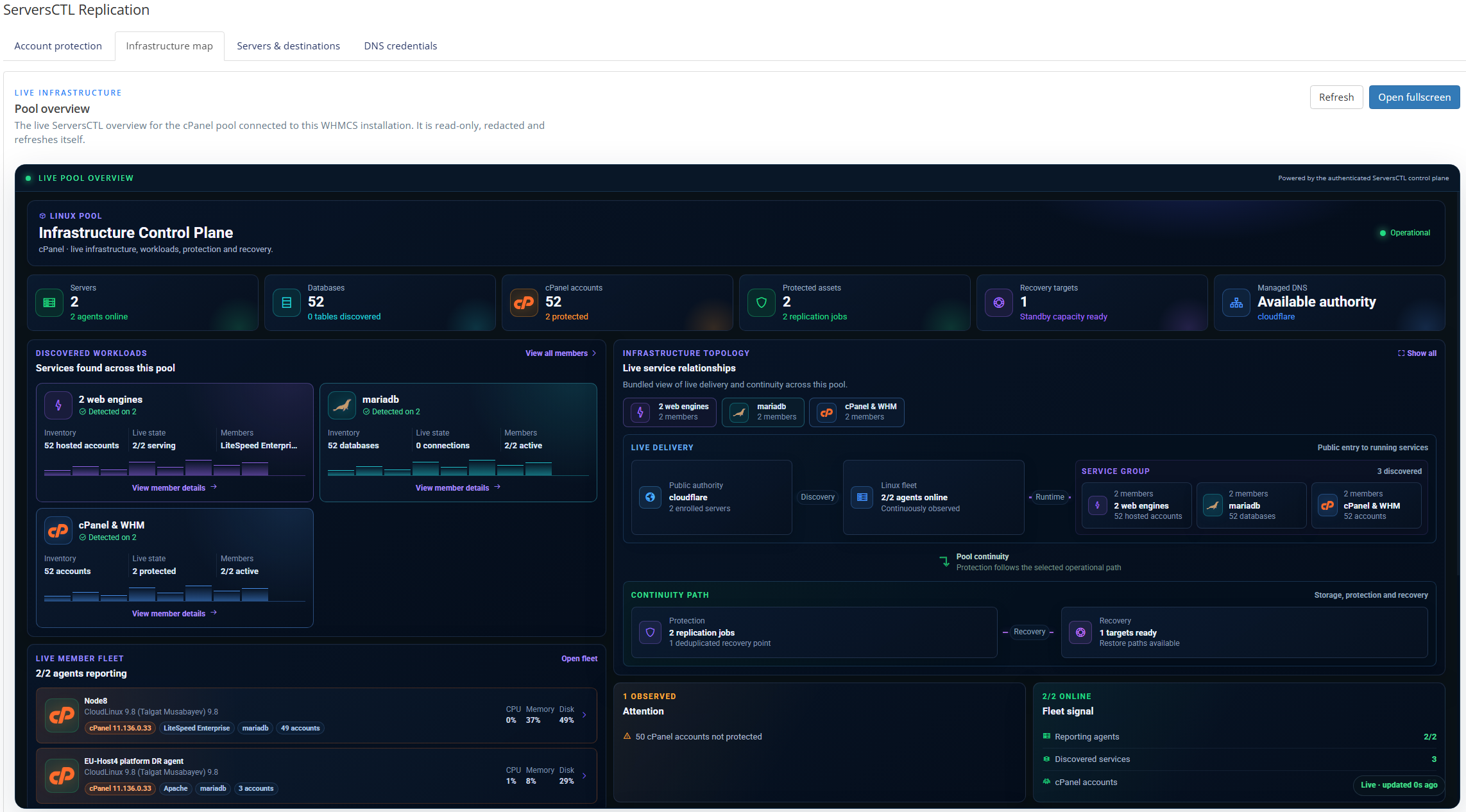
Automated Server Management
ServersCTL also reduces repetitive infrastructure work across participating production and recovery servers.
Features include:
- Secure agent-based server connectivity
- Automatic server discovery
- Live server and agent health reporting
- Centralised production and recovery-server management
- Automated cPanel account preparation
- Automated account restoration
- Recovery-target capacity management
- Scheduled replication operations
- Server-side website and TLS checks
- Operational activity history
- Infrastructure wallboards
- Automatic WHMCS server reassignment during recovery
- Automatic restoration of WHMCS routing after failback
Branded Customer Continuity Console
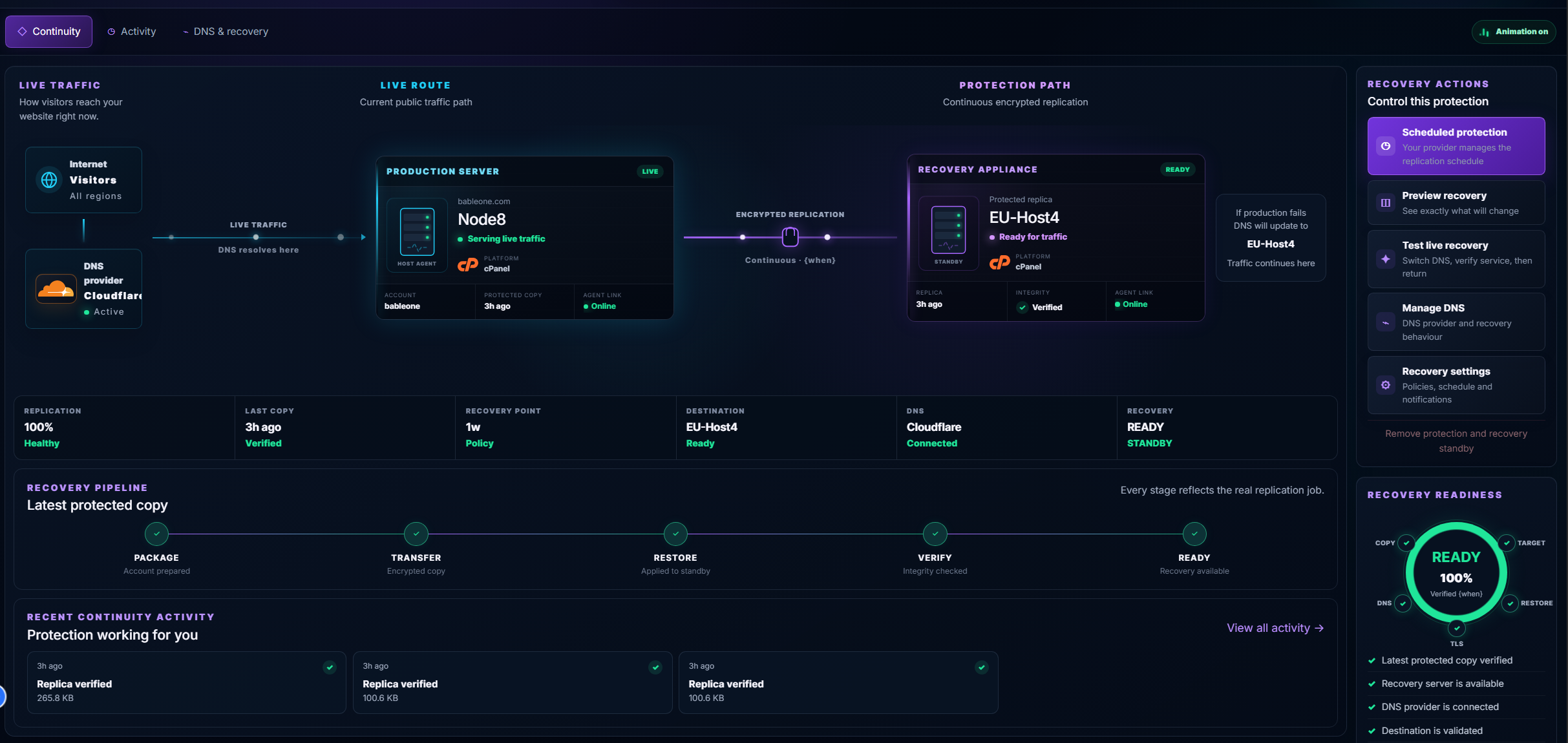
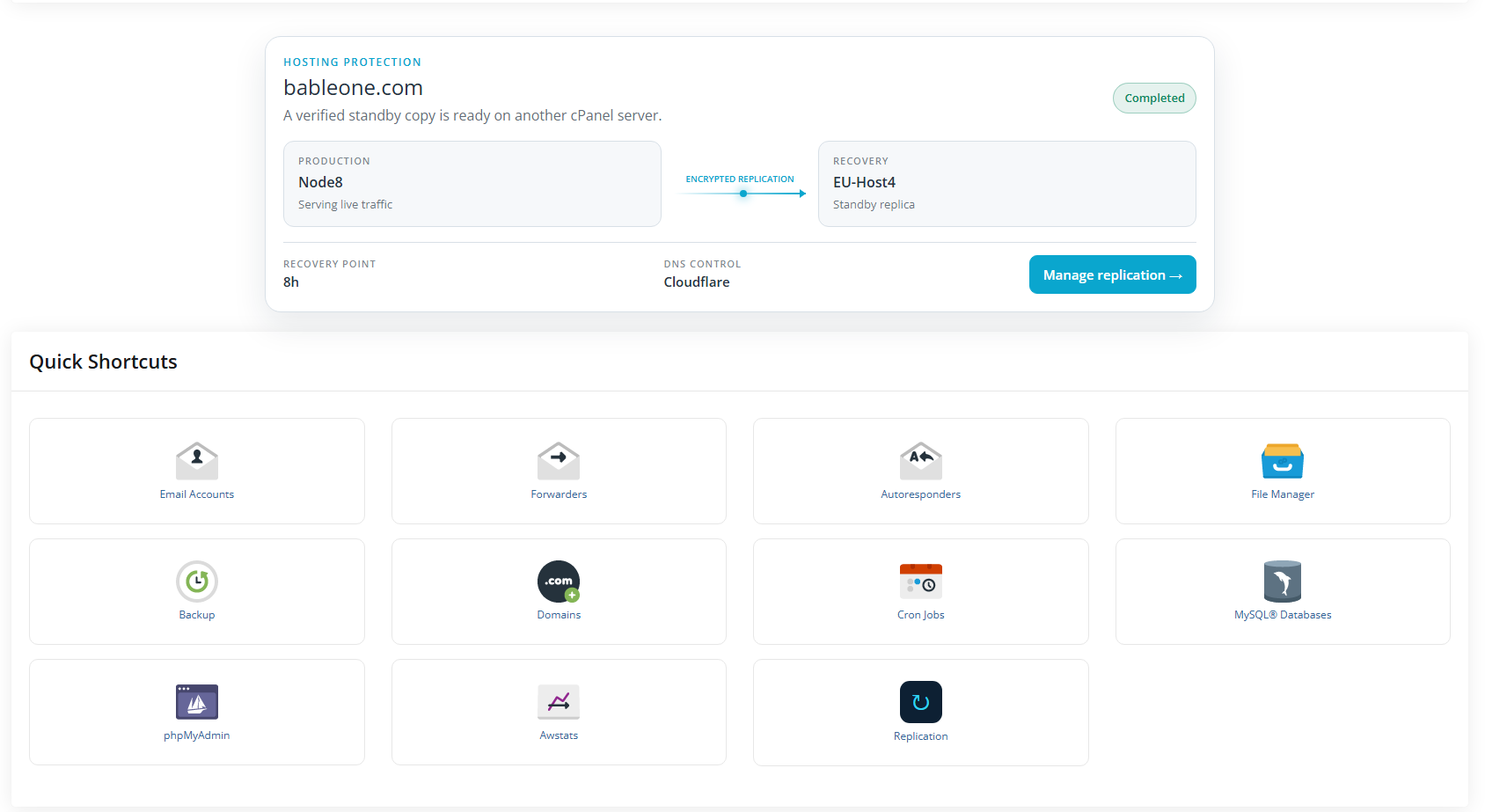
Customers manage their protection from a dedicated continuity experience inside the hosting provider's existing WHMCS client area.
They can:
- View where their account is currently running
- View their designated recovery server
- See the live production and protection paths
- Check replication health
- See when the latest protected copy was verified
- Review recent continuity activity
- Confirm recovery-server readiness
- Check DNS and TLS status
- Preview exactly what will change during recovery
- Run an authorised recovery test
- Follow replication and recovery progress
- Move traffic to the recovery server when authorised
- Return safely to production
The interface uses the hosting company's configured WHMCS identity and branding.
Internal infrastructure secrets, credential names, root access and ServersCTL administrative controls remain hidden from the customer.
Turn Recovery Into Recurring Revenue
ServersCTL enables hosting providers to package infrastructure they already operate into a managed continuity service.
Instead of selling only hosting, providers can offer an additional recurring service that protects individual customer accounts.
For example:
- Customer purchases hosting.
- Customer adds account protection.
- WHMCS bills the recurring service.
- ServersCTL provisions protection automatically.
- A recovery destination is assigned.
- Protected copies are created according to policy.
- ServersCTL continuously reports recovery readiness.
- The customer sees the service inside WHMCS.
- Recovery can be tested or activated when required.
This allows providers to scale protected accounts without scaling repetitive administration at the same rate.
Benefits for Hosting Providers
- Create recurring revenue from managed continuity services
- Turn available recovery capacity into a sellable service
- Add disaster recovery to an existing WHMCS installation
- Reduce manual provisioning and support work
- Automate routine server-management operations
- Manage distributed infrastructure from one control plane
- Standardise replication and recovery procedures
- Validate recovery before moving customer traffic
- Keep WHMCS aligned with live infrastructure
- Give customers clear recovery visibility
- Provide branded recovery services without exposing infrastructure credentials
- Scale protected accounts without building a custom DR platform
Start Free — Protect Up to 5 Customers
Free Partner access provides an entry point for smaller hosting providers and allows the complete workflow to be deployed before upgrading.
Includes:
- Up to 5 protected customers
-
1 connected WHMCS installation
- Up to 2 API keys
-
1 recovery target
- Supported scheduled replication
- Core agent connectivity
- Automated provisioning
- Server and replication monitoring
- Branded customer continuity experience
Upgrade when additional protected customers, API keys or recovery destinations are required.
Partner Starter
$49 per month
Partner Starter includes:
- Up to 30 protected customers
-
1 connected WHMCS installation
- Up to 10 API keys
- Up to 3 recovery targets
- Weekly replication
- Daily replication
- Replication every 8 hours
- Replication every 4 hours
- Hourly replication
- Manual replication
- API storage fallback
- Automated service provisioning
- Agent-powered server management
- Branded customer continuity console
- DNS and TLS validation
- Full replication-before-cutover workflows
- Automated cutover and failback
Requirements
To use ServersCTL cPanel Replication & Recovery you will need:
- A supported WHMCS installation
- At least one compatible cPanel production server
- A compatible recovery destination
- The ServersCTL agent installed on participating servers
- Appropriate DNS access for automated recovery routing
- Outbound HTTPS connectivity to ServersCTL services
Typical Workflow
- Install and configure the ServersCTL WHMCS module.
- Connect WHMCS to a ServersCTL Partner account.
- Install the ServersCTL agent on participating servers.
- Add production and recovery servers to ServersCTL.
- Configure replication products or add-ons in WHMCS.
- Allow customers to purchase account protection.
- ServersCTL provisions the protection service automatically.
- The first protected copy is created, restored and verified.
- Scheduled replication maintains the recovery copy.
- ServersCTL monitors infrastructure and recovery readiness.
- The customer can preview or test their recovery path.
- When required, ServersCTL coordinates controlled cutover and failback.
Ideal For
ServersCTL is designed for:
- Shared-hosting providers
- Managed cPanel providers
- Web-hosting resellers
- Managed service providers
- Disaster-recovery service providers
- Hosting companies operating multiple cPanel servers
- Providers with spare or dedicated recovery-server capacity
- Providers wanting to add branded continuity services to WHMCS
Summary
ServersCTL brings together WHMCS automation, secure server agents, infrastructure management, cPanel account replication, DNS control and live recovery orchestration.
It allows hosting providers to turn disaster recovery into a recurring service sold through their existing WHMCS installation.
Customers receive a simple, branded continuity experience.
Hosting providers retain control of the infrastructure, recovery capacity, policies and access.
Sell the service through WHMCS. Provision it automatically. Keep the account protected. Prove recovery works. Recover when it matters.