NXT Dash Reseller Addon for WHMCS
NXT Dash Reseller Addon for WHMCS connects WHMCS directly to your NXT and Xtream-compatible reseller panels, turning paid orders into fully provisioned streaming lines without manual panel work.
The addon handles the complete subscription lifecycle — provisioning, renewals, upgrades, downgrades, suspensions, unsuspensions and terminations — while continuously monitoring panel health, reseller credits, expiry dates, DNS availability and connection usage.
With multi-panel routing, automatic failover, expiry reconciliation, DNS rotation, anti-sharing controls and a fully integrated client experience, you can automate your reseller operation while giving customers everything they need to manage and configure their subscriptions.
Provisioning & Automation
-
Automatic provisioning — paid orders automatically create the account on your reseller panel without manual intervention
-
Complete lifecycle management — renewals, upgrades, downgrades, suspensions, unsuspensions and terminations are handled automatically through WHMCS
-
Returning customer support — returning subscribers can retain their existing credentials instead of reconfiguring their devices
-
Trial support — create free trial products with one-per-customer restrictions and seamless conversion to paid subscriptions
-
Streaming lines & MAG devices — support both product types with appropriate client-area information
-
Live package selection — panel packages are retrieved dynamically and selected directly from the WHMCS product configuration
-
Configurable credentials — generate numeric, lowercase, uppercase or alphanumeric credentials with configurable lengths
-
Outbound event notifications — send signed events to external systems when subscribers are created, renewed or cancelled
Multi-Panel Routing
-
Unlimited panel connections — connect as many reseller panels as required
-
Panel groups — assign products to panel groups instead of individual panels and let the addon automatically select the destination
-
Four balancing strategies — priority order, round robin, least full or most credits remaining
-
Automatic failover — failed provisioning attempts can automatically move to the next eligible panel
-
Unhealthy panel protection — offline, out-of-credit or full panels are automatically skipped
-
Capacity limits — define maximum line counts for individual panels to prevent overselling
-
Temporary panel disabling — remove a panel from new-order rotation without affecting existing subscribers
-
Routing history — every panel selection and routing decision is recorded for auditing and troubleshooting
Panel Health & Credits
-
Automatic health monitoring — panels are regularly checked for connectivity, authentication and available credits
-
Credit monitoring — configure warning thresholds to identify low reseller credits before provisioning starts failing
-
Panel status tracking — healthy, credits low, degraded and down states provide clear operational visibility
-
Smart notifications — receive alerts when panel status changes instead of repeated notifications for every check
-
Global or per-panel thresholds — configure different credit warning levels for individual panels
-
Response time monitoring — track panel latency and last successful communication
-
Admin alerts — dashboard and navigation badges highlight panels requiring attention
-
Manual health checks — run an immediate health check from the admin area whenever required
DNS Rotation
-
Hostname pools — maintain multiple customer-facing hostnames for each panel
-
One-click hostname switching — change the active hostname for all affected client-facing URLs at once
-
Automatic hostname monitoring — active and standby hostnames are periodically checked for availability
-
Optional automatic failover — automatically promote a standby hostname when the active hostname becomes unavailable
-
URL preservation — ports, paths and playlist parameters remain intact when switching hostnames
-
Panel connection protection — DNS rotation only changes customer-facing hostnames and does not affect the panel API connection
-
Switch history — record hostname changes, timestamps and the reason for each switch
Expiry Reconciliation
-
Automatic expiry comparison — compare panel expiry dates against WHMCS service due dates on a scheduled basis
-
Two-way mismatch detection — identify subscriptions that are active on one side but expired or different on the other
-
Missing line detection — identify WHMCS services that have no corresponding panel subscription
-
Configurable tolerance — ignore small differences caused by timezone or end-of-day calculations
-
Customer-friendly correction — automatic corrections can only extend a customer's expiry date and never shorten it
-
Manual correction mode — disable automatic correction and review individual mismatches before applying changes
-
Expiry reports — receive email summaries when reconciliation identifies mismatches
Connections & Device Limits
-
Additional connection selling — map simultaneous connection limits to WHMCS configurable options
-
Mid-cycle upgrades — additional connections can be pushed to the panel automatically after payment
-
Post-change verification — read the subscription back from the panel and verify that the requested change was actually applied
-
Single-service testing — test connection updates on an individual service before rolling them out
-
Bulk mismatch scanning — identify services where panel connection limits do not match the customer's current plan
-
Overage detection — detect subscriptions being used across more devices than their configured allowance
-
Configurable tolerance — allow temporary reconnect overlap without immediately triggering enforcement
-
Escalation controls — choose between recording the event, notifying the customer or suspending repeat offenders
-
Record-only mode — monitor real-world connection overages before enabling automatic enforcement
Client Experience
-
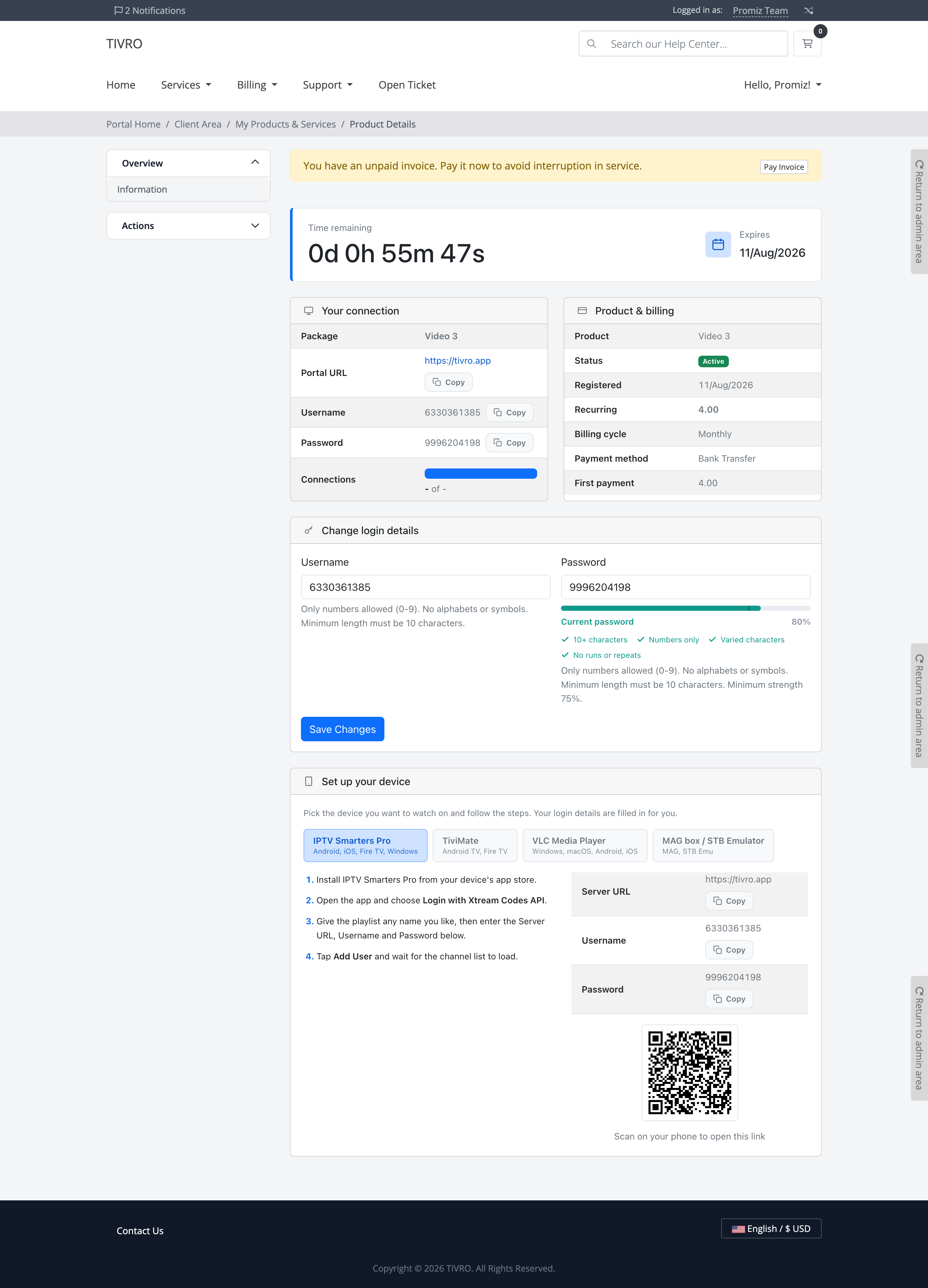
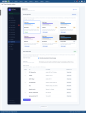
All-in-one service page — credentials, expiry countdown, connection usage and billing information are available in one place
-
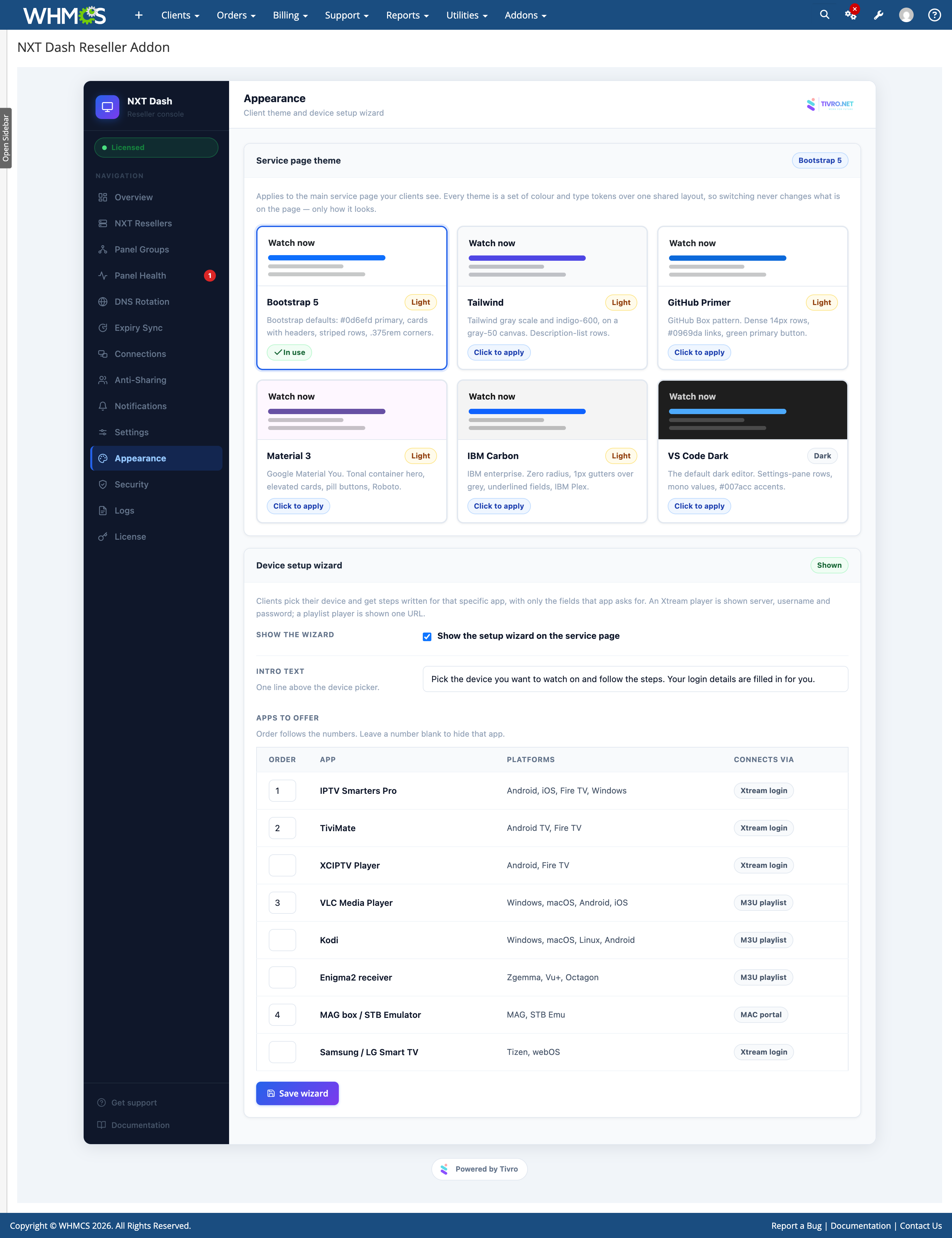
Guided setup wizard — setup instructions are available for popular IPTV players and devices
-
App-specific instructions — customers only see the fields and instructions relevant to their selected application
-
Xtream setup — display server, username and password information for compatible players
-
Playlist setup — provide the required playlist URL for compatible applications
-
MAG setup — display the portal address required by MAG devices
-
App-specific guidance — instructions use the actual menus and configuration options of the selected player
-
QR codes — customers can scan playlist URLs and other supported information directly from their phone
-
One-click copy — credentials and URLs can be copied instantly
-
Self-service credential changes — customers can change their username and password from the client area
-
Password policy — configure minimum strength, length, allowed formats and username-based password restrictions
-
Configurable player list — choose which supported applications are displayed and control their order
-
Fully responsive — designed for desktop, tablet and mobile devices
Supported Players & Devices
-
IPTV Smarters Pro
-
TiviMate
-
XCIPTV
-
VLC
-
Kodi
-
Enigma2 Receivers
-
MAG Devices
-
STB Emulator
-
Samsung Smart TVs
-
LG Smart TVs
Appearance
-
Six complete themes — Bootstrap 5, Tailwind, GitHub Primer, Material 3, IBM Carbon and a dark editor theme
-
Theme switching from admin — select your preferred design directly from the module settings
-
Design-system based UI — each theme follows the visual principles of its respective design system
-
Light and dark options — five light themes plus a dedicated dark theme
-
Theme independent — works consistently across default, custom and third-party WHMCS client themes
-
Scoped styling — module styles are isolated so they do not affect the rest of the WHMCS client area
-
Accessible interface — focus states and text contrast are designed for accessible use
Security & Reliability
-
Encrypted panel credentials — panel passwords are protected using AES-256-GCM encryption with a unique installation key
-
Signed API endpoints — external endpoints can be protected using signed requests and individual secrets
-
Endpoint controls — independently enable or disable supported API endpoints
-
IP allowlisting — restrict endpoint access to specific addresses or ranges
-
Replay protection — timestamp validation prevents previously captured requests from being replayed
-
Client-side rate limiting — credential changes are rate limited per service
-
Bouquet preservation — credential updates preserve the customer's assigned channels
-
Expiry protection — routine subscription updates cannot accidentally modify the customer's expiry date
-
Private data storage — customer and panel data remains within your own WHMCS installation
Admin Panel
-
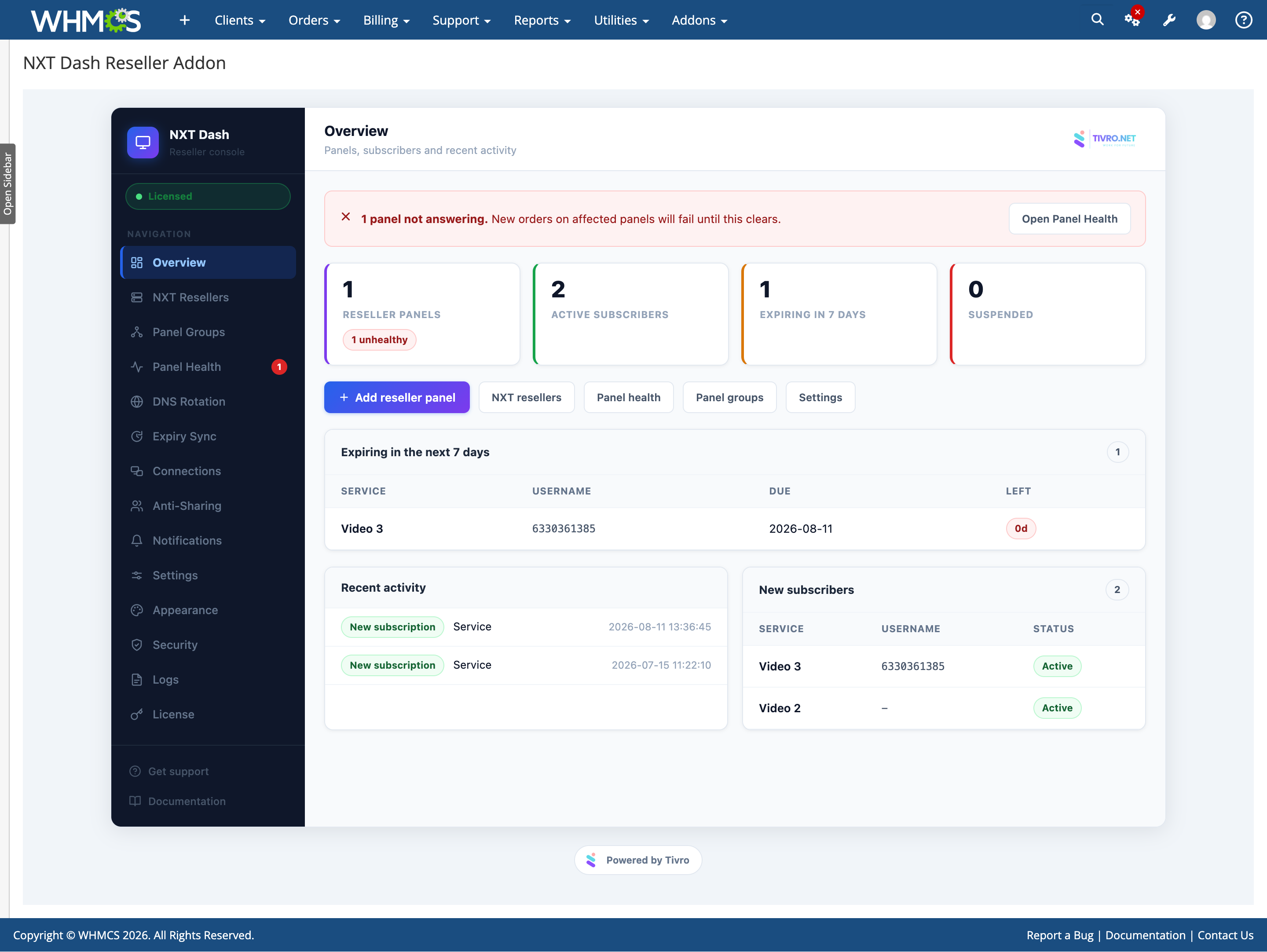
Complete administration interface — manage panels, panel groups, health, DNS rotation, expiry sync, connections, anti-sharing, notifications, settings, appearance, security, logs and licensing
-
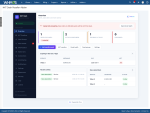
Operational dashboard — monitor panel status, active subscribers, upcoming expirations and recent provisioning activity
-
Connection testing — panel credentials are tested against the API before being saved
-
Provisioning event feed — monitor new subscriptions, renewals, suspensions and terminations
-
API call logging — review API requests and responses between WHMCS and your reseller panels
-
Deep links — quickly access the relevant WHMCS client or service record from reports
-
Automatic upgrades — database updates are applied automatically when the upgraded module is loaded
-
Existing WHMCS cron support — health monitoring, DNS checks, expiry reconciliation and housekeeping use the standard WHMCS cron
-
Safe deactivation — disabling the module preserves existing configuration and records
Monitoring & Logs
-
Panel health history — monitor connectivity and response information for every configured panel
-
Provisioning logs — review account creation and subscription lifecycle events
-
API logs — inspect communication between WHMCS and reseller panels
-
Routing logs — see which panel was selected and why
-
DNS switch history — review manual and automatic hostname changes
-
Expiry reconciliation reports — identify and investigate service mismatches
-
Connection monitoring — review connection limit mismatches and overage events
-
Audit-friendly records — operational events remain available for troubleshooting and administration
Compatibility
-
WHMCS: 8+
-
PHP: 8.1+
-
ionCube Loader: v15
-
Database: MySQL 5.7+ or MariaDB 10.3+
-
Panels: NXT and Xtream-compatible reseller panels
-
Products: Streaming line and MAG device products
-
Client Area: Works with any WHMCS client area theme
-
Cron: Uses the standard WHMCS cron
-
License: Valid license required