Advanced Reports

Advanced Reports

Developed By JetHosting.ch

Compatible with WHMCS v9.1

JetHosting Reports – MRR, churn, LTV and cohorts for WHMCS

See at a glance how your hosting business is really growing. JetHosting Reports turns the data WHMCS already holds (services, addons, domains and payments) into a clear, interactive dashboard with the metrics that matter for a subscription business: recurring revenue, lost clients, lifetime value and cohort retention.

No complex setup and no external services: activate the addon, enter your license key and your reports are ready.

Why you need it

The built-in WHMCS reports show invoices and income, but they don't answer the questions that matter most to a recurring-services provider:

  • Is my recurring revenue really growing, or are new clients just replacing the ones I lose?
  • How many clients do I lose each month, and how much MRR leaves with them?
  • What is a client worth over time, and how much can I spend to acquire one?
  • Which product retains clients best?
  • Do this year's clients stay longer or shorter than last year's?

JetHosting Reports answers all of them on a single page.

Features

Overview

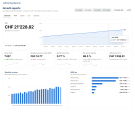
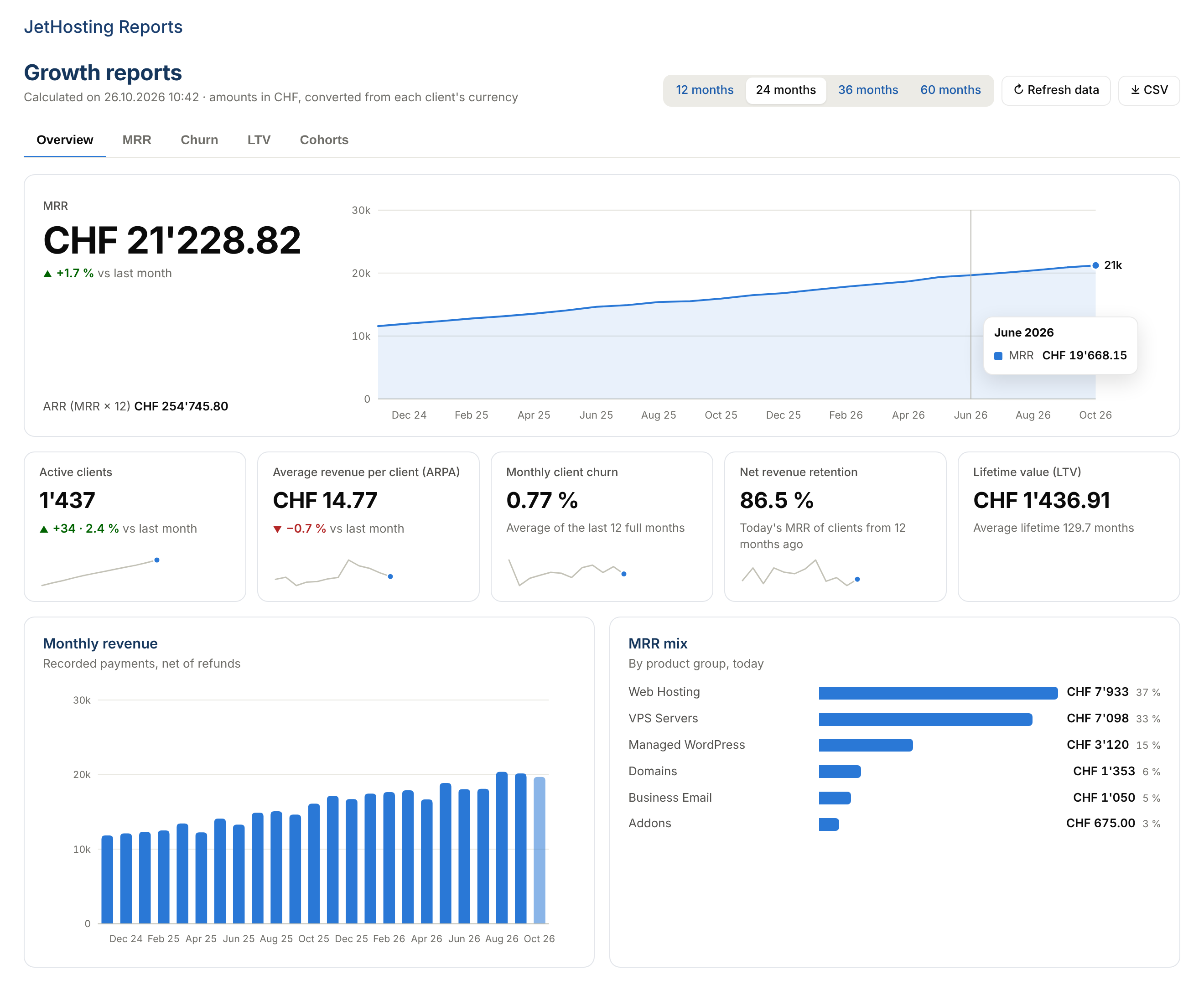
  • Headline MRR with month-over-month change, plus ARR
  • Tiles for active clients, average revenue per client (ARPA), churn, net revenue retention and LTV, each with a trend sparkline
  • Monthly revenue, net of refunds
  • MRR mix by product group

MRR

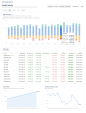
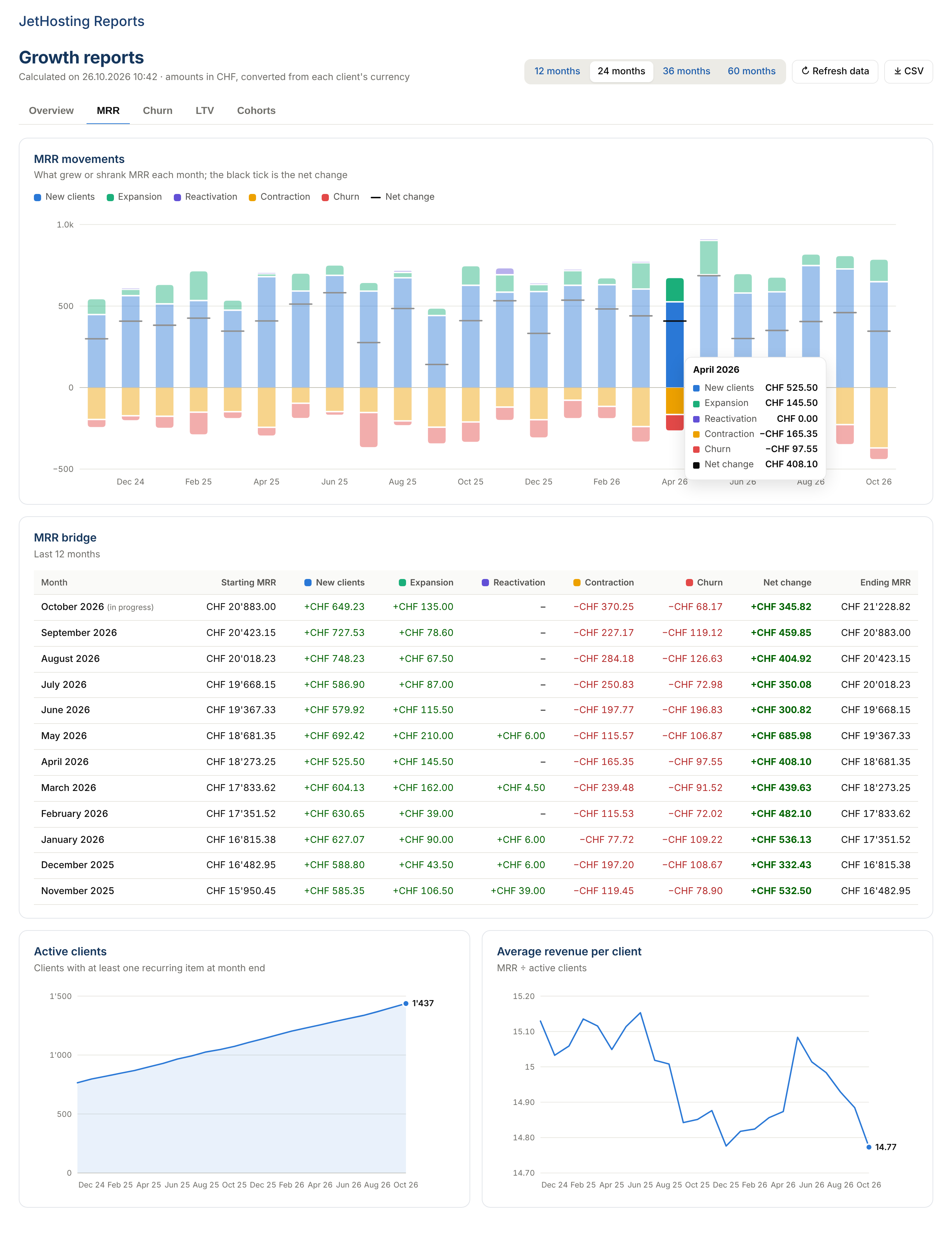
  • Month-by-month MRR bridge: new clients, expansion, reactivation, contraction and churn, with the net change
  • Detail table: starting MRR + movements = ending MRR
  • Active clients and ARPA trends

Churn

  • Monthly client churn and gross MRR churn, with the average of the last full months
  • 12-month NRR and GRR, annual churn
  • Clients gained and lost each month

LTV

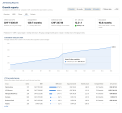
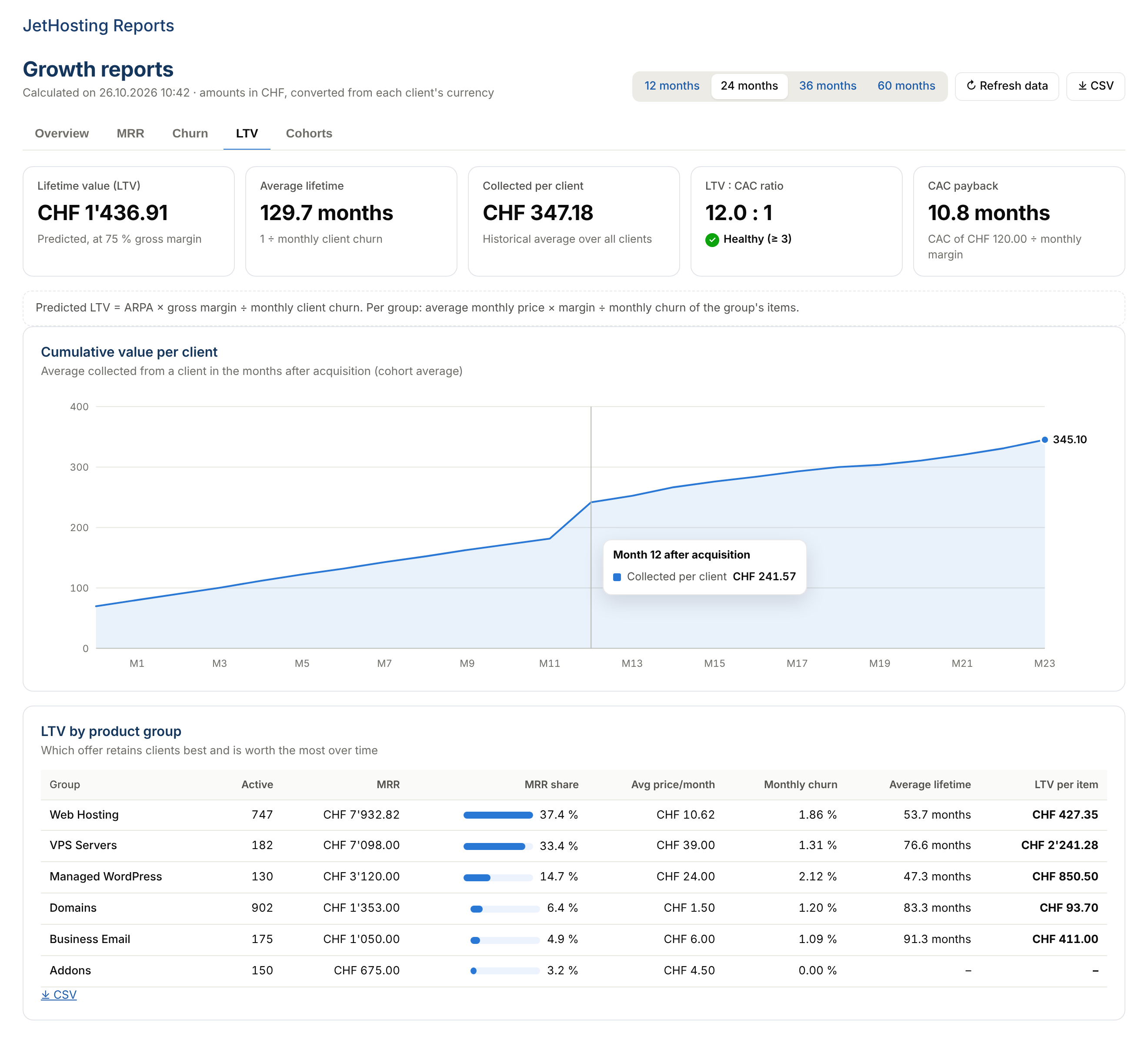
  • Predicted lifetime value (using your gross margin) and collected per client
  • Average client lifetime
  • LTV : CAC ratio and CAC payback in months
  • LTV by product group: average price, churn, lifetime and value of each offer
  • Cumulative value per client curve over the months after acquisition

Cohorts

  • Colour-coded table of clients grouped by month of acquisition
  • Three views: clients still active, MRR retained, collected per client
  • Weighted average row across all cohorts

And more

  • Interactive charts: values on hover for every month and every cell
  • 12, 24, 36 or 60-month period, switchable right on the page
  • CSV export of monthly series, product groups and cohorts (Excel-ready)
  • Admin home widget with MRR, clients, ARPA, churn and LTV
  • Interface in English, Italian, German and French, following the admin's language

WHMCS integration

  • Native addon module: activated from Addon Modules, using WHMCS role-based access control; the widget is only shown to authorised roles
  • Reads services, product addons, domains, currencies and payments directly: no imports, nothing to enter by hand
  • All amounts are converted to your default currency using WHMCS exchange rates and shown in its format
  • Billing cycles are normalised to one month (quarterly ÷ 3, annually ÷ 12…)
  • Nightly calculation via the WHMCS daily cron with a configurable cache: the page opens instantly, even with tens of thousands of services
  • Options to include or exclude domains and addons, product groups and client groups (e.g. internal or test accounts)
  • No WHMCS files modified, no templates to edit

Privacy and security

  • Charts are generated by the module itself: no external libraries, no CDN, no analytics services
  • Your data never leaves your server: the only outbound connection is the license check, which sends only the key, domain and version

Requirements

  • WHMCS 8.x or 9.x
  • PHP 7.4 – 8.3 with the OpenSSL extension
  • ionCube Loader 15
  • A valid JetHosting license with outbound HTTPS connection to billing.jethosting.ch (license check)

FAQ

How is MRR calculated? It is the sum of the recurring amounts of active services, addons and domains, normalised to one month. One-time and free items are excluded.

Can I see data from before the installation? Yes. History is rebuilt from the start and end dates already stored in WHMCS, up to 60 months back.

Are past price changes taken into account? WHMCS only stores each service's current price, so history uses that price. Services added or cancelled are still correctly shown as expansion, contraction or churn.

Does it support multiple currencies? Yes. Each client's amounts are converted to the default currency using the rates configured in WHMCS.

Will it slow down the admin area? No. Reports are calculated overnight by the cron and cached. The license is checked at most once every few days.

What happens if the license server is unreachable? The module keeps working for the grace period. If the license expires, reports are paused without changing any data, and they come back as soon as the license is valid again.

Can I use the license on another installation? The license is bound to your WHMCS domain and folder. If you move WHMCS, you can reissue it from the JetHosting.ch client area.

Can I export the data? Yes, as CSV: monthly series, product groups and cohorts in the selected view.


There are no reviews yet!

Be the first to review Advanced Reports.

Version Compatibility


Compatible with WHMCS v9.1

Full Version Compatibility


  • Selected versions of WHMCS v9.1
        9.1.0
  • All versions of WHMCS v9.0

Support for this product

The best place to start if you need help with a specific product is to contact the developer. All WHMCS Marketplace developers have both a website and support URL listed.

Developed By JetHosting.ch

Changelog

v1.1.1 Released October 28th, 2026

Latest Version


Initial version


See also

Google Tag Manager & GA 4 Enhanced Ecommerce for WHMCS

GA4 ecommerce for WHMCS through Google Tag Manager: full data layer, purchase funnels, server-side purchase and first-party container

Commercial
Report Generator For WHMCS

Build dynamic reports, schedule their creation and email the results to your staff members.
Commercial
Sales By Staff Report

Report to show the Sales per Staff member per month.

Free
Intercom Addon Module

Intercom Addon Module integrates Intercom.io customer platform into WHMCS.

Free
MetricsCube Business Analytics For WHMCS

Access MetricsCube business reports with user tracking and data comparison features.

Free