Mail Cow For WHMCS

Mail Cow For WHMCS

Developed By Provonic

Compatible with WHMCS v9.1
Spooktacular Halloween Sale!
Get 20% OFF and enjoy frighteningly good deals! Use code HALLOWEEN20 at checkout before this spooky offer disappears!

Mailcow Module for WHMCS Provonic

Seamless, Scalable & Smart Email Hosting Integration

Provonic Mail Cow For WHMCS is a Mailcow WHMCS module that connects WHMCS to your Mailcow server so you can sell email hosting with full email automation. As a Mailcow server module it handles Mailcow provisioning end to end: email provisioning and mailbox provisioning when an order is paid, then suspend, unsuspend and terminate from WHMCS. It is Mailcow for WHMCS, built for hosting providers and IT companies who run self-hosted email on Mailcow and want a professional Mailcow email hosting product, sold as standalone email hosting or as a way to bundle email with hosting and VPS plans.

Mailbox management is built in. Both admins and clients can manage mailboxes for their domain, create mailboxes, delete mailboxes and change passwords for any mailbox password directly in WHMCS, while admins can also reset passwords and adjust quotas: full email account management for all email accounts. Configurable options set the number of mailboxes, mailboxes per domain and the default mailbox quota, so quota management and storage quota rules follow each plan. Sell extra storage, additional mailboxes or extra mailboxes as a mailbox addon or email addon, and charge per mailbox, per GB or as a bundle.

Usage metrics report disk usage (MB and GB) and message count for every account, so usage billing and usage-based billing in WHMCS reflect what clients really store. The module is multi-tenant, serving many clients from a single Mailcow instance, and reseller-friendly, with delegated control for resellers who manage their own clients. Everything runs over the Mailcow API: a clean Mailcow integration, a WHMCS Mailcow mail server module and a Mailcow module that turns your mail server into a mail hosting business, with one email hosting module for every plan.

Test all features with our 5-Day Free Access!

Admin Features:

  • Automatic Account Creation
  • Suspend, Unsuspend, Terminate
  • Reset Mailbox Passwords
  • Adjust Quotas From WHMCS
  • Create And Delete Mailboxes
  • Multi-Tenant Mailcow Instance
  • Reseller-Friendly, Delegated Control
  • Secure API Communication
  • Mailboxes, Aliases And DNS & DKIM Popups On The Service Page
  • One-Click Login To The Mailcow Admin Panel
  • Own Domain Admin Or Shared Central Admin Mode
  • Check For Update And Automatic Updates

Client Area Features:

  • Create Mailboxes For Their Domain
  • Delete Mailboxes
  • Change Mailbox Passwords
  • Create And Delete Aliases, Including Forwarding
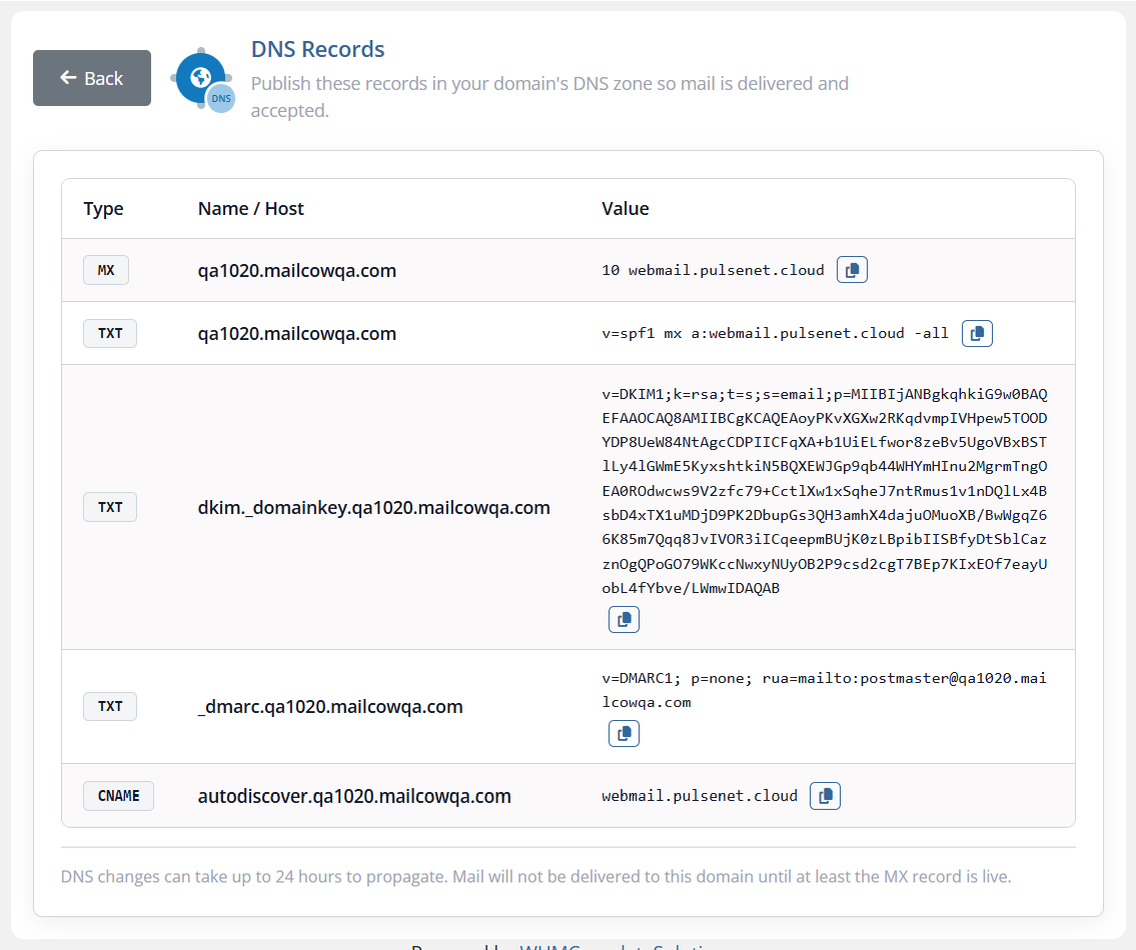
  • DNS Records Page With MX, SPF, DKIM And DMARC
  • One-Click Login To Mail Panel And Webmail
  • Self-Service Email Management

Configurable Options:

  • Extra Mailboxes
  • Extra Aliases
  • Extra Storage (GB)

Addons:

  • Extra Mailbox Storage
  • Additional Mailboxes

Usage Metrics:

  • Disk Usage In MB And GB
  • Message Count Across Mailboxes

Billing Models:

  • Per Mailbox
  • Per GB
  • Bundled Packages
  • Usage-Based Billing From Metrics

Use It As:

  • A WHMCS Product Module
  • A Service Addon For Mail Hosting
  • Email Alongside Shared Hosting Or VPS

General Info:

  • WHMCS 8.7 To 9.X
  • PHP 8.1, 8.2, 8.3 And 8.4
  • Requires A Mailcow Server
  • Six, Twenty-One, Nexus, Nexum And Lagom Themes, With Dark Mode
  • Requires ionCube Loader v13 Or Later
  • 5-Day Free Trial, Once Per Client

Available Pricing Models:

  • Annually: $̵2̵4̵ > $19.20
  • One-Time: $̵3̵9̵ > $31.20
  • Open Source: $̵1̵0̵9̵ > $87.20


Reviews

5 stars
1
1
4 stars
0
0
3 stars
0
0
2 stars
0
0
1 star
0
0
Jack Christopher avatar

Jack Christopher @jack5217

July 2, 2026 at 12:55:40 PM

I've been using the Mailcow Server Module for a few months now, and it has made email hosting management incredibly smooth. Provisioning new mailboxes is fully automated, and clients can manage everything from WHMCS create/delete accounts, set quotas, and handle passwords all without needing to log into Mailcow separately. The integration is seamless and reliable. It's perfect for hosting providers looking to offer professional email hosting with minimal admin overhead. Highly recommended

  • 4 months ago
  • Version Number 1.0

Version Compatibility


Compatible with WHMCS v9.1

Full Version Compatibility


  • Selected versions of WHMCS v9.1
        9.1.0
  • All versions of WHMCS v9.0
  • All versions of WHMCS v8.13
  • All versions of WHMCS v8.12
  • All versions of WHMCS v8.11
  • Selected versions of WHMCS v8.10
        8.10.0
  • Selected versions of WHMCS v8.9
        8.9.0
  • Selected versions of WHMCS v8.8
        8.8.0
  • All versions of WHMCS v8.7
  • All versions of WHMCS v8.6
  • All versions of WHMCS v8.5
  • All versions of WHMCS v8.4
  • All versions of WHMCS v8.3
  • All versions of WHMCS v8.2
  • All versions of WHMCS v8.1
  • All versions of WHMCS v8.0

Support for this product

The best place to start if you need help with a specific product is to contact the developer. All WHMCS Marketplace developers have both a website and support URL listed.

Developed By Provonic

Changelog

v1.2.0 Released October 21st, 2026

Latest Version


Added

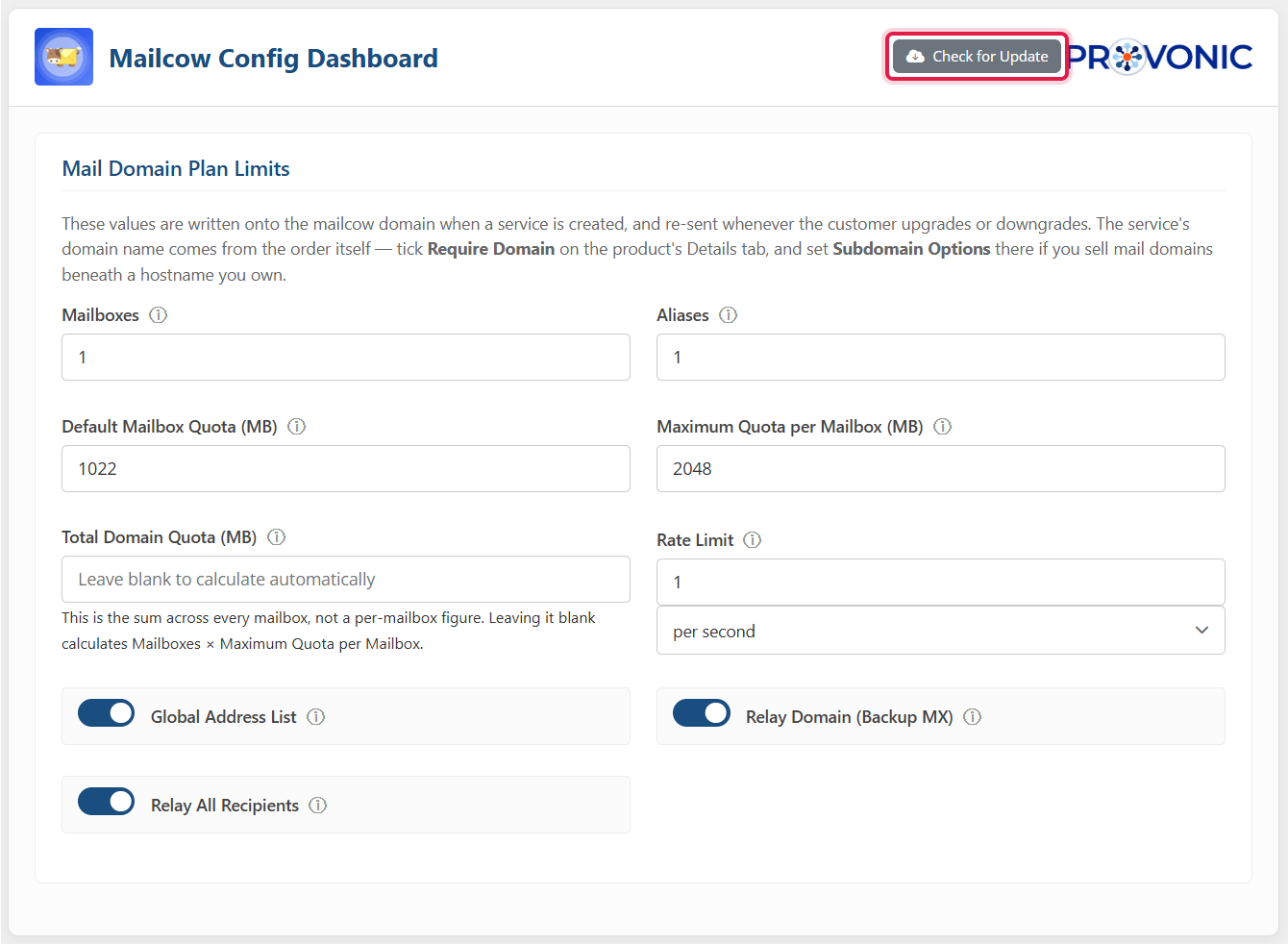
  • Check for Update button on the product's Module Settings, and the daily automatic update now downloads and installs new versions
  • "Log in to mailcow Admin" from the Servers page, signing the WHMCS administrator in to the mailcow admin panel; the server's Username field is now labelled "Mailcow Admin Username"
  • The module ships its own Font Awesome icons, so every icon draws on every client area template

Changed

  • Rebuilt on the current Provonic server module standard: the product dashboard, the admin service tab and the Client Area keep all their features with refreshed styling, Provonic branding and logos
  • Readable Client Area styling on Nexum dark mode and on Lagom dark mode and futuristic style
  • Mailboxes, Aliases and DNS Records tables keep their columns on phones and scroll sideways inside their card
  • The admin Mailboxes and Aliases popups are wider, so addresses and usage figures fit on one line
  • Mailbox and administrator passwords are masked in the WHMCS module log
  • Untranslated text falls back to English in every language

Fixed

  • Terminate now removes the domain administrator's login from the mail server; previously it was left behind because the domain was deleted first
  • The service page no longer fails when the mail server cannot be reached; the domain status reads Unknown instead
  • "Login to Mail Panel" no longer appears twice in the Client Area sidebar on some templates
  • Generate DKIM on creation no longer logs an error when mailcow has already created the key
  • Email addresses, usage figures and status badges no longer break mid-word in tables


Previous Versions


v1.1.0 Released September 10th, 2026

View/hide detailed changelog

Added

Client Area — Rebuilt Interface

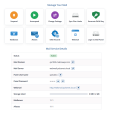
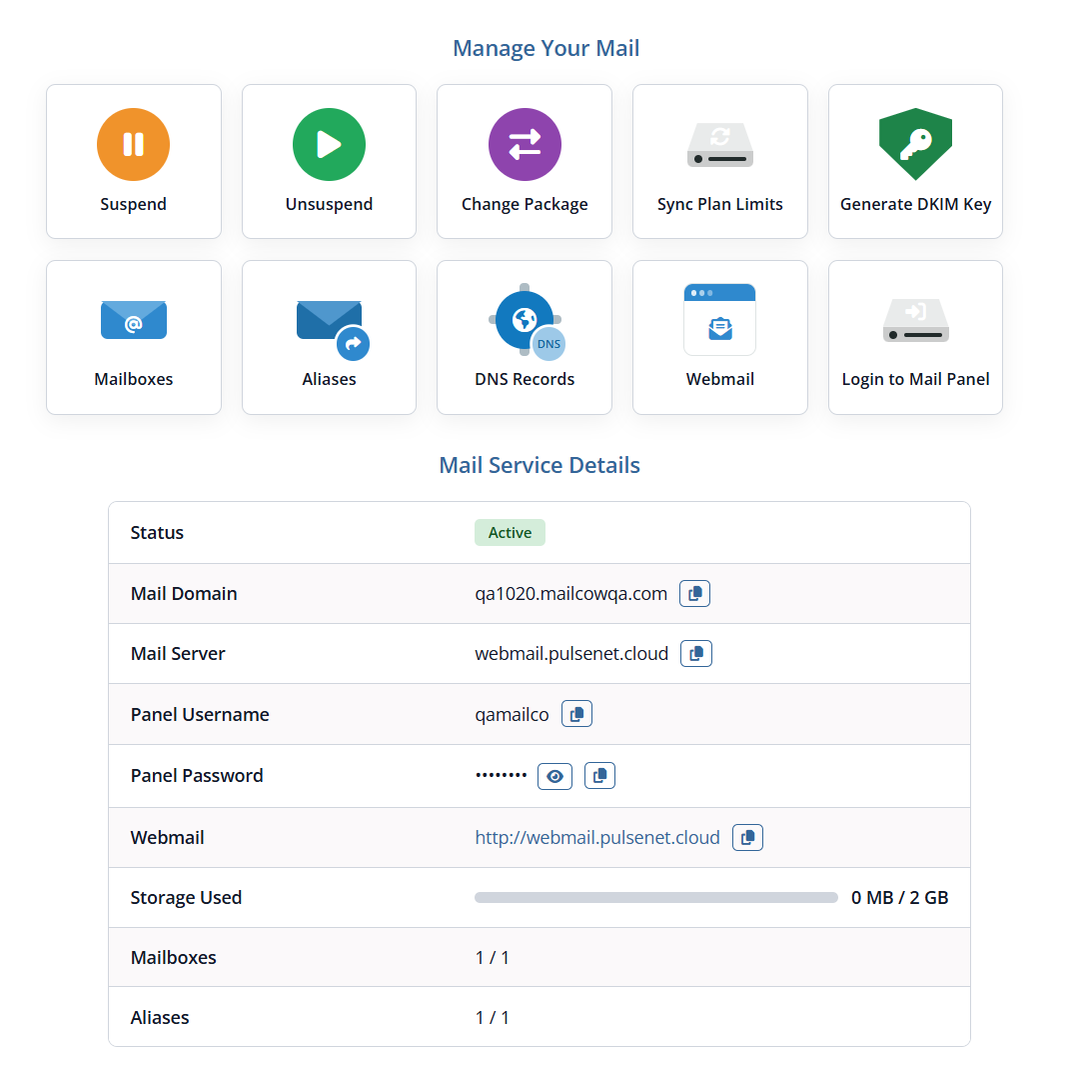
  • Replaced the single flat details panel with a Service Actions row of composed action tiles plus a centred Mail Service Details table
  • Three dedicated pages, each reached from its own action tile and from the service sidebar: Mailboxes, Aliases and DNS Records — every page can be turned off per product
  • Mailboxes page: create, delete, enable/disable and re-password mailboxes, with live usage and message counts, an allowance counter and plan-limit enforcement before the request is sent
  • Aliases page: create and delete aliases, including multi-destination forwarding, with per-destination address validation
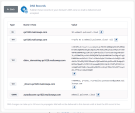
  • DNS Records page: the MX, A, SPF, DKIM, DMARC and autodiscover records the customer must publish, each with click-to-copy, plus one-click DKIM generation when no key exists yet
  • Full Lagom support plus white/dark mode that follows the active template's own toggle, and Client Area Styling Settings that map the module's surfaces, buttons, alerts and tables onto the template's own theme variables — Lagom, Twenty-One, Six and Nexus ship with a working default mapping
  • Responsive across mobile, tablet, laptop and desktop breakpoints; wide tables scroll inside their own card so the page never scrolls sideways
  • Every user-facing string moved into lang/, so the interface can be translated

Service Actions — Full Lifecycle, Both Areas

  • Added Suspend, Unsuspend, Terminate, Change Package, Change Password, Sync Plan Limits and Generate DKIM Key to the Service Actions row in the Admin Area and the Client Area
  • In the Client Area, Suspend, Unsuspend, Terminate and Change Package each have their own product switch, all four shipping OFF and enforced server-side rather than only hidden in the interface; Sync Plan Limits and Generate DKIM Key are always available to the customer

Provisioning Modes — Own Domain Admin Or Shared Central Admin

  • New per-product switch to sell sub-domains on one central Mailcow administrator you own, or (default) give every service its own mailcow domain administrator
  • New per-product fields: Mailcow Panel URL, Central Admin Username and Central Admin Password (stored encrypted, never echoed back)
  • Terminate is per mode: a shared service deletes only its own mailboxes, aliases and domain and detaches that one domain from the central administrator — no other customer's domain is ever touched
  • Order form: for a shared-mode product the domain step offers only the free sub-domain
  • Products that collect no credentials at checkout now get generated ones, written onto the service encrypted

Login — One Worker, Three Surfaces

  • A real panel login from the Client Area service page, the Client Area home page and My Services listing, and the Admin Area service page, through a single-use, encrypted, expiring ticket
  • A password is never posted over plain http, and an HTTP-to-HTTPS redirect no longer drops the credentials
  • New product setting "Login Button Label" renames the button everywhere it appears
  • Per-mailbox "Login To Mailbox" icon in the Mailboxes table (own-admin services)

Plan Limits — Enforced, And The Extras Counted

  • Configurable options (Extra Mailboxes, Extra Aliases, Extra Storage) are now applied on top of the plan limits
  • A plan limit can no longer fail open: adds are refused when the mail server cannot be reached
  • The Add Mailbox and Add Alias buttons switch off, with the reason as their tooltip, when the allowance is used up; the server re-counts before writing

Admin Area — Rebuilt Product Configuration

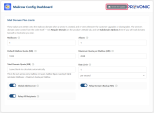
  • A configuration dashboard covering Mail Domain Plan Limits, DKIM & Connection, Client Area Features Visibility, Optional Client Area Pages and Client Area Styling Settings
  • Domain rate limiting, Global Address List, relay domain (backup MX) and relay-all-recipients controls; DKIM key size, generate-on-creation, webmail path and a TLS-verification switch
  • The service tab mirrors the Client Area overview, with Mailboxes, Aliases and DNS & DKIM popups and the full Service Actions row

New Functionality

  • Change Package re-sends every plan limit and refuses a downgrade that would strand mailboxes
  • Daily disk usage import from mailcow into WHMCS
  • Mail domains reported to the WHMCS Server Sync tool
  • Mailbox enable/disable
  • Daily auto-update check

Fixed

  • Every write to mailcow now verifies the response body, so a rejected provision is no longer reported as success
  • POST requests keep their method and body across an HTTP-to-HTTPS redirect
  • Mailbox listing uses the documented API path and is filtered to the service's own domain
  • Domain creation rolls back if the domain administrator cannot be created
  • Test Connection performs a real authenticated API call
  • mailcow error codes are translated into readable messages; the API key is redacted in the module log
  • Suspend keeps all stored mail, so unsuspending is lossless
  • Per-service ownership checks on every mailbox and alias action

Removed

  • The "Open mailcow Panel" custom action and the old LoginLink that only opened the login page (replaced by the real login)


v1.0 Released August 15th, 2025

View/hide detailed changelog

Seamlessly Connect MailCow Server with WHMCS.

 

See also

Hetzner Servers Manager

Integrate manager for Hetzner Dedicated

Commercial
Liquid Web VPS & Cloud Dedicated Reseller Program

Resell VPS & Cloud Dedicated Products from Liquid Web

Free
SolusVM WHMCS module

Automate the sale of VPS servers & give your clients the ability to completely manage their VPS server inside of WHMCS, using the industry leading SolusVM control panel.


Free
Acronis Cyber Protect Cloud

AI-Powered Integration of Data Protection and Cybersecurity.

Free
VPN reseller module

Resell VPN accounts with whitelabel Windows, Mac, IOS and Android software

Free