
Bring next-generation AI automation, accuracy, and efficiency to your support team.
The hTech AI Ticket Assistant is an advanced WHMCS addon that uses artificial intelligence to help technicians respond to support tickets faster, more consistently, and with dramatically less effort. Designed for hosting providers, SaaS companies, and any WHMCS-based business, this module integrates deeply into your support workflow, augmenting your team without replacing them.
With smart automation, real-time intelligence, and full administrative control, hTech transforms WHMCS support into a high-performance, AI-driven operation.
Current Availability
hTech OpenAI Proxy Hosted GPT-4.0 to 4.-2 Live Now Hosted GPT-5.1 Live Now Hosted GPT-5.2 Live Now
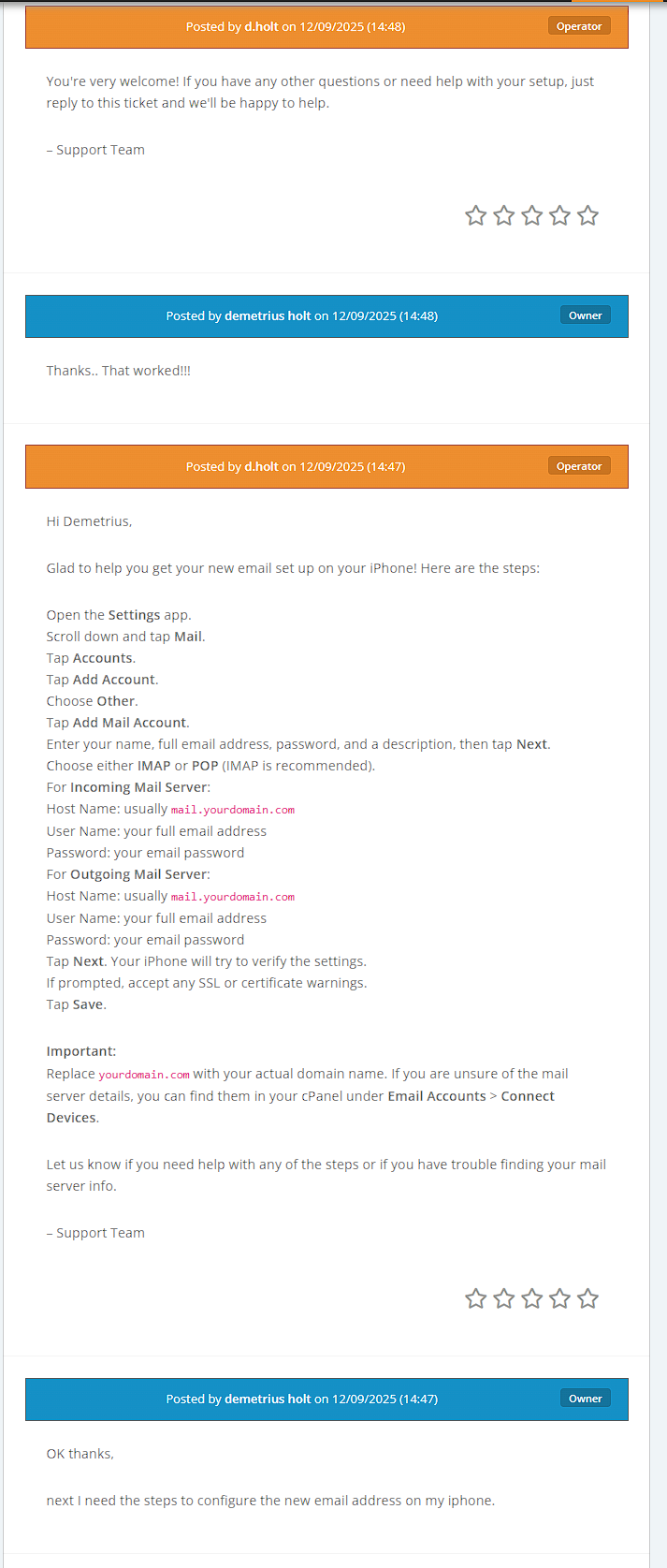
Automatically generate high-quality replies based on the customer's message, your SOPs, KB articles, and historical context.
The AI reads and applies your Standard Operating Procedures, including:
This ensures replies remain consistent with your business standards.
The assistant automatically learns from:
Replies improve over time and stay aligned with your real-world content.
Enable and configure AI independently per department:
You maintain full control over where and how AI is used.
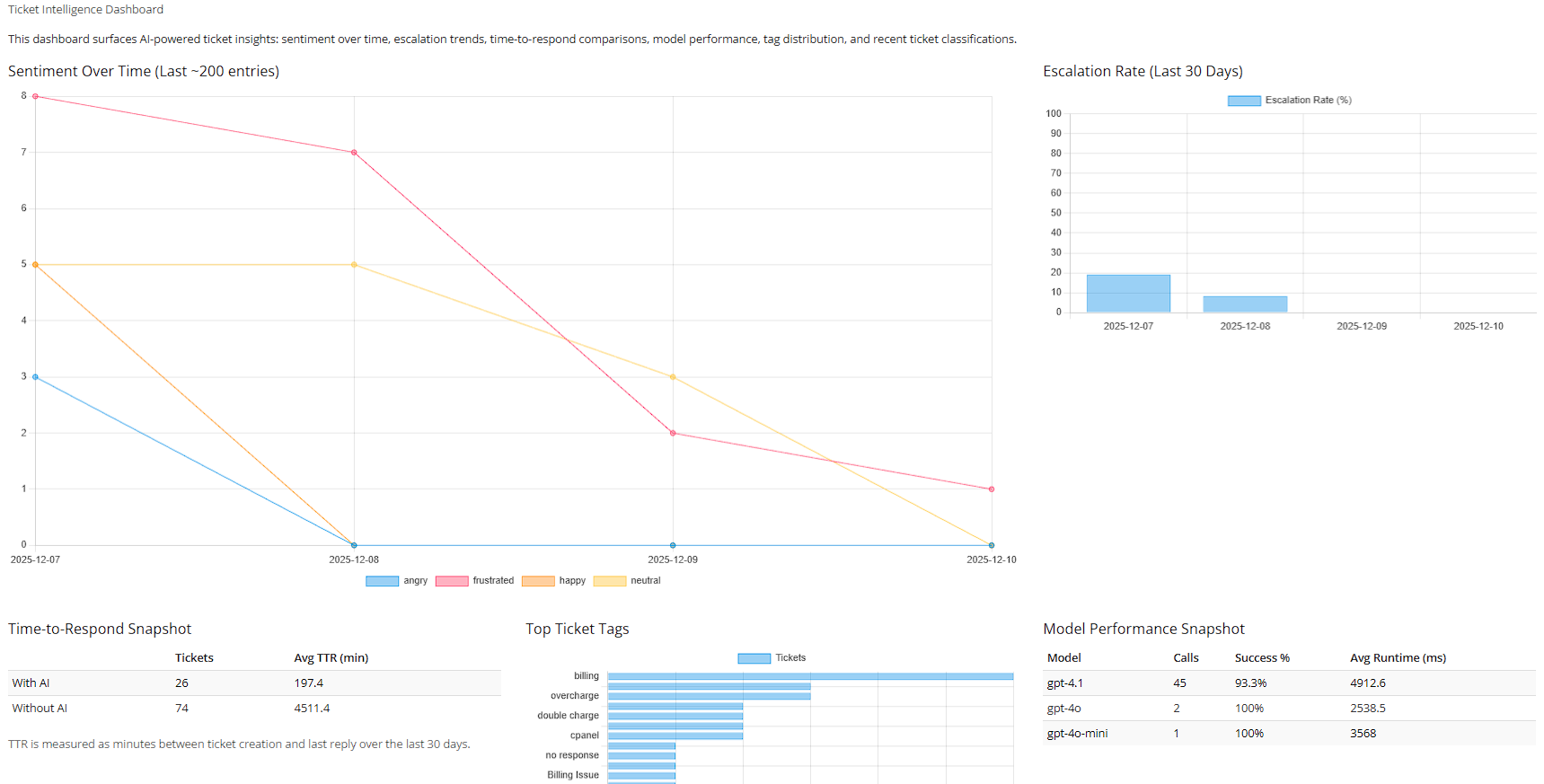
Monitor AI activity in real time:
Each ticket is analyzed for:
This allows teams to prioritize tickets intelligently.
Create natural, human-like response timing:
Support agents receive:
Agents stay in control while working faster.
The module automatically identifies:
Admins can review, approve, or dismiss suggestions.
The BYO plan licenses the hTech AI Ticket Assistant software itself, not the AI usage.
You receive:
AI usage is billed directly to your OpenAI account.
The subscription covers the software platform, not the AI tokens.
Even in BYO mode, the module provides:
Your OpenAI key simply supplies the AI responses.
No. Your API key is stored securely in your WHMCS installation and used only for your system.
Yes. Once hosted GPT-5.1 and GPT-5.2 plans are released, you will be able to switch without reinstalling the module.
Try the whole module for 7 days using the BYO plan or hosted, with all **Featured Automation Enabled!!! **** Experience how AI can transform your WHMCS support workflow before committing.
Privacy Notice: Ticket data is processed securely for AI functionality and is not stored on hTech servers; all data remains within your WHMCS environment or is sent directly to your selected AI provider.
The best place to start if you need help with a specific product is to contact the developer. All WHMCS Marketplace developers have both a website and support URL listed.
download.php update gate on updates.htech.cloud that validates required headers, verifies licenses via WHMCS verify.php, and streams versioned update packages.tbladdonmodules) to prevent license=unknown during update checks.download_request breadcrumbs and extended updater and gate logging for full end-to-end traceability.
priority_proxy, routing_lane, and model_requested.X-HTech-Priority: 1 whenever priority lane is requested.<script> tag (prevents raw JS from printing on the page).Note: Earlier entries were lost during development and will be reconstructed as we consolidate historical changes.
All notable changes to hTech AI Ticket Assistant will be documented in this file.
The format is based on Keep a Changelog, and this project follows Semantic Versioning (major.minor.patch) with occasional “b” hotfix suffixes during rapid development/testing.
Logger when available; falls back to WHMCS logActivity() if not.configoptions parsing
verify.php responses, including configoptions (pipe-separated Option=Yes pairs), allowing add-on entitlements to work without needing a hostingId.Auto-Reply Engine
Tag Routing + Auto-Assign
Knowledge Engine (Auto-KB Suggestions)
Advanced Escalation Rules
Agent Assist Panel
Priority Proxy Routing
GPT-5.x Models
configoptions
tblhosting.id) when auto-detection is not possibleconfigoptions as the primary entitlement source.FeatureGate::SENTIMENT_PRIO
FeatureGate::ESCALATION (alias to ADV_ESCALATION)verify.php → configoptions (preferred)tbladdonmodules).&proxy_force_register=1
tbladdonmodules (licenseKey / licensekey)auto_reply option (not the entire dropdown)Priority Proxy Routing option into proxy routing strategy (pool/header/path).
updated_at errors when toggling AI flags.DELETE.
DELETE.
module.json and composer.json metadata for WHMCS compatibility scanning.


Chat and Engage with Your Customers to Increase Conversions!

Customer service platform with live chat and customer engagement capabilities

PreMadeKB - Readymade Knowlegebase Articles for WHMCS - With Images and 431+ Articles on cPanel, Plesk, DA, Softaculous, etc.




Kent @kent7100
The developer is extremely responsive and easy to work with. I made a few recommendations, and they quickly applied the patch, which was impressive on its own. But here’s the best part: they developed an in-app update, so I didn’t have to uninstall or re-download the app. Just one click and it was done. If you prefer, you can still download and add it manually, which is a nice option to have.
As for the app itself, once you have your SOP set up correctly with all common issues covered, the app handles tickets smoothly with little to no human interaction. It’s been a real time-saver and works exactly as intended.
Overall, it’s been great working with this team. I’m really impressed with their support and development speed, and I can’t wait to see what new features and updates they roll out next.
Demetrius holt @demetrius8000
We are here to support. Let us know if you have any other issue or feature request.
Owner@hTech