XUI IPTV Panel

XUI IPTV Panel

Developed By Provonic

Compatible with WHMCS v9.0
Upgrade your WHMCS save 20% off. With
Use promo code: COUNTDOWN20

XUI IPTV Panel for WHMCS

XUI IPTV Panel for WHMCS connects WHMCS to your XUI.one IPTV reseller panel and automates the full life of every IPTV subscription you sell. When a client orders, a stream line or MAG device is created on your panel with the right package and bouquets; renewals, package changes, suspensions and cancellations then follow the service in WHMCS automatically. Your clients manage their subscription from a clean, modern service page, and your team manages panels, bouquets and applications from one dashboard inside WHMCS.

Free Trial

Try XUI IPTV Panel free for 7 days with instant access, then continue with the licence that suits you. Free installation and setup on your WHMCS are included.

Key Features for Administrators

  • Automated provisioning: creation, renewal, package changes, suspension, unsuspension and termination of IPTV lines and MAG devices on your XUI panel.
  • Two product types: Stream Line (username and password) and MAG Device (MAC address), each as a trial or an official line.
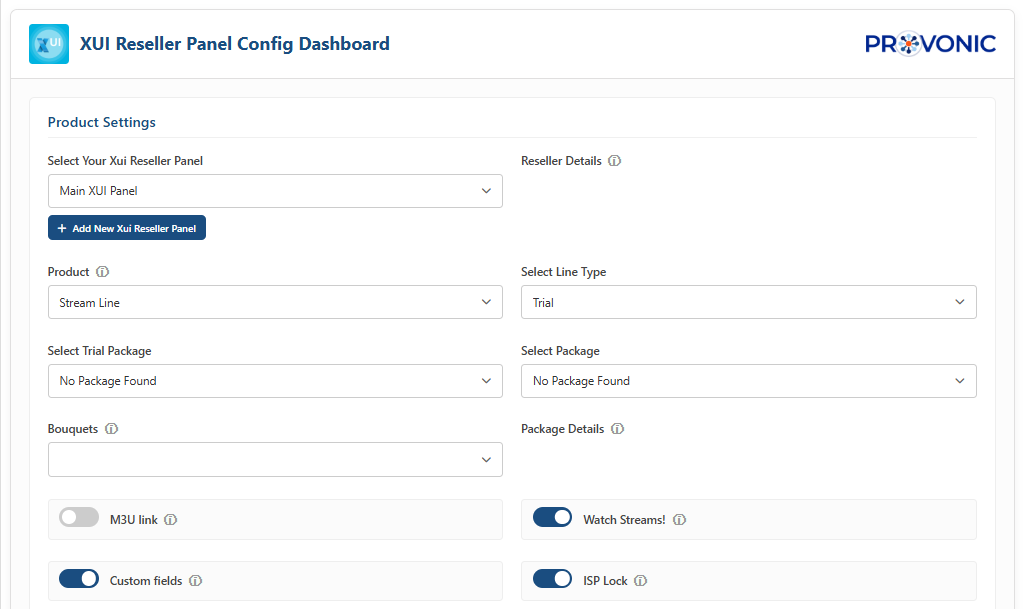
  • Live panel data: your reseller name, credit balance and each package's cost, duration and maximum connections shown while you set up a product.
  • Multiple panels: connect any number of XUI reseller panels, each with its own M3U, MAG portal and web player addresses.
  • Bouquet management: organise your panel's bouquets into categories and build a bouquet set for each product.
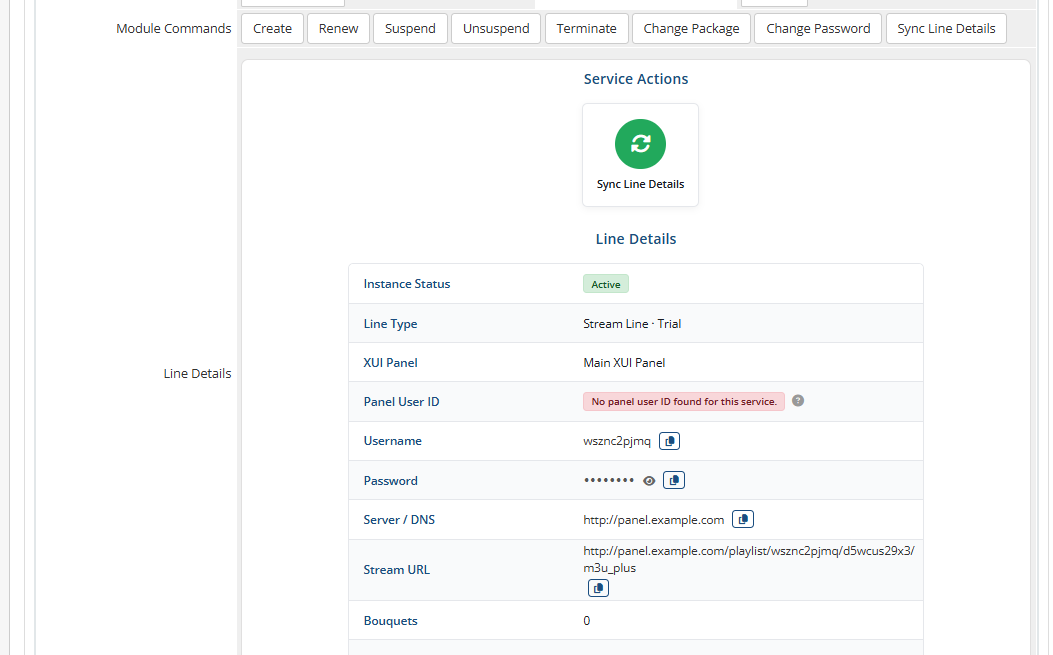
  • Line details at a glance: a dedicated tab on the admin service page with the line's status, credentials or MAC address, stream addresses, bouquets and expiry date, plus one-click synchronisation with the panel.
  • Connection testing: confirm from the server record that WHMCS can log in to every connected panel.
  • Password management: change a line's password from the admin area.
  • Order-form checks: duplicate usernames and MAC addresses are refused before checkout.
  • Credential generation: automatic usernames and passwords in the format and length you choose, or one fixed password for every line.
  • Ready-made emails: IPTV welcome email templates for stream lines and MAG devices, filled with the right portal address.
  • Request log: every panel request and reply recorded in the dashboard for quick troubleshooting.
  • Automatic updates: a daily update check and a Check for Update button keep the whole module current.

Key Features for Clients

  • Line Details: copy the username, reveal and copy the password, change the password, and see the expiry date.
  • M3U Playlist: M3U Plus or M3U playlist link with copy and download buttons.
  • Watch Stream: open the web player in one click, already signed in.
  • Download App: the recommended IPTV applications for Android, iOS, Windows, Linux and macOS.
  • Select Bouquets: choose channel groups by category, applied to the panel instantly.
  • MAG Box: the portal address for the set-top box, and a form to move the subscription to a new device.
  • Setup Guide, Upgrade and Cancellation: links to your knowledgebase, the upgrade page and the cancellation request.

Client Area Design

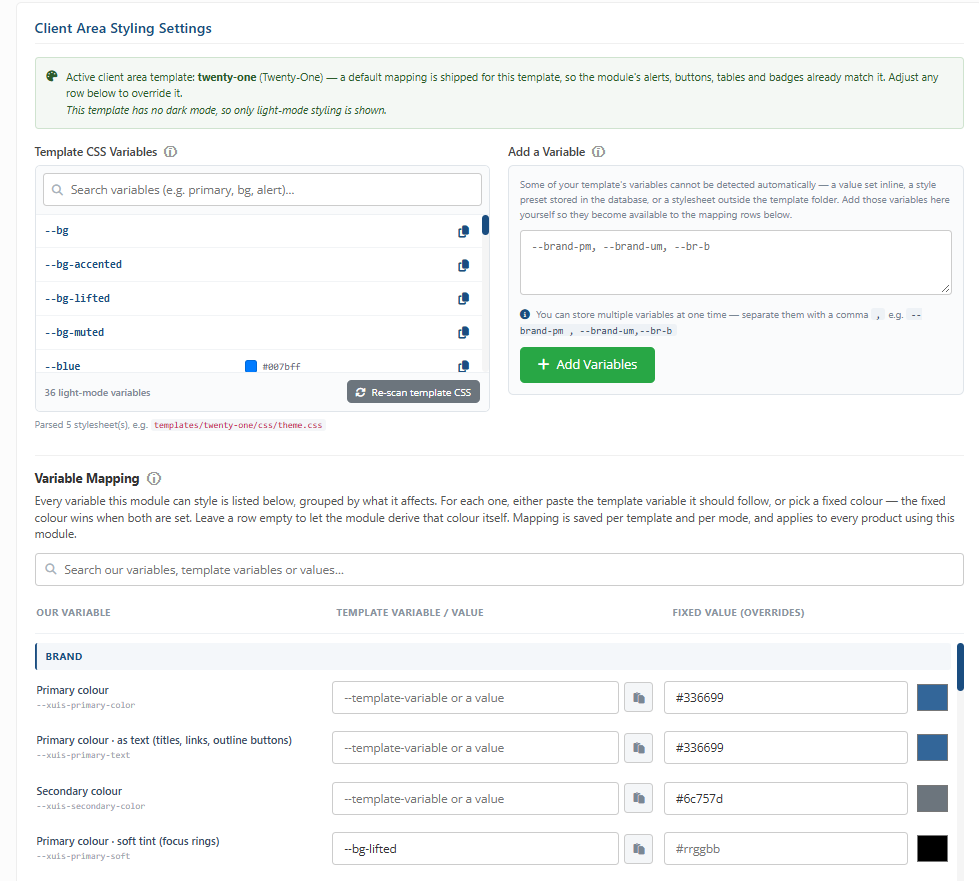
The service page matches your WHMCS client area template out of the box, with ready-made styling for Lagom, Twenty-One, Six, Nexus and Nexum, including dark mode. Any other template can be styled per product from the module's styling settings.

Compatibility

  • WHMCS: 8.x and 9.x
  • PHP: 8.1 to 8.4
  • ionCube Loader: required; builds are included for ionCube Loader v13 (PHP 8.1 to 8.2), v14 (PHP 8.1 to 8.3) and v15 (PHP 8.1 to 8.4)
  • Client area templates: Lagom, Twenty-One, Six, Nexus and Nexum supported out of the box; other templates through the styling settings
  • Panel: an XUI IPTV panel with a reseller account
  • Languages: client area texts can be translated through language files

Documentation and Support

  • Documentation: https://provonic.com/docs
  • Support: [email protected]
  • Website: https://provonic.com

Available Pricing Models:

  • Annually: $39
  • One-Time: $49
  • Open Source: $99


Reviews

5 stars
2
2
4 stars
0
0
3 stars
0
0
2 stars
0
0
1 star
0
0
Maikel Sheppard avatar

Maikel Sheppard @maikel2378

July 22, 2026 at 02:36:02 PM

Our experience with this XUI module has been positive from the start. It handles automated provisioning and lifecycle management seamlessly. Clients appreciate the self-service tabs for managing channels, packages, and devices directly from WHMCS. The stream status monitoring and EPG integration add real value. Setup was straightforward and the module has been stable. A great fit for streaming service providers using the XUI platform.

  • 2 months ago
  • Version Number 1.0.0
Rayonni Stewart avatar

Rayonni Stewart @rayonni9276

May 18, 2026 at 02:09:09 PM

Excellent XUI streaming module for WHMCS. The automation works smoothly, client management is very easy, and the integration with the XUI panel is seamless. It has simplified our streaming service management a lot.

  • 5 months ago
  • Version Number 1.0.0

Version Compatibility


Compatible with WHMCS v9.0

Full Version Compatibility


  • Selected versions of WHMCS v9.0
        9.0.0 - 9.0.3
  • Selected versions of WHMCS v8.13
        8.13.0 - 8.13.2
  • All versions of WHMCS v8.12
  • All versions of WHMCS v8.11
  • Selected versions of WHMCS v8.10
        8.10.0
  • Selected versions of WHMCS v8.9
        8.9.0
  • Selected versions of WHMCS v8.8
        8.8.0
  • All versions of WHMCS v8.7

Support for this product

The best place to start if you need help with a specific product is to contact the developer. All WHMCS Marketplace developers have both a website and support URL listed.


Developed By Provonic

Changelog

v1.2.0 Released October 19th, 2026

Latest Version


Added

  • A Check for Update button on the addon's Info tab, and automatic daily updates that keep both the addon and the server module up to date.
  • Test Connection on the server record, which logs in to every connected XUI panel and names any panel that refused the login.
  • A Line Details tab on the admin service page, showing the line's status, type, panel, panel user ID, credentials or MAC address, server and stream or portal URLs, bouquets and expiry date.
  • A Sync Line Details button that reads the line's ID and expiry date from the XUI panel again.
  • Change Password for stream lines from the admin service page, and a confirmation step when clients change their password.
  • Refresh Database and Enable Module Logs options on the addon configuration.
  • Client Area Styling Settings on every product, with ready-made styling for Lagom, Twenty-One, Six, Nexus and Nexum, including dark mode.
  • Builds for ionCube Loader v13, v14 and v15, covering PHP 8.1 to 8.4.
  • An optional setting to choose which of your server's IP addresses panel requests leave from.

Changed

  • Redesigned the admin dashboard: tabs, forms and tables work without reloading the page, add and edit forms open in dialogs, and every action shows a notification.
  • Redesigned the client service page, with Service Actions followed by the line or MAG device details.
  • The product's Module Settings are now shown in a configuration dashboard.
  • Bouquet selections in the client area are saved at once, and only after the XUI panel confirms them.
  • Panel requests now leave from your server's own IP address, so services provision on any server.
  • The panel login session is now kept in the server's temporary folder, one session per panel, so no module file has to be writable.
  • Deactivating the addon now keeps your panels, bouquets and settings unless Refresh Database is ticked, and activating it never resets your settings.
  • Provisioning errors now say exactly which setting to fix.
  • The client service page now explains when a service has not been set up yet.
  • The licence key is now masked on the Info tab.
  • The module is now published by Provonic.

Fixed

  • Errors on the product settings page and in the client area when the XUI panel cannot be reached.
  • Saved settings being reset when the addon configuration was saved, or the addon was reactivated or deactivated.
  • The Static/Same Password option being ignored when lines were created, and not staying selected after a reload.
  • Invoice descriptions being rewritten on invoice items that are not XUI services.
  • A client's saved bouquet selection being shown unticked.
  • Panel connection errors appearing on the order form and other pages.
  • A Panel URL without a slash at the end stopping the module from finding a newly created line.
  • Panel logins failing when the reseller username or password contains characters such as & or +.
  • Several XUI panels sharing one login session.
  • An unresponsive panel holding up the page; panel requests now time out.
  • Unreadable table rows in Nexum dark mode, and the Bouquets list briefly appearing on page load.
  • Improved the security of every admin and client request.


Previous Versions


v1.1.0 Released April 28th, 2026

View/hide detailed changelog

Changed

  • Improved the client area layout for a cleaner, easier interface.


v1.0.0 Released April 17th, 2026

View/hide detailed changelog

  • This module enables seamless integration with the XUI Reseller platform.


See also

Hetzner Servers Manager

Integrate manager for Hetzner Dedicated

Commercial
Liquid Web VPS & Cloud Dedicated Reseller Program

Resell VPS & Cloud Dedicated Products from Liquid Web

Free
SolusVM WHMCS module

Automate the sale of VPS servers & give your clients the ability to completely manage their VPS server inside of WHMCS, using the industry leading SolusVM control panel.


Free
Acronis Cyber Protect Cloud

AI-Powered Integration of Data Protection and Cybersecurity.

Free
VPN reseller module

Resell VPN accounts with whitelabel Windows, Mac, IOS and Android software

Free