Proxmox VPS For WHMCS

Proxmox VPS For WHMCS

Developed By WHMPress

Compatible with WHMCS v9.0

Proxmox VPS for WHMCS

Proxmox VE for WHMCS by WHMPress turns your Proxmox cluster into a fully automated VPS and container hosting product. The package ships two modules that work together: the Proxmox VE Server Module, which provisions and manages guests against the Proxmox VE REST API using API-token authentication, and the Proxmox VE Manager addon, which adds a fleet-wide admin console with built-in IPAM. Orders provision themselves — the module picks the VMID, builds the guest from your product's hardware profile, leases an IP from your own address pool, writes it into the guest with Cloud-Init, waits for the Proxmox task to finish, and hands the customer a working server.

Customers get far more than a start/stop button. The client area is a full self-service control panel: power actions, live resource graphs drawn from Proxmox RRD data, network interface management, disk add/resize/detach, OS reinstallation from a curated image grid, snapshots and scheduled snapshot jobs, vzdump backups with restore and file browsing, per-VM firewall rules and options, scheduled power tasks, resource-threshold email alerts, uptime checks, and three console types — noVNC, an HTML5 xterm.js terminal, and a downloadable SPICE file. Every page can be switched on or off per product, and the whole interface follows a light/dark theme with your own brand colours, in 26 bundled languages.

Key Features

Admin Area Features

Provisioning & lifecycle

  • Full WHMCS lifecycle support — Create, Suspend, Unsuspend, Terminate, Change Package and Test Connection, all implemented against the Proxmox VE REST API.
  • API-token authentication (PVEAPIToken) — no root password stored in WHMCS; the Servers screen relabels the Username/Password fields to API Token ID and API Token Secret automatically when the Proxmox module is selected.
  • Task-aware provisioning — the module submits the create call, polls the returned Proxmox UPID and waits (bounded) for the task to actually complete before reporting success.
  • KVM (QEMU) and LXC containers — a single product setting switches the whole pipeline between the two endpoint families, including container-specific handling for templates, swap, nesting, unprivileged mode and extra mount points.
  • Graceful suspend — suspension sends an ACPI shutdown and waits, then falls back to a hard stop only if the guest does not go down.
  • Automatic VMID allocation — the next free VMID is taken from the cluster and stored against the service; the service domain field is populated with it when empty.
  • Node capacity validation — optionally refuses to provision when the target node cannot fit the requested RAM and cores, instead of creating a guest that will not start.
  • Weighted load balancer — optionally scores every node on guest count, CPU, RAM and disk (with configurable weights per product) and re-selects the least loaded node at create time.
  • Hostname patterns — build guest names from a pattern with an incremental counter per product.
  • High Availability — set HA state, HA group, max relocate and max restart per product; the HA resource is created on provisioning and removed on termination.
  • SDN VNet support — attach guests to a Proxmox SDN VNet instead of a plain bridge.
  • Per-service PVE user provisioning — the module creates a scoped Proxmox user per service for console access and removes it on termination, rather than sharing one account across guests.

Service management

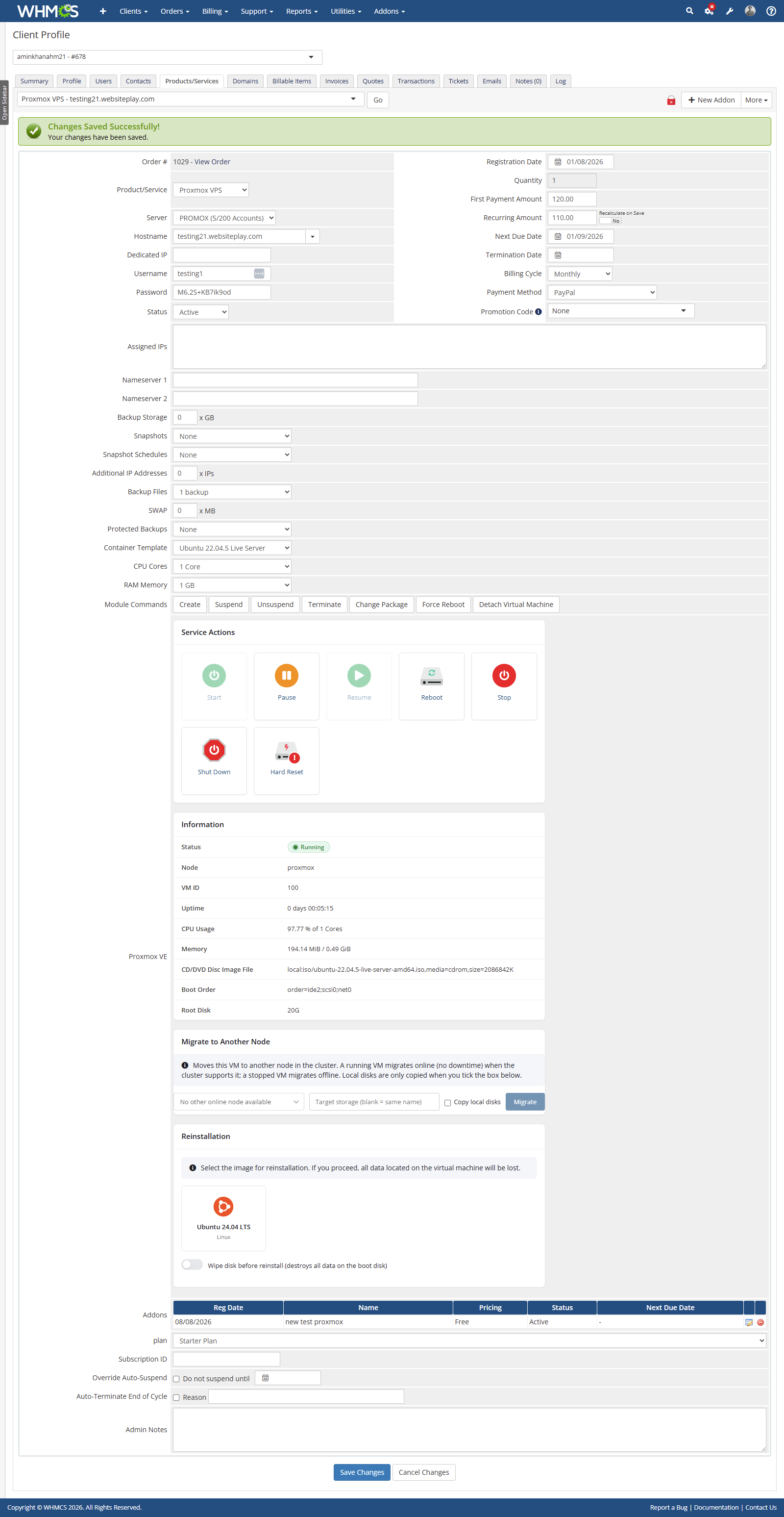
  • Admin service tab with live status — status badge (running / paused / stopped), node, VM ID, uptime, CPU usage against allocated cores, memory usage, boot media, boot order and root disk size, read live from the API.
  • Power tiles on the service tab — Start, Pause, Resume, Reboot, Stop, Shut Down and Hard Reset, with unavailable actions greyed out based on the guest's current state.
  • Force Reboot and Detach Virtual Machine — module buttons on the service; Detach unlinks the guest from the service without deleting it in Proxmox.
  • Attach an existing VM — when a service has no guest, the tab offers an inline VMID field that binds an existing Proxmox guest to the service, reading the guest type (KVM or LXC) from the cluster rather than assuming it.
  • Live migration from the service tab — pick a target node, optionally a target storage, and choose whether to copy local disks; running guests migrate online where the cluster supports it.
  • Admin-side reinstallation — the same OS image grid the customer sees, with an optional "wipe disk before reinstall" toggle and a confirmation modal.
  • IPAM addresses on the service — leased addresses are listed with a "Return to pool" button (which frees the address in WHMCS without reconfiguring the running guest).
  • Masked API logging — every request and response is written to the WHMCS Module Log with credentials redacted.

Proxmox VE Manager addon (admin console)

  • Fleet dashboard — total VMs, active/total nodes, IP pool utilisation, failed backup task count, a per-node completed-vzdump chart, running backup tasks by server and node, storage utilisation bars and IP pool bars.
  • Servers tab — every Proxmox server in WHMCS with its host, active account count, aggregate RAM used/total/free, the managed VMID range and an online/offline badge.
  • Recovery VMs — a read-only list of guests that exist on Proxmox but which no active WHMCS service claims, with the reason each is listed and CSV export. Nothing on this screen deletes anything.
  • Guests tab — a cross-server guest list (VMID, name, type, status, node, CPU, memory, uptime, linked WHMCS service) with a migrate dialog per guest.
  • Plans — reusable hardware plans for QEMU or LXC (CPU sockets, cores, RAM, disk, VLAN tag, bandwidth), applied at provisioning and on package change.
  • Import Guest — verify that a VMID exists on a chosen server/node, then bind it to a new WHMCS service for a chosen client and product without modifying the guest.
  • IPv4 / IPAM — create pools with network CIDR, gateway, DNS and VLAN tag; add address blocks by CIDR or single IP (expanded into individual address rows); allocate IPv6 blocks as routed subnets; scope a pool to a specific server, node, bridge or VLAN tag; reserve, unreserve or delete individual addresses; filter the address table by pool and status.
  • Settings tab — reusable backup templates and firewall templates, per-product auto-provisioning bindings (applied once per service on first provisioning), IP log retention in days, auto-apply IP on/off and SSL verification on/off.
  • Tools tab — system log viewer with success/error filtering and counts, the module's own cron scheduler (per-command interval, enable/disable, run-now, last run and last result), fleet-wide backup task limits (max per node, max per target storage, max across the fleet) and a job queue view with retry-failed and clear-finished.
  • Task Auditor — a searchable view over the WHMCS Module Log covering both Proxmox modules, with payload inspection and secrets masked.
  • Info tab — module name, version, license key, valid domain, author, next due date, WHMCS version, PHP version and ionCube version.
  • Admin home widget — failed deployments, failed tasks and remaining cluster capacity at a glance, cached for five minutes.
  • Access control — the addon's Access Control setting restricts which admin role groups can open it.
  • Optional table cleanup — a "Refresh Database" setting drops the module's tables on deactivation (off by default).

Automation

  • WHMCS DailyCronJob integration — scheduled power tasks, resource notification rules, monitoring checks and snapshot jobs are all processed on the daily cron pass out of the box.
  • Optional CLI cron dispatcher — a bundled cron.php runs any single job or the built-in scheduler (scheduler:run), which fires each job on its own interval (power tasks, monitoring and snapshot jobs every 5 minutes, resource notifications every 15 by default) with a lock so overlapping runs cannot collide.
  • Hook-driven template application — bound backup and firewall templates are applied after module create, order acceptance, product upgrade and unsuspend, guarded so each service is only ever configured once.
  • Automatic IP release on termination — leases return to the pool and the release is written to the IP log.

Client Area Features

  • Overview dashboard — VM status with uptime, hostname, root password (show/hide and copy to clipboard), server IP, CPU usage against allocated cores, memory usage, root disk size, network rate, boot media and boot order, plus an IP address table with netmask, gateway and MAC.
  • Power action tiles — Start, Pause, Resume, Reboot, Stop, Shut Down and Hard Reset, each individually switchable per product, with a confirmation for Hard Reset explaining what it does.
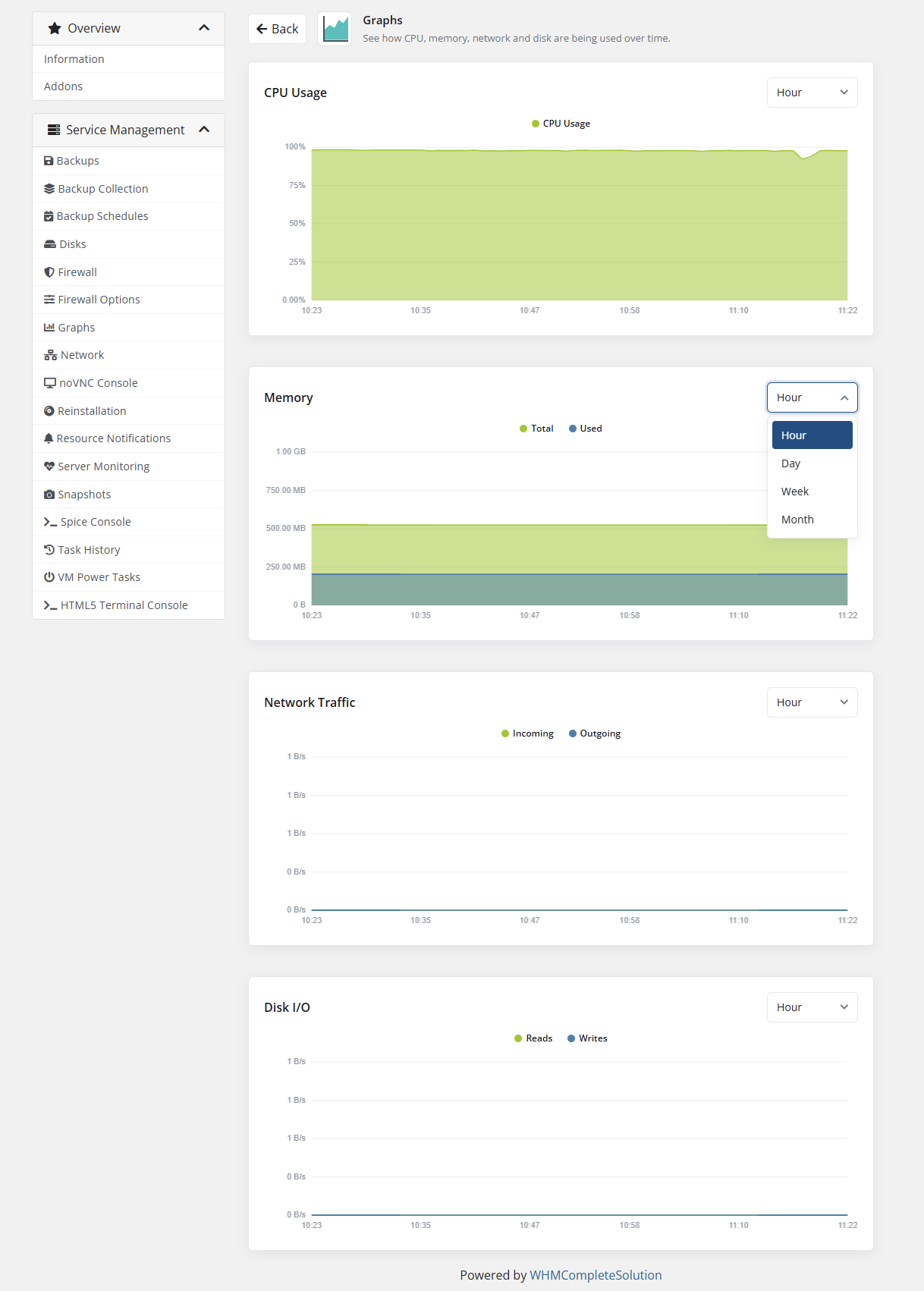
  • Resource graphs — CPU, memory, network traffic and disk I/O drawn from Proxmox RRD data over hour, day, week and month timeframes, rendered on a self-contained HTML5 canvas (no external chart library or CDN).
  • Network management — list interfaces with model, MAC, bridge, VLAN, rate, MTU and firewall state; add a network interface (including private-bridge networks where the product allows it); edit model, bridge, VLAN, addressing (DHCP or static CIDR) and connect/disconnect; toggle the per-NIC firewall; delete an interface.
  • Disk management — list disks with bus/device, storage, size, format and backup flag; add a hard disk to the next free slot on a bus; grow a disk by a chosen number of GB; toggle whether a disk is included in backups; detach a disk (the volume is preserved on the storage, not wiped); plus a storage usage summary.
  • Reinstallation — a visual OS image grid built from the images the administrator curated, with per-image icons and group labels, an optional "wipe disk before reinstall" switch and a typed confirmation warning.
  • Snapshots — take a snapshot (optionally including RAM/live state), roll back, and delete, with confirmations; snapshot count and schedule count are both quota-limited.
  • Snapshot schedules — recurring snapshot jobs with a name prefix, once/daily/weekly schedule, day-of-week selection, start time and a retention count that automatically prunes the oldest snapshots the job created.
  • Backups — create a vzdump backup choosing compression (ZSTD, LZO, GZIP) and mode (snapshot, suspend, stop); list backups with date, format and size; mark a backup protected (exempt from rotation); delete; and restore, with a clear warning that the guest is stopped, replaced and restarted.
  • Backup file browser — browse inside a backup and download individual files or whole folders as a .tar. Restoring a file directly back into a running VM is not something Proxmox supports, and the module says so rather than implying otherwise.
  • Backup quotas on screen — the customer sees their backup size, backup file count and protected-backup allowances, and is told when a new backup will rotate out the oldest unprotected one.
  • Backup schedules — recurring vzdump jobs using Proxmox calendar-event syntax, with day-of-week selection, compression, mode, enable/disable and email notification (always or on failure) to chosen recipients.
  • Backup collection — a read-only index of backups across every Proxmox service the customer owns, in one place.
  • Firewall rules — create, edit, enable/disable, reorder (move up/down) and delete per-VM rules with direction, action, protocol, source, destination, source/destination ports, interface, macro and comment. Macros are fetched live from Proxmox.
  • Firewall options — enable the firewall, DHCP, NDP, router advertisement, MAC filter and IP filter, input/output policy and input/output log levels.
  • noVNC console — a full graphical console, opened with a per-service Proxmox ticket. noVNC is bundled with the module.
  • HTML5 terminal console — an xterm.js serial console, with an "Enable Serial Console" button that adds the serial0 device to the guest when it is missing.
  • SPICE console — downloads a .vv connection file for virt-viewer or another SPICE client, with an explanation that SPICE cannot run in the browser.
  • Self-configuring console routing — the module decides between connecting the browser straight to the node, going through a proxy path on your WHMCS origin, or using a console relay daemon, re-checks periodically, and reports exactly what to fix when none of them can work yet. A sample config file lets you pin the mode globally or per server.
  • Change password — set the password of an operating system account inside the guest through the QEMU guest agent, with a client-side and server-side password policy.
  • Scheduled power tasks — customers schedule start, stop, shutdown or reboot once, daily or weekly, with a description, day-of-week and start time, plus next-run and last-run columns.
  • Resource notifications — email alerts when CPU, memory, network traffic, disk read or disk write cross a threshold the customer sets, with a data timeframe and an "exceed all thresholds" mode.
  • Server monitoring — uptime checks by port connect, cURL, ICMP ping or Proxmox VM power state, against the VM's own IP or an explicit target, with a run-now / run-all button, result logging and log clearing.
  • Task history — the Proxmox task log for the customer's own guest, with start time, end time, description and status.
  • Honest scheduling notices — pages that depend on cron say so on screen: schedules fire on the WHMCS cron pass rather than to the minute, and monitoring is described as a lightweight uptime signal, not a real-time service. SMS notification is shown as unavailable rather than offered.
  • Dedicated sidebar panel — module pages are collected into their own "Service Management" sidebar panel in a defined order, instead of being scattered through the native Actions list.
  • Guest-aware navigation — pages that do not apply to LXC containers (SPICE and the xterm console) are hidden automatically for container products.
  • Service state handling — pending, suspended and inactive services get a clear explanatory page instead of a broken dashboard.

Package & Configuration Options

Per-product module settings (Config Dashboard)

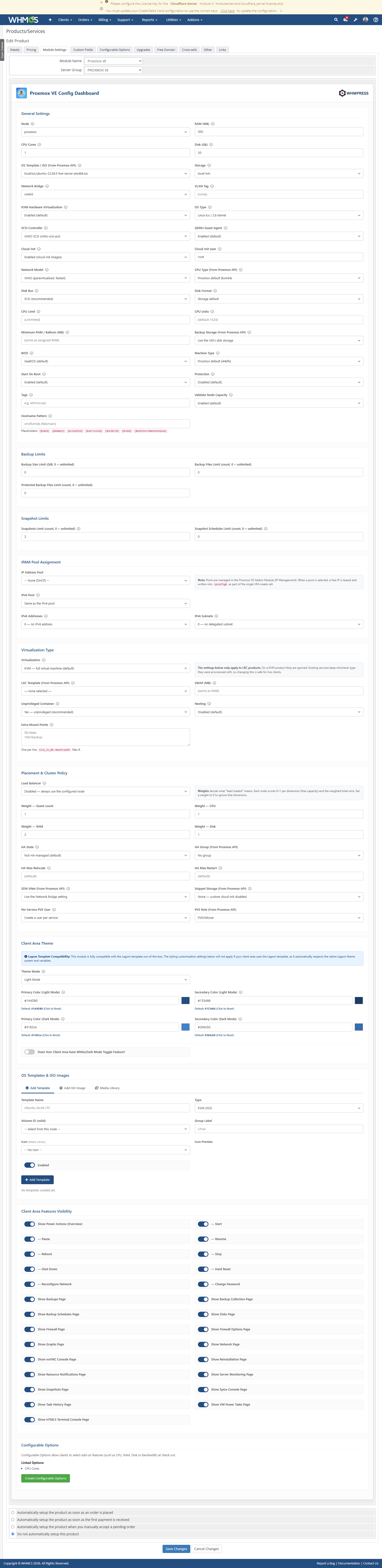
  • General — Node, RAM (MB), CPU Cores, Disk (GB), OS Template/ISO, Storage, Network Bridge and VLAN Tag, with Node, Storage, Bridge and ISO dropdowns populated live from the Proxmox API and falling back to free-text fields when the server is unreachable.
  • Hardware — KVM hardware virtualisation on/off, OS Type (Linux 2.4/2.6+, Windows 2000 through 11/2022/2025, Solaris, Other), SCSI controller (VirtIO SCSI, VirtIO SCSI single, LSI 53C895A, LSI 53C810, MegaRAID SAS, VMware PVSCSI), QEMU Guest Agent, network model (VirtIO, E1000, RTL8139, vmxnet3), disk bus (SCSI, VirtIO Block, SATA, IDE), disk format (storage default, raw, qcow2, vmdk), CPU type (live from the API), CPU limit, CPU units, balloon/minimum RAM, BIOS (SeaBIOS or OVMF/UEFI), machine type (default i440fx, q35, pc), start-on-boot, protection flag and Proxmox tags.
  • Cloud-Init — enable/disable, default Cloud-Init user, optional per-image user override and custom user-data rendered from a template with {ip}, {gateway}, {netmask}, {hostname} and similar placeholders, written via a chosen snippet storage.
  • Networking & IPAM — IP address pool assignment, additional IPv4 addresses (0–16), IPv6 pool, IPv6 address count, IPv6 subnet count and private bridges.
  • Backup limits — backup size limit in GiB, backup file count limit and protected backup file limit (0 = unlimited each).
  • Snapshot limits — snapshot count limit and snapshot schedule limit (0 = unlimited each).
  • Virtualization type — QEMU or LXC, plus LXC template (live from the API), swap in MB, unprivileged container, nesting and extra mount points.
  • Placement & cluster policy — load balancer on/off with weights for guest count, CPU, RAM and disk; HA state, HA group, max relocate and max restart; SDN VNet; snippet storage; per-service PVE user on/off and PVE role (roles fetched live); node capacity validation; hostname pattern; backup storage.
  • Client area theme — light or dark mode, primary and secondary colours for each mode, and optional white/dark toggle class names for custom templates.
  • Client area feature visibility — individual switches for every client page (Backups, Backup Collection, Backup Schedules, Disks, Firewall, Firewall Options, Graphs, Network, noVNC Console, Reinstallation, Resource Notifications, Server Monitoring, Snapshots, SPICE Console, Task History, VM Power Tasks, HTML5 Terminal Console) and for the Power Actions panel plus each individual action tile (Start, Pause, Resume, Reboot, Stop, Shut Down, Hard Reset, Reconfigure Network, Change Password).
  • OS Images — curate exactly which images clients may reinstall from: pick an ISO or container template read live from your nodes, give it a display name, group label and icon, and enable or disable it. Images already in use are marked so the same volume cannot be added twice.
  • Media Library — upload the icons shown beside OS images (PNG, JPG, SVG, WEBP, max 512 KB) with an optional match key, and preview them inline. Ubuntu, Debian, Fedora, AlmaLinux, CentOS and Windows icons ship with the module.

One-click Configurable Options generator

The dashboard creates WHMCS configurable options for you, wired to the values the module reads at provisioning and upgrade:

  • CPU Cores (1 / 2 / 4 / 8 / 16)
  • RAM Memory (1 / 2 / 4 / 8 / 16 GB)
  • Disk Space (quantity, 20–1000 GB)
  • Bandwidth Limit (quantity, 100–10000 GB)
  • Backup Storage (quantity, 0–1000 GB)
  • Backup Files (1 / 3 / 5 / 10)
  • Protected Backups (none / 1 / 2 / 5)
  • Snapshots (none / 1 / 3 / 5 / 10)
  • Snapshot Schedules (none / 1 / 2 / 5)
  • Additional IP Addresses (quantity, 0–16)
  • Operating System — populated live from your Proxmox API
  • Container Template — populated live from your Proxmox API (LXC products)
  • SWAP (quantity, 0–16384 MB, LXC products)
  • Nesting / Docker support (LXC products)

Created options are listed back on the product and can be removed again from the same screen.

Product addon allowances

A WHMCS product addon can grant extra quota on top of the product's own limits — Backup Storage (GB), Backup Files, Protected Backups, Snapshots, Snapshot Schedules and Additional IP Addresses — configured on the addon's own settings screen and added to the customer's allowance automatically.

Proxmox VE Integration Coverage

Guest and cluster operations used

  • Guests: next free VMID, create, delete, start, stop, shutdown, reboot, reset, suspend, resume, status, config read/write, RRD statistics, task list and task status
  • Migration: migrate with online/offline, target storage and local-disk options, plus migration preconditions
  • Disks: resize, storage content listing, storage status
  • Snapshots: list, create (with or without RAM state), delete, rollback
  • Firewall: options get/set, rule list, create, update, delete and macro list
  • Backups: list, create (vzdump), delete, protect, restore, backup job list/create/update/delete, file-restore listing and file download
  • Consoles: VNC proxy, term proxy, SPICE proxy and access tickets
  • Cluster & platform: node list, node status, cluster status, cluster resources, storage list, node networks, CPU capabilities, container templates, SDN zones/VNets/subnets and apply, HA resources and HA groups
  • Access control: user list/create/update/delete, password set, ACL list and set, role list

Guest types

  • KVM / QEMU virtual machines
  • LXC containers

Console technologies

  • noVNC (bundled with the module)
  • xterm.js serial terminal (bundled)
  • SPICE via downloadable .vv file for virt-viewer or compatible clients

Client area languages (26 bundled)

Arabic · Azerbaijani · Catalan · Chinese · Croatian · Czech · Danish · Dutch · English · Estonian · Farsi · French · German · Hebrew · Hungarian · Italian · Macedonian · Norwegian · Portuguese (BR) · Portuguese (PT) · Romanian · Russian · Spanish · Swedish · Turkish · Ukrainian

The client area follows the customer's own WHMCS language, falling back to English for any string a translation has not covered.

Stated limits, so there are no surprises

  • Scheduled power tasks, snapshot jobs, resource notifications and monitoring checks run on cron passes, not continuously; with the WHMCS daily cron alone they fire once per day.
  • SMS notification is not available in this build — monitoring and resource alerts are email only.
  • Backup file restore downloads the file or folder to the customer's computer; Proxmox does not support writing a restored file straight back into a running guest.
  • Additional IP addresses beyond the first are leased and recorded against the service, but Proxmox carries only one address per interface in ipconfig0, so the extras are configured inside the guest operating system.
  • The Recovery VMs screen is read-only by design — it identifies unclaimed guests but never deletes anything.

Why Choose WHMPRESS?

This module is built against Proxmox's actual API surface rather than a thin wrapper around start and stop. KVM and LXC are both first-class, the console works out its own route to your nodes instead of assuming one, IP leasing is transaction-guarded so two simultaneous orders can never take the same address, and every API call lands in the WHMCS Module Log with secrets masked. Where a feature has a real limit — cron cadence, what Proxmox itself will not do — the module tells you plainly instead of pretending otherwise.

General Compatibility:

  • WHMCS Versions: Fully compatible with versions 9.0.6 to 8.x

  • PHP Versions: Supports PHP 8.4, 8.3, 8.2, and 8.1

  • Themes Supported: Works with WHMCS themes such as Six, Twenty-One, and Lagom WHMCS Client Theme

  • System Requirement: Requires ionCube Loader v13 or later

Module Price

Monthly Price: $10

Annually Price: $49

One-Time Price: $149

OPEN-SOURCE VERSION: $249 One-Time Price


There are no reviews yet!

Be the first to review Proxmox VPS For WHMCS.

Version Compatibility


Compatible with WHMCS v9.0

Full Version Compatibility


  • All versions of WHMCS v9.0
  • All versions of WHMCS v8.13
  • All versions of WHMCS v8.12
  • All versions of WHMCS v8.11
  • Selected versions of WHMCS v8.10
        8.10.0
  • Selected versions of WHMCS v8.9
        8.9.0
  • Selected versions of WHMCS v8.8
        8.8.0
  • All versions of WHMCS v8.7
  • All versions of WHMCS v8.6
  • All versions of WHMCS v8.5
  • All versions of WHMCS v8.4
  • All versions of WHMCS v8.3
  • All versions of WHMCS v8.2
  • All versions of WHMCS v8.1
  • All versions of WHMCS v8.0

Support for this product

The best place to start if you need help with a specific product is to contact the developer. All WHMCS Marketplace developers have both a website and support URL listed.


Developed By WHMPress

Changelog

v1.0.0 Released August 11th, 2026

Latest Version


  • Fleet Dashboard with VM/server stat cards, per-node completed-task chart and storage/pool utilization bars.
  • Servers: cluster node listing, per-node VM/CPU/RAM limits and storage binding, node groups, VM Cleaner orphan detection with guarded purge.
  • Guests: cross-server guest listing with status, node, uptime and power state.
  • Plans: reusable QEMU/LXC hardware plans (sockets, cores, RAM, disk, VLAN, bandwidth, onboot).
  • Import Guest: verify an existing Proxmox VMID and bind it to a new WHMCS service without modifying the VM.
  • IPv4/IPAM: IP pools with CIDR or First/Last-IP bulk expansion, IPv6 subnet allocation, per-pool server/node/bridge scoping and per-address CIDR/MAC/VLAN/private metadata.
  • Atomic, transaction-guarded IP leasing on account creation (AfterModuleCreate) with net0 merge (bridge/VLAN/MAC preserved) and automatic release on termination (AfterModuleTerminate).
  • Settings: backup and firewall templates, auto-provisioning template bindings per product, IP log retention, auto-apply IP and SSL verification options.
  • Tools: system logs with filtering, job queue, cron scheduler, console proxy, translation overrides and media library.
  • Task Auditor: searchable cross-service view over the WHMCS module log for both Proxmox modules, with secrets masked.
  • Info: module, license, WHMCS, PHP and ionCube environment details.
  • Admin home widget showing fleet status at a glance.
  • Daily auto-update check via the DailyCronJob hook.
  • Optional table cleanup on deactivation (Refresh Database setting).


See also

Hetzner Servers Manager

Integrate manager for Hetzner Dedicated

Commercial
Liquid Web VPS & Cloud Dedicated Reseller Program

Resell VPS & Cloud Dedicated Products from Liquid Web

Free
SolusVM WHMCS module

Automate the sale of VPS servers & give your clients the ability to completely manage their VPS server inside of WHMCS, using the industry leading SolusVM control panel.


Free
Acronis Cyber Protect Cloud

AI-Powered Integration of Data Protection and Cybersecurity.

Free
VPN reseller module

Resell VPN accounts with whitelabel Windows, Mac, IOS and Android software

Free