Magiz AI Live Chat for WHMCS

Magiz AI Live Chat for WHMCS

Developed By MagizAI

Compatible with WHMCS v9.0

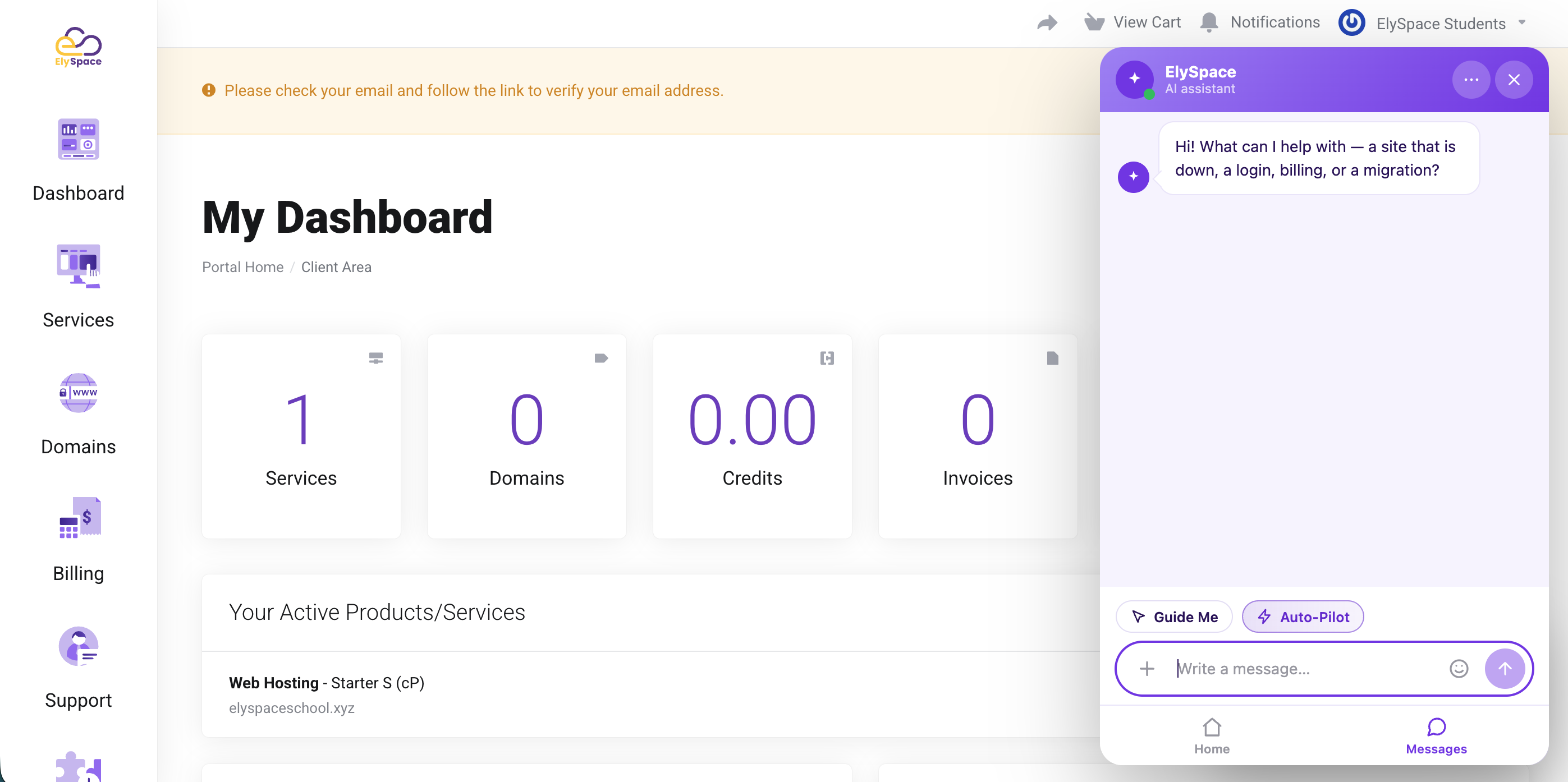
MagizAI for WHMCS adds the MagizAI chat assistant to your WHMCS client area. It answers from your own WHMCS data, and for signed-in clients it can look up and change things on their account.

For any visitor

  • Knowledgebase search. Answers from your public help articles, with links. Private articles are never used.
  • Announcements and network status. News, maintenance and current outages.
  • Products and prices. Recommends plans with your real prices and order links.
  • Domain check. Says whether a domain is free, gives its price and suggests alternatives if it is taken.
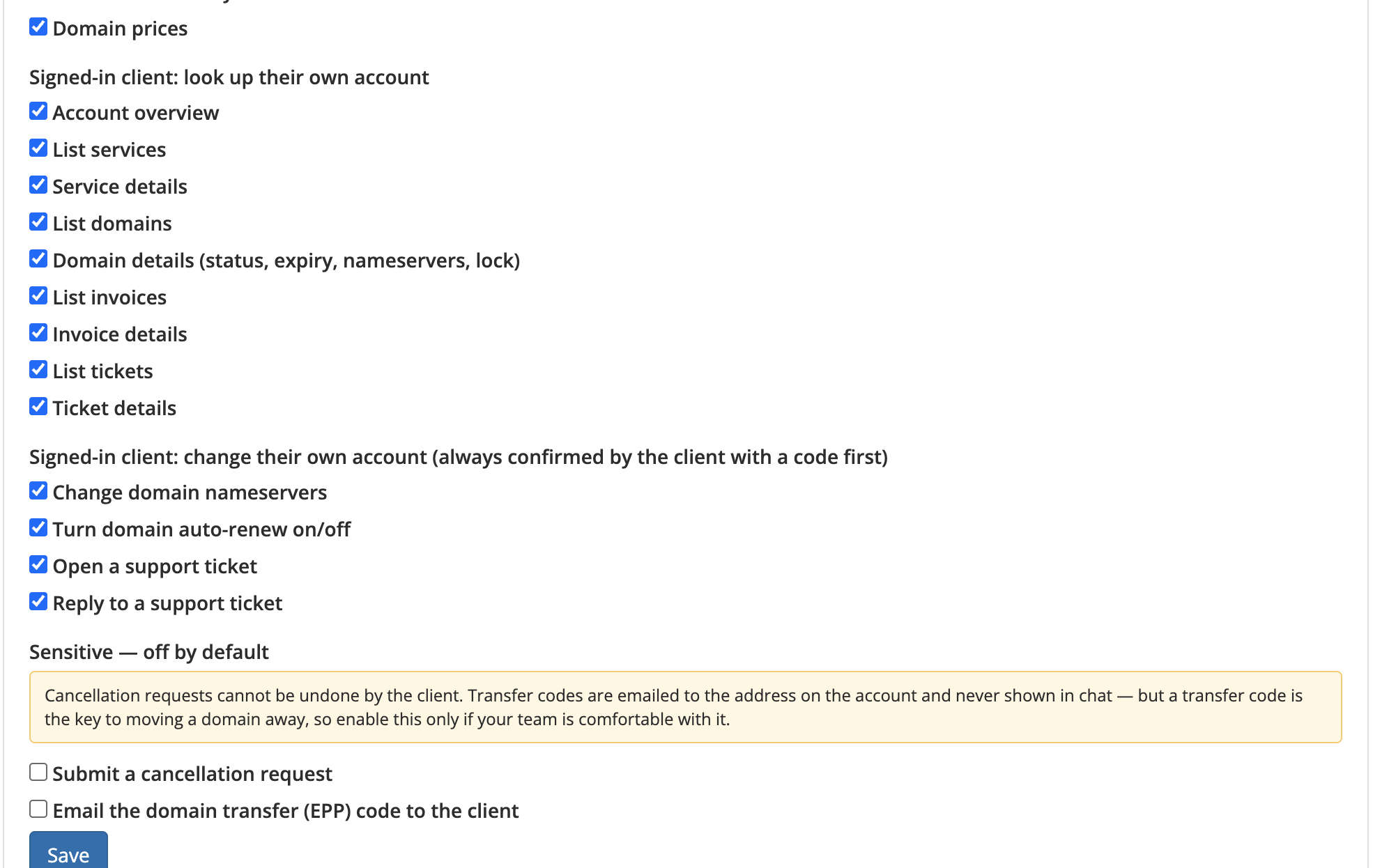
  • Domain prices. Register, renew and transfer prices for any extension.

For signed-in clients

A client only ever sees their own account.

  • Account overview. Services, domains, unpaid invoices, open tickets and credit balance.
  • Services. Status, next due date, server and IP, disk and bandwidth use. If a service is suspended it gives the reason and links the overdue invoice.
  • Domains. Status, expiry, nameservers, lock and auto-renew, plus a warning for anything expiring within 30 days.
  • Invoices. Unpaid ones first, with pay links and the items on each invoice.
  • Tickets. Status and the latest staff reply.

Changes a client can make in chat

Every change runs only after the client types a one-time code the chat gives them.

  • Change nameservers, for example to point a domain at your hosting.
  • Turn auto-renew on or off.
  • Open a support ticket or reply to one.
  • Submit a cancellation request (off by default).
  • Email the domain transfer (EPP) code to the address on the account (off by default). The code is never shown in chat.

Automatic knowledge sync

Every night the module sends your knowledgebase, announcements, products and prices to the assistant, together with your nameservers, support departments and domain prices. Only changed items are sent, and anything deleted in WHMCS is removed from the assistant. There is also a Sync now button.

Admin controls in WHMCS

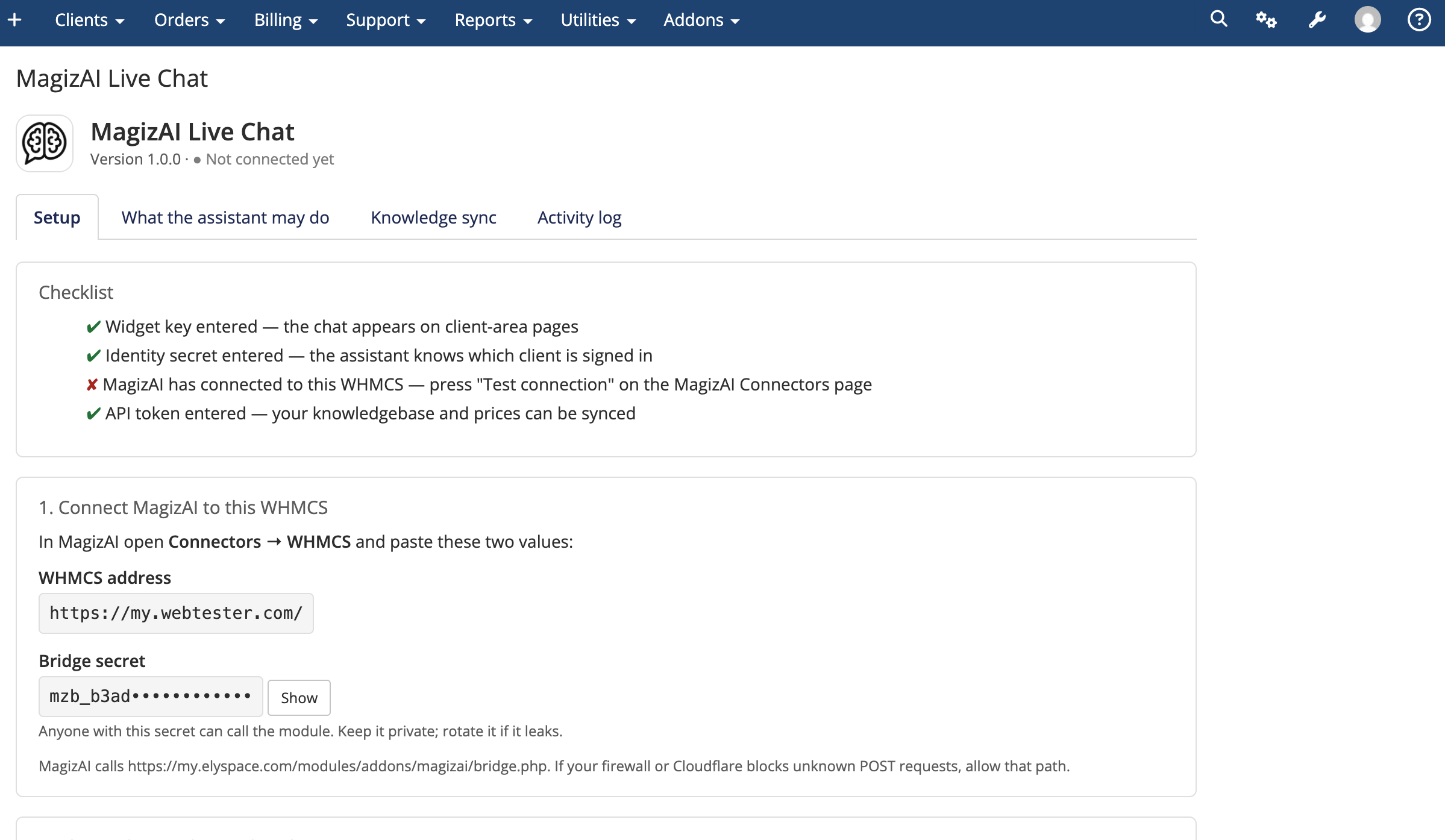
  • Setup page with a checklist, the widget key and identity secret, where the chat appears, and the default ticket department.
  • An on/off switch for every action. WHMCS has the final say, whatever MagizAI is set to.
  • Limits: how recently a client must have signed in before a change is allowed (default 60 minutes), the maximum changes per client per hour (default 10), and whether the client is emailed about each change.
  • An activity log of every request, linked to the client. Changes also go into the WHMCS activity log.
  • Rotate the connection secret with one click.

Security

  • No WHMCS admin access is given to MagizAI. It can only call the module, and the module only performs the actions listed above.
  • Every request and reply is signed. Old or repeated requests are refused.
  • WHMCS verifies the client's sign-in itself rather than trusting MagizAI.
  • Another client's domain gets the same answer as a domain that does not exist.
  • No passwords, payment details or transfer codes ever appear in chat.
  • Staff logged in as a client get the chat without the client's identity, so they cannot change the client's account through it.

On the MagizAI side

  • A WHMCS card on the Connectors page, with Save and test.
  • A one-click "Add WHMCS skills" button. Account-change skills are added switched off, and their safety settings cannot be loosened from the skill form.
  • Workflows can use the lookups, but never the account changes.

The module is free to download. It needs a MagizAI account with an active plan at magiz.ai.


There are no reviews yet!

Be the first to review Magiz AI Live Chat for WHMCS.

Version Compatibility


Compatible with WHMCS v9.0

Full Version Compatibility


  • All versions of WHMCS v9.0
  • All versions of WHMCS v8.13
  • All versions of WHMCS v8.12
  • All versions of WHMCS v8.11
  • Selected versions of WHMCS v8.10
        8.10.0
  • Selected versions of WHMCS v8.9
        8.9.0
  • Selected versions of WHMCS v8.8
        8.8.0
  • All versions of WHMCS v8.7
  • All versions of WHMCS v8.6
  • All versions of WHMCS v8.5
  • All versions of WHMCS v8.4
  • All versions of WHMCS v8.3
  • All versions of WHMCS v8.2

System Requirements


  • A MagizAI account with an active plan (magiz.ai)

* Requirements listed are in addition to the WHMCS default system requirements.

Support for this product

The best place to start if you need help with a specific product is to contact the developer. All WHMCS Marketplace developers have both a website and support URL listed.


Developed By MagizAI

Changelog

v1.0.0 Released September 17th, 2026

Latest Version


  • First public release.
  • Client area chat with knowledgebase, announcement, product, domain availability and domain pricing lookups.
  • Signed-in client lookups for services, domains, invoices and tickets.
  • Account changes confirmed with a one-time code: nameservers, auto-renew, tickets, cancellation requests and EPP code by email.
  • Nightly knowledge sync with a Sync now button.
  • Admin setup page, per-action switches, rate limits and activity log.


See also

tawk.to Live Chat

Free live chat App

Free
Live Chat & Visitor Tracking

Chat and Engage with Your Customers to Increase Conversions!

Commercial
LiveChat - live chat for WHMCS

Customer service platform with live chat and customer engagement capabilities

Free
PreMadeKB WHMCS Knowledgebase - Step by Step + Images

PreMadeKB - Readymade Knowlegebase Articles for WHMCS - With Images and 431+ Articles on cPanel, Plesk, DA, Softaculous, etc.

Commercial
Lara AI Assistant

Lara, AI Assistant .. OpenAI's ChatGPT for WHMCS Tickets

Commercial